Caire Core

    Scheduling architecture for real home care

    Caire Core is the technical layer that turns care decisions, master data, and operating rules into transparent schedule candidates that planners can review, explain, and publish.
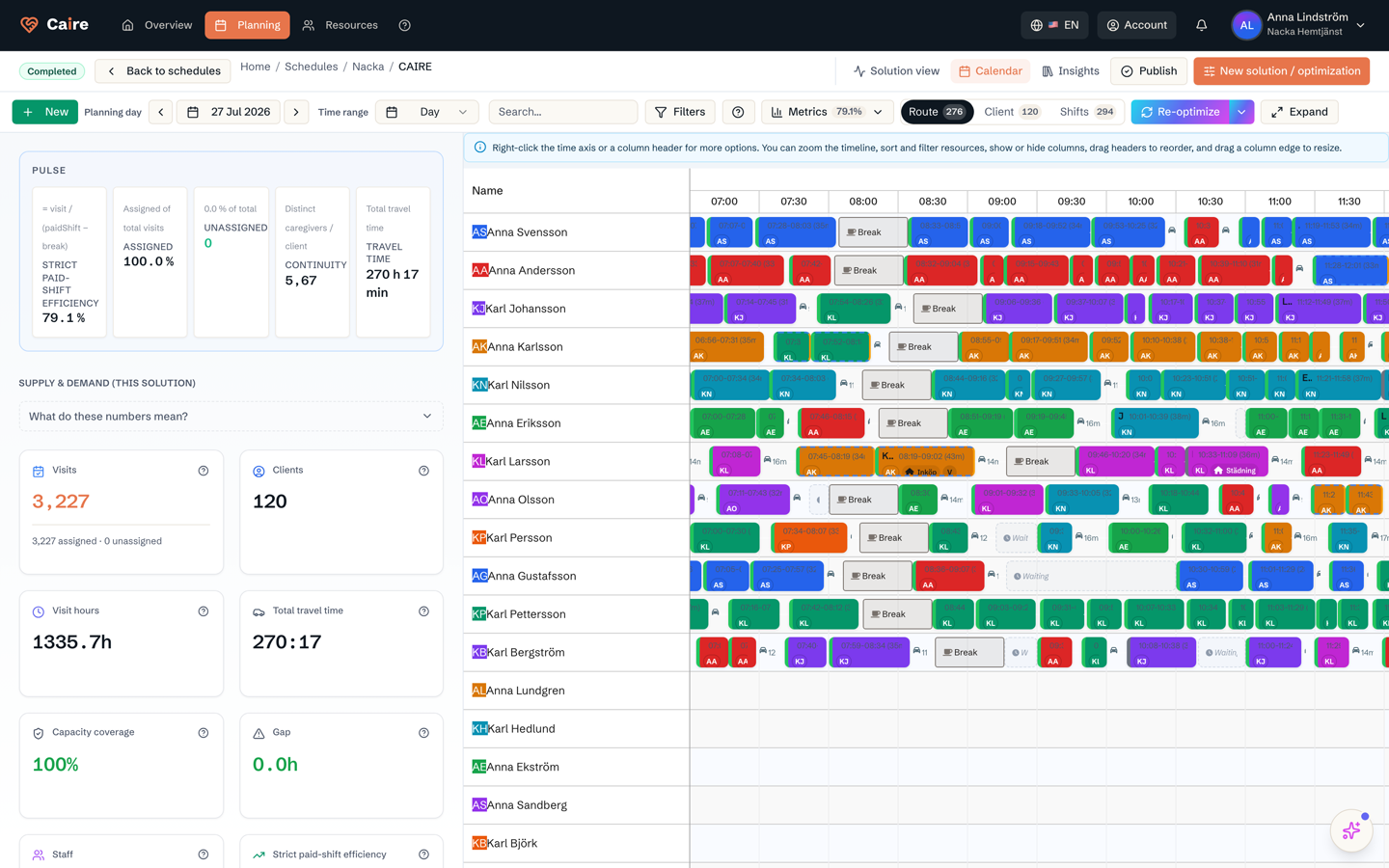
    Caire Core scheduling architecture with metrics and calendar

    Current page

    Caire Core

    The technical scheduling architecture behind planning.

    Technical evaluation

    What makes the architecture evaluable

    Shared operating model

    Clients, care plans, visits, time windows, skills, shifts, service areas, and travel all live in one model.

    Configurable goals and constraints

    Planners can weigh continuity, care time, travel, cost, skills, preferences, and working conditions without hiding the logic.

    Traceable solutions

    Every candidate gets quality metrics, baseline comparison, and clear reasons why visits move or stay.

    Controlled publishing

    AI candidates do not become production schedules until responsible planners review, choose, and publish them.

    Caire Core uses two planning passes

    The first pass shapes staffing demand, shift supply, breaks, and capacity. The second pass assigns visits, exact times, routes, continuity, and exceptions. From-patch lets a planner add or repair a small change without rebuilding the entire schedule.

    AspectTraditional planningCaire Core
    Staffing inputManual configurationDemand-driven discovery
    ContinuityPlanner memoryContinuity weighted and visible
    Travel timeSeparate map workRoute cost in the schedule graph

    Migrated architecture prototypes

    From old technical mockups to the Caire Core model

    The retired platform prototypes described a split between shift planning and route optimization. In Brand 2.0 that content is expressed as one Caire Core scheduling architecture: a unified dashboard, two planning passes, route costs, mobile execution, and a convergence timeline planners can evaluate.

    Caire Core prototype mapping
    Unified planning dashboard
    Shift planning
    Route optimization
    Convergence timeline
    Mobile integration
    Before/after comparison

    continuous learning loop

    Every optimization, change, mobile event, and planner-approved decision can become a learning signal for the next run. The model improves from observed outcomes while planner approval remains the control point.

    Evaluator checklist

    • Can planners explain why a visit moved?
    • Can the organization tune goals without custom code?
    • Can a solution be compared with baseline and previous runs?
    • Can mobile outcomes feed the next cycle with human review?

    Deep dive

    How the workflow works in practice

    Product detail

    Optimization Engine — Technical Architecture

    Workflow diagrams

    Diagram 1

    Loading diagram...

    Diagram 2

    Loading diagram...

    Workflow section

    Optimization Engine — Technical Architecture

    Complete technical documentation for CAIRE's dual-model automatic staffing discovery system. Understand the architecture, algorithms, API integration, and performance characteristics.

    CAIRE uses a dual-model optimization architecture that combines two specialized engines:

    Workflow section

    Caire Core shift layer: Employee Shift Scheduling

    Determines who works when and on which shifts, based on hourly demand curves and labor law constraints.

    Workflow section

    Caire Core routing layer: Field Service Routing

    Assigns which employee visits which client and optimizes routes to minimize travel time.

    Workflow section

    Why Two Models?

    Traditional schedulers only optimize routes for pre-defined shifts. But how do you know how many employees you need? Using Caire Core routing layer alone leads to a catch-22: if you send a full set of shifts (e.g. one per employee per day), the solver assigns visits to some shifts and leaves others empty—so you get "shifts with no visits." If you send only the shifts you think you need (cold start), the solver often cannot assign all visits and you get "unassigned visits." Caire Core routing layer does not decide how many shifts to create; it routes visits to shifts you already defined. Caire Core shift layer+Caire Core routing layer avoids this: Caire Core shift layer is demand-driven and creates exactly the shifts needed; Caire Core routing layer then only routes to those shifts, so you get no empty shifts and full visit coverage. CAIRE uses the dual model to automatically discover optimal staffing levels:

    Key Innovation: Caire Core shift layer and Caire Core routing layer work iteratively. Caire Core shift layer estimates travel overhead and creates shifts. Caire Core routing layer reveals actual travel needed. If the delta is >5%, Caire Core shift layer adjusts and re-runs. Typically converges in 2-3 iterations.

    Workflow section

    What is Caire Core shift layer?

    Employee Shift Scheduling (Caire Core shift layer) is a mathematical optimization model that determines who works when and on which shifts , based on demand curves and labor law constraints. It treats demand as input and staffing as output.

    Workflow section

    Core Functionality

    Input: Demand curve (employees needed per hour), employee pool, availability, labor law rules Output: Shift assignments (employee ID, start time, end time), activated employee count, total cost Optimization Goals: Minimize total staffing cost while covering 100% of demand

    • Input: Demand curve (employees needed per hour), employee pool, availability, labor law rules
    • Output: Shift assignments (employee ID, start time, end time), activated employee count, total cost
    • Optimization Goals: Minimize total staffing cost while covering 100% of demand

    Workflow section

    Timefold API Integration

    CAIRE uses Timefold's commercial optimization solver via cloud API:

    Workflow section

    Swedish Labor Law Automation

    Caire Core shift layer automatically enforces Swedish kollektivavtal rules:

    • Max 40h/week (preferred), max 48h/week (hard limit)
    • 11h daily rest (EU Working Time Directive)
    • Max 5 consecutive working days
    • Break requirements after 5h work
    • Weekend rest rules

    Workflow section

    Cost Optimization

    Caire Core shift layer prioritizes fixed-contract employees (zero activation cost) over hourly staff (500 SEK activation cost):

    Workflow section

    Fixed Contract Employees

    Activation cost: 0 SEK (already salaried) Strategy: Fill available hours first

    Workflow section

    Hourly Staff

    Activation cost: 500 SEK Strategy: Activate only when demand exceeds fixed capacity

    Workflow section

    Demand Curve Generation

    The Critical Bridge: Caire Core shift layer has no concept of geography. It only sees "X employees needed from 08:00-09:00". But home care includes travel time. CAIRE solves this through iterative learning:

    • Bootstrap (First Run): Estimate travel from GPS coordinates (average distance, urban speed model)
    • Iterative (Each Run): Caire Core routing layer reveals actual travel → Caire Core shift layer adjusts demand → Converges in 2-3 iterations
    • Learned (After 5+ Runs): System builds efficiency profiles per service area/hour → Future runs converge in 1 iteration

    Workflow section

    What is Caire Core routing layer?

    Field Service Routing (Caire Core routing layer) solves the Vehicle Routing Problem with Time Windows (VRPTW) for home care. Given employees with shifts, Caire Core routing layer determines which employee visits which client and optimizes routes.

    Workflow section

    Core Functionality

    Input: Employees (vehicles) with shifts, visits (jobs) with time windows and locations Output: Visit-to-employee assignments, visit sequence per employee, travel times, efficiency metrics Optimization Goals: Minimize travel time, maximize continuity, balance workload

    • Input: Employees (vehicles) with shifts, visits (jobs) with time windows and locations
    • Output: Visit-to-employee assignments, visit sequence per employee, travel times, efficiency metrics
    • Optimization Goals: Minimize travel time, maximize continuity, balance workload

    Workflow section

    Optimization Objectives (Weighted)

    Continuity Focus: Caire Core routing layer prioritizes client-caregiver relationships (40% weight). Target: <10-15 different caregivers per client per 14 days. This builds trust and familiarity.

    Workflow section

    Pinning Mechanics

    Caire Core routing layer supports hybrid schedules with both fixed and flexible visits:

    Workflow section

    Pinned Visits (Fixed)

    Locked assignments from approved slingor. Cannot be moved by Caire Core routing layer.

    Workflow section

    Unpinned Visits (Flexible)

    New or movable visits. Caire Core routing layer can optimize freely.

    Use Cases: Stable days use pinned visits (70-90% of schedule). New slingor start fully unpinned. Daily disruptions unpin only affected visits.

    Workflow section

    From-Patch API (Incremental Optimization)

    Two Caire Core routing layer modes for different scenarios:

    Workflow section

    Performance Characteristics

    45 visits, 9 employees: 60-120 seconds 100 visits, 20 employees: 2-4 minutes 200 visits, 40 employees: 5-8 minutes Optimization strategy: Metaheuristics (simulated annealing, tabu search) Mobile Actuals Integration & Learning

    • 45 visits, 9 employees: 60-120 seconds
    • 100 visits, 20 employees: 2-4 minutes
    • 200 visits, 40 employees: 5-8 minutes
    • Optimization strategy: Metaheuristics (simulated annealing, tabu search)

    Workflow section

    The Learning Loop

    As caregivers use the mobile app to check in/out of visits, CAIRE learns actual travel patterns and improves accuracy automatically.

    Workflow section

    Multi-Source EVV (Electronic Visit Verification)

    CAIRE mobile app supports multiple check-in methods (priority order):

    • Phoniro - Smart lock system (official billing record in municipalities like Nacka)
    • NFC - Physical tag verification at client location
    • GPS - Geofence verification (100m radius default)
    • Manual - Fallback when offline or no hardware

    Workflow section

    What Gets Learned

    Service area overhead: Travel multiplier per geographic area (Huddinge: 1.28x, Nacka: 1.45x) Hour-of-day patterns: Morning rush vs afternoon calm Day-of-week patterns: Monday (busy) vs Friday (lighter) Employee-specific patterns: Some caregivers consistently faster/slower

    • Service area overhead: Travel multiplier per geographic area (Huddinge: 1.28x, Nacka: 1.45x)
    • Hour-of-day patterns: Morning rush vs afternoon calm
    • Day-of-week patterns: Monday (busy) vs Friday (lighter)
    • Employee-specific patterns: Some caregivers consistently faster/slower

    Workflow section

    Convergence Improvement Over Time

    Key Insight: Manual slingor represent years of accumulated knowledge about travel patterns. CAIRE learns this in days, not years, and updates automatically as conditions change.

    Workflow section

    Offline Mode

    Mobile app works without internet connection:

    • Local database: WatermelonDB (SQLite wrapper) with encrypted PII
    • Sync strategy: Download 7 days of visits on app open, queue mutations when offline
    • Auto-sync: Queued actions sync within 30 seconds of reconnection

    Workflow section

    Core Concepts

    Caire Core shift layer (Employee Shift Scheduling) Optimization model that determines who works when and on which shifts, based on demand curves and labor law constraints. Caire Core routing layer (Field Service Routing) Optimization model that assigns visits to employees and sequences them into routes, minimizing travel time. Convergence State where Caire Core shift layer estimated overhead matches Caire Core routing layer actual overhead within tolerance (typically ±5%). Indicates optimization is complete. Demand Curve Hourly breakdown of how many employees are needed per time slot (e.g., 08:00-09:00: 9 employees). Input to Caire Core shift layer. Travel Overhead Multiplier applied to service hours to account for travel time. Example: 1.35x means 35% additional time needed beyond service hours. Pinning Marking a visit as "fixed" so Caire Core routing layer cannot move it to a different

    Workflow section

    GraphQL API

    CAIRE exposes a GraphQL API for optimization operations:

    Workflow section

    Database Schema (PostgreSQL)

    Key tables for Caire Core shift layer+Caire Core routing layer optimization:

    • TravelProfile: Learned overhead per service area per hour
    • OptimizationMetrics: Combined Caire Core shift layer+Caire Core routing layer KPIs per solution
    • EmployeeClientAffinity: Continuity tracking (visit history)
    • Visit: Core visit data with actuals (actualStartTime, actualEndTime, checkInSource)

    Workflow section

    File Locations (Codebase)

    apps/dashboard-server/src/services/timefold/ESSClient.ts - Caire Core shift layer API client apps/dashboard-server/src/services/timefold/ess.types.ts - TypeScript types apps/dashboard-server/src/services/bridge/mappers/db-to-ess.mapper.ts - Data mapper apps/dashboard-server/src/services/bridge/scheduling/demand-curve.service.ts - Demand generation packages/graphql/operations/mutations/startTwoPhaseOptimization.graphql - GraphQL mutation

    • apps/dashboard-server/src/services/timefold/ESSClient.ts - Caire Core shift layer API client
    • apps/dashboard-server/src/services/timefold/ess.types.ts - TypeScript types
    • apps/dashboard-server/src/services/bridge/mappers/db-to-ess.mapper.ts - Data mapper
    • apps/dashboard-server/src/services/bridge/scheduling/demand-curve.service.ts - Demand generation
    • packages/graphql/operations/mutations/startTwoPhaseOptimization.graphql - GraphQL mutation

    Workflow section

    Ready to See It in Action?

    Try the interactive demo or return to the customer overview

    Why Two Models?

    AspectTraditional ApproachCAIRE Caire Core shift layer+Caire Core routing layer
    Staffing InputManual configuration requiredAutomatic discovery from demand
    Employee CountYou guess (8? 10? 12?)System calculates (discovers: 9)
    Shift TimesYou define manuallySystem optimizes automatically
    Travel OverheadAssumed or ignoredLearned from actuals data

    Optimization Objectives (Weighted)

    ObjectiveWeightDescription
    Continuity40%Prefer employees who visited this client before
    Travel Time30%Minimize total travel distance/time
    Workload Balance20%Even distribution across employees
    Shift Utilization10%Maximize service time vs empty hours

    From-Patch API (Incremental Optimization)

    ModeUse CasePerformance
    Full SolveNew slinga creation, weekly planning2-4 minutes (45 visits, 9 employees)
    From-PatchAdding 1-2 visits to existing schedule, real-time disruptions30-60 seconds (inherits previous solution)

    Convergence Improvement Over Time

    StageIterationsTimeConfidence
    First optimization38 minutesManual geographic estimate
    After 5 runs25 minutesMedium (learned profile)
    After 20 runs13 minutesHigh (auto-pilot)