AI-Driven Scheduling

    Automate and optimize your scheduling with advanced AI technology. Create efficient routes, ensure staff continuity and free up valuable time for your planners.

    30%Efficiency Gain
    15%Reduced Travel Time
    98%Staff Continuity
    100%AI-optimized
    app.caire.se/schedules/nacka
    Caire
    Översikt
    Schema
    Jämför
    Resurser
    Organisation
    SVBE
    Namn
    07:00
    07:30
    08:00
    08:30
    09:00
    ALAnna Lind
    JBJohan Berg
    SHSara Holm
    MEMaria Ek
    ESErik Ström
    LFLena Falk
    6m
    8m
    8m
    5m
    5m
    7m
    7m
    9m
    9m
    6m
    6m
    6m
    Astrid N. · Morgonomsorg
    AL07:0007:45
    Olof H. · Frukost
    AL07:5008:15
    Greta B. · Morgonomsorg
    AL08:2509:00
    Gunnar P. · Morgonomsorg
    JB07:0507:40
    Vera S. · Frukost
    JB07:5008:15
    Nils F. · Morgonomsorg
    JB08:2008:55
    Britta S. · Dusch
    SH07:0507:40
    Sven A. · Morgonomsorg
    SH07:4508:25
    Ester L. · Frukost
    SH08:3008:55
    Karl O. · Morgonomsorg
    ME07:0507:40
    Margit E. · Frukost
    ME07:4508:10
    Holger M. · Morgonomsorg
    ME08:2008:55
    Elsa T. · Morgonomsorg
    ES07:0507:45
    Rune K. · Frukost
    ES07:5008:15
    Åke T. · Dusch
    ES08:2008:55
    Dagny M. · Morgonomsorg
    LF07:0507:40
    Bengt R. · Dusch
    LF07:5008:20
    Frida N. · Morgonomsorg
    LF08:2509:00
    Caire föreslårVecka 21
    Tid hos brukare+10 %
    Restid−15 %
    KontinuitetBättre
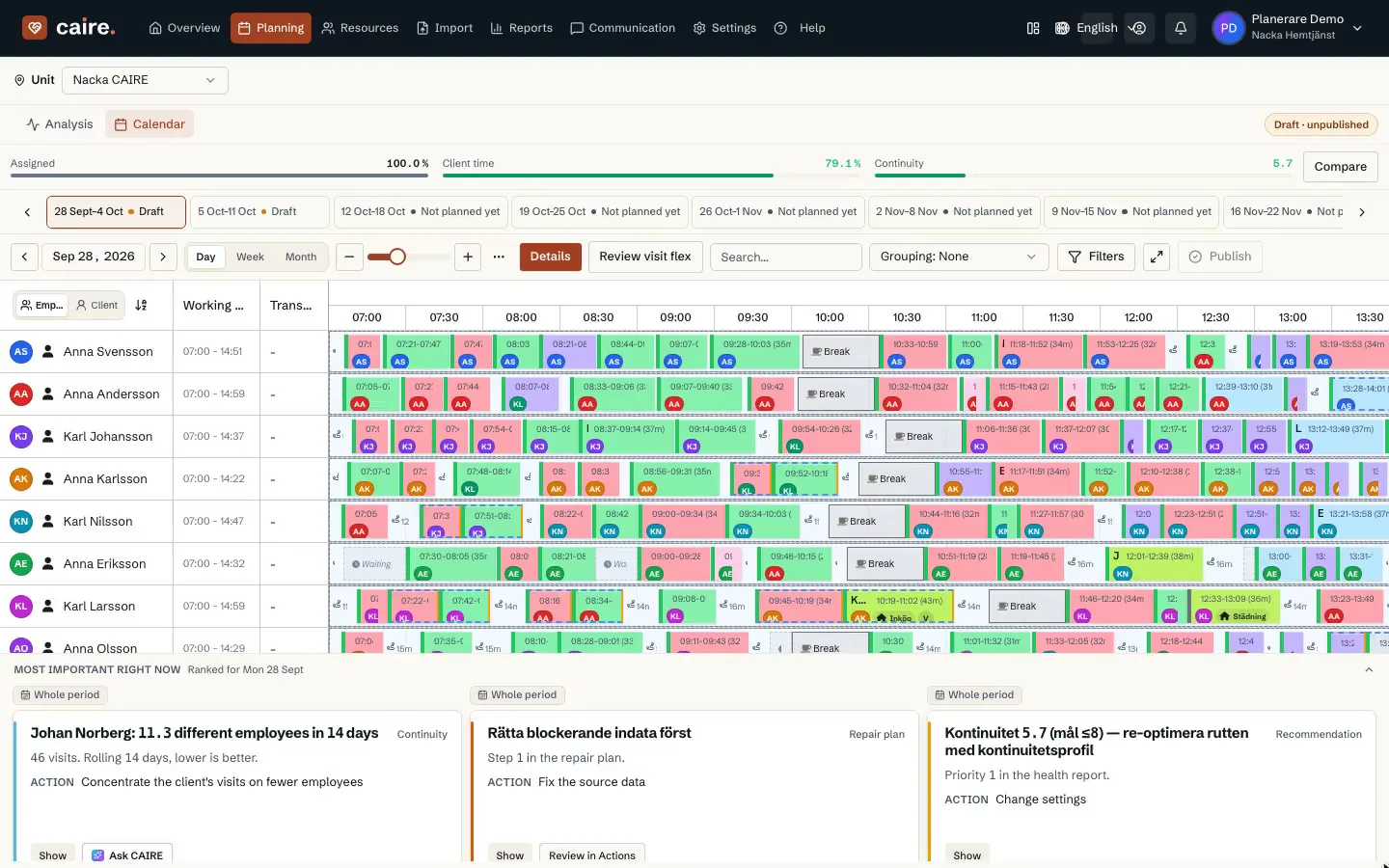
    Real planner workspace: calendar, routes, visits, and optimization context in one view.

    Current page

    AI scheduling

    Plan, optimize, review, publish, and learn from outcomes.

    What is AI scheduling in home care?

    AI scheduling in home care means that CAIRE proposes optimized schedules for visits, routes, continuity, and staffing while the planner reviews and approves every operational change before publication.

    AI-Driven Scheduling

    Our AI-driven scheduling solution automates and optimizes home care planning with advanced algorithms that balance efficiency, continuity, and quality. The system continuously adapts to handle dynamic changes in real time.

    • Optimized SchedulesBalances efficiency, quality, and employee satisfaction
    • Adaptable PlanningTailored to your specific needs and regulations
    • Real-time managementAutomatic rescheduling for unexpected events
    Caire schedule calendar with optimized route rows and planned home-care visits

    The planner schedule in Caire

    The calendar shows routes, visits, and replanning in one workspace.

    Buyer workflow

    From first plan to published schedule

    AI scheduling in Caire is a controlled workflow where the team can plan, optimize, review, publish, and learn from outcomes in one process.

    Caire Core

    Caire Core keeps the scheduling architecture, rules, visit graph, route costs, and planner decisions in one explainable model.

    Planner-approved

    AI creates candidate schedules, but planners review quality, constraints, and trade-offs before publishing to mobile apps.

    Continuous learning loop

    Outcomes, changes, delays, and planner feedback improve the next planning cycle without turning the workflow into autopilot.

    Migrated prototype flows

    From pre-planning mockups to the scheduling workspace

    The old platform prototype pages are folded into the AI scheduling page as workflow guidance: create a visit, optimize the candidate, review with the coordinator, bring client preferences into the plan, and compare the resulting calendar timeline.

    Pre-planning workflow

    • Create & Configure
    • Select existing visit
    • Or create new visit
    • Enter visit parameters

    Optimize & Review

    • Optimization completed
    • Coordinator review schema
    • Customer meeting and preferences
    • AI-revised proposal

    Finalize & Export

    • Final review and completion
    • Before vs after pre-planning
    • Next steps after finalization

    Interactive calendar timeline

    Calendar timelineUnplanned editorOptimized tuningRecurring patternsComparison viewKPI comparison

    Configuration Options

    Preferences

    • Staff Profiles and Preferences
    • Client Settings and Preferences
    • Flexible Time Windows
    • Customizable rule sets
    • Priority Settings

    Quality Rules

    • Staff Continuity
    • Skill-based matching
    • Balanced workload
    • Break and Rest Time Settings
    • Service Window Settings

    Alerts

    • Scheduling Conflicts
    • Unplanned Visits
    • Quality deviations
    • Overtime Alerts
    • Custom Alert Criteria

    Analytics tools

    • Efficiency analysis
    • Staff utilization
    • Continuity reports
    • Travel-time Analysis
    • Schedule History and Comparison

    How It Works

    1

    Data collection

    The system gathers information about staff, care recipients, visits, skill requirements, time windows, and other relevant parameters.

    2

    AI Optimization

    Advanced algorithms analyze millions of possible scheduling options to find the optimal solution based on your specific goals and rules.

    3

    Dynamic Adaptation

    Continuous rescheduling and fine-tuning as new data comes in, such as sick leave, new visits, or other changes that affect the schedule.

    AI Features

    Continuous Learning

    The system continuously learns from past schedules, feedback, and outcomes. Over time, the optimization keeps improving as the AI adapts to your operation's specific patterns and preferences.

    Predictive Analysis

    Anticipates needs, traffic, delays, and other factors that may affect scheduling. This allows the system to plan proactively rather than reactively, minimizing disruptions to operations.

    Smart Matching

    Advanced matching between staff and care recipients based on skills, preferences, personality, and previous interactions. This improves both quality of care and job satisfaction.

    Discover the benefits of AI-driven scheduling

    Contact us for a demonstration of how our AI-driven scheduling solution can transform your operation and free up time for what truly matters - delivering the best possible care.

    Contact us

    Läs mer om hur AI-schemaläggning fungerar tekniskt och se CaireIndex – den nya branschstandarden.

    Benefits and ROI

    See how ai-driven scheduling can improve your operations

    AI-Driven Optimization

    Automatic scheduling that optimizes for both efficiency and quality

    Efficient Routes

    Minimize travel time and maximize care time with optimized routes

    Real-time Adjustments

    Handle changes and unexpected situations with automatic rescheduling

    Deep dive

    How the workflow works in practice

    Product detail

    CAIRE Scheduling Platform

    Product visuals
    CAIRE Scheduling PlatformCAIRE Scheduling PlatformCAIRE Scheduling PlatformCAIRE Scheduling PlatformCAIRE Scheduling PlatformCAIRE Scheduling Platform

    Workflow section

    CAIRE Scheduling Platform

    One unified flow: import recurring visit templates (slingor), create a schedule from a service area, run Caire Core shift layer+Caire Core routing layer optimization (~35 min), review and edit in the Bryntum workspace, then publish. Achieve 50%+ scheduling time savings, 20% travel reduction, and 75–80% staff utilization through intelligent automation.

    Workflow section

    Automatic Staffing Discovery

    Stop guessing how many employees you need. CAIRE automatically discovers the optimal staffing level and shift times based on your visit demand. No placeholders, no manual configuration—just select your visits and click optimize.

    System calculates exactly how many employees you need and when they should work—no more guessing or over-staffing.

    CAIRE's goal is to assign 100% of visits. If more staff is needed, you'll get a clear recommendation with cost analysis.

    As your caregivers use the mobile app, CAIRE learns actual travel patterns and improves accuracy automatically.

    Workflow section

    Real Example

    You have 45 visits on Monday . Instead of guessing "probably need 10 employees?", you select the visits and click optimize. CAIRE discovers: 9 employees needed , creates 14 optimal shifts, assigns all visits with 78% efficiency. Saves you 1 employee + 45 minutes of planning time.

    Workflow section

    Key Terms

    Why slingor matter: Home care is 90% predictable patterns. The same clients need the same services at roughly the same times every week. Fighting this reality with full AI optimization creates chaos and destroys continuity. CAIRE embraces this by letting humans design stable patterns (slingor) while AI optimizes around them.

    Workflow section

    The Hybrid Philosophy

    CAIRE combines the best of both worlds: human expertise in building stable care patterns that maintain continuity, and AI optimization for handling changes and disruptions. The result is a scheduling system that respects relationships while maximizing efficiency.

    Planners excel at building stable recurring patterns that maintain continuity and respect client relationships. They understand the nuances of care delivery.

    AI excels at finding optimal placement for new visits, handling disruptions, and optimizing routes to minimize travel time across hundreds of visits.

    Workflow section

    The Three Layers

    Recurring weekly patterns built by planners. These visits are locked and provide continuity. Example: Mrs. Andersson gets help from Lisa every Monday, Wednesday, Friday at 09:00.

    New clients fit into existing gaps using AI optimization. Movable visits are optimized around the baseline without disrupting slingor.

    Handle disruptions (sick leave, cancellations) with instant AI re-optimization. Ongoing visits stay locked, future visits become flexible.

    Workflow section

    Why This Works

    Home-care routing is a computationally explosive problem combining multiple NP-hard challenges: vehicle routing with time windows (VRPTW), staff scheduling, skill matching, continuity requirements, and multi-objective optimization. A single day with 240 visits and 32 caregivers creates (240!) 32 possible route permutations. Neither humans nor algorithms alone can solve this complexity—only a hybrid approach works.

    Learn more about the routing science behind CAIRE's hybrid model →

    Read the Caire Core shift layer+Caire Core routing layer technical docs

    CAIRE's scheduling system operates as one unified flow. All steps use the same UI (Bryntum SchedulerPro + Timefold AI solver): import master data → create a schedule → optimize → review → publish → handle disruptions.

    Workflow section

    Step 1: Master Data (Layer 1, Timeless)

    Purpose: Define recurring care needs per client without any dates. Municipality care decisions are imported as Insets (service types) + DaySlots + InsetGroups + VisitTemplates + TemplateTimeWindows. Slingor (recurring weekly patterns) are imported from external systems (Carefox, eCare, Attendo CSV) via manual CSV upload or API.

    Workflow section

    Step 2: Schedule Creation

    Purpose: Materialize a schedule for a specific service area and date range.

    How it works: Planner selects a service area and date range, then triggers createScheduleFromServiceArea . This materializes Visit, VisitTimeWindow, VisitDependency, and VisitGroup rows from the master data templates — and auto-starts Caire Core shift layer+Caire Core routing layer optimization immediately. The planning window is dynamic, derived from the visit time windows, not a fixed rolling window.

    Planner opens the schedule creation dialog and picks which service area and time window to plan for.

    createScheduleFromServiceArea creates Visit + VisitTimeWindow + VisitDependency + VisitGroup rows from the timeless master data.

    Workflow section

    Step 3: Real-Time Disruption Handling

    Purpose: Handle unexpected events during the day while protecting ongoing visits and maintaining continuity.

    Algorithm freezes started/imminent visits. Only future visits become flexible.

    Solver fills gaps and reassigns visits, minimizing disruption to rest of day.

    Planner reviews "ghost tracks" (previous positions) and metrics, then publishes to mobile apps.

    Workflow section

    For Planners

    Your role: Set up VisitTemplates and care decisions, create schedules, review optimization results, define continuity rules and skill requirements.

    • Create schedules from service areas — Caire Core shift layer+Caire Core routing layer starts automatically
    • Review the Bryntum workspace and run health checks before publishing
    • Upload municipal decision PDFs for new customers
    • Review AI-optimized suggestions before customer meetings
    • Define time windows and flexibility levels per visit type

    Workflow section

    For Coordinators

    Your role: Manage daily schedules, handle real-time disruptions, publish to mobile apps, monitor performance.

    • Review optimization results in the Bryntum workspace after each schedule creation run
    • Handle sick leave by running real-time re-optimization
    • Fill gaps from cancellations using AI suggestions
    • Publish approved schedules to caregiver mobile apps
    • Track adherence: planned vs actual executed visits

    Workflow section

    For Caregivers

    Your role: Execute visits according to mobile app schedule, report deviations, receive real-time updates.

    • View your daily route on mobile app with map and timestamps
    • Receive notifications for schedule changes during the day
    • See client details, service instructions, and navigation
    • Report completed visits or issues back to coordinators

    Workflow section

    For Managers

    Your role: Monitor KPIs, analyze performance trends, approve major schedule changes, set organizational rules.

    • View analytics dashboard: utilization, travel time, continuity scores
    • Compare baseline vs AI optimized vs actual executed schedules
    • Track approval rates, time savings, and ROI metrics
    • Set organization-wide constraints and priorities
    • Review disruption patterns to improve future planning

    Workflow section

    For Customers/Clients

    Your role: Review and approve proposed schedules, provide preferences, receive consistent care.

    • Attend meeting with planner to review AI-optimized schedule
    • Express preferences for specific times or caregivers
    • Approve final schedule which becomes fixed pattern
    • Enjoy predictable care with same caregivers at same times (continuity)

    Workflow section

    Bryntum SchedulerPro Interface

    CAIRE uses Bryntum SchedulerPro, a professional-grade scheduling grid component, for the user interface. This provides:

    • Drag & drop event management with real-time validation
    • Multi-week calendar views (3 days, 1 week, 2 weeks, 1 month)
    • Resource timeline showing all employees and their routes
    • Event coloring based on status (fixed, movable, conflicts)
    • Tooltips with visit details, client info, and constraints

    Workflow section

    Timefold AI Solver

    The optimization engine is powered by Timefold (formerly OptaPlanner), a constraint satisfaction solver:

    • Hard constraints: Skill matching, time windows, availability (cannot be broken)
    • Soft constraints: Continuity, travel minimization, workload balance (optimized)
    • Multi-objective: Balances competing goals with weighted scoring
    • Incremental solving: Fast re-optimization when disruptions occur
    • Benchmarks: Continuous testing ensures solution quality

    Workflow section

    Integration APIs

    CAIRE integrates with operations systems via APIs and CSV import/export:

    • Carefox API: Two-way sync for visits, clients, employees, schedules
    • eCare Welfare API: Similar integration for Welfare users
    • CSV Import: Offline workflow for pilots or non-API systems
    • CSV Export: Publish optimized schedules back to operations systems
    • Webhook Support: Real-time notifications for schedule changes

    Workflow section

    Data Model

    Core entities in CAIRE's scheduling system:

    • Organization: Top-level entity with settings and constraints
    • ServiceArea: Geographic region with specific rules
    • Employee: Caregiver with skills, availability, home location
    • Client: Care recipient with needs, preferences, location
    • Visit: Scheduled service with time window, duration, required skills
    • Slinga: Recurring weekly pattern (template) that generates daily visits
    • Schedule: Collection of visits for a specific date range
    • Solution: Optimized assignment of visits to employees with routes

    Workflow section

    System Architecture

    CAIRE follows a microservices architecture:

    • Dashboard (React + Vite): Frontend UI for planners and coordinators
    • Dashboard-Server (GraphQL): Backend API with Prisma ORM and PostgreSQL
    • Timefold Solver Service: Java-based optimization engine
    • Integration Layer: Handles external API calls and CSV processing
    • Mobile Apps: React Native apps for caregivers (iOS/Android)

    Workflow section

    Product Screenshots

    Preview how AI-optimized schedules, health check results, and route details appear in the platform. All personal data is masked but workflows are shown exactly as in production.

    Workflow section

    Drag & Drop Scheduling

    Intuitive drag and drop interface for scheduling visits with real-time rule verification. Drag unplanned visits to the schedule and see immediate validation of continuity, competencies, and time constraints. Statistics

    Workflow section

    Statistics & Routes

    Comprehensive statistics and route optimization insights for schedule performance. View service time, travel time, waiting time, utilization rates, and route segments for each employee. Filtering

    Workflow section

    Advanced Filtering

    Powerful filtering options for visits, staff, competencies, and service areas. Filter by visit type, priority, staffing requirements, competencies, and service areas to focus on specific scheduling needs. Optimization

    Workflow section

    Optimization Scenarios

    Choose from predefined optimization scenarios or create custom optimization settings. Select scenarios like Daily Plan, New Clients, Disruption Management, Continuity Focus, or Maximum Efficiency, each with customizable weights and constraints. Pre-Planning

    Workflow section

    Approve recurring visits with one click

    AI identifies patterns that require user approval before optimization becomes a fixed plan. The panel shows priority, time suggestions, and why the change is recommended. Daily Review

    Workflow section

    Optimized daily schedule ready for publishing

    The timeline shows all employees' shifts, service, travel, and breaks in one view. Color coding makes it easy to see balance and identify gaps. Routes

    Workflow section

    Map view for route validation

    The map layout visualizes each caregiver's route, timestamps, and alternatives. Compare office start against optimal route and see quality indicators in real-time. Frequently Asked Questions

    Workflow section

    How does CAIRE scheduling work end-to-end?

    CAIRE uses one unified flow : (1) Master data — municipality decisions are imported as timeless VisitTemplates and slingor patterns. (2) Schedule creation — planner selects a service area + date range; createScheduleFromServiceArea materializes visits and auto-starts Caire Core shift layer+Caire Core routing layer optimization (~35 min total). (3) Review and publish — planner reviews the Bryntum workspace, runs health checks, makes edits, and publishes. (4) Disruptions — pin intact visits, run from-patch re-optimization, re-publish. There is no separate pre-planning phase or daily scheduling phase; it is all the same system.

    Workflow section

    Can I use CAIRE without Carefox or eCare Welfare?

    Yes! While CAIRE has API integrations with Carefox and eCare Welfare for two-way sync, you can also use CSV import/export for offline workflows. This is common during pilot phases or for organizations using other systems.

    Workflow section

    How does AI handle continuity?

    You define continuity priority per client (high, medium, low). High priority clients (e.g., dementia) will preferentially get the same caregiver every time. Medium priority (e.g., cleaning) allows more flexibility. AI respects these weights when optimizing.

    Workflow section

    What happens if AI suggests bad assignments?

    All AI suggestions are reviewed by humans before publishing. You can manually override any assignment using drag & drop. The system validates rules in real-time (skills, time windows, availability).

    Workflow section

    How long does optimization take?

    Depends on problem size. Daily schedules (50-300 visits) typically optimize in 1-5 minutes. Pre-planning (longer time spans) may take 10-30 minutes. You can set time limits and stop early if needed.

    Workflow section

    Can I lock specific visits so AI never touches them?

    Yes! Use the pin/unpin feature. Pinned visits are locked and won't be moved by AI. This is useful for VIP clients or sensitive situations.

    Workflow section

    What if a caregiver calls in sick?

    Mark the employee as unavailable. CAIRE will protect ongoing visits (already started or imminent) and re-optimize future visits to other available caregivers. You'll see a diff view showing what changed.

    Workflow section

    Does CAIRE work for small organizations?

    Yes! CAIRE scales from 5-10 employees to 100+. Smaller organizations benefit even more from time savings since manual scheduling is proportionally more time-consuming.

    Workflow section

    Continue exploring the CAIRE platform

    Dive deeper into resource management and analytics to complete your understanding.