CAIRE · Product images

    Image library

    Explore approved images of the CAIRE planning platform, calendar, analytics, reports. Also see which mobile views remain to be documented. Each image explains where the feature lives and what it demonstrates.

    Images show synthetic demonstration data. They explain the product interface and workflows, not customer data or customer outcomes.

    146 publicly approved images are shown from 152 catalogue entries. 146 match the latest capture; 6 entries have no approved image of their latest version.

    • Resources and foundation data44 images
    • Planning and calendar21 images
    • Analysis and results51 images
    • Operations and settings23 images
    • Ask CAIRE and help7 images
    • Mobile app0 images

    Approved images by product surface

    53 dashboard page types; detail views are still being inventoried. The counts below are approved images with a classified surface, not surface totals or a completeness measure.

    Mobile inventory: 20 employee views (including 2 handbook views), 8 client views, 4 family views, and 1 shared views. Handbook views are included in the employee count.

    • Dashboard · Page: 48
    • Dashboard · Detail view: 98
    • Dashboard · Unmapped: 0
    • Employee · Page: 0
    • Employee · Detail view: 0
    • Employee · Unmapped: 0
    • Client · Page: 0
    • Client · Detail view: 0
    • Client · Unmapped: 0
    • Family · Page: 0
    • Family · Detail view: 0
    • Family · Unmapped: 0

    Screenshots use synthetic demonstration data. They illustrate the interface, not customer data or customer outcomes. When a new capture awaits approval, the last approved image remains public until its replacement is approved.

    The gallery is built from versioned screenshots and frozen approvals. A new capture stays out of the public gallery until it is approved and the website change is released.

    Showing 146 of 146 approved current images.

    CAIRE platformResources and foundation data

    Organization setup step with an existing name and the demo organization's saved depot

    Approved image · Cropped detail

    Approved: 2026-10-10

    Image annotation
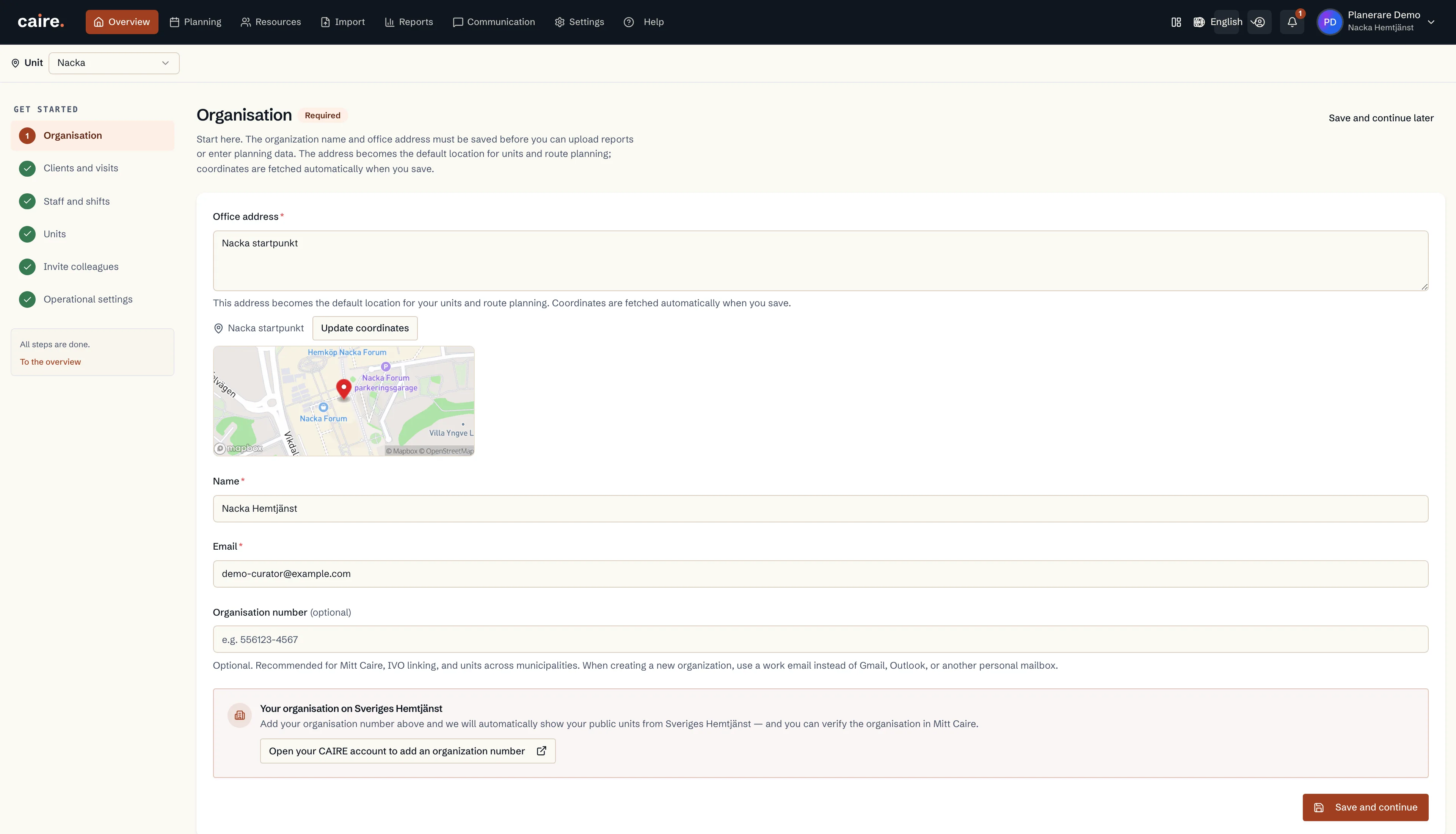
    Organization setup step with an existing name and the demo organization's saved depot
      The native start form displays the demo organization's saved name, office/depot point and Save and continue control.The planner can review organization details where the office address supports units and route planning. The image records no new geocoding or saved change.
      Open approved image full size

      Image shows: The native start form displays the demo organization's saved name, office/depot point and Save and continue control.

      What it demonstrates: The planner can review organization details where the office address supports units and route planning. The image records no new geocoding or saved change.

      Product URL

      CAIRE platform

      app.caire.se

      View/route template: /start/organisationThe template shows where the view lives. Record IDs resolve to a selected record in the app and are not a direct link.

      Website destinations and suggestions
      Capture source and setup

      Source module: Kom igång · Organisation

      Opens in CAIRE: /start/organisation → OrganizationStep

      Capture scenario: Synthetic demonstration scenario S5

      Capture setup
      1. Läs S5:s befintliga Nacka-organisation; kräv sparat namn och kontorsadress utan platshållarvärde
      2. Öppna organisationssteget och verifiera att namn och adress kommer från samma sparade organisation
      3. Visa formuläret utan att ändra fält eller klicka Spara och fortsätt
      CAIRE platformResources and foundation data

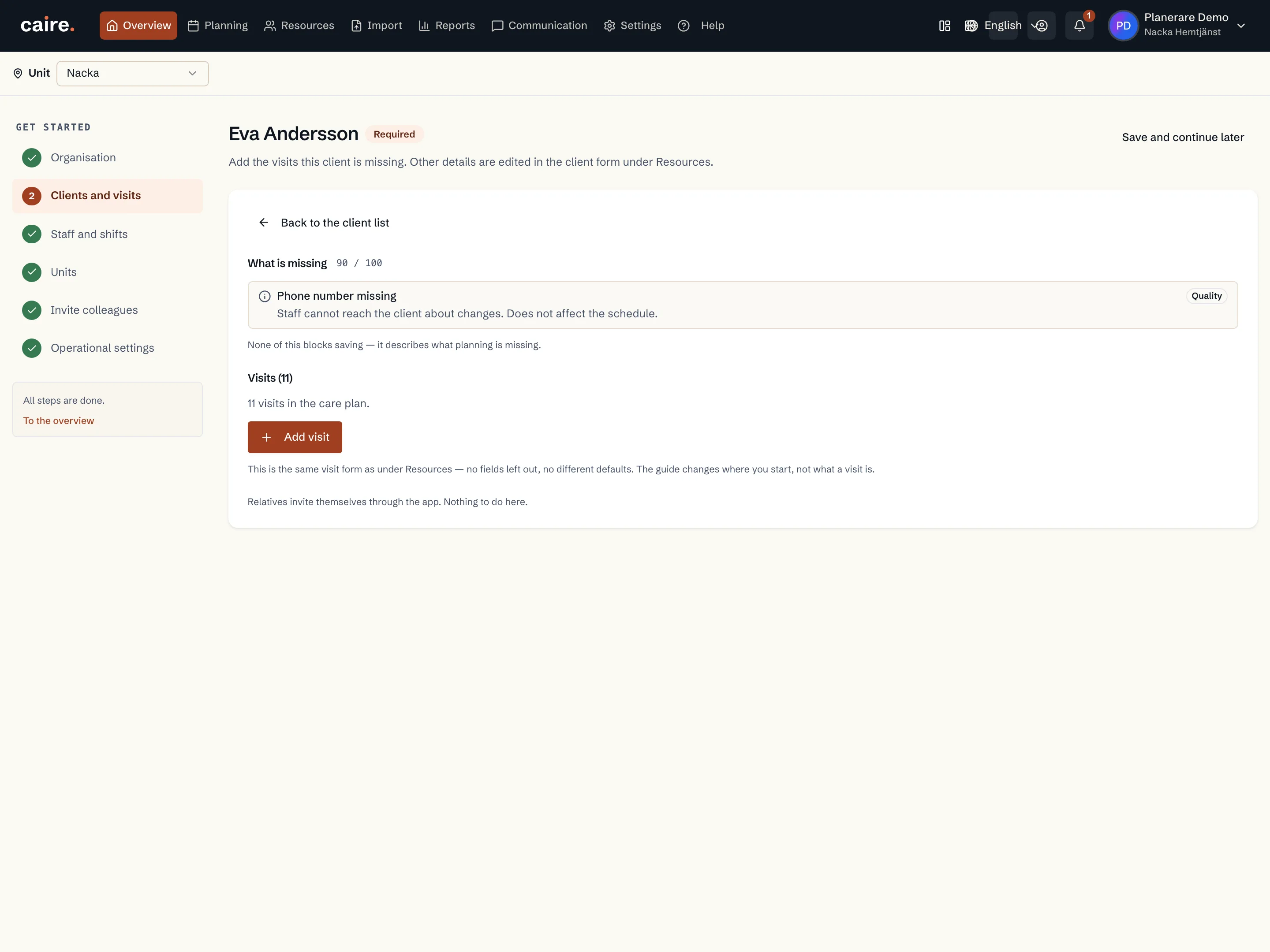
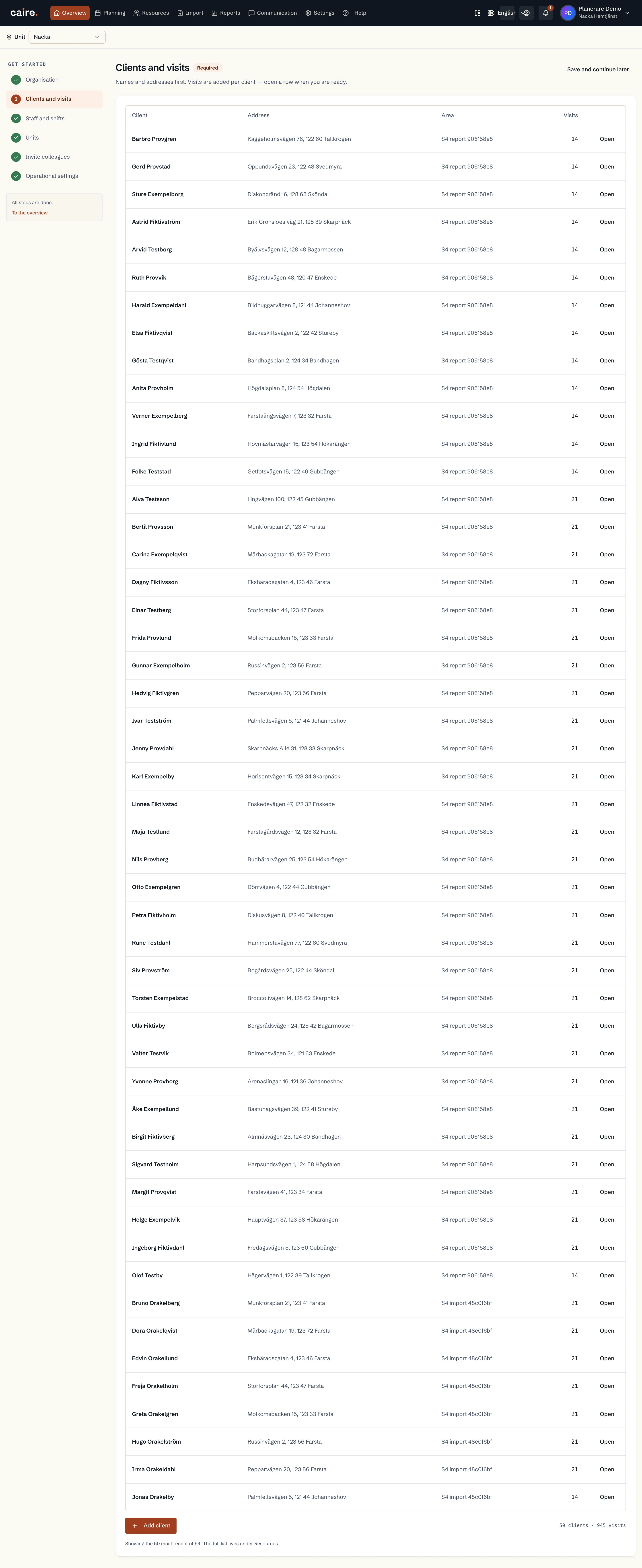
      Clients in the setup guide

      Approved image · Image and caption

      Approved: 2026-10-10

      Clients in the setup guide
      The list shows existing clients in the setup guide’s client and visit step.This help image shows where these details are reviewed in the actual view. No changes have been saved.
      Open approved image full size

      Image shows: The list shows existing clients in the setup guide’s client and visit step.

      What it demonstrates: This help image shows where these details are reviewed in the actual view. No changes have been saved.

      Product URL

      CAIRE platform

      app.caire.se

      View/route template: /start/clientsThe template shows where the view lives. Record IDs resolve to a selected record in the app and are not a direct link.

      Website destinations and suggestions
      Capture source and setup

      Source module: Klienter i startguiden

      Opens in CAIRE: /start/clients

      Capture scenario: Synthetic demonstration scenario S5

      Capture setup
      1. Öppna den befintliga vyn; spara eller skicka inga ändringar
      CAIRE platformResources and foundation data

      Client data quality in the setup guide

      Approved image · Image and caption

      Approved: 2026-10-10

      Client data quality in the setup guide
      The client’s readiness, data quality and visit foundation appear together.This help image shows where these details are reviewed in the actual view. No changes have been saved.
      Open approved image full size

      Image shows: The client’s readiness, data quality and visit foundation appear together.

      What it demonstrates: This help image shows where these details are reviewed in the actual view. No changes have been saved.

      Product URL

      CAIRE platform

      app.caire.se

      View/route template: /start/clients/:clientIdThe template shows where the view lives. Record IDs resolve to a selected record in the app and are not a direct link.

      Website destinations and suggestions
      Capture source and setup

      Source module: Klientens datakvalitet i startguiden

      Opens in CAIRE: /start/clients/:clientId

      Capture scenario: Synthetic demonstration scenario S5

      Capture setup
      1. Öppna den befintliga vyn; spara eller skicka inga ändringar
      CAIRE platformResources and foundation data

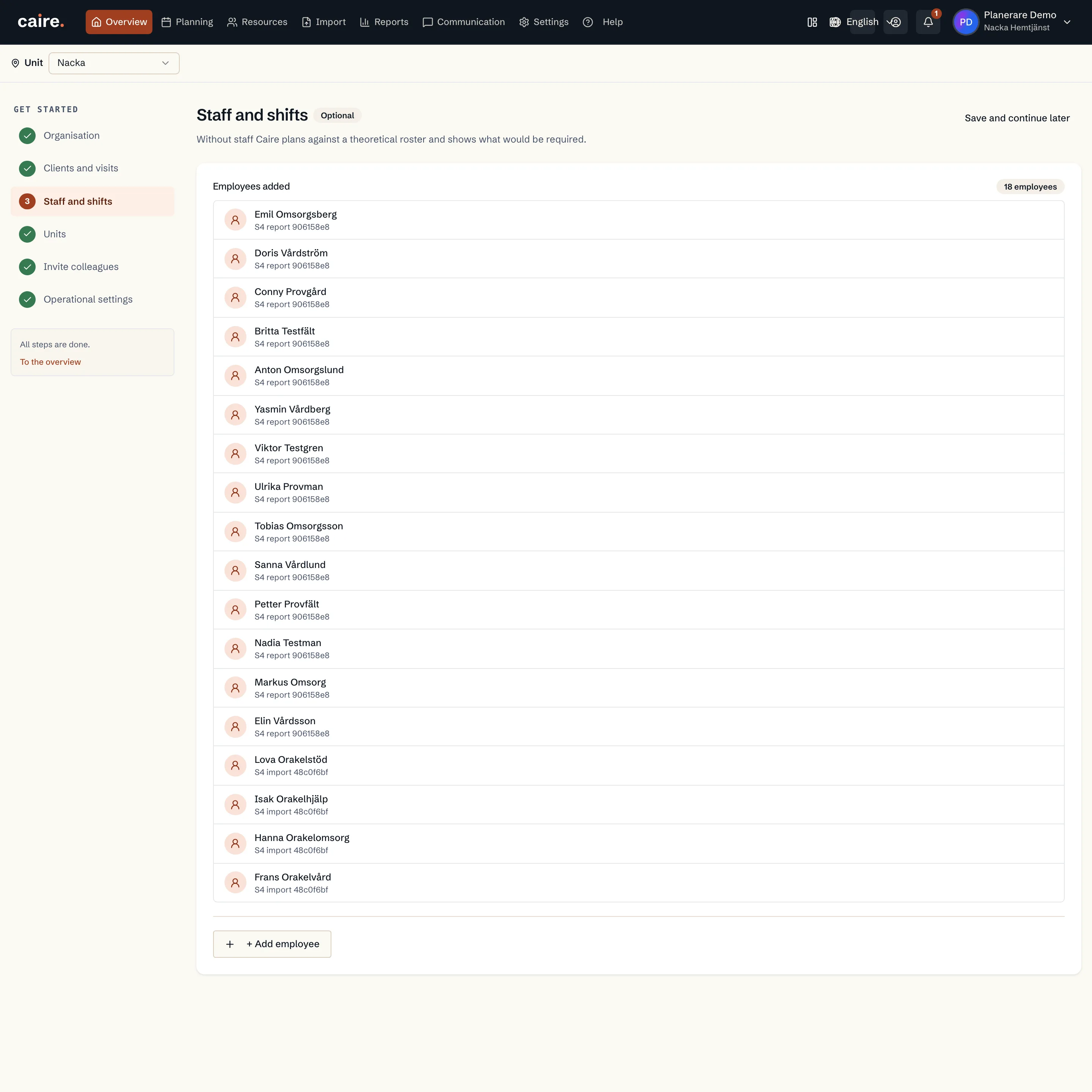
      Employees in the setup guide

      Approved image · Image and caption

      Approved: 2026-10-10

      Employees in the setup guide
      The production onboarding flow shows the organization’s existing employees.This help image shows where these details are reviewed in the actual view. No changes have been saved.
      Open approved image full size

      Image shows: The production onboarding flow shows the organization’s existing employees.

      What it demonstrates: This help image shows where these details are reviewed in the actual view. No changes have been saved.

      Product URL

      CAIRE platform

      app.caire.se

      View/route template: /start/employeesThe template shows where the view lives. Record IDs resolve to a selected record in the app and are not a direct link.

      Website destinations and suggestions
      Capture source and setup

      Source module: Medarbetare i startguiden

      Opens in CAIRE: /start/employees

      Capture scenario: Synthetic demonstration scenario S5

      Capture setup
      1. Öppna den befintliga vyn; spara eller skicka inga ändringar
      CAIRE platformResources and foundation data

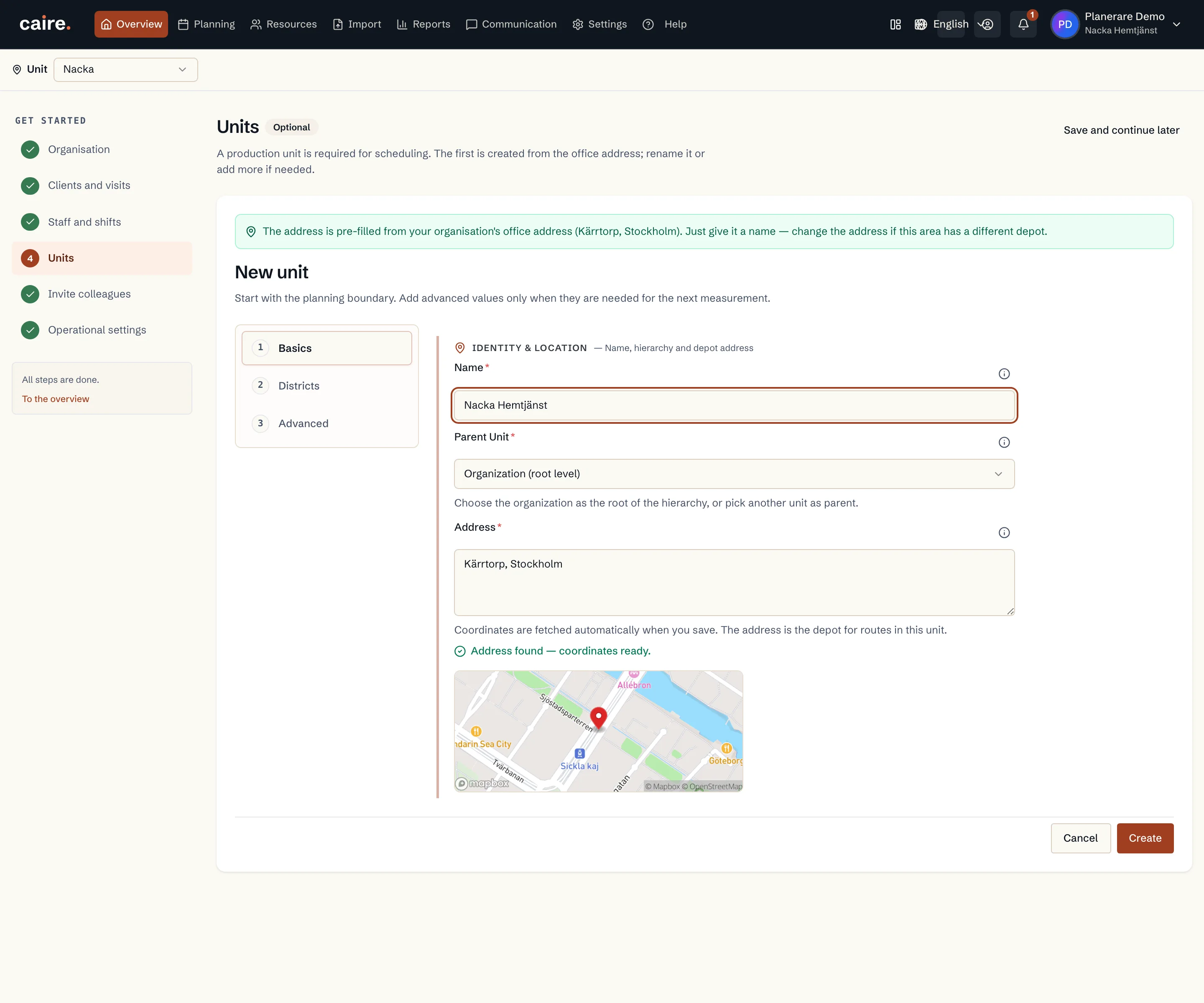
      Unsaved unit name and depot address form in the setup guide

      Approved image · Image and caption

      Approved: 2026-10-10

      Unsaved unit name and depot address form in the setup guide
      The unsaved unit form shows its name, depot address and geographic context.This help image shows the fields reviewed before creating a unit. No unit has been created.
      Open approved image full size

      Image shows: The unsaved unit form shows its name, depot address and geographic context.

      What it demonstrates: This help image shows the fields reviewed before creating a unit. No unit has been created.

      Product URL

      CAIRE platform

      app.caire.se

      View/route template: /start/service-areasThe template shows where the view lives. Record IDs resolve to a selected record in the app and are not a direct link.

      Website destinations and suggestions
      Capture source and setup

      Source module: Skapa enhet i startguiden

      Opens in CAIRE: /start/service-areas

      Capture scenario: Synthetic demonstration scenario S5

      Capture setup
      1. Öppna den befintliga vyn; spara eller skicka inga ändringar
      CAIRE platformResources and foundation data

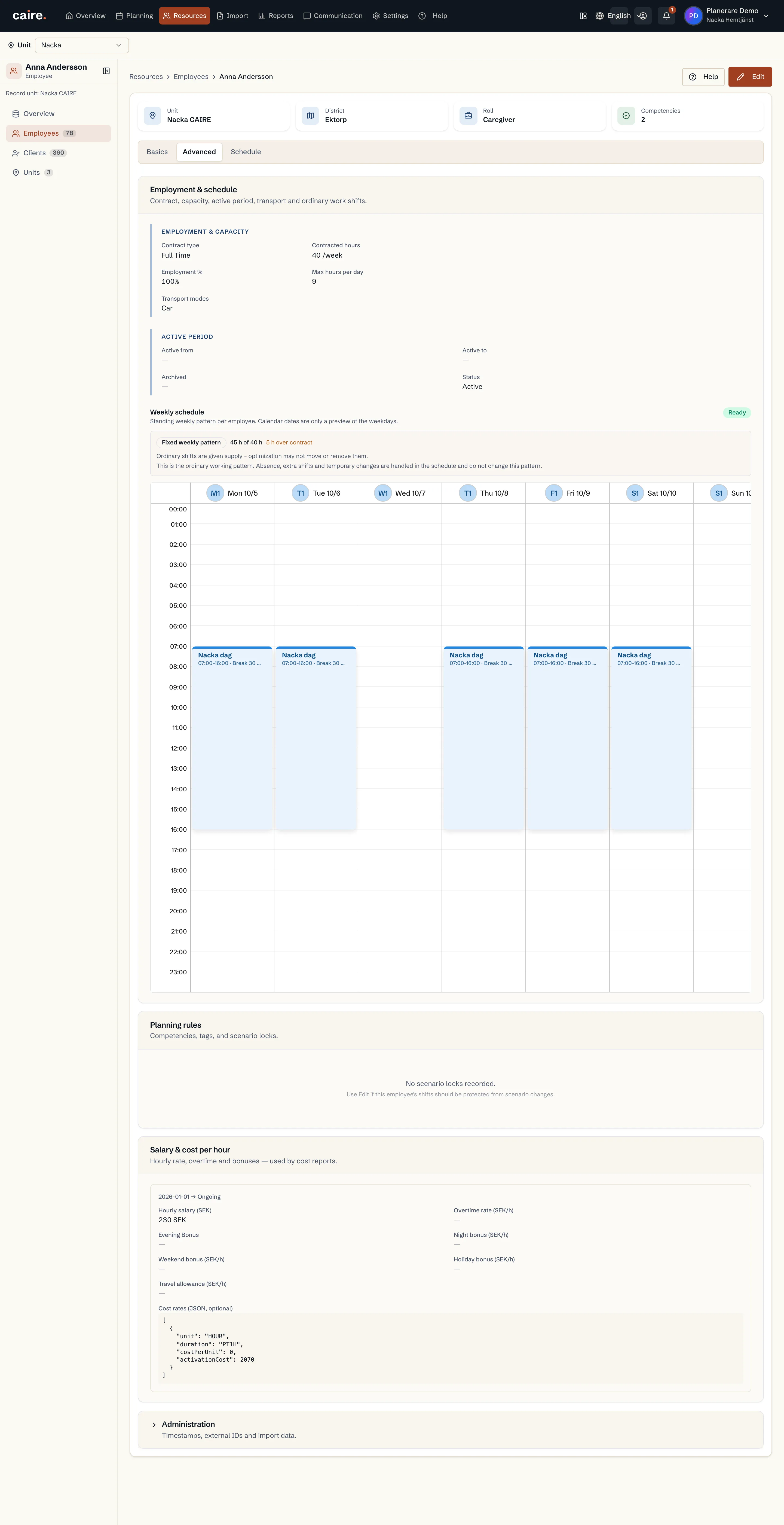
      Employee advanced details

      Approved image · Image and caption

      Approved: 2026-10-10

      Employee advanced details
      The read-only view brings together employment, shifts, planning rules and costs.This help image shows where these details are reviewed in the actual view. No changes have been saved.
      Open approved image full size

      Image shows: The read-only view brings together employment, shifts, planning rules and costs.

      What it demonstrates: This help image shows where these details are reviewed in the actual view. No changes have been saved.

      Product URL

      CAIRE platform

      app.caire.se

      View/route template: /resources/employees/:idThe template shows where the view lives. Record IDs resolve to a selected record in the app and are not a direct link.

      Website destinations and suggestions
      Capture source and setup

      Source module: Medarbetarens avancerade uppgifter

      Opens in CAIRE: /resources/employees/:id?tab=advanced

      Capture scenario: Synthetic demonstration scenario S5

      Capture setup
      1. Öppna den befintliga vyn; spara eller skicka inga ändringar
      CAIRE platformResources and foundation data

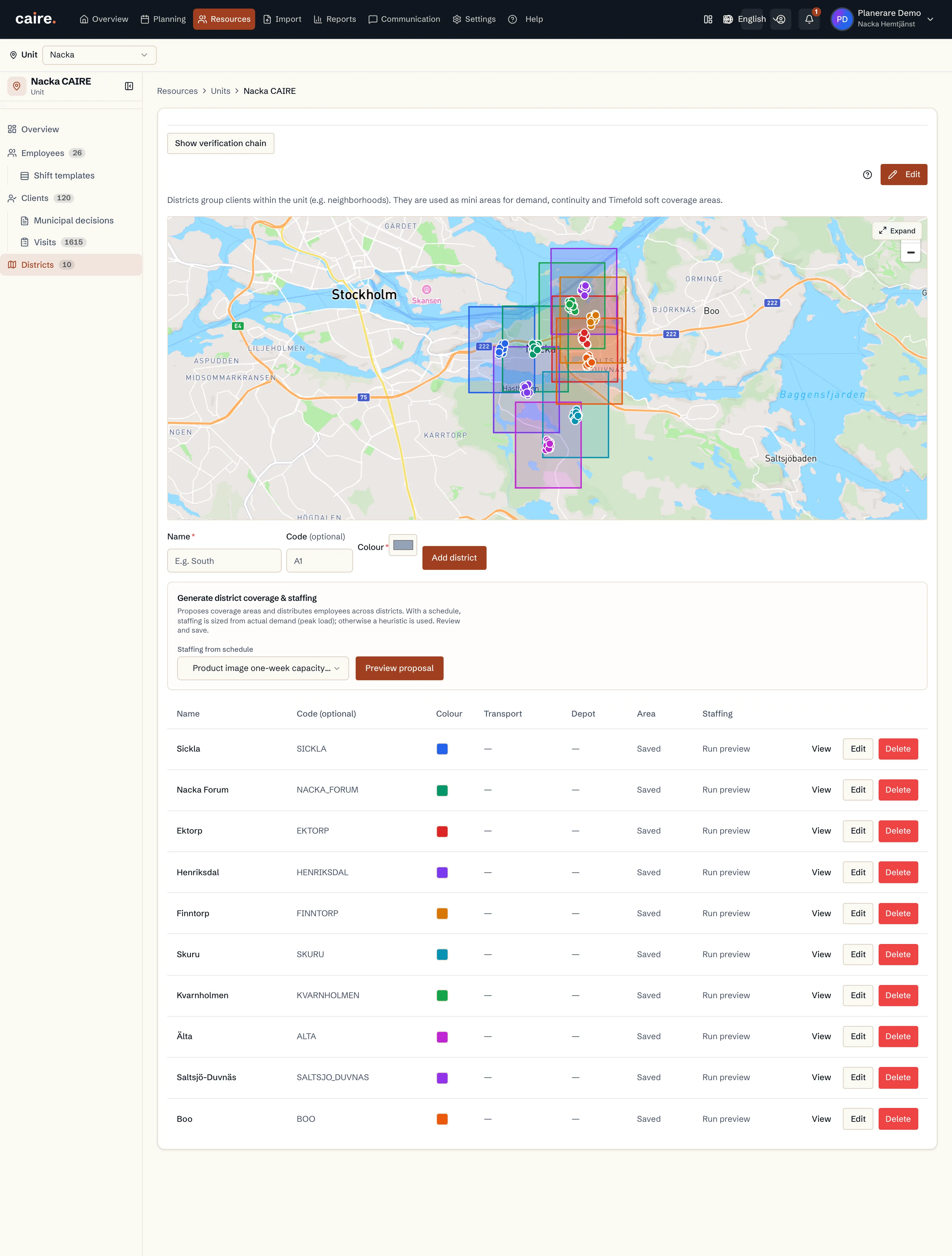
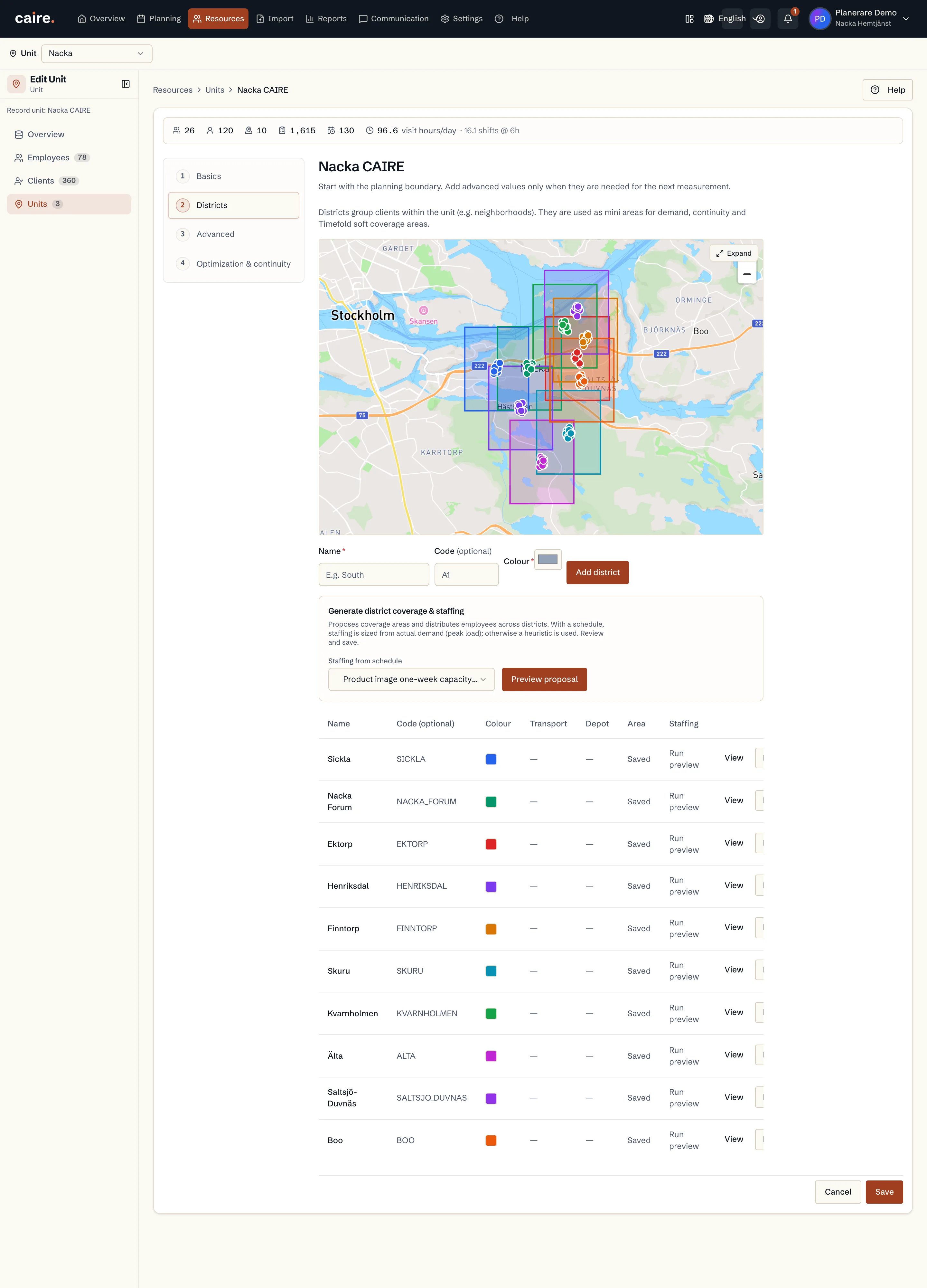
      Unit districts

      Approved image · Image and caption

      Approved: 2026-10-10

      Unit districts
      The unit district view presents its divisions in their geographic and resource context.This help image shows where these details are reviewed in the actual view. No changes have been saved.
      Open approved image full size

      Image shows: The unit district view presents its divisions in their geographic and resource context.

      What it demonstrates: This help image shows where these details are reviewed in the actual view. No changes have been saved.

      Product URL

      CAIRE platform

      app.caire.se

      View/route template: /resources/service-areas/:idThe template shows where the view lives. Record IDs resolve to a selected record in the app and are not a direct link.

      Website destinations and suggestions
      Capture source and setup

      Source module: Enhetens distrikt

      Opens in CAIRE: /resources/service-areas/:id?tab=districts

      Capture scenario: Synthetic demonstration scenario S5

      Capture setup
      1. Öppna den befintliga vyn; spara eller skicka inga ändringar
      CAIRE platformResources and foundation data

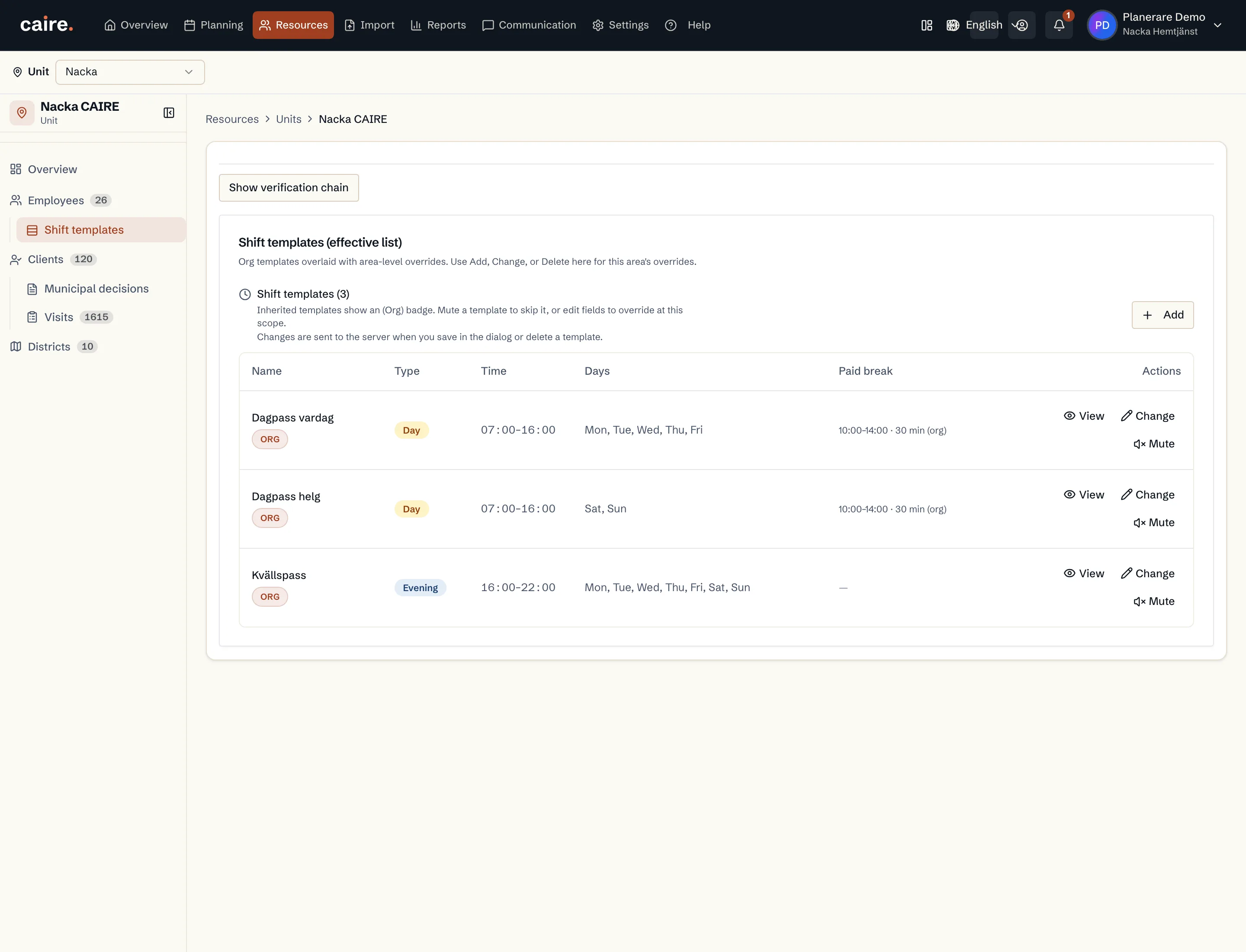
      Unit shift templates

      Approved image · Image and caption

      Approved: 2026-10-10

      Unit shift templates
      The view shows the unit’s applicable shift templates and their local or inherited values.This help image shows where these details are reviewed in the actual view. No changes have been saved.
      Open approved image full size

      Image shows: The view shows the unit’s applicable shift templates and their local or inherited values.

      What it demonstrates: This help image shows where these details are reviewed in the actual view. No changes have been saved.

      Product URL

      CAIRE platform

      app.caire.se

      View/route template: /resources/service-areas/:idThe template shows where the view lives. Record IDs resolve to a selected record in the app and are not a direct link.

      Website destinations and suggestions
      Capture source and setup

      Source module: Enhetens skiftmallar

      Opens in CAIRE: /resources/service-areas/:id?tab=shift-templates

      Capture scenario: Synthetic demonstration scenario S5

      Capture setup
      1. Öppna den befintliga vyn; spara eller skicka inga ändringar
      CAIRE platformResources and foundation data

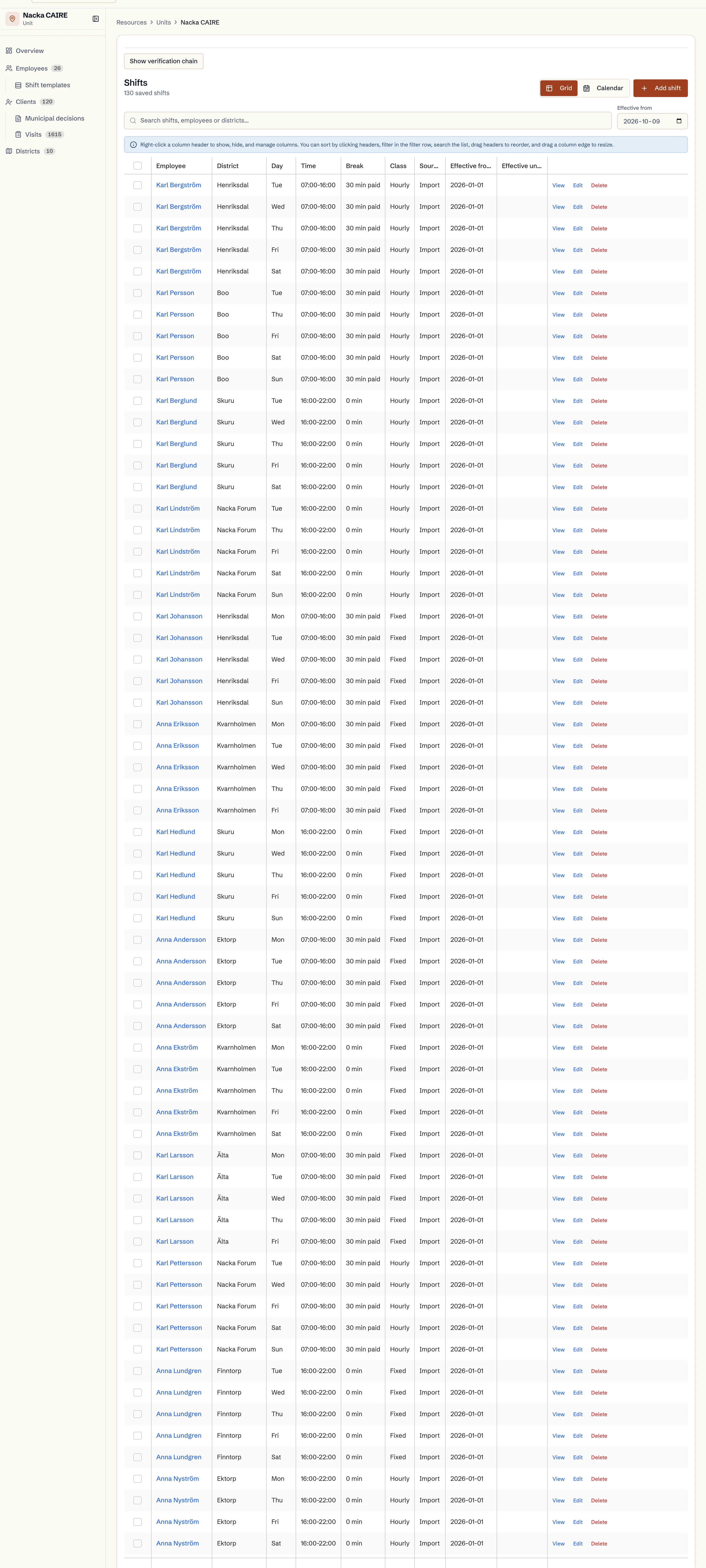
      Unit standing roster shifts

      Approved image · Image and caption

      Approved: 2026-10-10

      Unit standing roster shifts
      The unit’s standing roster shifts appear in a resource table.This help image shows where these details are reviewed in the actual view. No changes have been saved.
      Open approved image full size

      Image shows: The unit’s standing roster shifts appear in a resource table.

      What it demonstrates: This help image shows where these details are reviewed in the actual view. No changes have been saved.

      Product URL

      CAIRE platform

      app.caire.se

      View/route template: /resources/service-areas/:idThe template shows where the view lives. Record IDs resolve to a selected record in the app and are not a direct link.

      Website destinations and suggestions
      Capture source and setup

      Source module: Enhetens ordinarie arbetspass

      Opens in CAIRE: /resources/service-areas/:id?tab=shifts

      Capture scenario: Synthetic demonstration scenario S5

      Capture setup
      1. Öppna den befintliga vyn; spara eller skicka inga ändringar
      CAIRE platformResources and foundation data

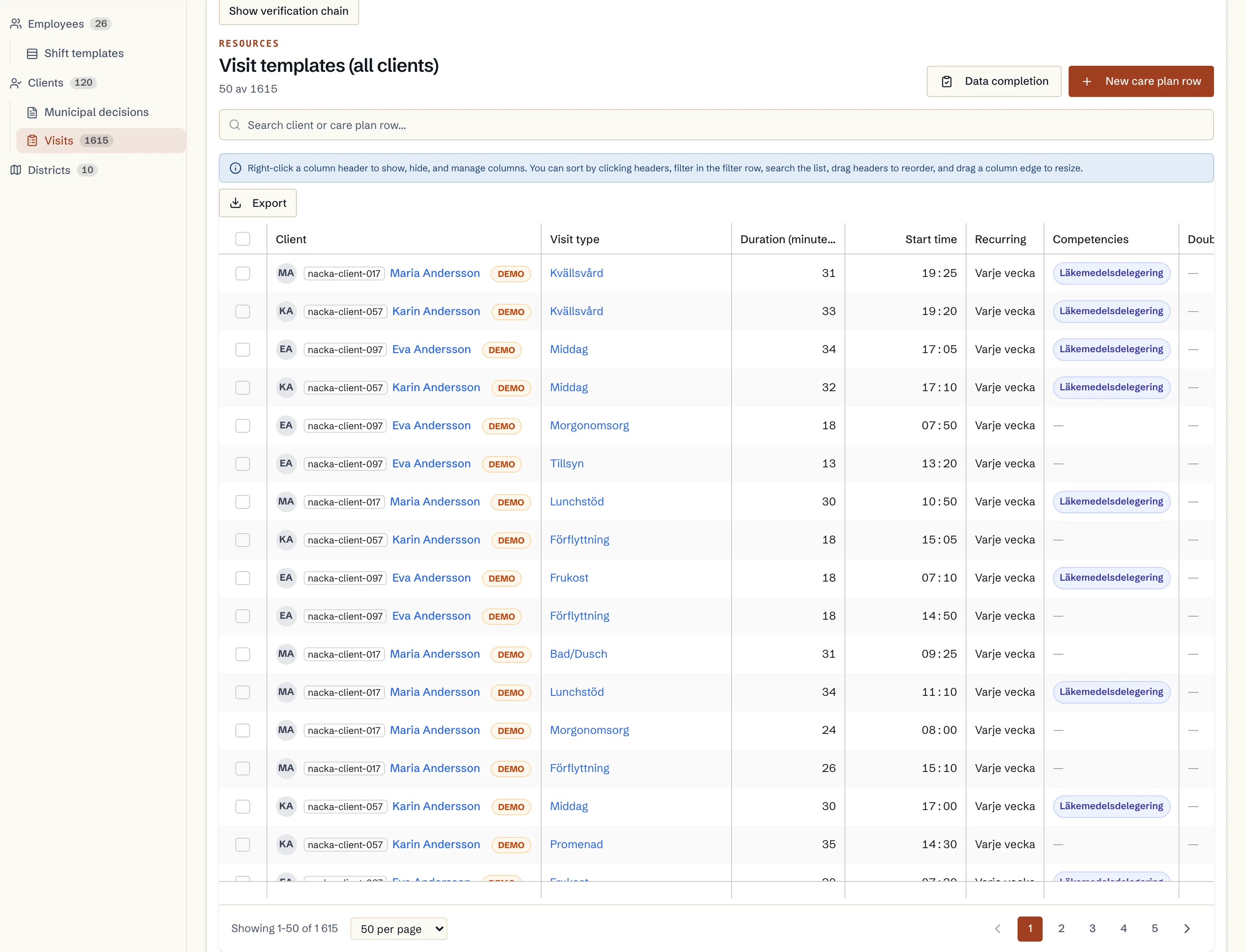
      Unit care-plan catalogue

      Approved image · Image and caption

      Approved: 2026-10-10

      Unit care-plan catalogue
      The unit’s existing visit templates appear in their shared catalogue.This help image shows where these details are reviewed in the actual view. No changes have been saved.
      Open approved image full size

      Image shows: The unit’s existing visit templates appear in their shared catalogue.

      What it demonstrates: This help image shows where these details are reviewed in the actual view. No changes have been saved.

      Product URL

      CAIRE platform

      app.caire.se

      View/route template: /resources/service-areas/:idThe template shows where the view lives. Record IDs resolve to a selected record in the app and are not a direct link.

      Website destinations and suggestions
      Capture source and setup

      Source module: Enhetens genomförandeplaner

      Opens in CAIRE: /resources/service-areas/:id?tab=care-plan

      Capture scenario: Synthetic demonstration scenario S5

      Capture setup
      1. Öppna den befintliga vyn; spara eller skicka inga ändringar
      CAIRE platformResources and foundation data

      Review unit district settings

      Approved image · Image and caption

      Approved: 2026-10-10

      Review unit district settings
      The district section of the unit form is shown without saving any fields.This help image shows where these details are reviewed in the actual view. No changes have been saved.
      Open approved image full size

      Image shows: The district section of the unit form is shown without saving any fields.

      What it demonstrates: This help image shows where these details are reviewed in the actual view. No changes have been saved.

      Product URL

      CAIRE platform

      app.caire.se

      View/route template: /resources/service-areas/:id/editThe template shows where the view lives. Record IDs resolve to a selected record in the app and are not a direct link.

      Website destinations and suggestions
      Capture source and setup

      Source module: Granska enhetens distriktsinställningar

      Opens in CAIRE: /resources/service-areas/:id/edit?section=districts

      Capture scenario: Synthetic demonstration scenario S5

      Capture setup
      1. Öppna den befintliga vyn; spara eller skicka inga ändringar
      CAIRE platformResources and foundation data

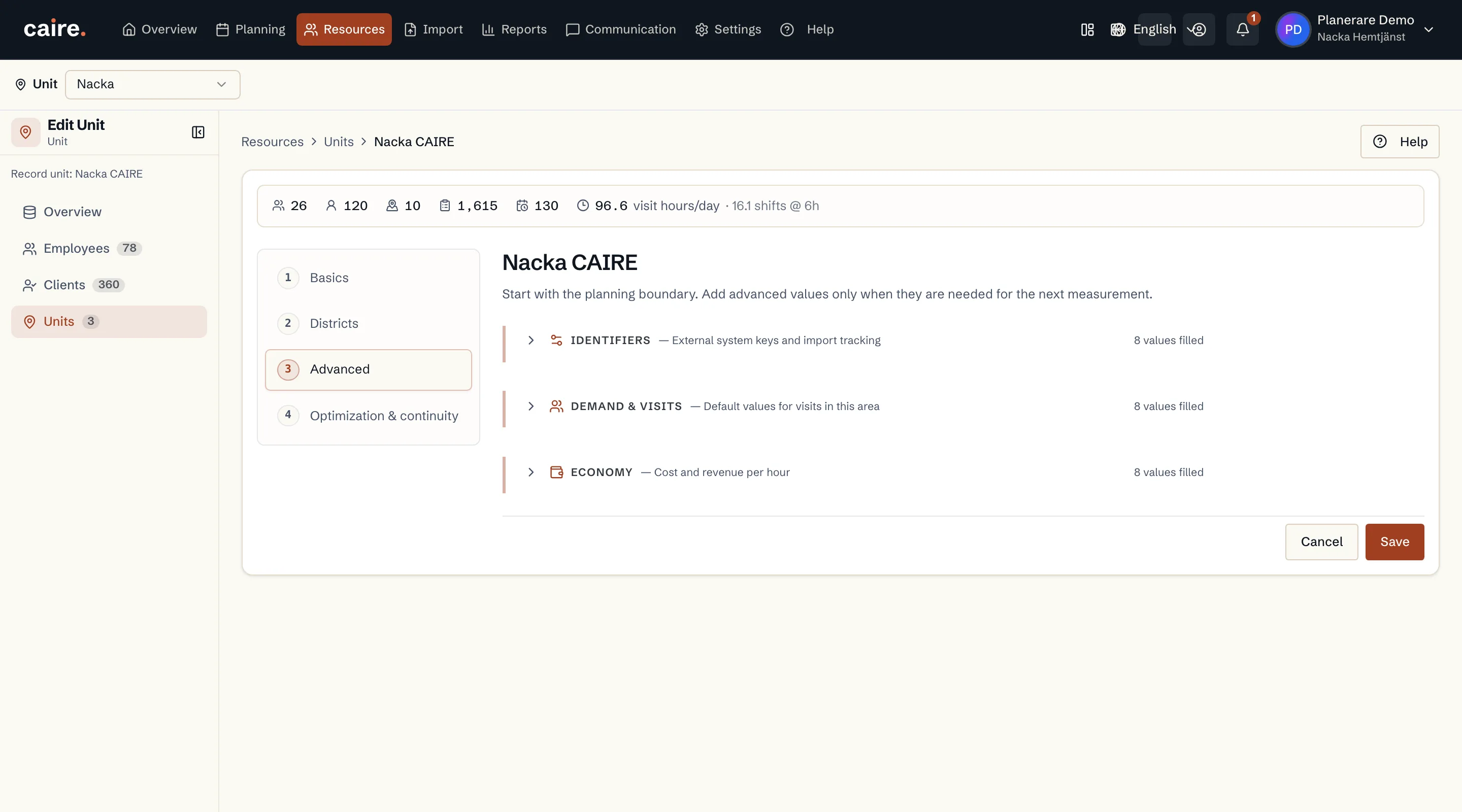
      Review unit advanced details

      Approved image · Image and caption

      Approved: 2026-10-10

      Review unit advanced details
      The unit’s advanced form section shows where local details can be reviewed.This help image shows where these details are reviewed in the actual view. No changes have been saved.
      Open approved image full size

      Image shows: The unit’s advanced form section shows where local details can be reviewed.

      What it demonstrates: This help image shows where these details are reviewed in the actual view. No changes have been saved.

      Product URL

      CAIRE platform

      app.caire.se

      View/route template: /resources/service-areas/:id/editThe template shows where the view lives. Record IDs resolve to a selected record in the app and are not a direct link.

      Website destinations and suggestions
      Capture source and setup

      Source module: Granska enhetens avancerade uppgifter

      Opens in CAIRE: /resources/service-areas/:id/edit?section=advanced

      Capture scenario: Synthetic demonstration scenario S5

      Capture setup
      1. Öppna den befintliga vyn; spara eller skicka inga ändringar
      CAIRE platformResources and foundation data

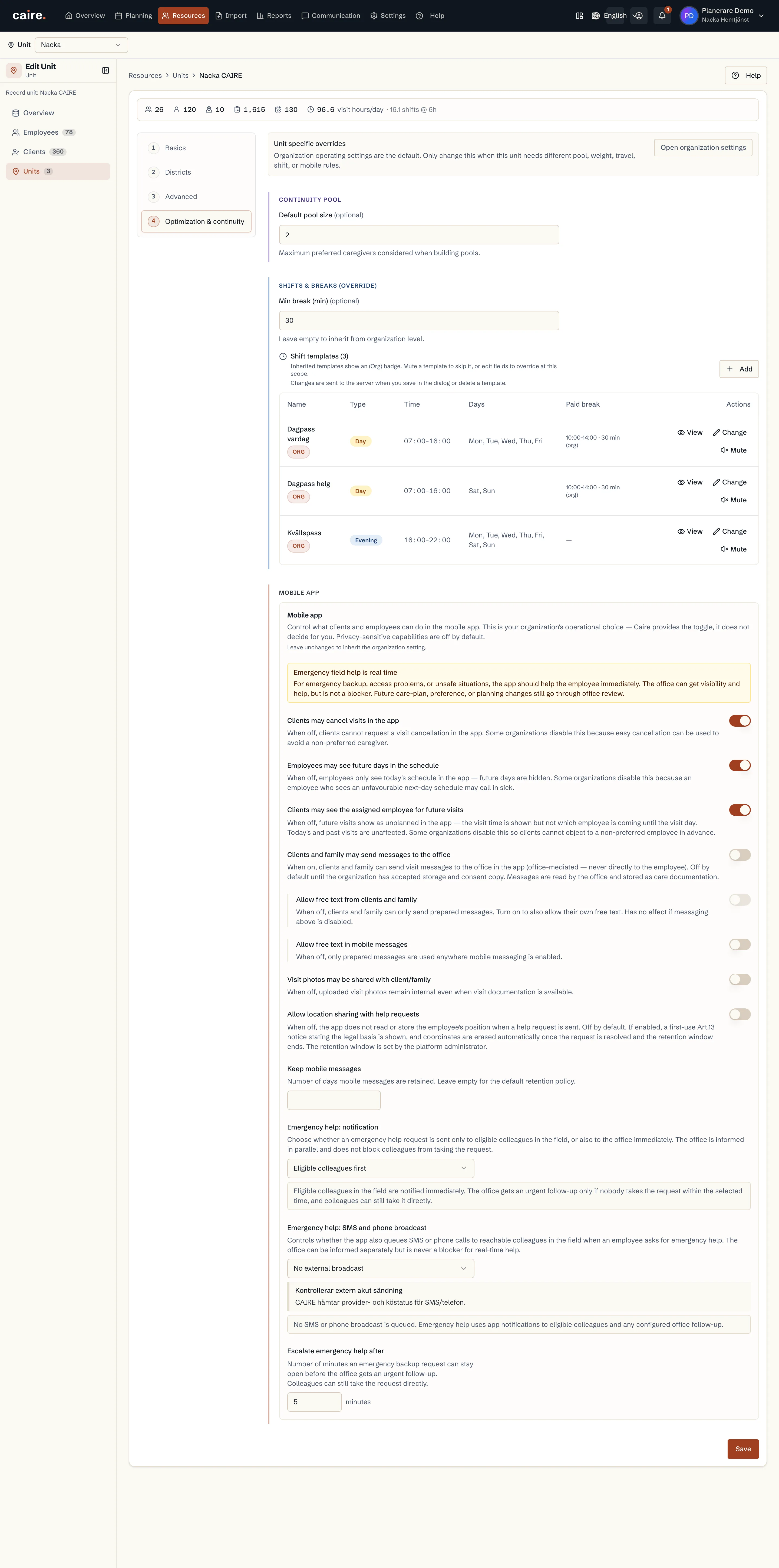
      Review unit optimization settings

      Approved image · Image and caption

      Approved: 2026-10-10

      Review unit optimization settings
      The optimization section shows the unit’s current planning settings and inherited defaults.This help image shows where these details are reviewed in the actual view. No changes have been saved.
      Open approved image full size

      Image shows: The optimization section shows the unit’s current planning settings and inherited defaults.

      What it demonstrates: This help image shows where these details are reviewed in the actual view. No changes have been saved.

      Product URL

      CAIRE platform

      app.caire.se

      View/route template: /resources/service-areas/:id/editThe template shows where the view lives. Record IDs resolve to a selected record in the app and are not a direct link.

      Website destinations and suggestions
      Capture source and setup

      Source module: Granska enhetens optimeringsinställningar

      Opens in CAIRE: /resources/service-areas/:id/edit?section=optimization

      Capture scenario: Synthetic demonstration scenario S5

      Capture setup
      1. Öppna den befintliga vyn; spara eller skicka inga ändringar
      CAIRE platformResources and foundation data

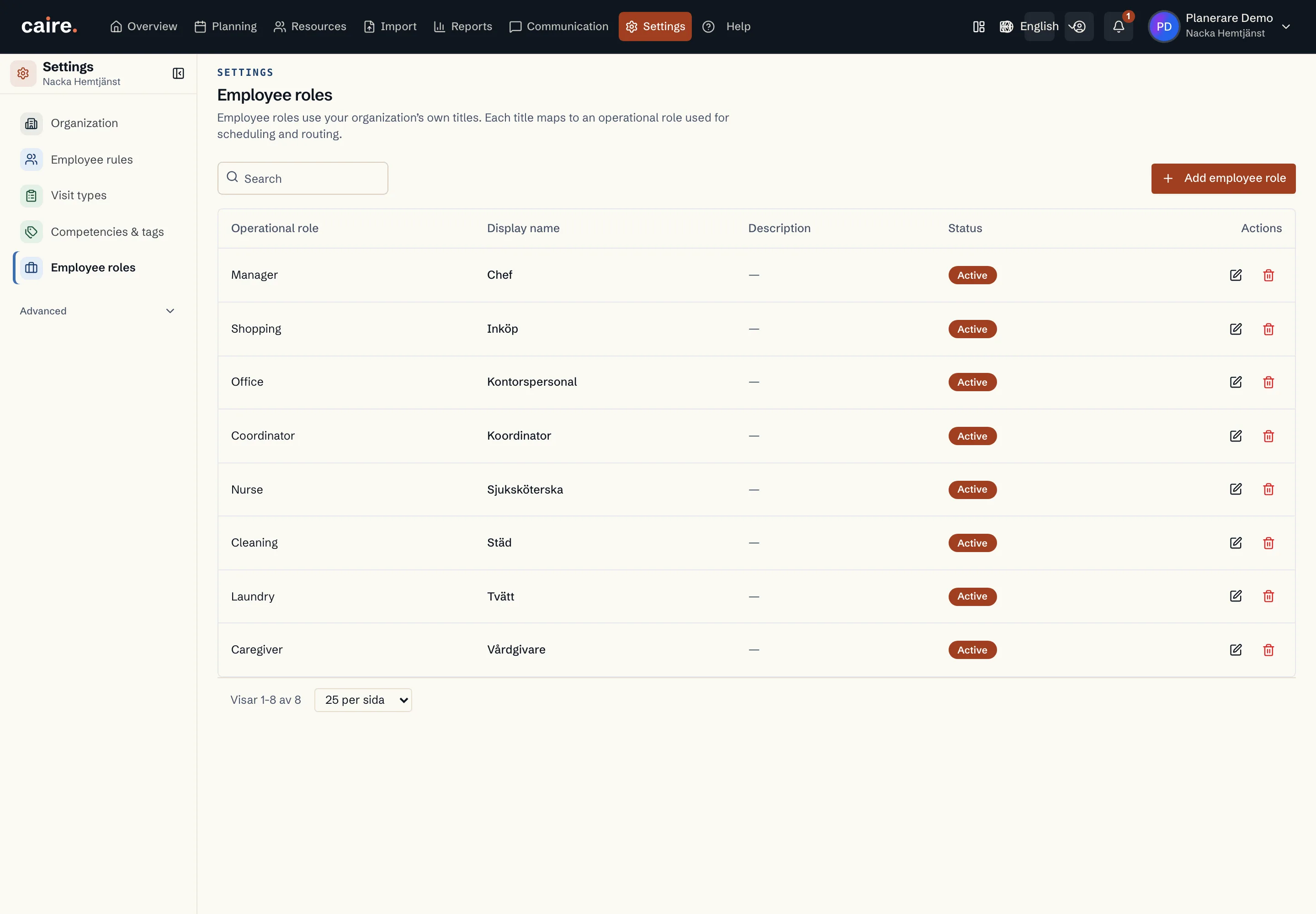
      Organization employee-role catalogue

      Approved image · Image and caption

      Approved: 2026-10-10

      Organization employee-role catalogue
      The role catalogue shows the organization’s existing employee roles.This help image shows where these details are reviewed in the actual view. No changes have been saved.
      Open approved image full size

      Image shows: The role catalogue shows the organization’s existing employee roles.

      What it demonstrates: This help image shows where these details are reviewed in the actual view. No changes have been saved.

      Product URL

      CAIRE platform

      app.caire.se

      View/route template: /settingsThe template shows where the view lives. Record IDs resolve to a selected record in the app and are not a direct link.

      Website destinations and suggestions
      Capture source and setup

      Source module: Organisationens medarbetarroller

      Opens in CAIRE: /settings?tab=employeeRoles

      Capture scenario: Synthetic demonstration scenario S5

      Capture setup
      1. Öppna den befintliga vyn; spara eller skicka inga ändringar
      CAIRE platformResources and foundation data

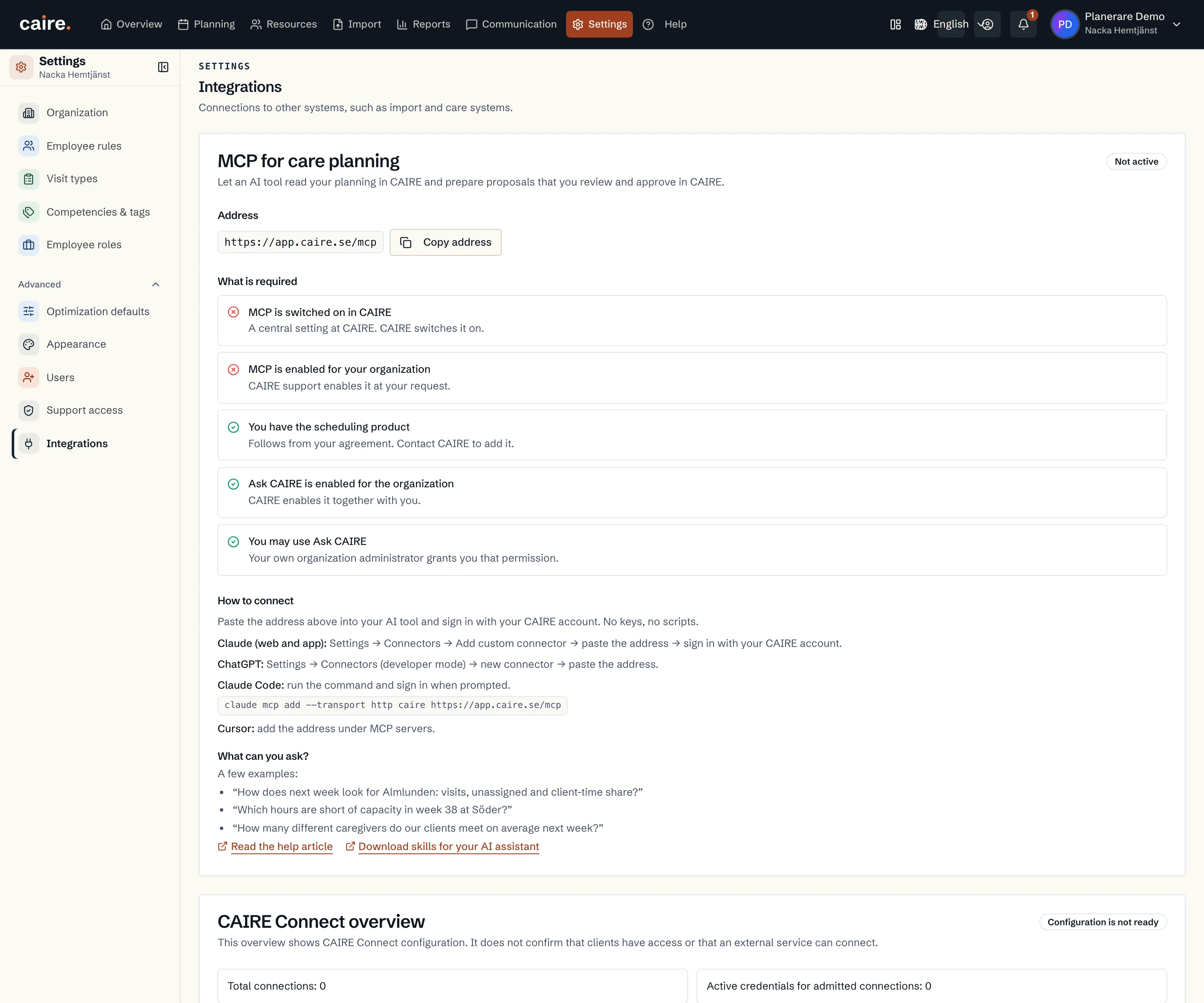
      Connect an AI client to CAIRE

      Approved image · Image and caption

      Approved: 2026-10-10

      Connect an AI client to CAIRE
      The built-in guide explains how an AI client connects using CAIRE sign-in.This help image shows where these details are reviewed in the actual view. No changes have been saved.
      Open approved image full size

      Image shows: The built-in guide explains how an AI client connects using CAIRE sign-in.

      What it demonstrates: This help image shows where these details are reviewed in the actual view. No changes have been saved.

      Product URL

      CAIRE platform

      app.caire.se

      View/route template: /settingsThe template shows where the view lives. Record IDs resolve to a selected record in the app and are not a direct link.

      Website destinations and suggestions
      Capture source and setup

      Source module: Anslut en AI-klient till CAIRE

      Opens in CAIRE: /settings?tab=integrations

      Capture scenario: Synthetic demonstration scenario S5

      Capture setup
      1. Öppna den befintliga vyn; spara eller skicka inga ändringar
      CAIRE platformResources and foundation data

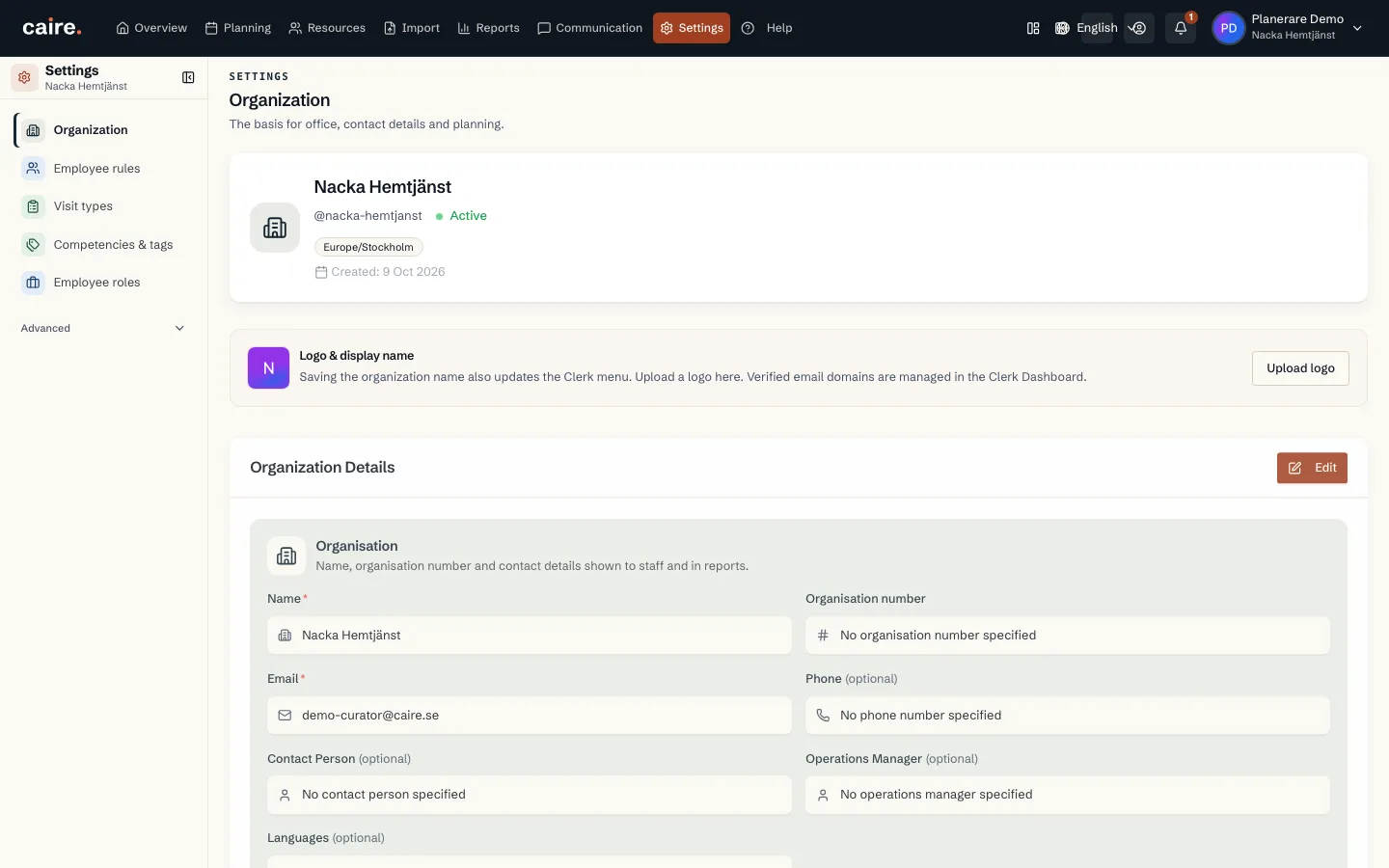
      Organisation

      Approved image · Image and caption

      Approved: 2026-10-10

      Organisation
      The organisation's actual name, time zone, contact details and connected organisation services.Organisation details can be reviewed together before an authorised user chooses to edit them.
      Open approved image full size

      Image shows: The organisation's actual name, time zone, contact details and connected organisation services.

      What it demonstrates: Organisation details can be reviewed together before an authorised user chooses to edit them.

      Product URL

      CAIRE platform

      app.caire.se

      View/route template: /settingsThe template shows where the view lives. Record IDs resolve to a selected record in the app and are not a direct link.

      Website destinations and suggestions
      Capture source and setup

      Source module: Organisation

      Opens in CAIRE: Inställningar → Organisation

      Capture scenario: Synthetic demonstration scenario S5

      Capture setup
      1. Öppna Inställningar i den syntetiska S5-organisationen
      2. Granska den valda sektionen utan att ändra värden
      CAIRE platformResources and foundation data

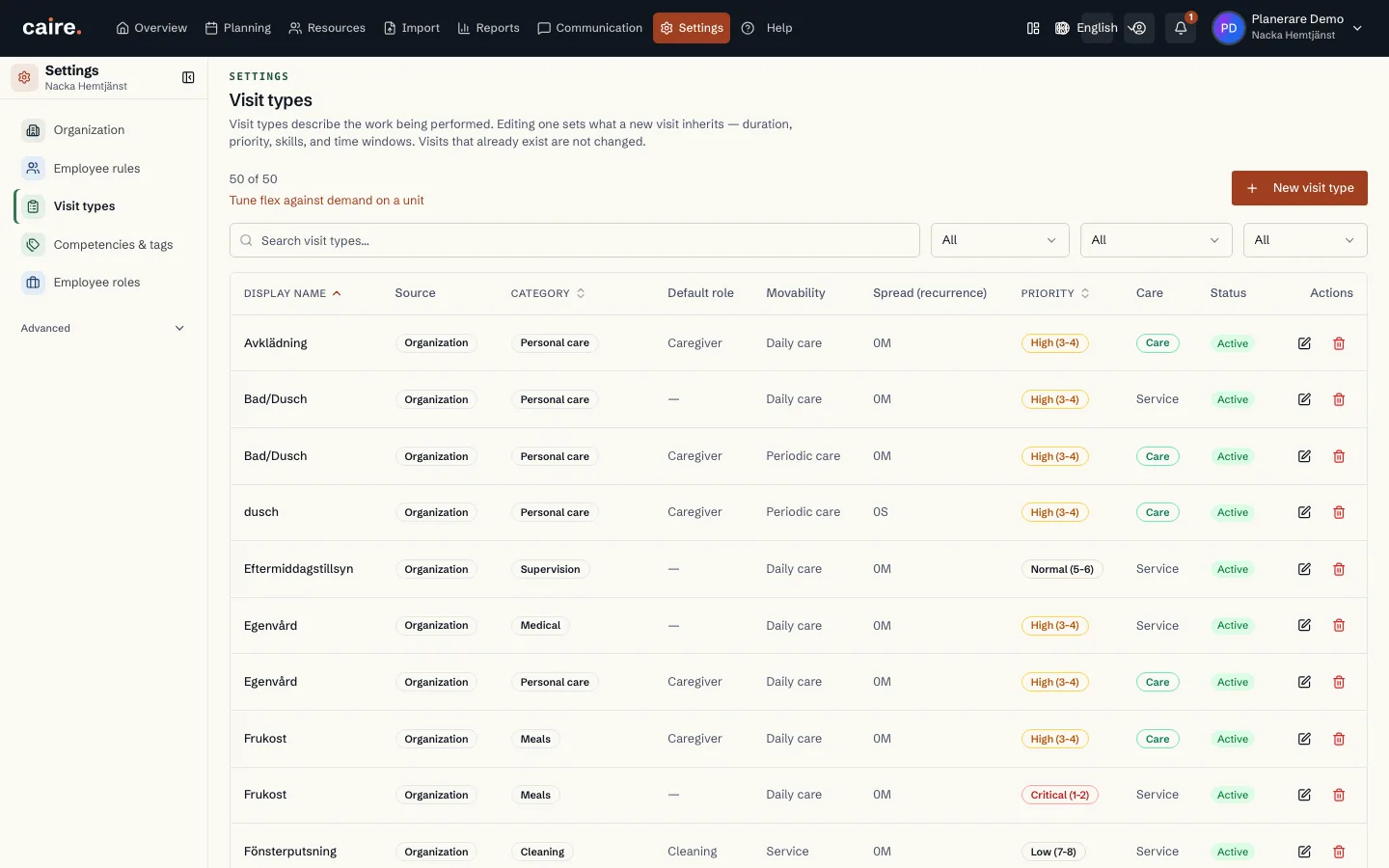
      Care interventions and groups

      Approved image · Image and caption

      Approved: 2026-10-10

      Care interventions and groups
      The organisation's existing care-intervention types and groups.The catalogue shows which interventions form the organisation's planning inputs.
      Open approved image full size

      Image shows: The organisation's existing care-intervention types and groups.

      What it demonstrates: The catalogue shows which interventions form the organisation's planning inputs.

      Product URL

      CAIRE platform

      app.caire.se

      View/route template: /settingsThe template shows where the view lives. Record IDs resolve to a selected record in the app and are not a direct link.

      Website destinations and suggestions
      Capture source and setup

      Source module: Insatser och grupper

      Opens in CAIRE: Inställningar → Insatser

      Capture scenario: Synthetic demonstration scenario S5

      Capture setup
      1. Öppna Inställningar i den syntetiska S5-organisationen
      2. Granska den valda sektionen utan att ändra värden
      CAIRE platformResources and foundation data

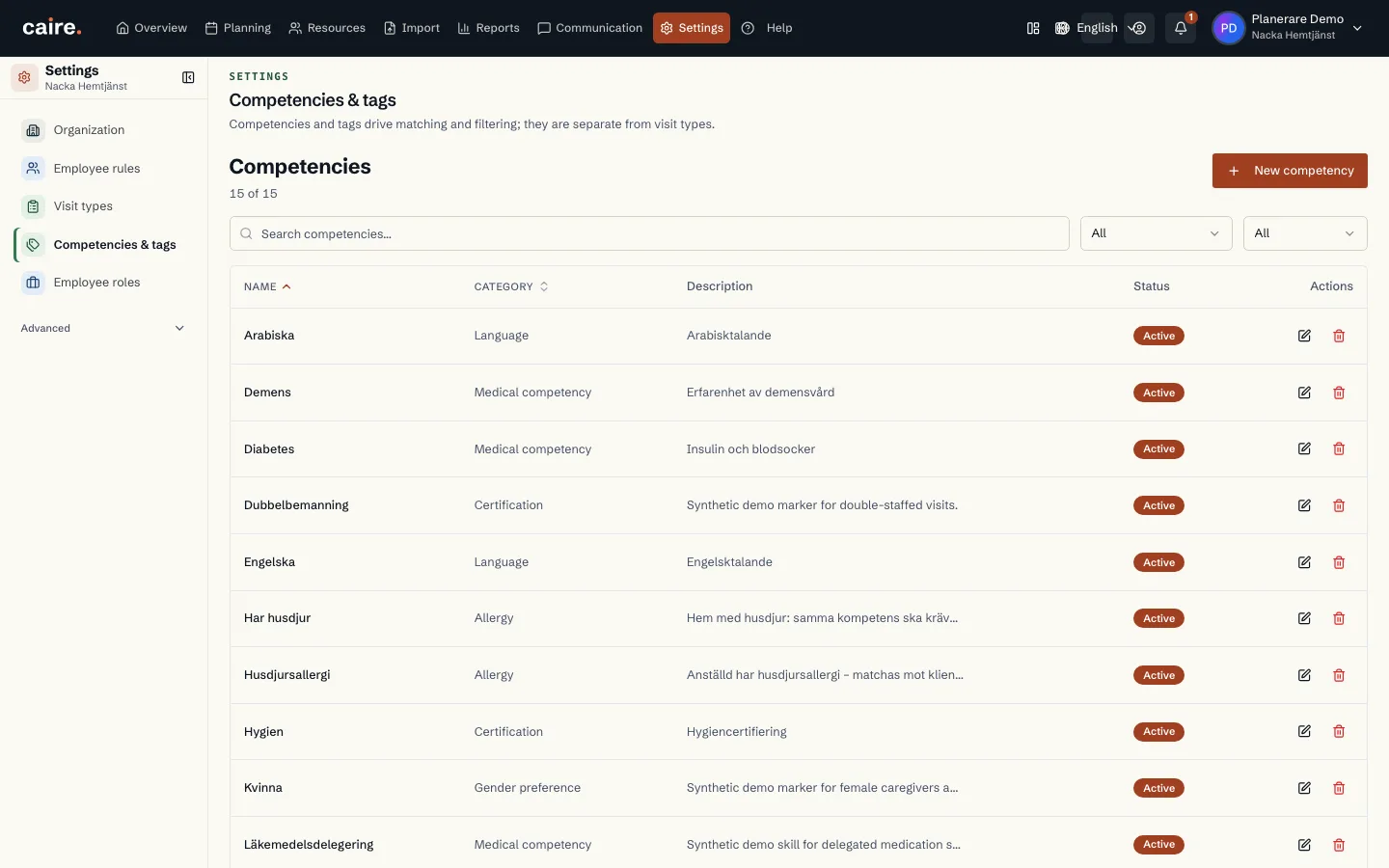
      Skills and tags

      Approved image · Image and caption

      Approved: 2026-10-10

      Skills and tags
      The organisation's existing skills and tags.Skills and tags are shown as shared values for the organisation's matching rules.
      Open approved image full size

      Image shows: The organisation's existing skills and tags.

      What it demonstrates: Skills and tags are shown as shared values for the organisation's matching rules.

      Product URL

      CAIRE platform

      app.caire.se

      View/route template: /settingsThe template shows where the view lives. Record IDs resolve to a selected record in the app and are not a direct link.

      Website destinations and suggestions
      Capture source and setup

      Source module: Kompetenser och taggar

      Opens in CAIRE: Inställningar → Kompetenser och taggar

      Capture scenario: Synthetic demonstration scenario S5

      Capture setup
      1. Öppna Inställningar i den syntetiska S5-organisationen
      2. Granska den valda sektionen utan att ändra värden
      CAIRE platformResources and foundation data

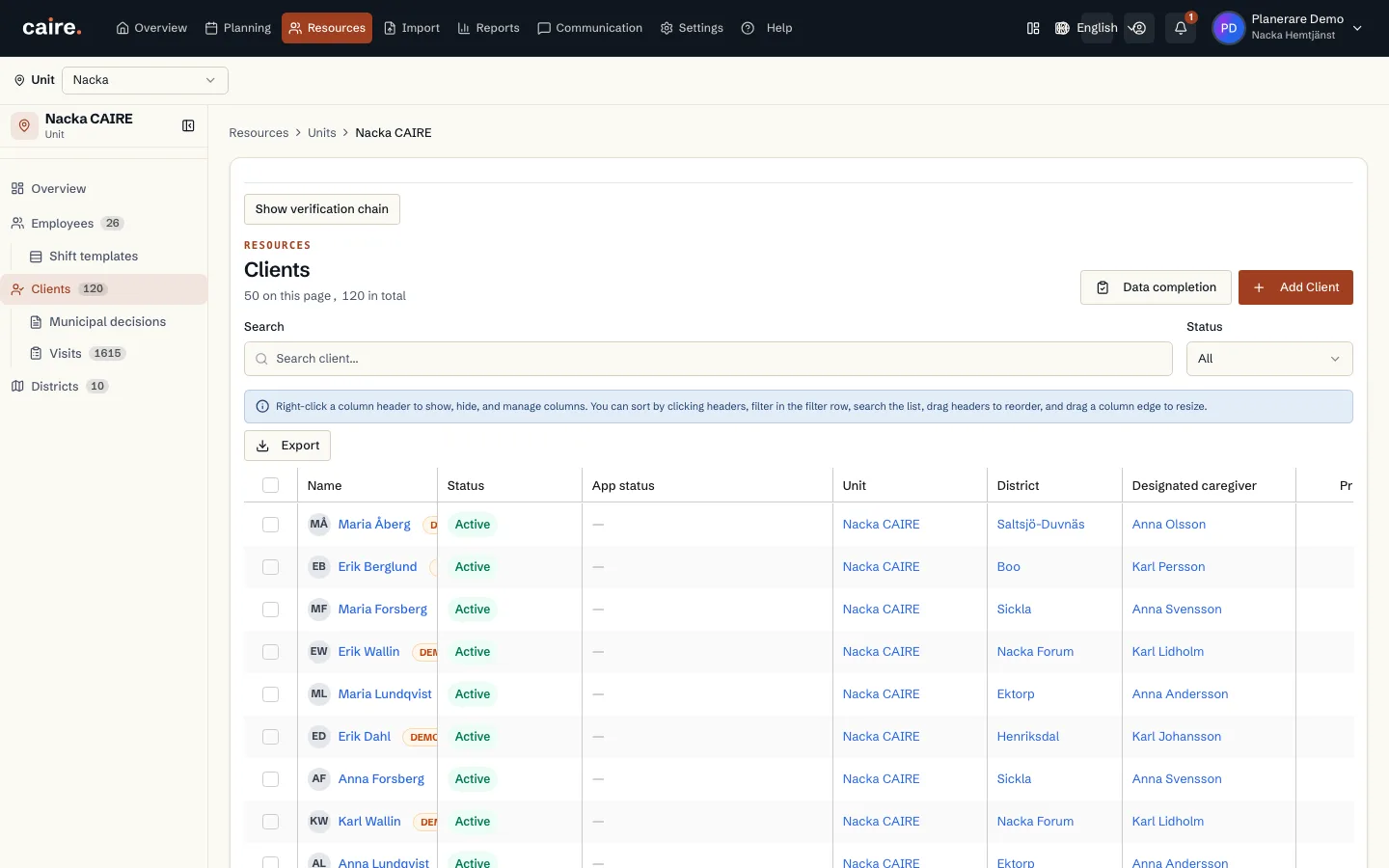
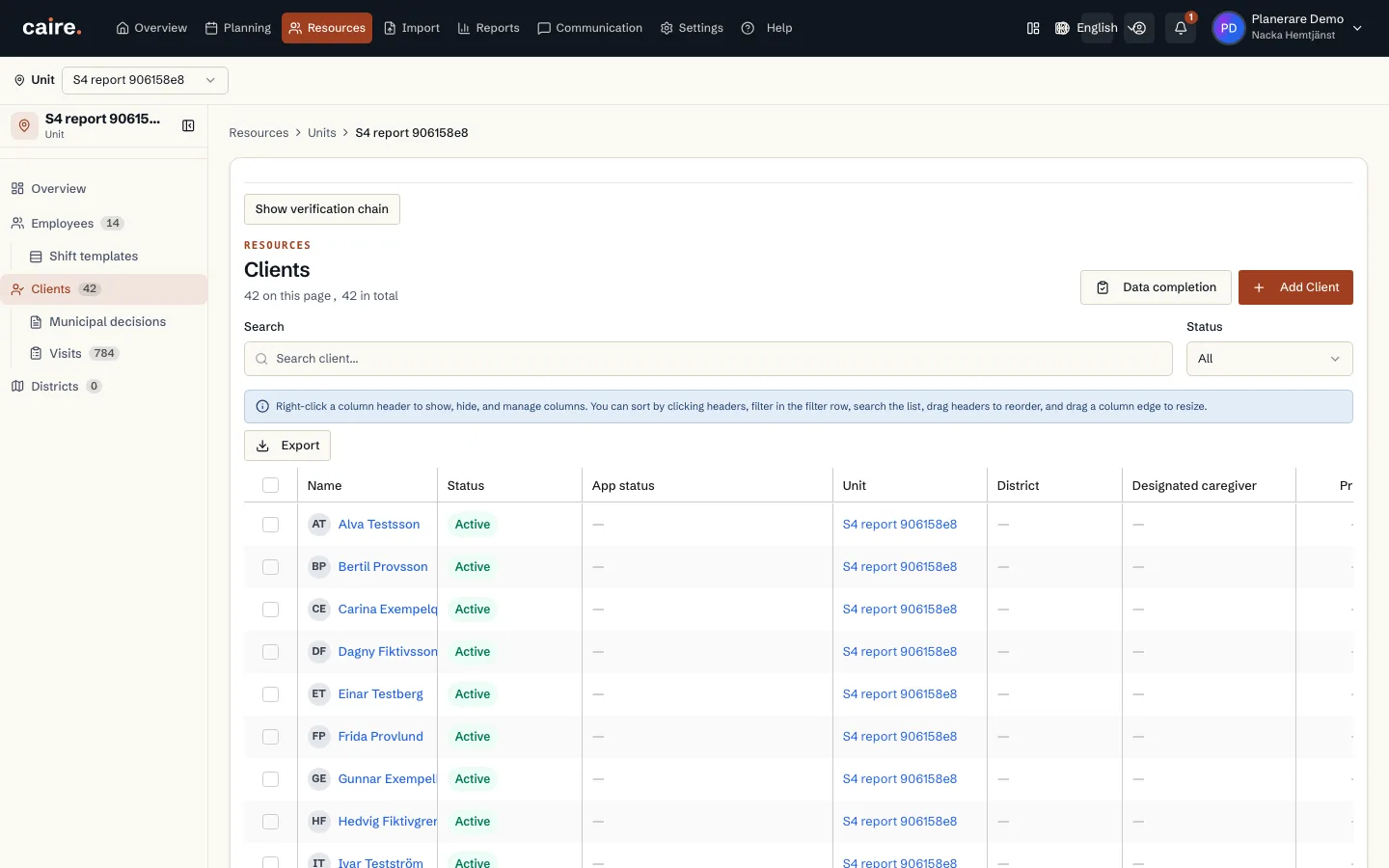
      Client list for a selected service area

      Approved image · Image and caption

      Approved: 2026-10-10

      Client list for a selected service area
      The client register lists clients belonging to the selected service area.The list brings together client records for the selected service area.
      Open approved image full size

      Image shows: The client register lists clients belonging to the selected service area.

      What it demonstrates: The list brings together client records for the selected service area.

      Product URL

      CAIRE platform

      app.caire.se

      View/route template: /resources/service-areas/:idThe template shows where the view lives. Record IDs resolve to a selected record in the app and are not a direct link.

      Website destinations and suggestions
      • Image libraryIn current website sourceImage treatment: Image and caption
      • Client registerIn current website sourceImage treatment: Image and caption
      Capture source and setup

      Source module: Kunder

      Opens in CAIRE: Resurser → enhet → Kunder

      Capture scenario: Synthetic demonstration scenario S5

      Capture setup
      1. Öppna kundlistan för den syntetiska enheten
      CAIRE platformResources and foundation data

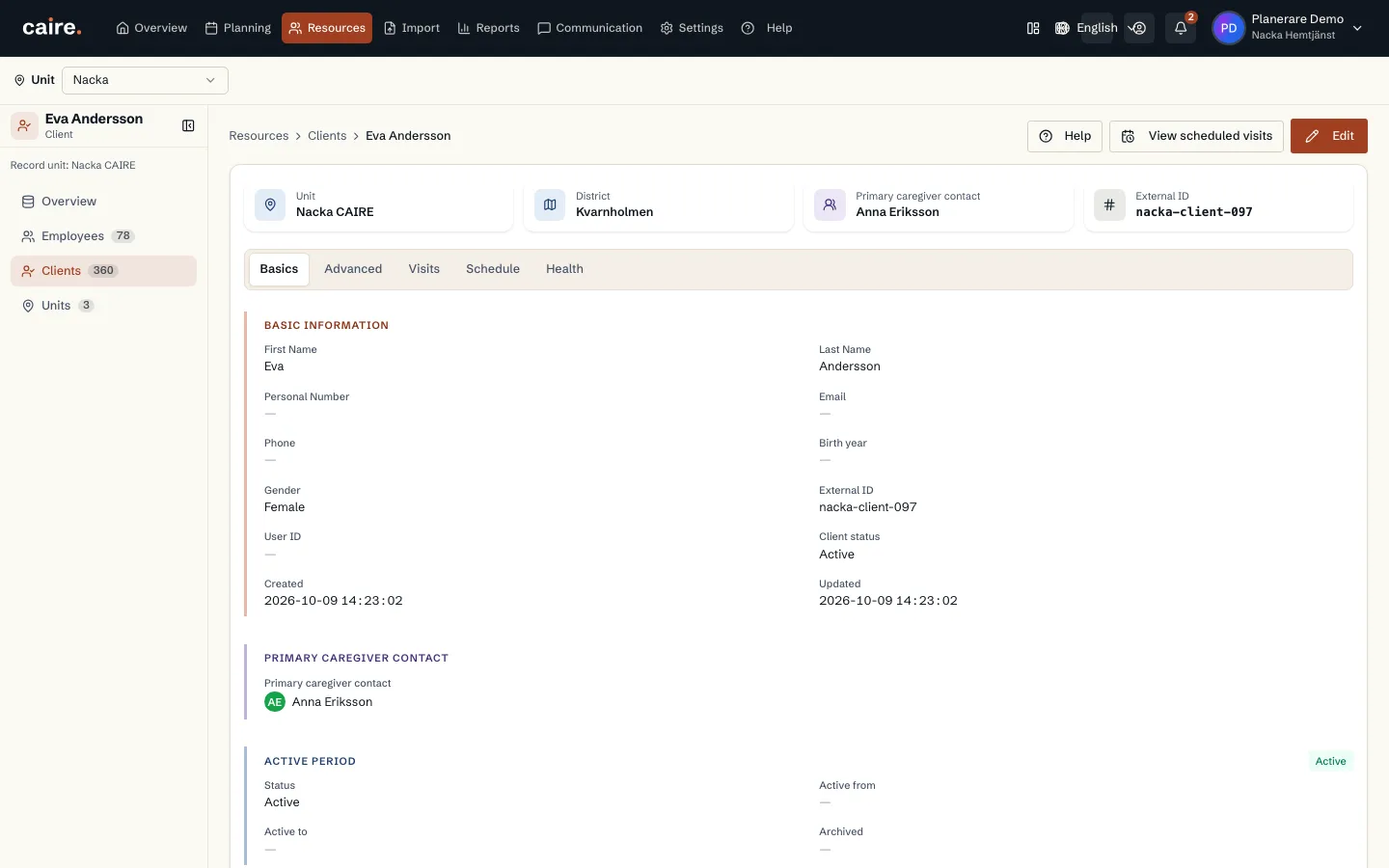
      Client basics in a read-only view

      Approved image · Image and caption

      Approved: 2026-10-10

      Client basics in a read-only view
      Basic details bring together the client's identity, contact, designated caregiver and address.The client view makes existing details available for review before editing.
      Open approved image full size

      Image shows: Basic details bring together the client's identity, contact, designated caregiver and address.

      What it demonstrates: The client view makes existing details available for review before editing.

      Product URL

      CAIRE platform

      app.caire.se

      View/route template: /resources/clients/:idThe template shows where the view lives. Record IDs resolve to a selected record in the app and are not a direct link.

      Website destinations and suggestions
      • Image libraryIn current website sourceImage treatment: Image and caption
      • Client registerIn current website sourceImage treatment: Image and caption
      • Client detailsIn current website sourceImage treatment: Image and caption
      Capture source and setup

      Source module: Kunduppgifter

      Opens in CAIRE: Resurser → kund → Grunddata

      Capture scenario: Synthetic demonstration scenario S5

      Capture setup
      1. Öppna en befintlig kunds grunddata
      CAIRE platformResources and foundation data

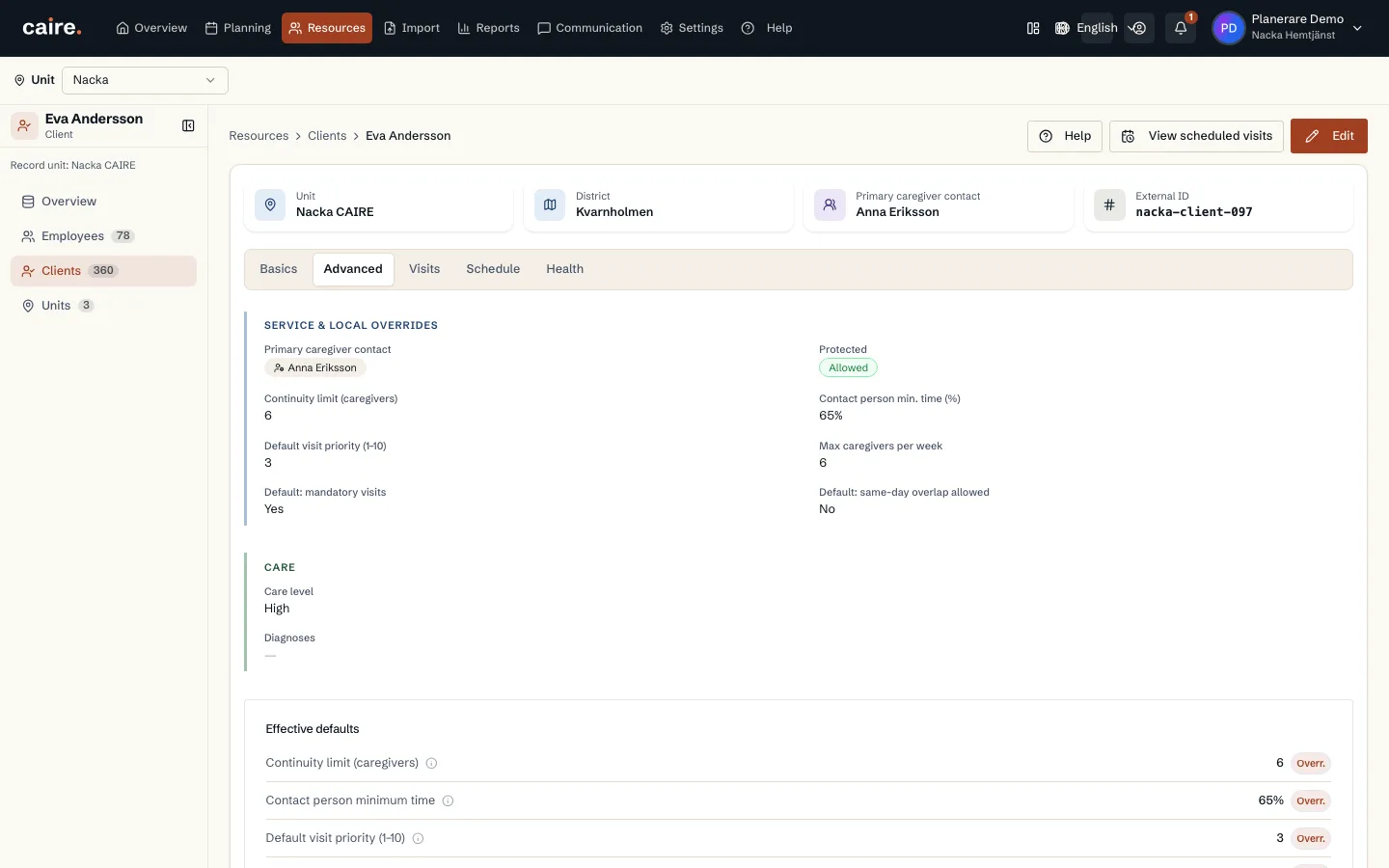
      Client continuity target and inherited planning settings

      Approved image · Image and caption

      Approved: 2026-10-10

      Client continuity target and inherited planning settings
      The advanced view brings together continuity target, priority and local overrides.The view shows the client's planning details and how local settings are presented.
      Open approved image full size

      Image shows: The advanced view brings together continuity target, priority and local overrides.

      What it demonstrates: The view shows the client's planning details and how local settings are presented.

      Product URL

      CAIRE platform

      app.caire.se

      View/route template: /resources/clients/:idThe template shows where the view lives. Record IDs resolve to a selected record in the app and are not a direct link.

      Website destinations and suggestions
      • Image libraryIn current website sourceImage treatment: Image and caption
      • Planning detailsIn current website sourceImage treatment: Image and caption
      Capture source and setup

      Source module: Kundens planeringsuppgifter

      Opens in CAIRE: Resurser → kund → Avancerat

      Capture scenario: Synthetic demonstration scenario S5

      Capture setup
      1. Öppna kundens avancerade uppgifter
      CAIRE platformResources and foundation data

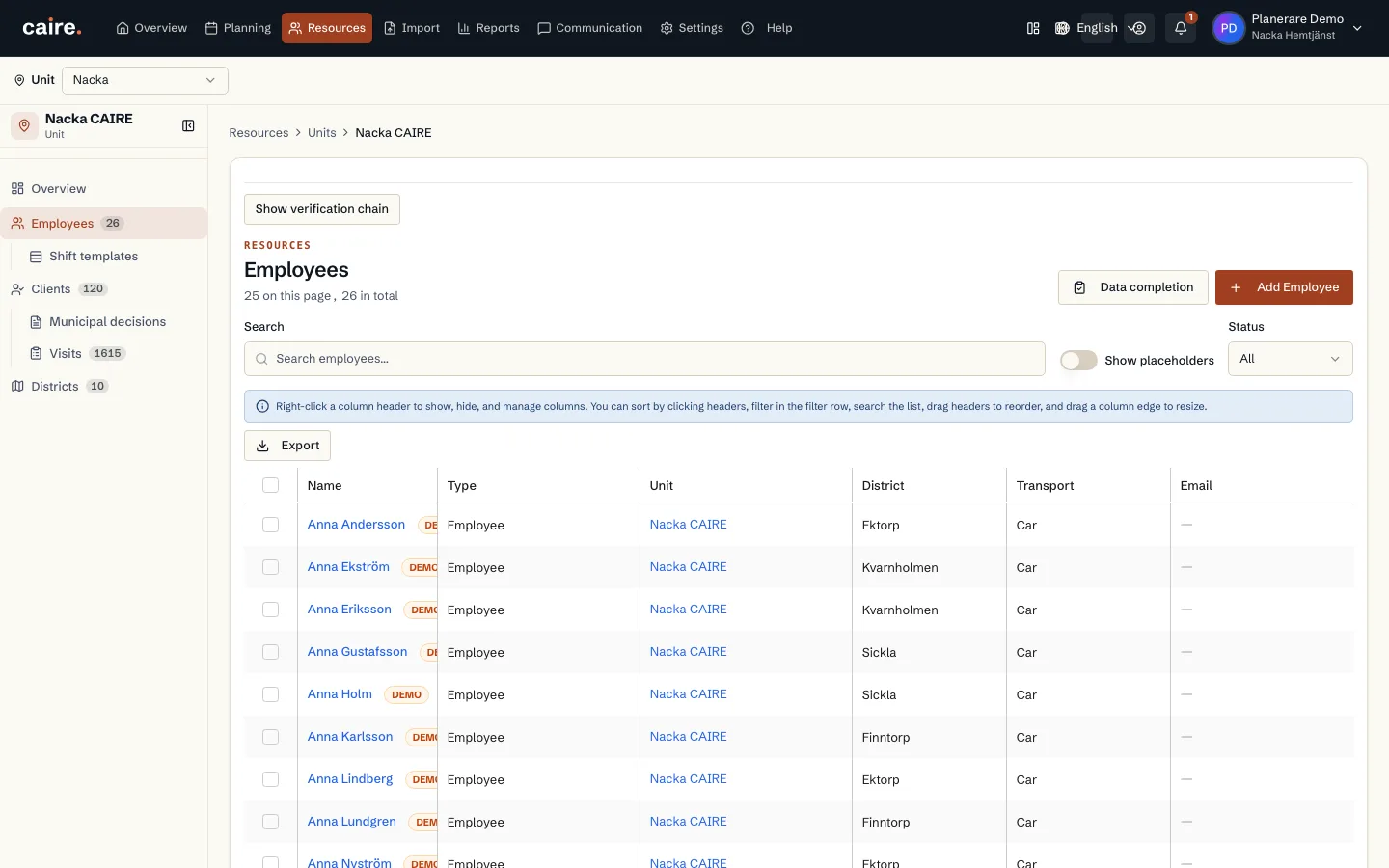
      Employee list for a selected service area

      Approved image · Image and caption

      Approved: 2026-10-10

      Employee list for a selected service area
      The employee register lists staff belonging to the selected service area.The list brings together employee records in the service area's context.
      Open approved image full size

      Image shows: The employee register lists staff belonging to the selected service area.

      What it demonstrates: The list brings together employee records in the service area's context.

      Product URL

      CAIRE platform

      app.caire.se

      View/route template: /resources/service-areas/:idThe template shows where the view lives. Record IDs resolve to a selected record in the app and are not a direct link.

      Website destinations and suggestions
      Capture source and setup

      Source module: Medarbetare

      Opens in CAIRE: Resurser → enhet → Medarbetare

      Capture scenario: Synthetic demonstration scenario S5

      Capture setup
      1. Öppna medarbetarlistan för den syntetiska enheten
      CAIRE platformResources and foundation data

      Employee basics in a read-only view

      Approved image · Image and caption

      Approved: 2026-10-10

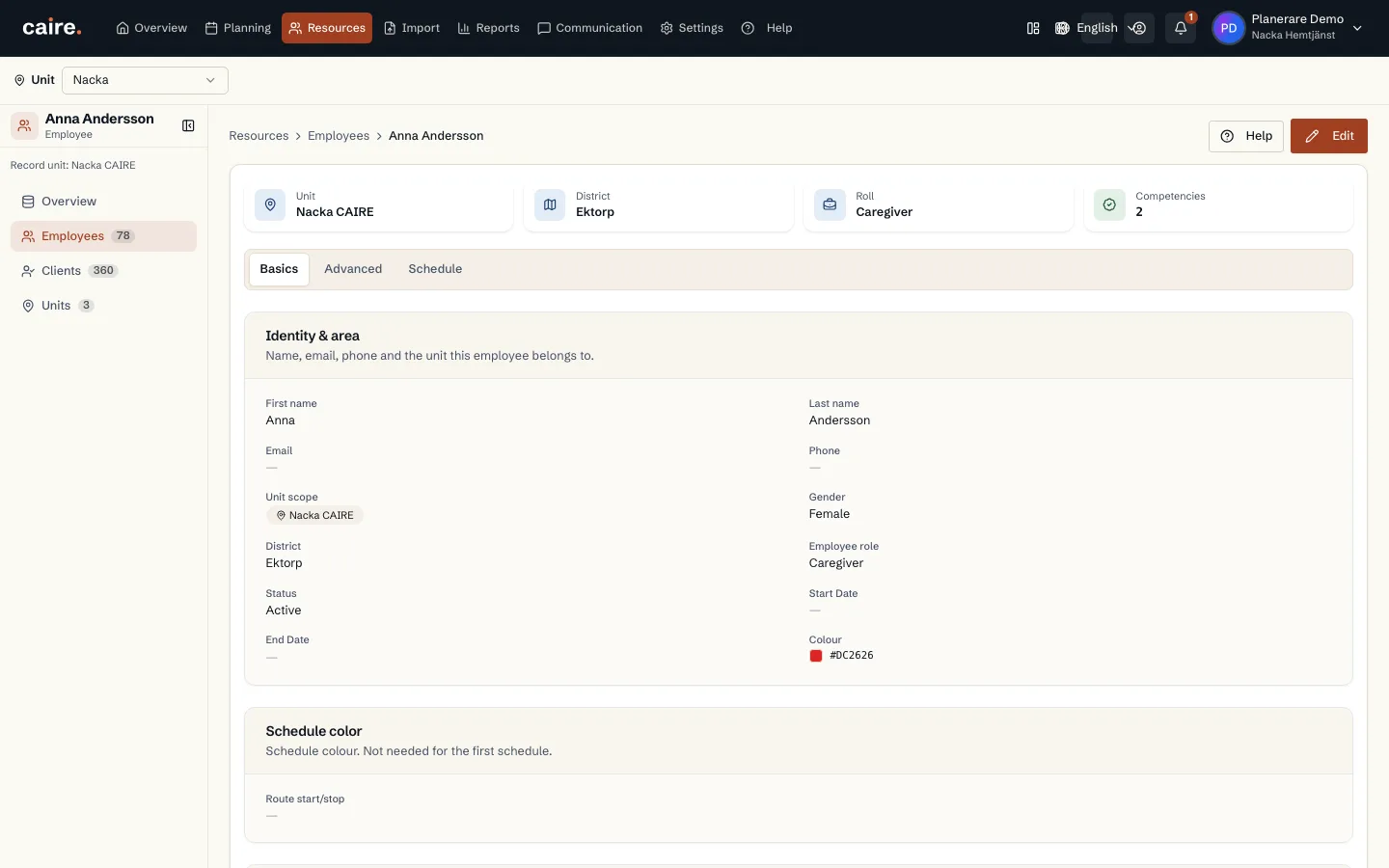
      Employee basics in a read-only view
      Basic details bring together identity, service area, contact, employment and skills.The employee view makes existing details available for review before editing.
      Open approved image full size

      Image shows: Basic details bring together identity, service area, contact, employment and skills.

      What it demonstrates: The employee view makes existing details available for review before editing.

      Product URL

      CAIRE platform

      app.caire.se

      View/route template: /resources/employees/:idThe template shows where the view lives. Record IDs resolve to a selected record in the app and are not a direct link.

      Website destinations and suggestions
      • Image libraryIn current website sourceImage treatment: Image and caption
      • Employee detailsIn current website sourceImage treatment: Image and caption
      Capture source and setup

      Source module: Medarbetaruppgifter

      Opens in CAIRE: Resurser → medarbetare → Grunddata

      Capture scenario: Synthetic demonstration scenario S5

      Capture setup
      1. Öppna en befintlig medarbetares grunddata
      CAIRE platformResources and foundation data

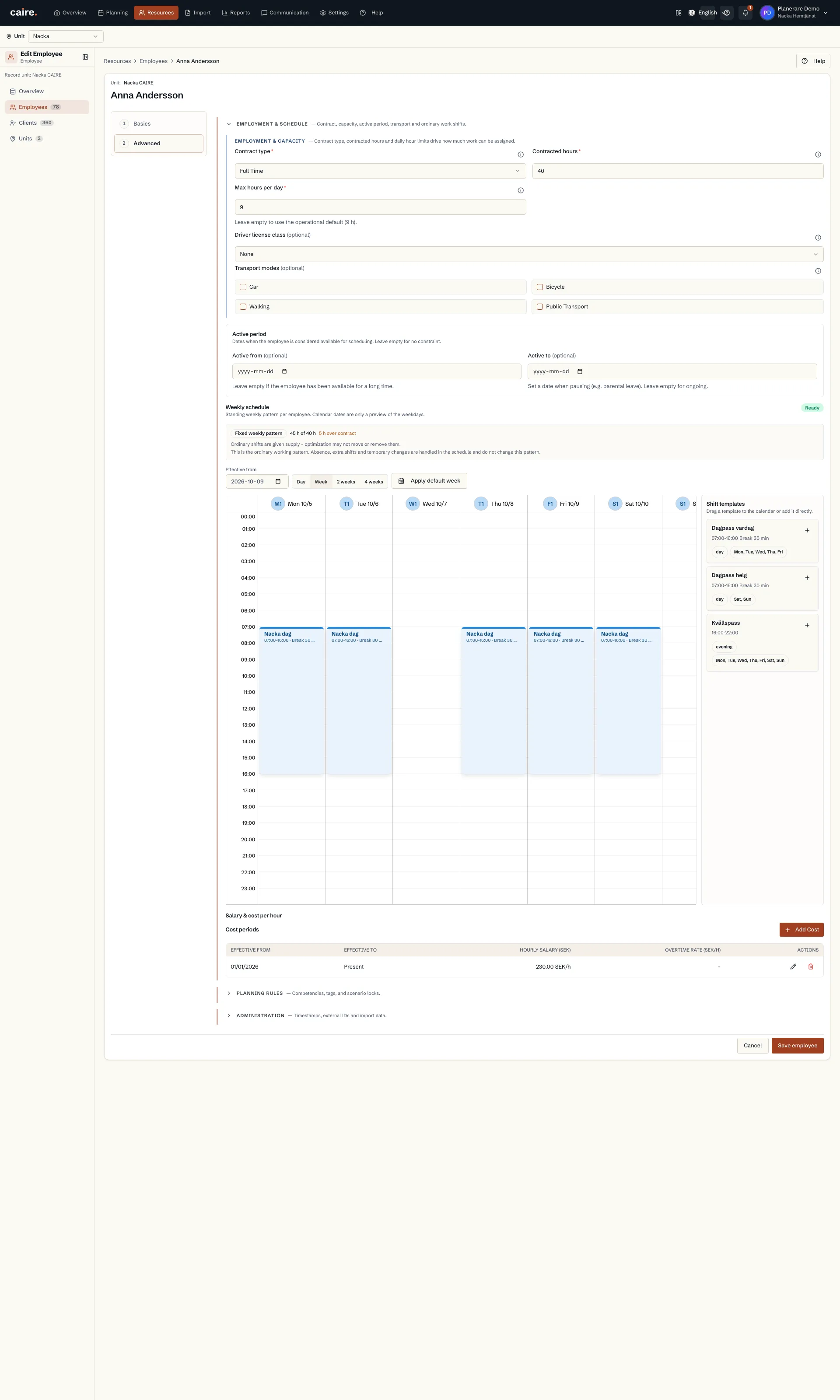
      Employee standing weekly pattern and hours

      Approved image · Image and caption

      Approved: 2026-10-10

      Employee standing weekly pattern and hours
      The weekly schedule shows ordinary shifts and a summary of working hours.The employee's standing weekly pattern appears with its working-hours summary.
      Open approved image full size

      Image shows: The weekly schedule shows ordinary shifts and a summary of working hours.

      What it demonstrates: The employee's standing weekly pattern appears with its working-hours summary.

      Product URL

      CAIRE platform

      app.caire.se

      View/route template: /resources/employees/:idThe template shows where the view lives. Record IDs resolve to a selected record in the app and are not a direct link.

      Website destinations and suggestions
      • Image libraryIn current website sourceImage treatment: Image and caption
      • Weekly patternIn current website sourceImage treatment: Image and caption
      Capture source and setup

      Source module: Medarbetarens veckoschema

      Opens in CAIRE: Resurser → medarbetare → Avancerat → Veckoschema

      Capture scenario: Synthetic demonstration scenario S5

      Capture setup
      1. Öppna medarbetarens avancerade uppgifter
      CAIRE platformResources and foundation data

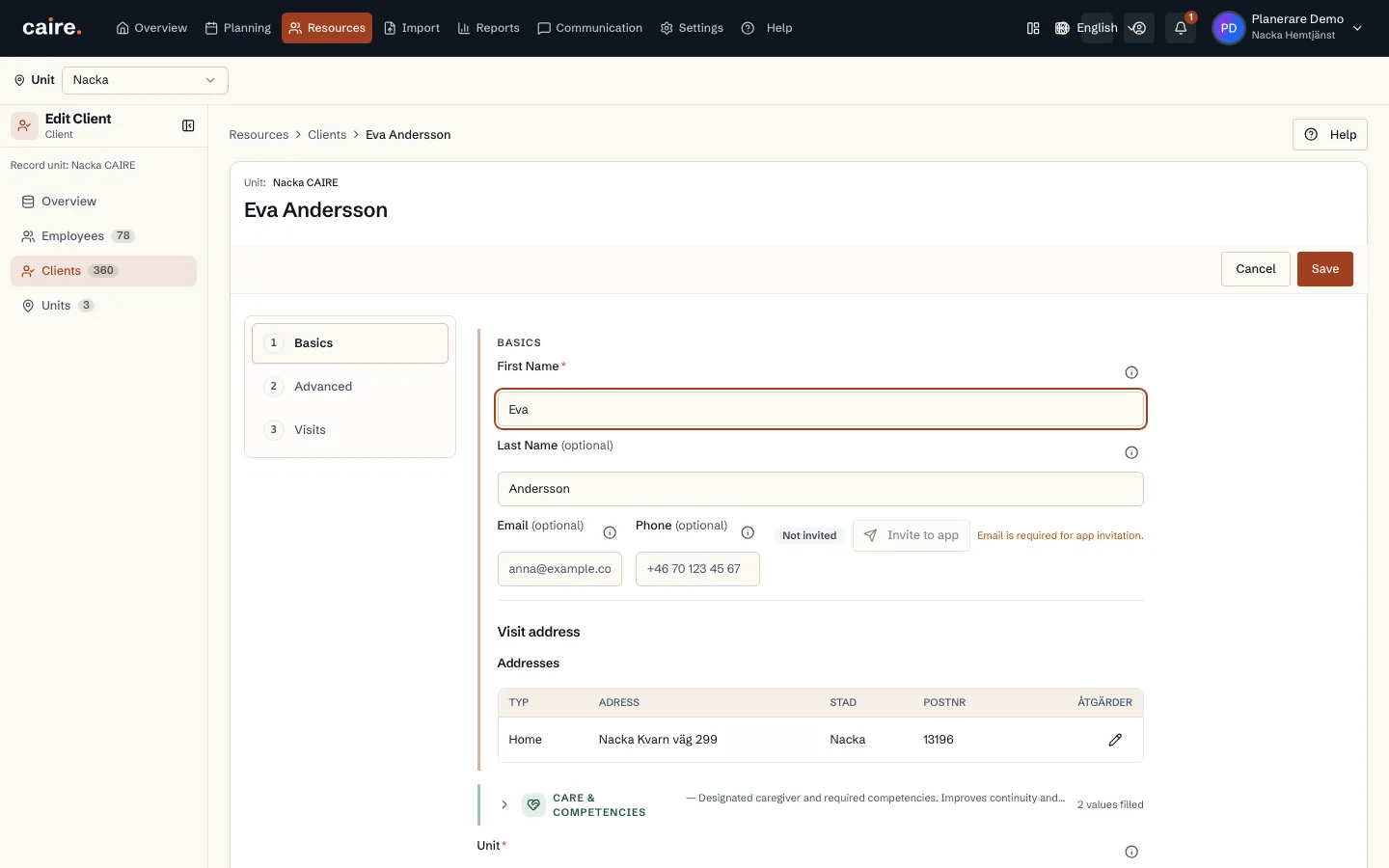
      Client identity and visiting address in the edit form

      Approved image · Image and caption

      Approved: 2026-10-10

      Client identity and visiting address in the edit form
      The form brings together the client's name, contact details and visiting address.Existing client details can be reviewed in context before anyone makes a change.
      Open approved image full size

      Image shows: The form brings together the client's name, contact details and visiting address.

      What it demonstrates: Existing client details can be reviewed in context before anyone makes a change.

      Product URL

      CAIRE platform

      app.caire.se

      View/route template: /resources/clients/:id/editThe template shows where the view lives. Record IDs resolve to a selected record in the app and are not a direct link.

      Website destinations and suggestions
      Capture source and setup

      Source module: Kunduppgifter

      Opens in CAIRE: Resurser → klient → Redigera → Grunder

      Capture scenario: Synthetic demonstration scenario S5

      Capture setup
      1. Öppna en befintlig klients grunduppgifter
      CAIRE platformResources and foundation data

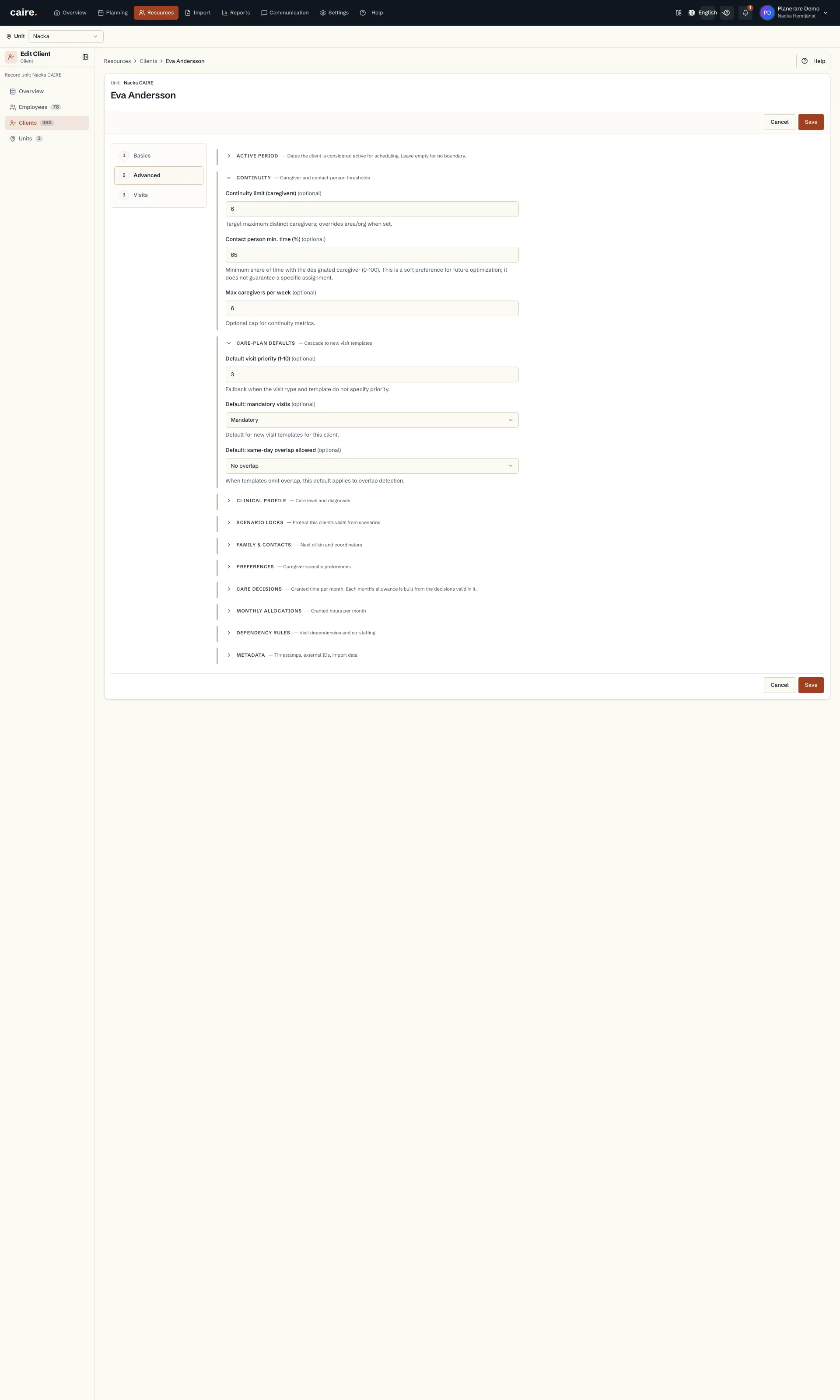
      Client continuity limit and default visit settings

      Approved image · Cropped detail

      Approved: 2026-10-10

      Image annotation
      Client continuity limit and default visit settings
        Advanced client fields bring together continuity targets and defaults that new visits can inherit.The form shows where planning values are reviewed and how client values remain distinct from unit defaults.
        Open approved image full size

        Image shows: Advanced client fields bring together continuity targets and defaults that new visits can inherit.

        What it demonstrates: The form shows where planning values are reviewed and how client values remain distinct from unit defaults.

        Product URL

        CAIRE platform

        app.caire.se

        View/route template: /resources/clients/:id/editThe template shows where the view lives. Record IDs resolve to a selected record in the app and are not a direct link.

        Website destinations and suggestions
        Capture source and setup

        Source module: Kontinuitet och planeringsstandarder

        Opens in CAIRE: Resurser → klient → Redigera → Avancerat

        Capture scenario: Synthetic demonstration scenario S5

        Capture setup
        1. Öppna klientens kontinuitets- och standardinställningar
        CAIRE platformResources and foundation data

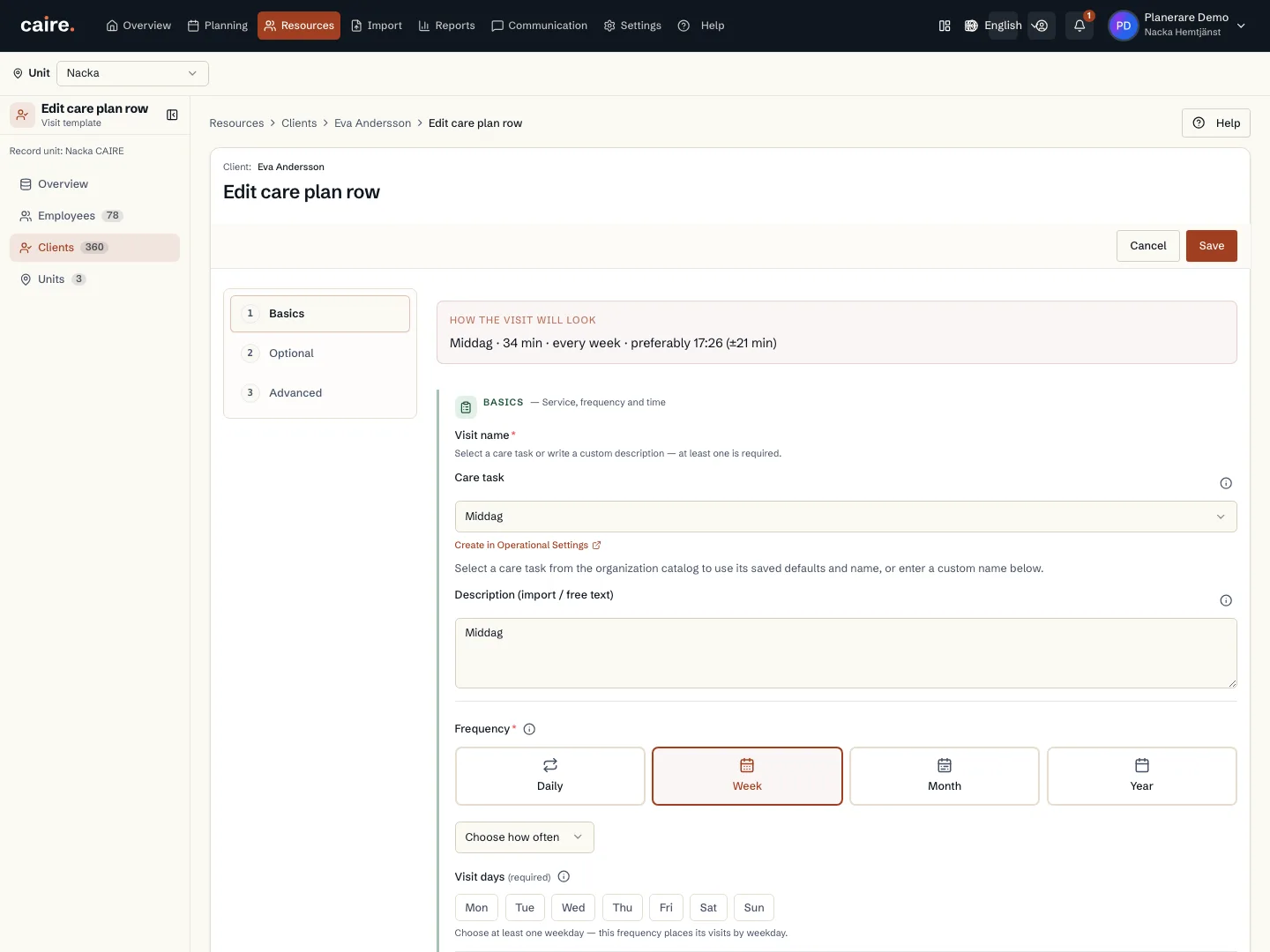
        Saved recurrence and weekdays in a visit template

        Approved image · Image and caption

        Approved: 2026-10-10

        Saved recurrence and weekdays in a visit template
        The frequency step shows the saved recurrence and, when used, selected weekdays.Recurring visits can be reviewed against the client's existing plan before editing the template.
        Open approved image full size

        Image shows: The frequency step shows the saved recurrence and, when used, selected weekdays.

        What it demonstrates: Recurring visits can be reviewed against the client's existing plan before editing the template.

        Product URL

        CAIRE platform

        app.caire.se

        View/route template: /resources/clients/:clientId/care-plan/:templateId/editThe template shows where the view lives. Record IDs resolve to a selected record in the app and are not a direct link.

        Website destinations and suggestions
        Capture source and setup

        Source module: Besöksfrekvens

        Opens in CAIRE: Resurser → klient → Genomförandeplan → Redigera besök → Grunder

        Capture scenario: Synthetic demonstration scenario S5

        Capture setup
        1. Öppna en befintlig besöksmall
        CAIRE platformResources and foundation data

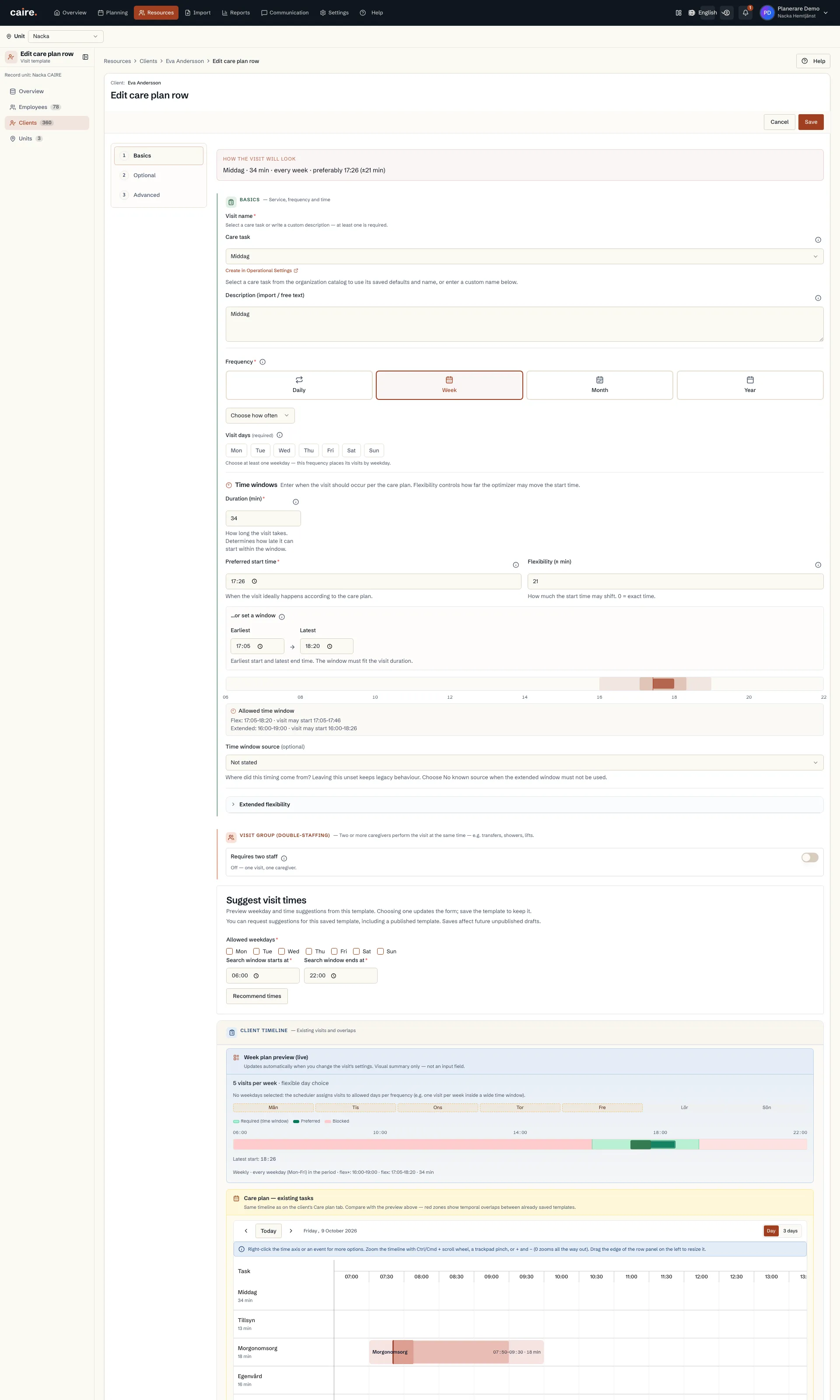
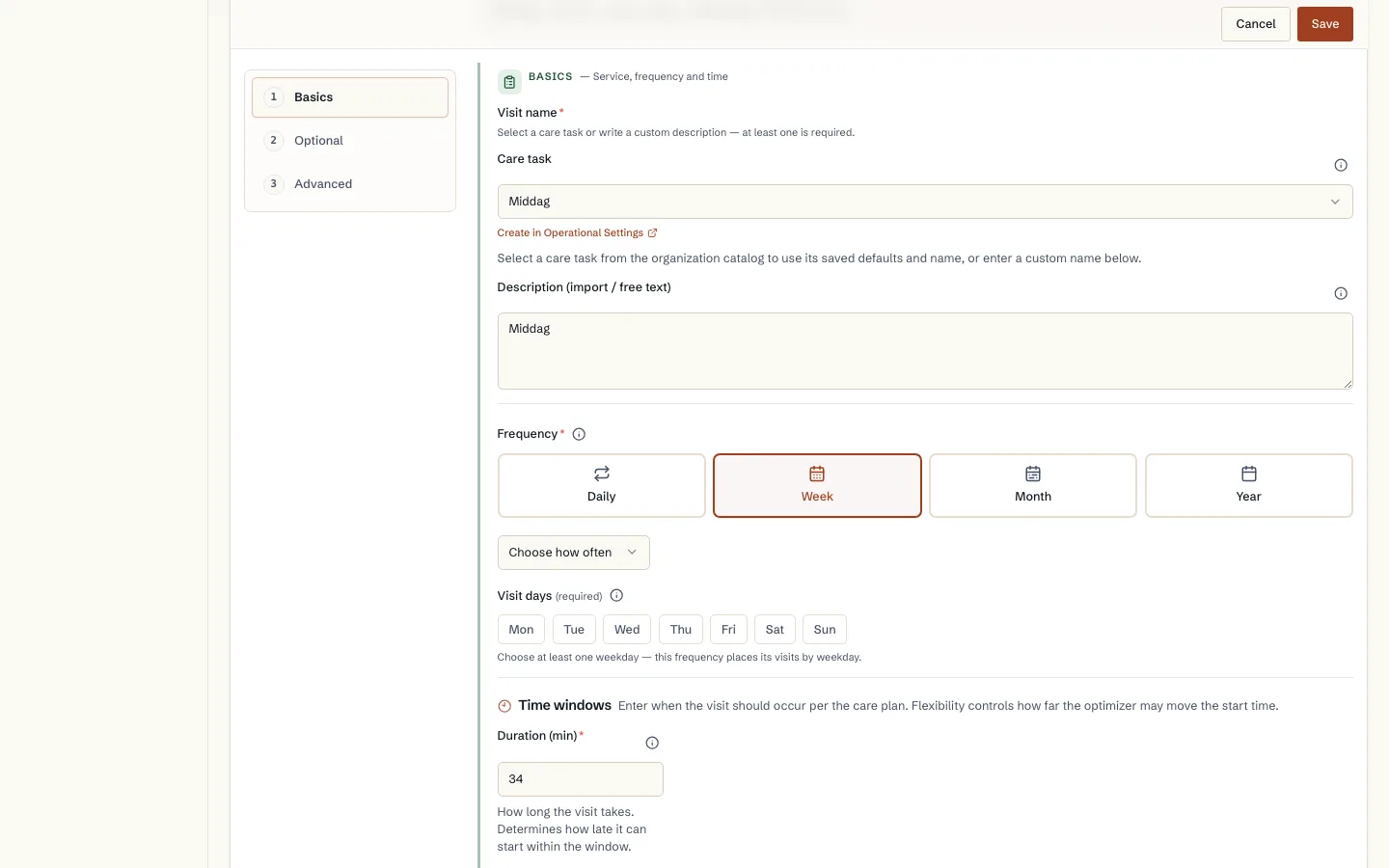
        Visit duration and saved time windows in a template

        Approved image · Cropped detail

        Approved: 2026-10-10

        Image annotation
        Visit duration and saved time windows in a template
          The form shows visit duration, preferred start and the allowed time window.Planned time and flexibility can be reviewed together in the same visit template.
          Open approved image full size

          Image shows: The form shows visit duration, preferred start and the allowed time window.

          What it demonstrates: Planned time and flexibility can be reviewed together in the same visit template.

          Product URL

          CAIRE platform

          app.caire.se

          View/route template: /resources/clients/:clientId/care-plan/:templateId/editThe template shows where the view lives. Record IDs resolve to a selected record in the app and are not a direct link.

          Website destinations and suggestions
          Capture source and setup

          Source module: Besökstid och tidsfönster

          Opens in CAIRE: Resurser → klient → Genomförandeplan → Redigera besök → Grunder

          Capture scenario: Synthetic demonstration scenario S5

          Capture setup
          1. Öppna besöksmallens befintliga varaktighet och tidsfönster
          CAIRE platformResources and foundation data

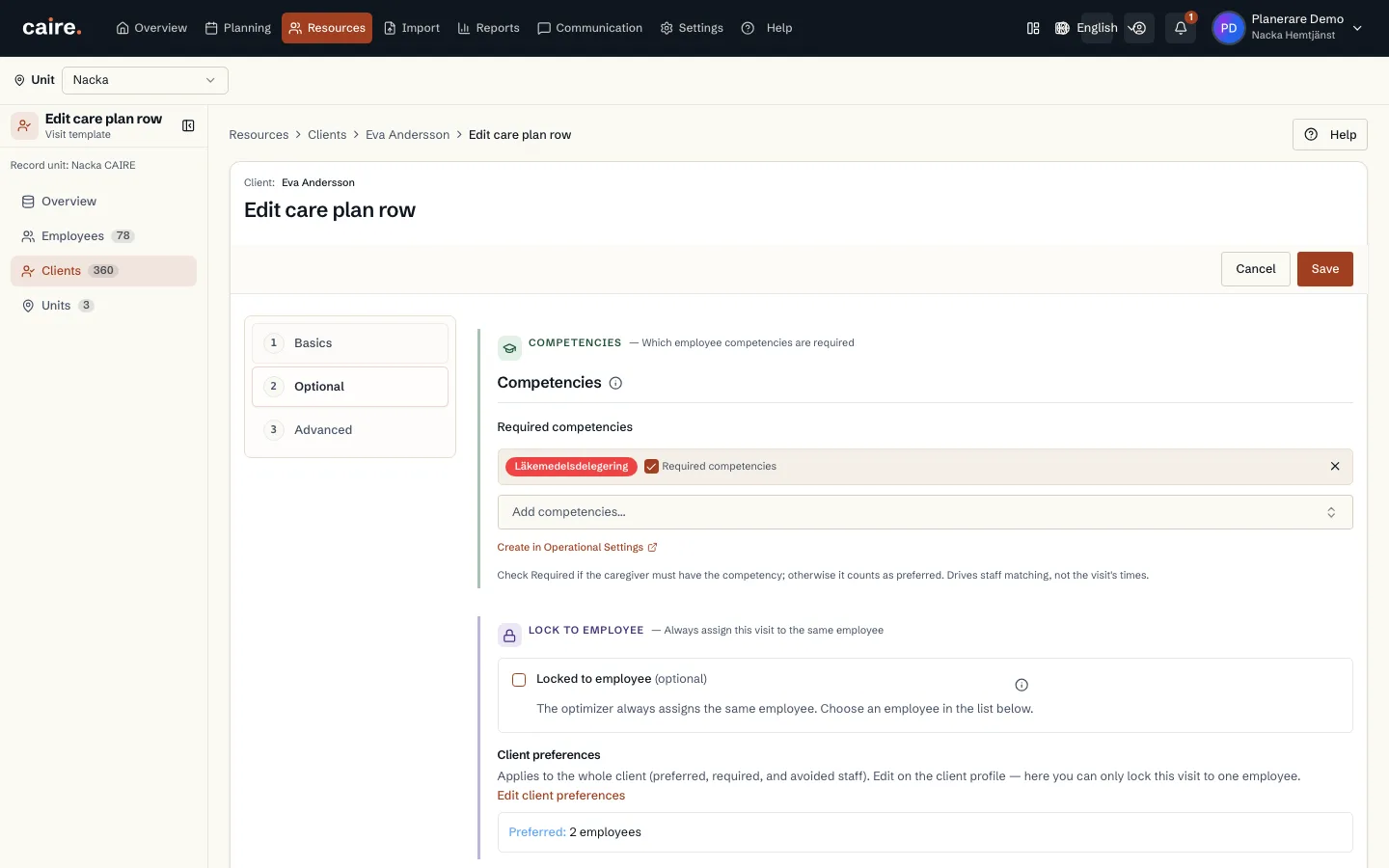
          Competencies attached to an existing visit template

          Approved image · Image and caption

          Approved: 2026-10-10

          Competencies attached to an existing visit template
          The competency step shows selected template competencies and the available competency catalogue.Competency requirements are reviewed on the visit template where they affect who can perform the visit.
          Open approved image full size

          Image shows: The competency step shows selected template competencies and the available competency catalogue.

          What it demonstrates: Competency requirements are reviewed on the visit template where they affect who can perform the visit.

          Product URL

          CAIRE platform

          app.caire.se

          View/route template: /resources/clients/:clientId/care-plan/:templateId/editThe template shows where the view lives. Record IDs resolve to a selected record in the app and are not a direct link.

          Website destinations and suggestions
          Capture source and setup

          Source module: Besöksmallens kompetenskrav

          Opens in CAIRE: Resurser → klient → Genomförandeplan → Redigera besök → Valfritt

          Capture scenario: Synthetic demonstration scenario S5

          Capture setup
          1. Öppna besöksmallens kompetenssteg
          CAIRE platformResources and foundation data

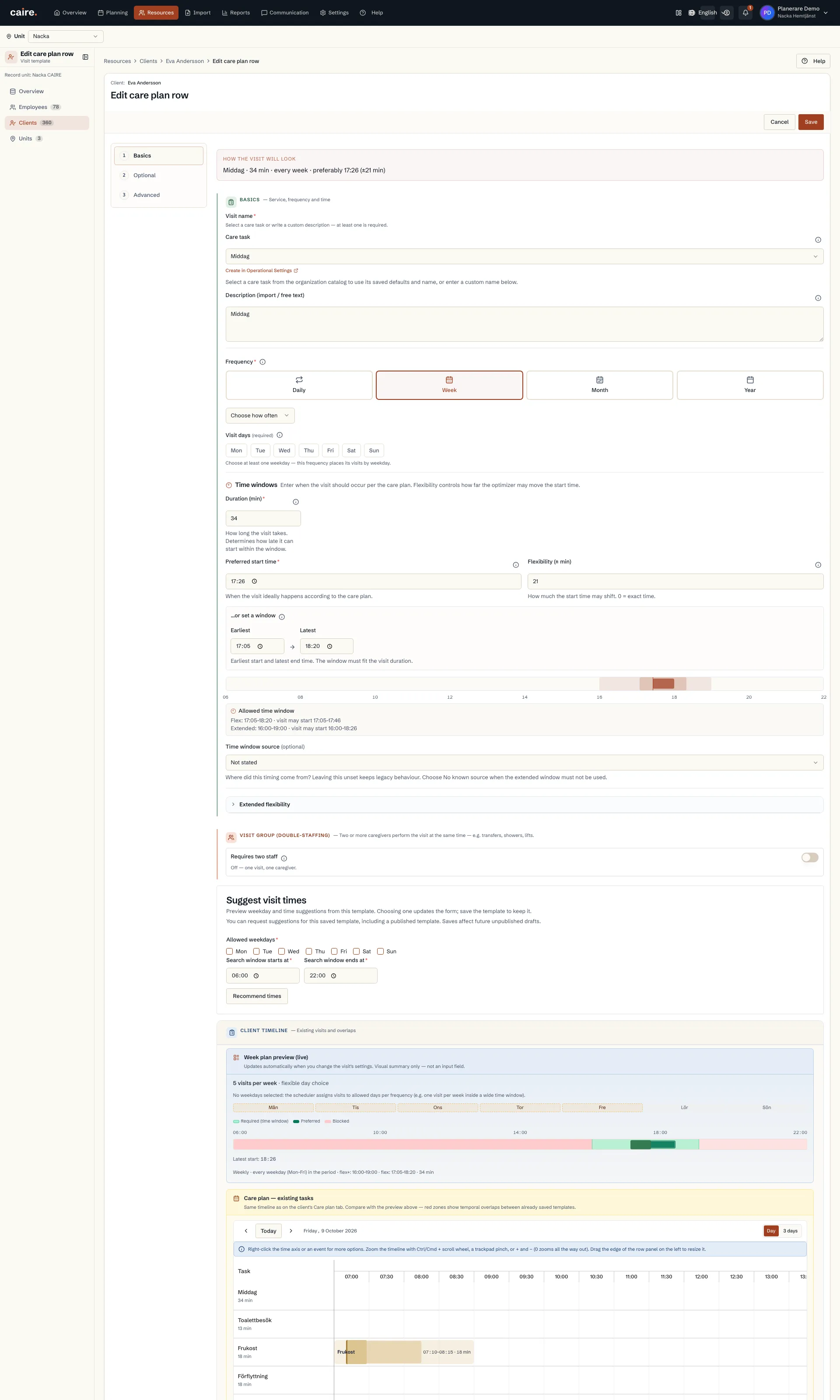
          Existing double-staffing setting on a visit template

          Approved image · Cropped detail

          Approved: 2026-10-10

          Image annotation
          Existing double-staffing setting on a visit template
            The template shows whether a visit requires two staff and how an existing partner is linked.The need for simultaneous staffing is visible on the visit where that setting belongs.
            Open approved image full size

            Image shows: The template shows whether a visit requires two staff and how an existing partner is linked.

            What it demonstrates: The need for simultaneous staffing is visible on the visit where that setting belongs.

            Product URL

            CAIRE platform

            app.caire.se

            View/route template: /resources/clients/:clientId/care-plan/:templateId/editThe template shows where the view lives. Record IDs resolve to a selected record in the app and are not a direct link.

            Website destinations and suggestions
            Capture source and setup

            Source module: Dubbelbemanning i besöksmall

            Opens in CAIRE: Resurser → klient → Genomförandeplan → Redigera besök → Grunder

            Capture scenario: Synthetic demonstration scenario S5

            Capture setup
            1. Granska besöksmallens inställning för dubbelbemanning utan att slå om den
            CAIRE platformResources and foundation data

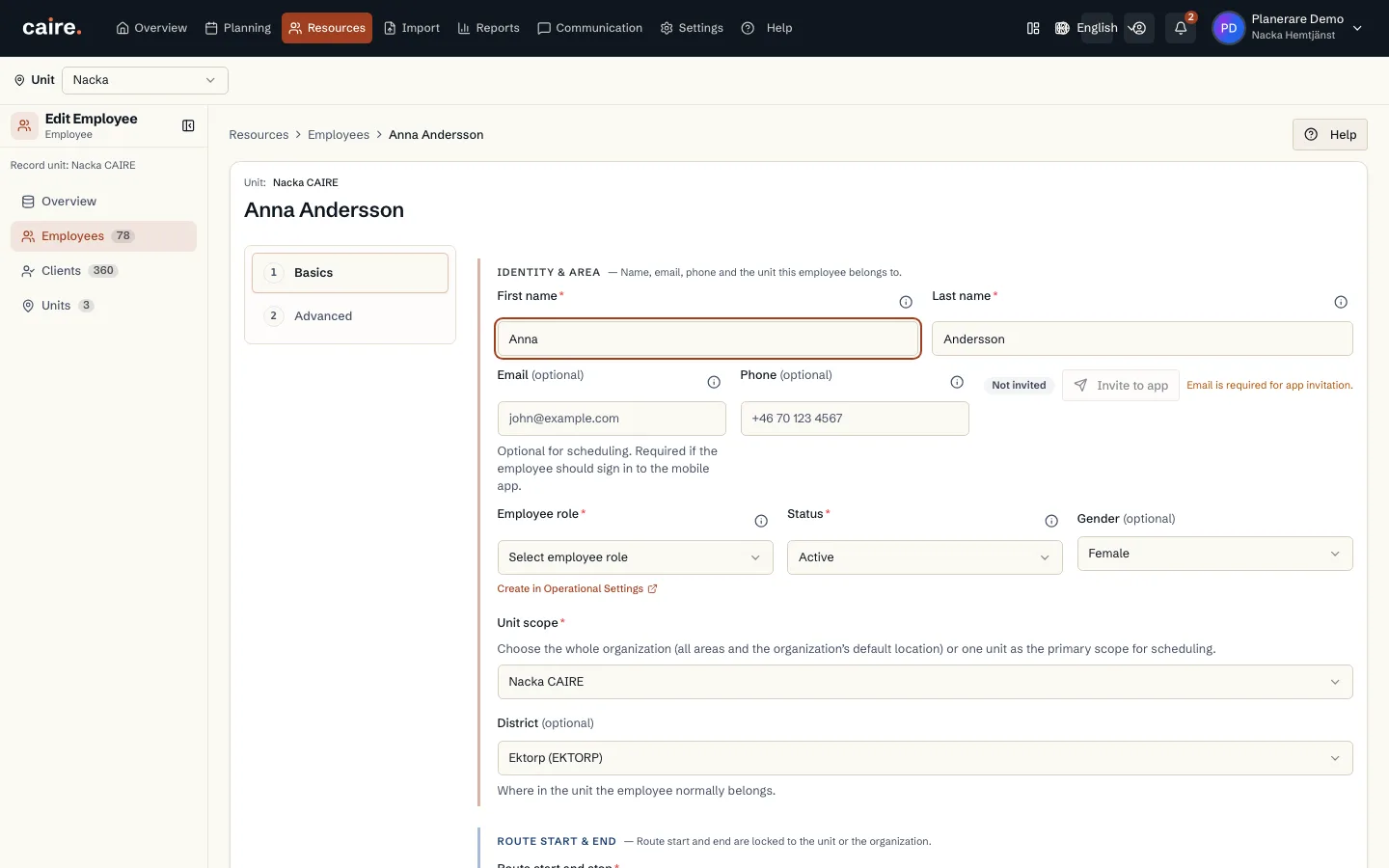
            Employee identity and service area in the edit form

            Approved image · Image and caption

            Approved: 2026-10-10

            Employee identity and service area in the edit form
            The basics step brings together employee identity, contact and service-area assignment.Existing staff details can be reviewed on one page before they are changed.
            Open approved image full size

            Image shows: The basics step brings together employee identity, contact and service-area assignment.

            What it demonstrates: Existing staff details can be reviewed on one page before they are changed.

            Product URL

            CAIRE platform

            app.caire.se

            View/route template: /resources/employees/:id/editThe template shows where the view lives. Record IDs resolve to a selected record in the app and are not a direct link.

            Website destinations and suggestions
            Capture source and setup

            Source module: Medarbetaruppgifter

            Opens in CAIRE: Resurser → enhet → Medarbetare → öppna medarbetare → Redigera → Grunder

            Capture scenario: Synthetic demonstration scenario S5

            Capture setup
            1. Öppna den första befintliga medarbetaren från listan
            CAIRE platformResources and foundation data

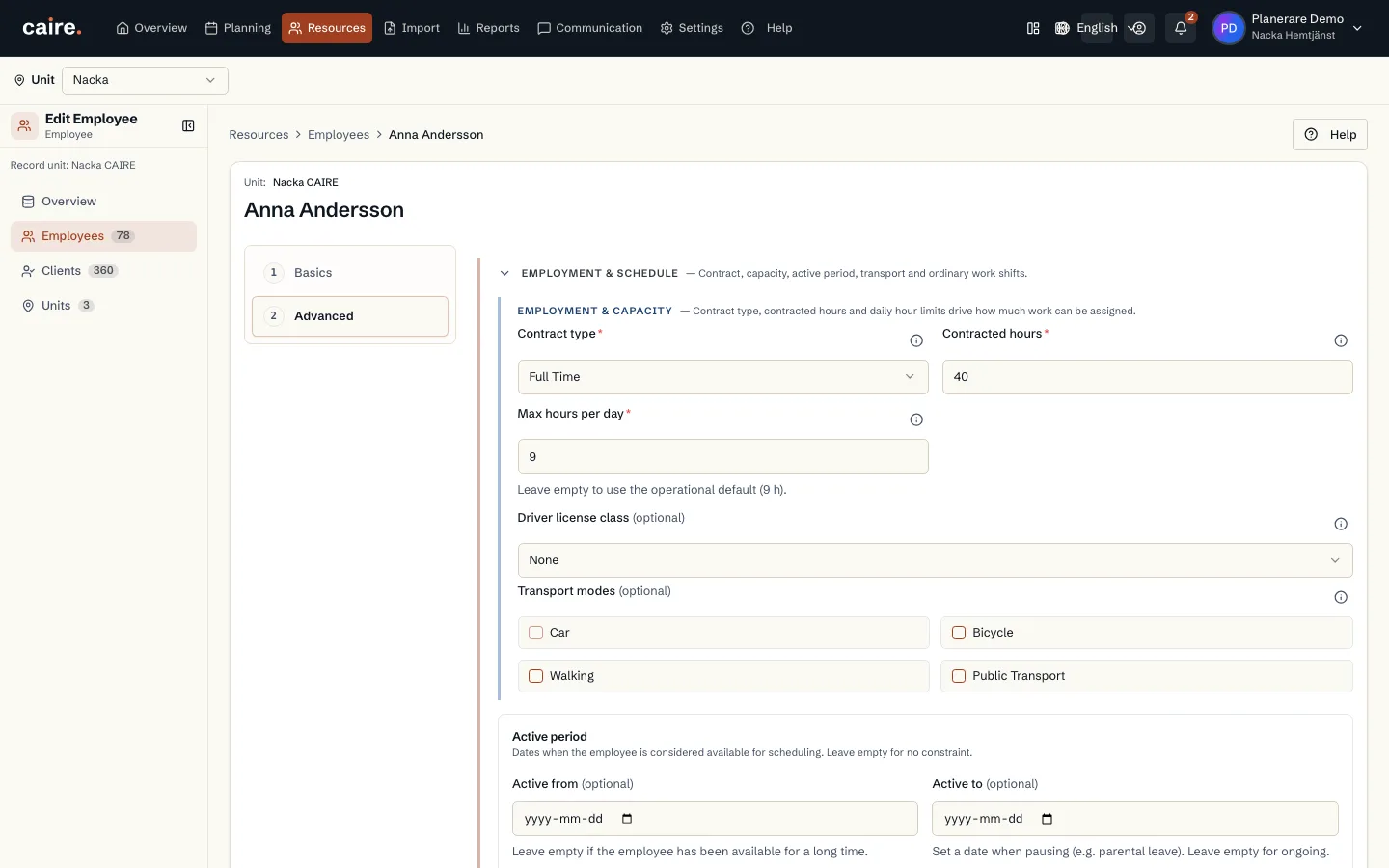
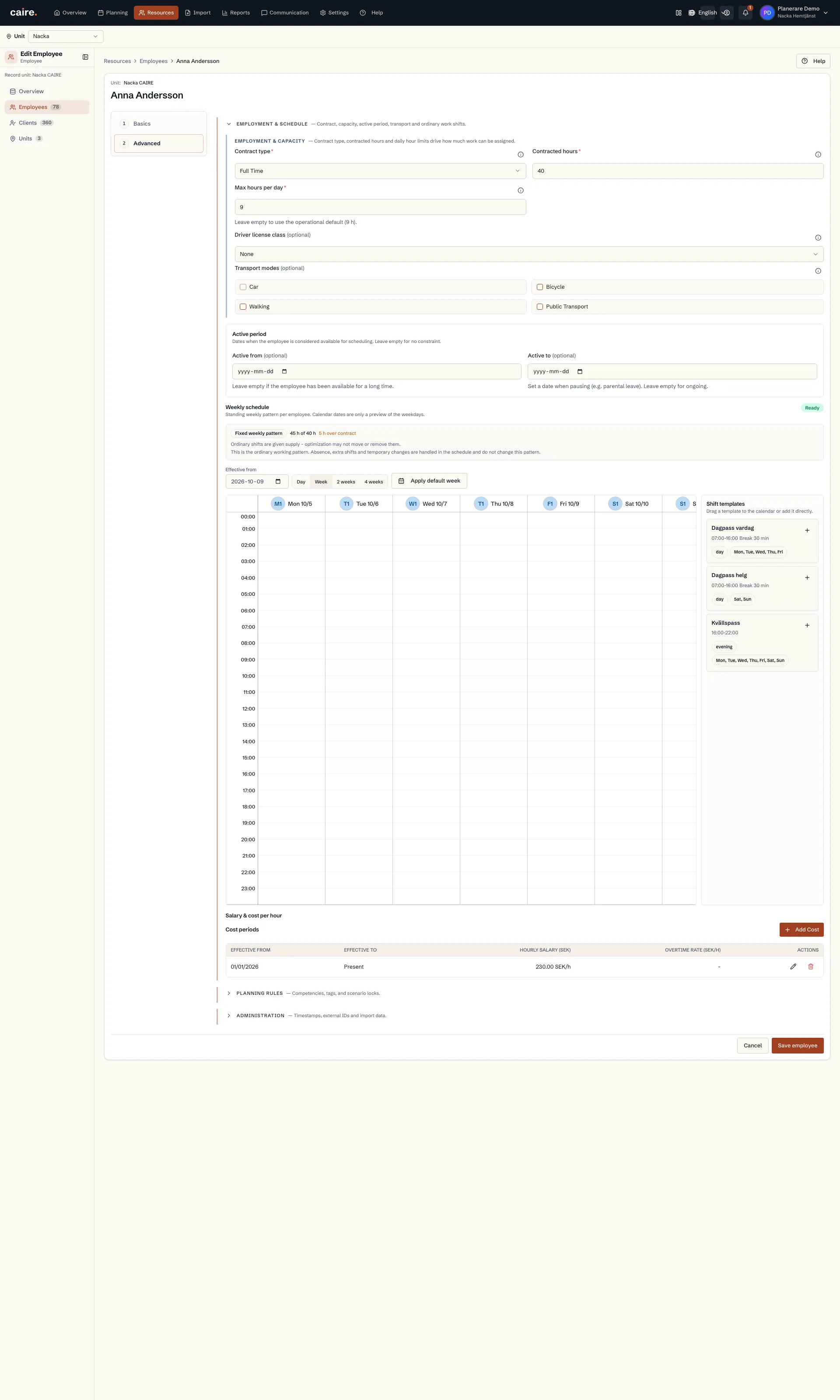
            Employee contract capacity and transport modes

            Approved image · Image and caption

            Approved: 2026-10-10

            Employee contract capacity and transport modes
            Advanced details bring together contract limits, capacity and transport modes.Staff planning inputs can be reviewed in the employee's existing form.
            Open approved image full size

            Image shows: Advanced details bring together contract limits, capacity and transport modes.

            What it demonstrates: Staff planning inputs can be reviewed in the employee's existing form.

            Product URL

            CAIRE platform

            app.caire.se

            View/route template: /resources/employees/:id/editThe template shows where the view lives. Record IDs resolve to a selected record in the app and are not a direct link.

            Website destinations and suggestions
            Capture source and setup

            Source module: Anställning och transportsätt
            Opens in CAIRE: Resurser → enhet → Medarbetare → öppna medarbetare → Redigera → Avancerat

            Capture scenario: Synthetic demonstration scenario S5

            Capture setup
            1. Öppna medarbetarens befintliga anställnings- och kapacitetsuppgifter
            CAIRE platformResources and foundation data

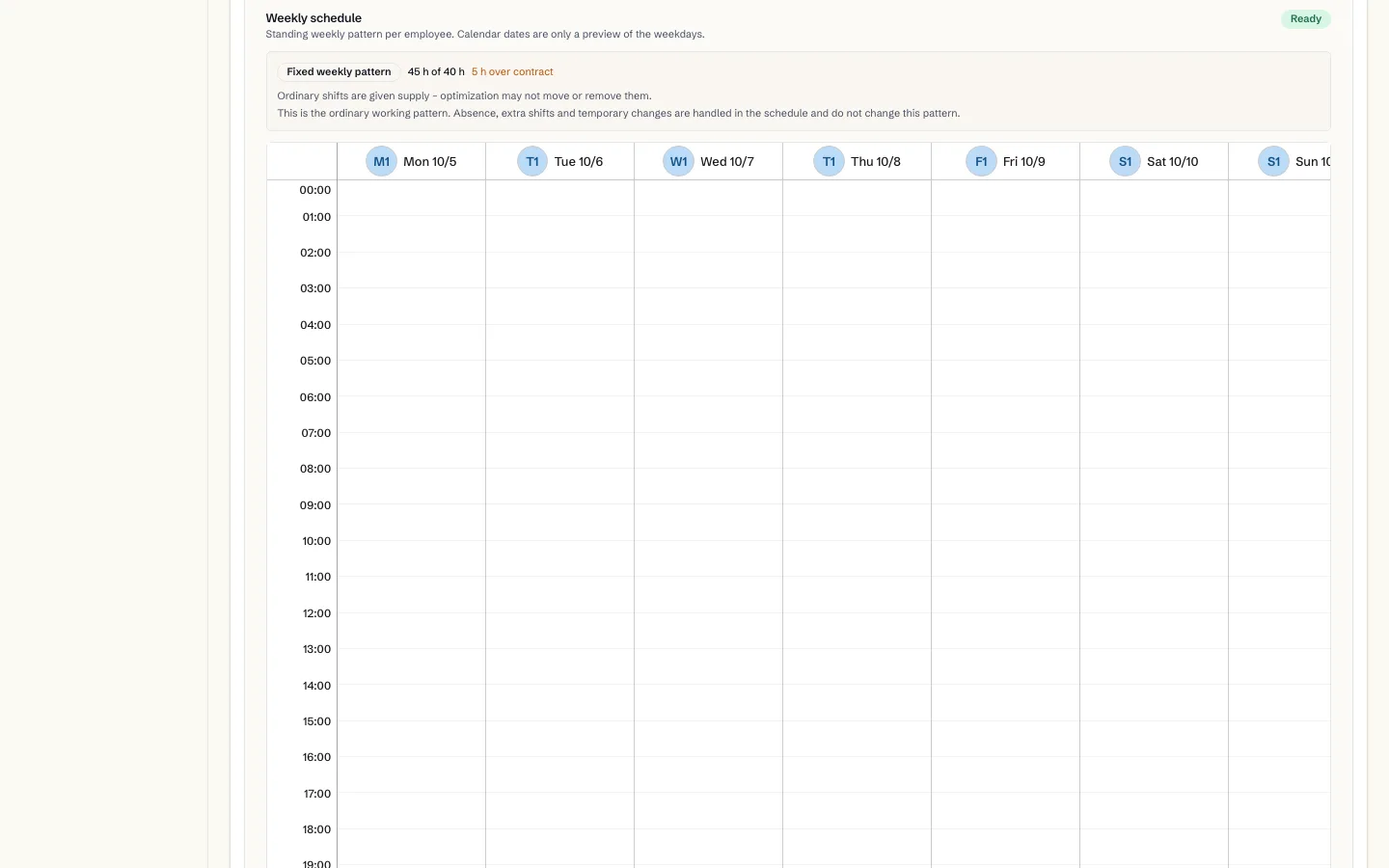
            Saved shifts in the employee's weekly schedule

            Approved image · Cropped detail

            Approved: 2026-10-10

            Image annotation
            Saved shifts in the employee's weekly schedule
              The weekly schedule shows the employee's ordinary shifts and a summary of working hours.Recurring availability can be reviewed in the calendar before the schedule is changed.
              Open approved image full size

              Image shows: The weekly schedule shows the employee's ordinary shifts and a summary of working hours.

              What it demonstrates: Recurring availability can be reviewed in the calendar before the schedule is changed.

              Product URL

              CAIRE platform

              app.caire.se

              View/route template: /resources/employees/:id/editThe template shows where the view lives. Record IDs resolve to a selected record in the app and are not a direct link.

              Website destinations and suggestions
              Capture source and setup

              Source module: Medarbetarens tillgänglighet

              Opens in CAIRE: Resurser → enhet → Medarbetare → öppna medarbetare → Redigera → Avancerat → Veckoschema

              Capture scenario: Synthetic demonstration scenario S5

              Capture setup
              1. Visa medarbetarens sparade ordinarie arbetspass
              CAIRE platformResources and foundation data

              Selected competencies in the employee's planning rules

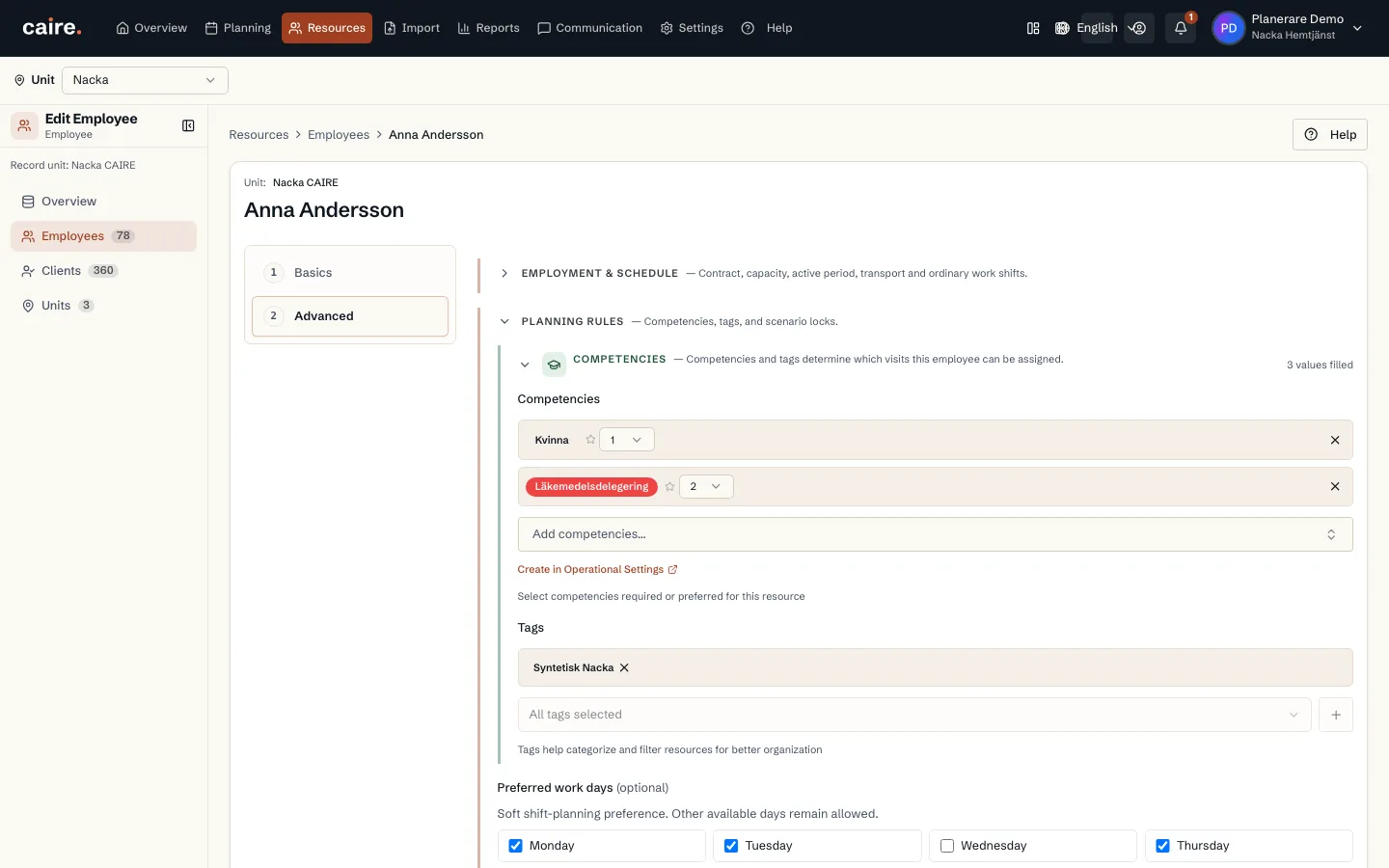
              Approved image · Image and caption

              Approved: 2026-10-10

              Selected competencies in the employee's planning rules
              The competency section shows the employee's selected competencies and tags.Existing staff competencies can be reviewed alongside visit-template requirements.
              Open approved image full size

              Image shows: The competency section shows the employee's selected competencies and tags.

              What it demonstrates: Existing staff competencies can be reviewed alongside visit-template requirements.

              Product URL

              CAIRE platform

              app.caire.se

              View/route template: /resources/employees/:id/editThe template shows where the view lives. Record IDs resolve to a selected record in the app and are not a direct link.

              Website destinations and suggestions
              Capture source and setup

              Source module: Medarbetarens kompetenser

              Opens in CAIRE: Resurser → enhet → Medarbetare → öppna medarbetare → Redigera → Avancerat → Planeringsregler

              Capture scenario: Synthetic demonstration scenario S5

              Capture setup
              1. Öppna medarbetarens befintliga kompetenser
              CAIRE platformResources and foundation data

              Existing salary and hourly-cost records for an employee

              Approved image · Cropped detail

              Approved: 2026-10-10

              Image annotation
              Existing salary and hourly-cost records for an employee
                The cost table shows saved hourly rates and their effective dates.Cost details can be reviewed where they belong to the employee, subject to existing permissions.
                Open approved image full size

                Image shows: The cost table shows saved hourly rates and their effective dates.

                What it demonstrates: Cost details can be reviewed where they belong to the employee, subject to existing permissions.

                Product URL

                CAIRE platform

                app.caire.se

                View/route template: /resources/employees/:id/editThe template shows where the view lives. Record IDs resolve to a selected record in the app and are not a direct link.

                Website destinations and suggestions
                • Image libraryIn current website sourceImage treatment: Cropped detail
                • Cost detailsIn current website sourceImage treatment: Cropped detail
                Capture source and setup

                Source module: Medarbetarens timkostnad

                Opens in CAIRE: Resurser → enhet → Medarbetare → öppna medarbetare → Redigera → Avancerat → Lön och timkostnad

                Capture scenario: Synthetic demonstration scenario S5

                Capture setup
                1. Öppna en befintlig kostnadsrad med läsbehörighet
                CAIRE platformResources and foundation data

                Service-area name and location in the edit form

                Approved image · Image and caption

                Approved: 2026-10-10

                Service-area name and location in the edit form
                The basics step brings together the unit name, hierarchy and depot address.The unit's existing planning context can be reviewed on its own resource page.
                Open approved image full size

                Image shows: The basics step brings together the unit name, hierarchy and depot address.

                What it demonstrates: The unit's existing planning context can be reviewed on its own resource page.

                Product URL

                CAIRE platform

                app.caire.se

                View/route template: /resources/service-areas/:id/editThe template shows where the view lives. Record IDs resolve to a selected record in the app and are not a direct link.

                Website destinations and suggestions
                Capture source and setup

                Source module: Enhetens identitet och plats

                Opens in CAIRE: Resurser → enhet → Redigera → Grunder

                Capture scenario: Synthetic demonstration scenario S5

                Capture setup
                1. Öppna den befintliga syntetiska Nacka-enhetens grunduppgifter
                CAIRE platformResources and foundation data

                Unit defaults for visit priority and continuity

                Approved image · Image and caption

                Approved: 2026-10-10

                Unit defaults for visit priority and continuity
                Demand and visits shows defaults that new client visits can inherit.Unit planning defaults can be reviewed separately from client overrides.
                Open approved image full size

                Image shows: Demand and visits shows defaults that new client visits can inherit.

                What it demonstrates: Unit planning defaults can be reviewed separately from client overrides.

                Product URL

                CAIRE platform

                app.caire.se

                View/route template: /resources/service-areas/:id/editThe template shows where the view lives. Record IDs resolve to a selected record in the app and are not a direct link.

                Website destinations and suggestions
                Capture source and setup

                Source module: Enhetens efterfrågan och besöksstandarder

                Opens in CAIRE: Resurser → enhet → Redigera → Avancerat → Efterfrågan och besök

                Capture scenario: Synthetic demonstration scenario S5

                Capture setup
                1. Öppna enhetens befintliga standarder för besök och kontinuitet
                CAIRE platformResources and foundation data

                Get-started checklist with the organisation's setup steps

                Approved image · Image and caption

                Approved: 2026-10-10

                Get-started checklist with the organisation's setup steps
                The guide brings together setup tasks, current progress and the requirements for a first schedule.Planners can review the next foundation step without leaving the working application.
                Open approved image full size

                Image shows: The guide brings together setup tasks, current progress and the requirements for a first schedule.

                What it demonstrates: Planners can review the next foundation step without leaving the working application.

                Product URL

                CAIRE platform

                app.caire.se

                View/route template: /startThe template shows where the view lives. Record IDs resolve to a selected record in the app and are not a direct link.

                Website destinations and suggestions
                Capture source and setup

                Source module: Kom igång-guiden

                Opens in CAIRE: /start

                Capture scenario: Synthetic demonstration scenario S5

                Capture setup
                1. Öppna setup-guidens checklista utan att ändra uppgiftsstatus
                CAIRE platformResources and foundation data

                Operational shift templates, visit types, roles and competencies

                Approved image · Image and caption

                Approved: 2026-10-10

                Operational shift templates, visit types, roles and competencies
                The settings step summarises the organisation's existing foundation catalogues.Planners can review operational defaults before opening an individual setting to change it.
                Open approved image full size

                Image shows: The settings step summarises the organisation's existing foundation catalogues.

                What it demonstrates: Planners can review operational defaults before opening an individual setting to change it.

                Product URL

                CAIRE platform

                app.caire.se

                View/route template: /start/settingsThe template shows where the view lives. Record IDs resolve to a selected record in the app and are not a direct link.

                Website destinations and suggestions
                Capture source and setup

                Source module: Grundinställningar för verksamheten

                Opens in CAIRE: /start/settings

                Capture scenario: Synthetic demonstration scenario S5

                Capture setup
                1. Granska befintliga skiftmallar, insatser, roller och kompetenser utan att bekräfta eller ändra
                CAIRE platformResources and foundation data

                Visit requirements with allowed times and flexibility

                Approved image · Image and caption

                Approved: 2026-10-10

                Visit requirements with allowed times and flexibility
                Care needs and allowed visit times inform the planning.Visit requirements describe time windows and which visits may move. Changes follow organisational rules and permissions.
                Open approved image full size

                Image shows: Care needs and allowed visit times inform the planning.

                What it demonstrates: Visit requirements describe time windows and which visits may move. Changes follow organisational rules and permissions.

                Product URL

                CAIRE platform

                app.caire.se

                View/route template: /resources/clients/:idThe template shows where the view lives. Record IDs resolve to a selected record in the app and are not a direct link.

                Website destinations and suggestions
                • Image libraryIn current website sourceImage treatment: Image and caption
                • Planning inputsIn current website sourceImage treatment: Image and caption
                • Planning inputsIn current website sourceImage treatment: Image and caption
                Capture source and setup

                Source module: Kunder och besök

                Opens in CAIRE: Resurser → Kunder → Besöksunderlag

                Capture scenario: Synthetic demonstration scenario S5

                Capture setup
                1. Öppna en kunds besöksunderlag
                CAIRE platformResources and foundation data

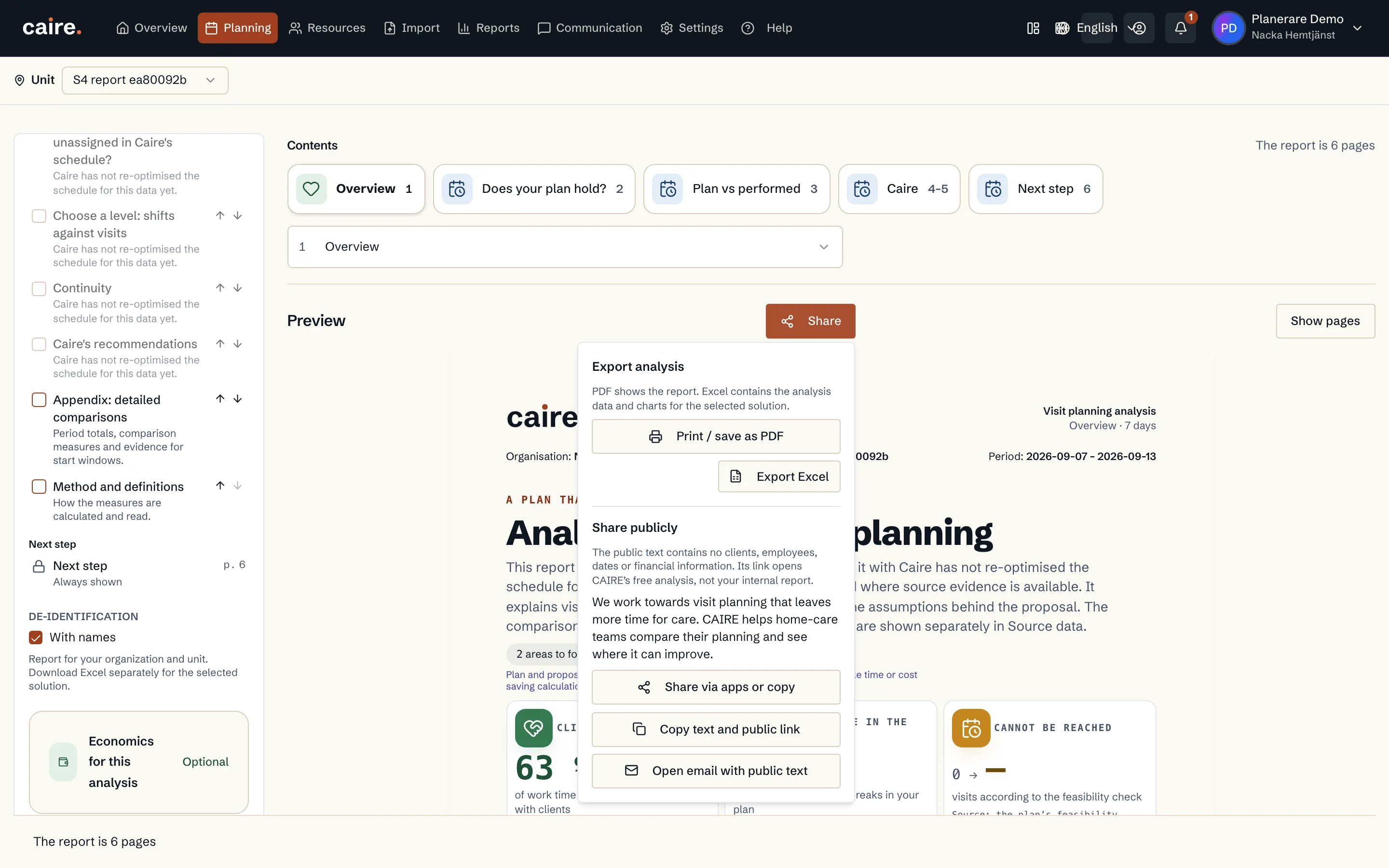
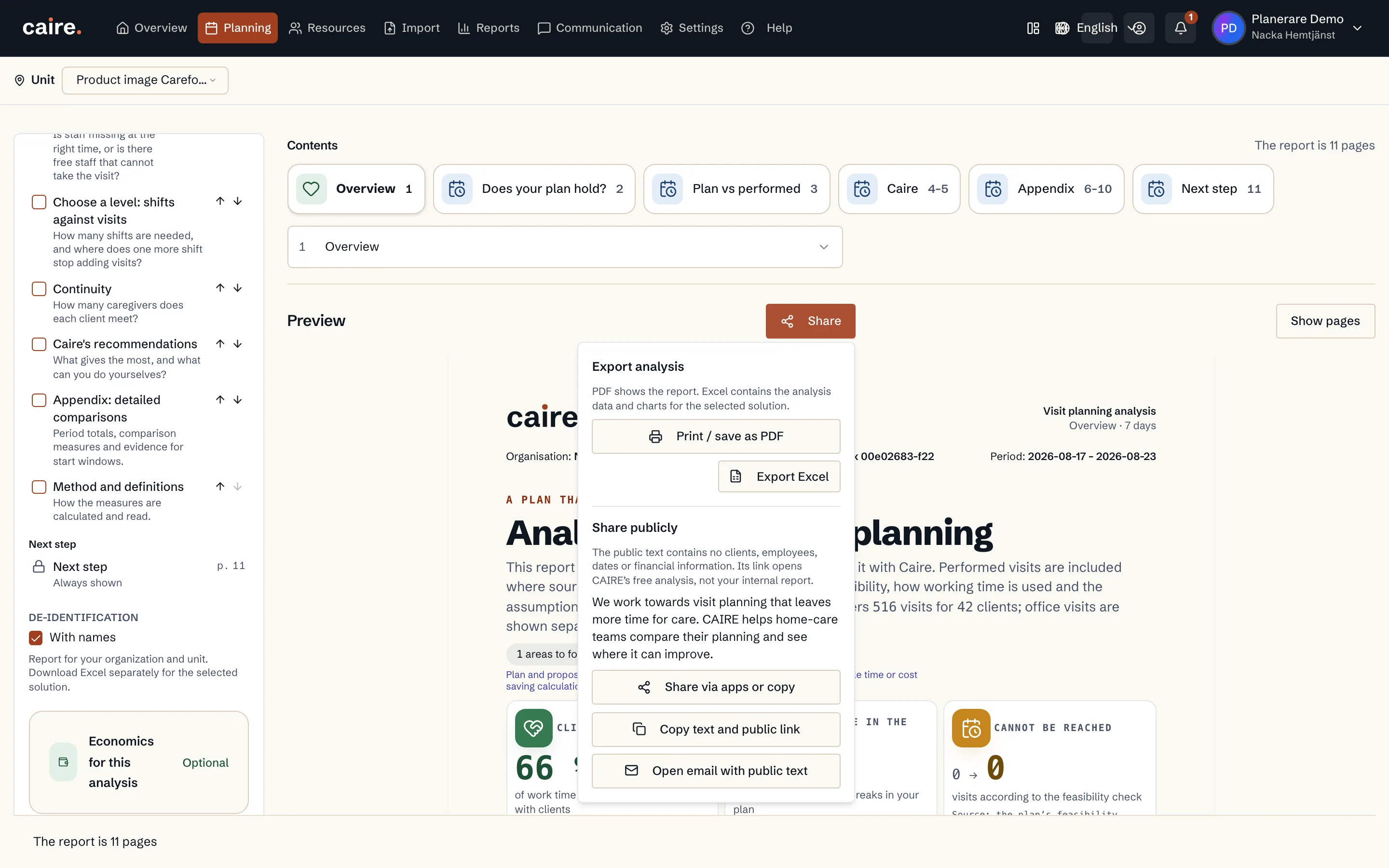
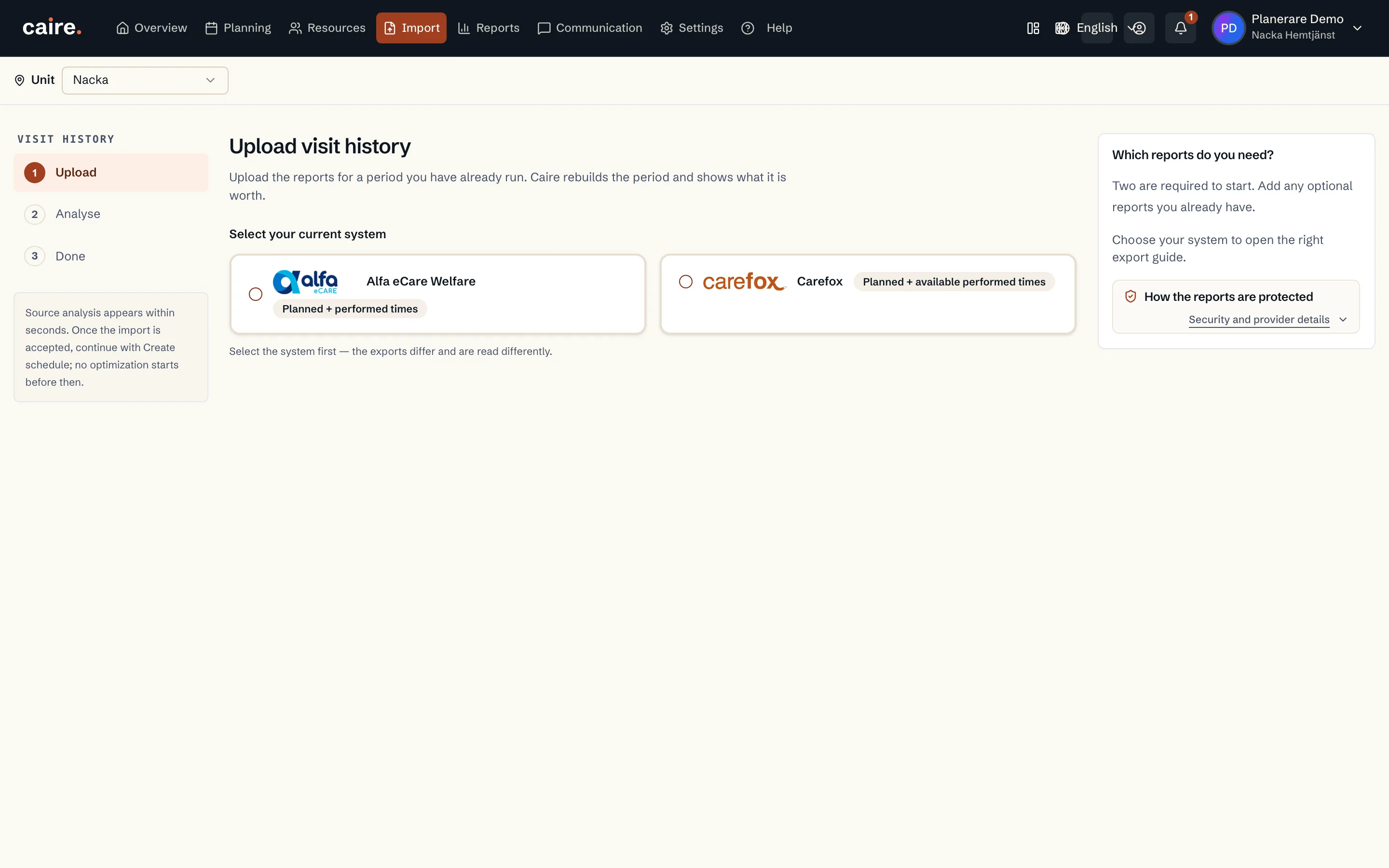
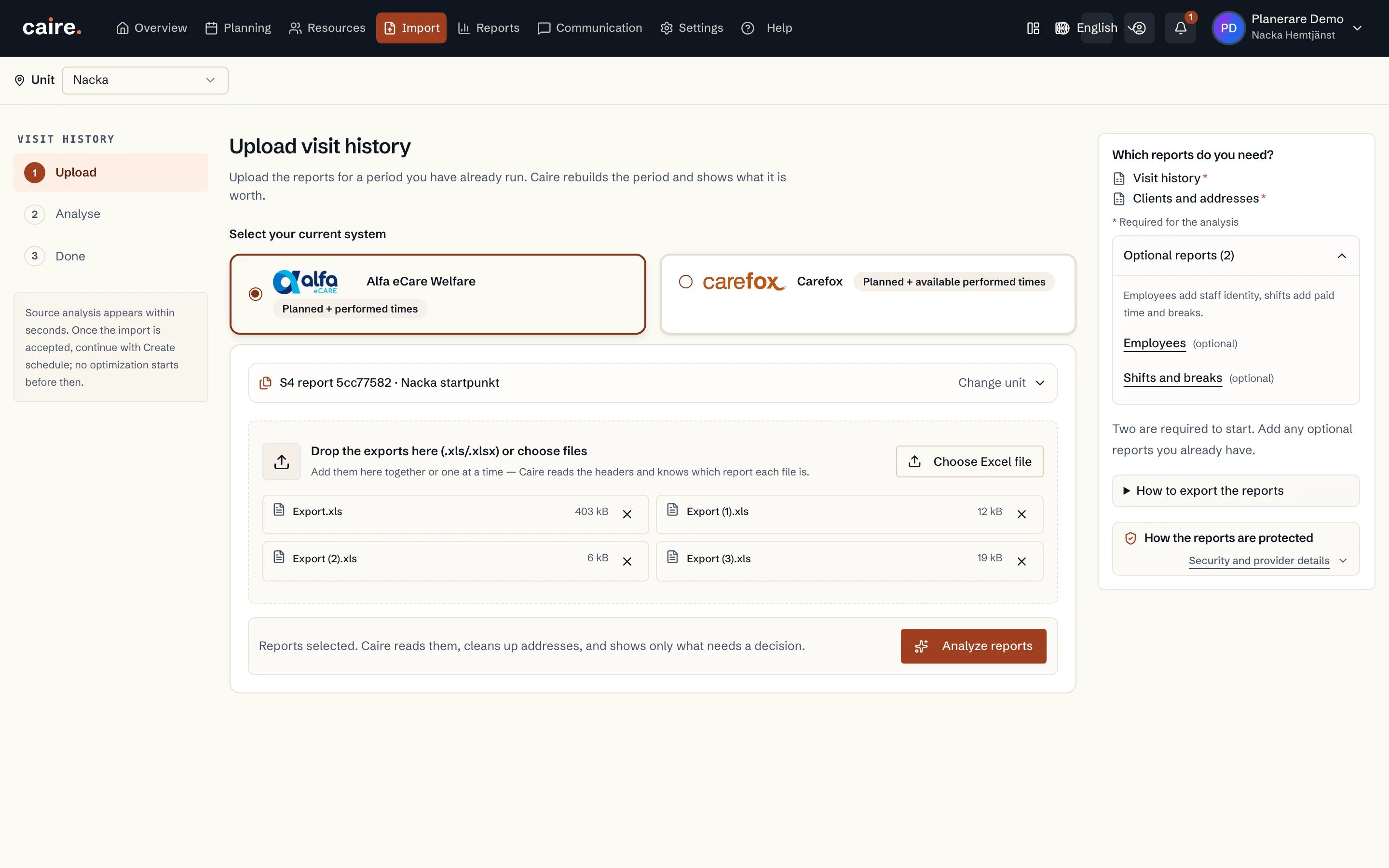
                Exporting a report as PDF or Excel in Caire

                Approved image · Image and caption

                Approved: 2026-10-10

                Exporting a report as PDF or Excel in Caire
                Import and export between Caire and your existing system.Caire accepts supported exports from your existing system and can export planning and reports as PDF or Excel.
                Open approved image full size

                Image shows: Import and export between Caire and your existing system.

                What it demonstrates: Caire accepts supported exports from your existing system and can export planning and reports as PDF or Excel.

                Product URL

                CAIRE platform

                app.caire.se

                View/route template: /schedules/:scheduleId/solutions/:solutionId/reportThe template shows where the view lives. Record IDs resolve to a selected record in the app and are not a direct link.

                Website destinations and suggestions
                Capture source and setup

                Source module: Rapporter

                Opens in CAIRE: Rapporter → Exportera

                Capture scenario: Existing product image retained with its source context

                Capture setup
                1. Öppna exportdialogen
                CAIRE platformResources and foundation data

                Visit template with recommended frequency and preferred weekdays

                Approved image · Image and caption

                Approved: 2026-10-10

                Visit template with recommended frequency and preferred weekdays
                Add a visit: recommended frequency sets preferred days of week.Onboarding starts with the client and visit template. Recommended frequency produces preferred weekdays before the first schedule is created.
                Open approved image full size

                Image shows: Add a visit: recommended frequency sets preferred days of week.

                What it demonstrates: Onboarding starts with the client and visit template. Recommended frequency produces preferred weekdays before the first schedule is created.

                Product URL

                CAIRE platform

                app.caire.se

                View/route template: /resources/clients/:clientId/care-plan/:templateId/editThe template shows where the view lives. Record IDs resolve to a selected record in the app and are not a direct link.

                Website destinations and suggestions
                Capture source and setup

                Source module: Besöksmallar

                Opens in CAIRE: Resurser → Kund → Besöksmall

                Capture scenario: Synthetic demonstration scenario S5

                Capture setup
                1. Öppna en besöksmall i redigeringsläge
                CAIRE platformResources and foundation data

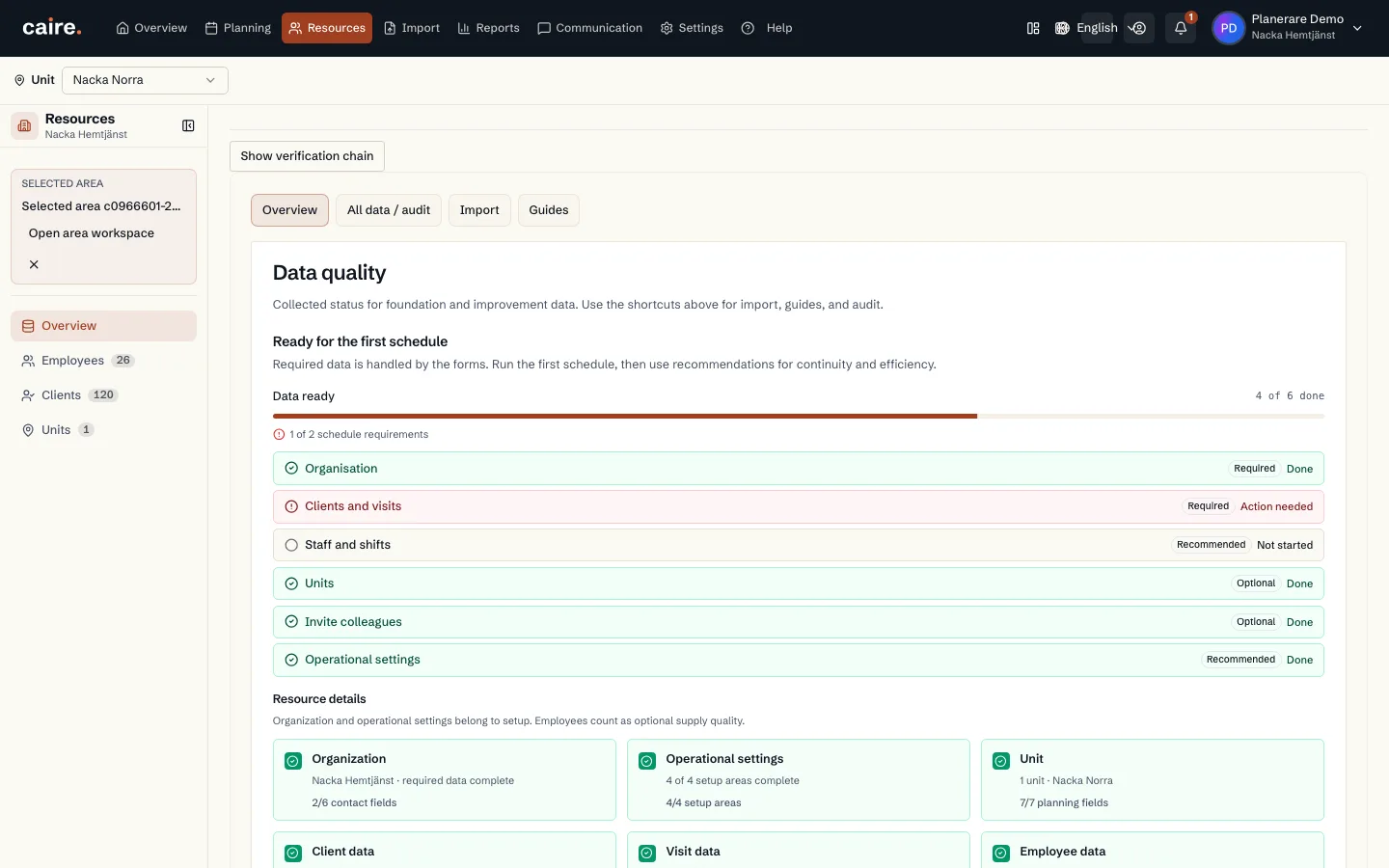
                Data quality: foundation data with a status per step and the next action

                Approved image · Image and caption

                Approved: 2026-10-10

                Data quality: foundation data with a status per step and the next action
                See which details are complete and what is missing before the first schedule.Data quality lists organisation, clients and visits, staff and shifts with a status per step, and which item needs completing next.
                Open approved image full size

                Image shows: See which details are complete and what is missing before the first schedule.

                What it demonstrates: Data quality lists organisation, clients and visits, staff and shifts with a status per step, and which item needs completing next.

                Product URL

                CAIRE platform

                app.caire.se

                View/route template: /resources/datahubThe template shows where the view lives. Record IDs resolve to a selected record in the app and are not a direct link.

                Website destinations and suggestions
                • Image libraryIn current website sourceImage treatment: Image and caption
                • Data qualityIn current website sourceImage treatment: Image and caption
                • Standing dataSuggestionImage treatment: Image and caption
                Capture source and setup

                Source module: Datakvalitet

                Opens in CAIRE: Resurser → Datakvalitet

                Capture scenario: Synthetic demonstration scenario S5

                Capture setup
                1. Öppna Datakvalitet för enheten
                CAIRE platformResources and foundation data

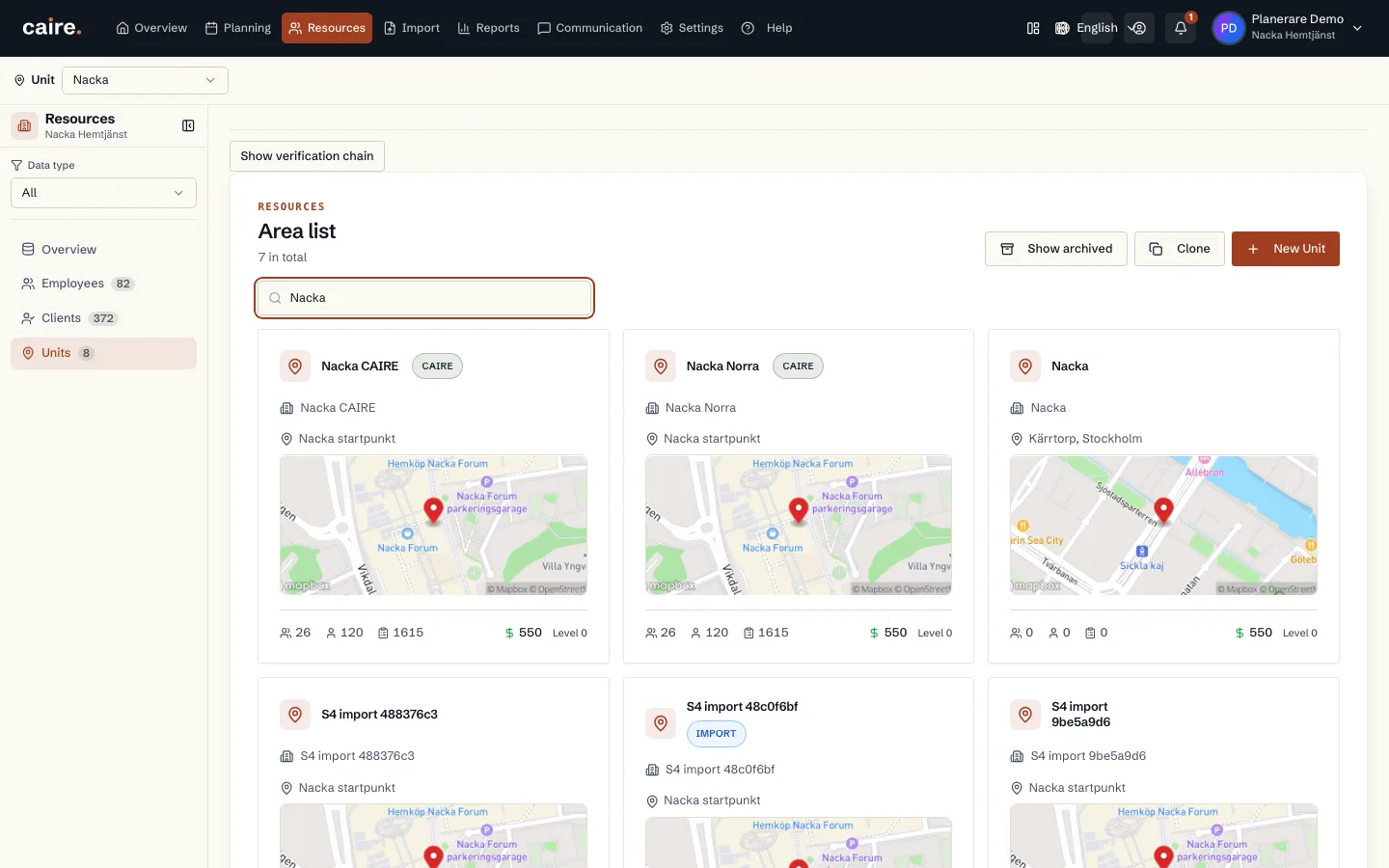
                The organisation's unit list with Nacka and Nacka Norra

                Approved image · Image and caption

                Approved: 2026-10-10

                The organisation's unit list with Nacka and Nacka Norra
                Manage several units in one organisation and open each unit's standing data.Each unit has its own employees, clients and visit requirements. The unit list provides a shared entry point while keeping each unit's planning inputs scoped.
                Open approved image full size

                Image shows: Manage several units in one organisation and open each unit's standing data.

                What it demonstrates: Each unit has its own employees, clients and visit requirements. The unit list provides a shared entry point while keeping each unit's planning inputs scoped.

                Product URL

                CAIRE platform

                app.caire.se

                View/route template: /resourcesThe template shows where the view lives. Record IDs resolve to a selected record in the app and are not a direct link.

                Website destinations and suggestions
                Capture source and setup

                Source module: Enheter

                Opens in CAIRE: Resurser → Enheter

                Capture scenario: Synthetic demonstration scenario S5

                Capture setup
                1. Kopiera den syntetiska Nacka-enhetens personal och besöksunderlag till en andra enhet
                2. Öppna organisationens enhetslista
                CAIRE platformPlanning and calendar

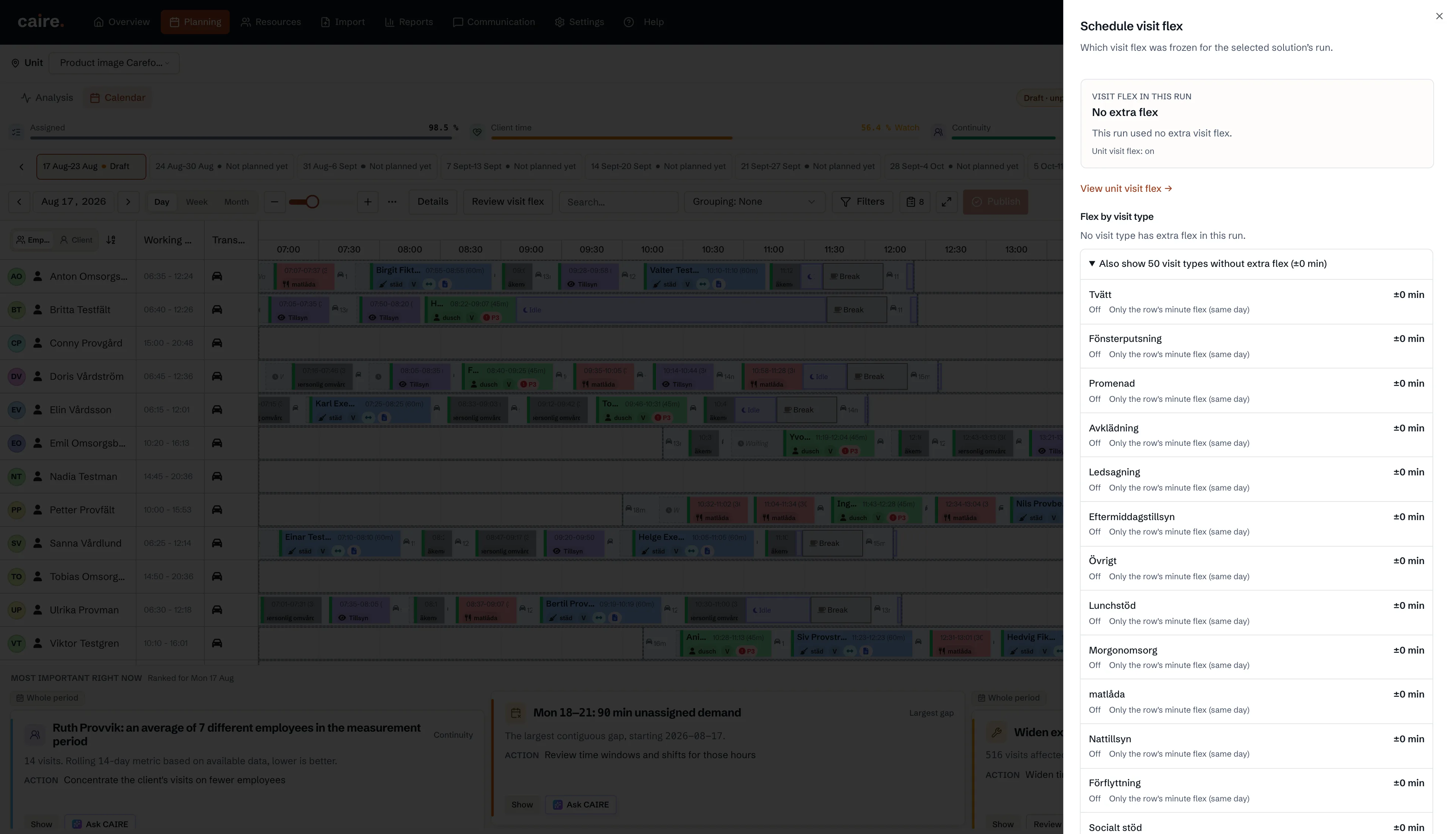
                Visit flex audit with a frozen base policy of No extra flex and expanded zero-minute rows

                Approved image · Cropped detail

                Approved: 2026-10-10

                Image annotation
                Visit flex audit with a frozen base policy of No extra flex and expanded zero-minute rows
                  The native audit panel shows the frozen base policy No extra flex and saved provenance for visit types with zero extra minutes.The planner can inspect the accepted Carefox source's base policy without changing it. This records OFF-policy provenance, not a positive flex allowance or the solver candidate's complete time windows.
                  Open approved image full size

                  Image shows: The native audit panel shows the frozen base policy No extra flex and saved provenance for visit types with zero extra minutes.

                  What it demonstrates: The planner can inspect the accepted Carefox source's base policy without changing it. This records OFF-policy provenance, not a positive flex allowance or the solver candidate's complete time windows.

                  Product URL

                  CAIRE platform

                  app.caire.se

                  View/route template: /schedules/:scheduleId/solutions/:solutionIdThe template shows where the view lives. Record IDs resolve to a selected record in the app and are not a direct link.

                  Website destinations and suggestions
                  • Image libraryIn current website sourceImage treatment: Cropped detail
                  • SchedulingSuggestionImage treatment: Cropped detail
                  Capture source and setup

                  Source module: Kalender · Insatsflex för schemat

                  Opens in CAIRE: Kalender → Granska insatsflex → Layer2InsetFlexAuditSheet

                  Capture scenario: Synthetic demonstration scenario S2

                  Capture setup
                  1. Verifiera S2:s accepterade Carefox-kvitto och sparade flex-15-resultat via qualifiedReport
                  2. Läs samma lösnings frysta OFF-policy med 50 nollminutsrader och tre sparade passintervall
                  3. Öppna Granska insatsflex och expandera nollminutsraderna utan att ändra underlaget
                  CAIRE platformPlanning and calendar

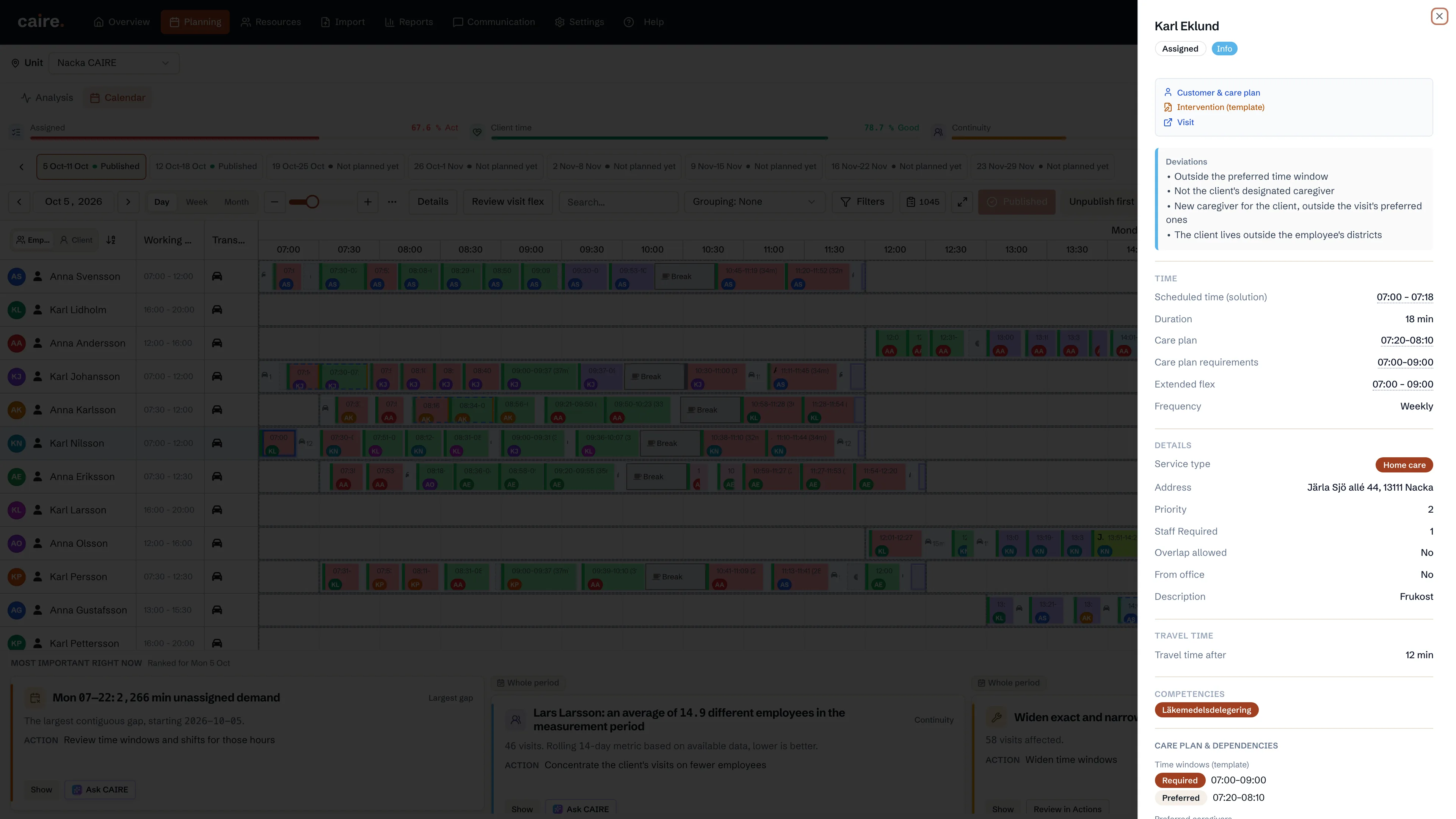
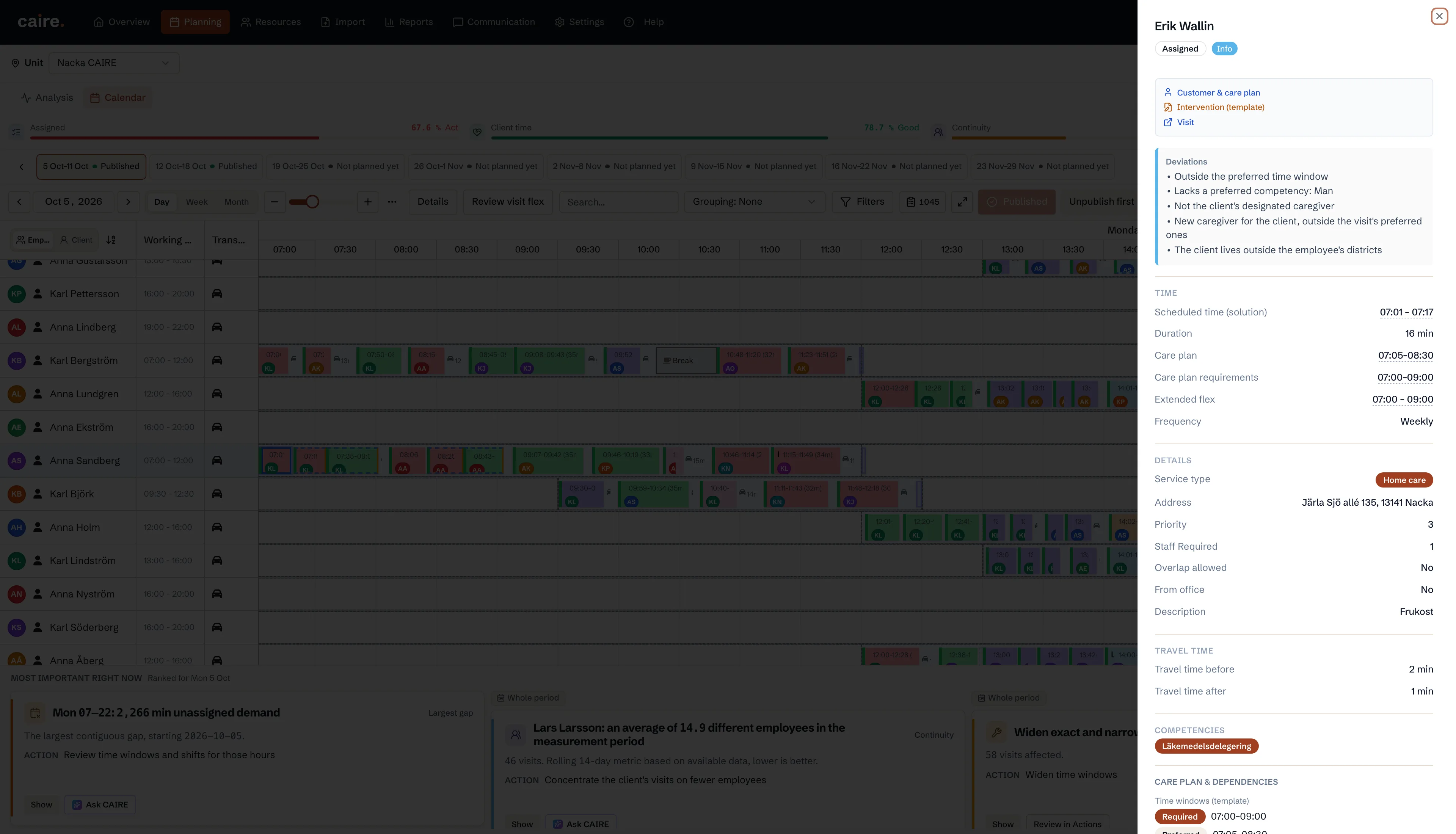
                  Visit details with preferred and required time windows from the linked care plan

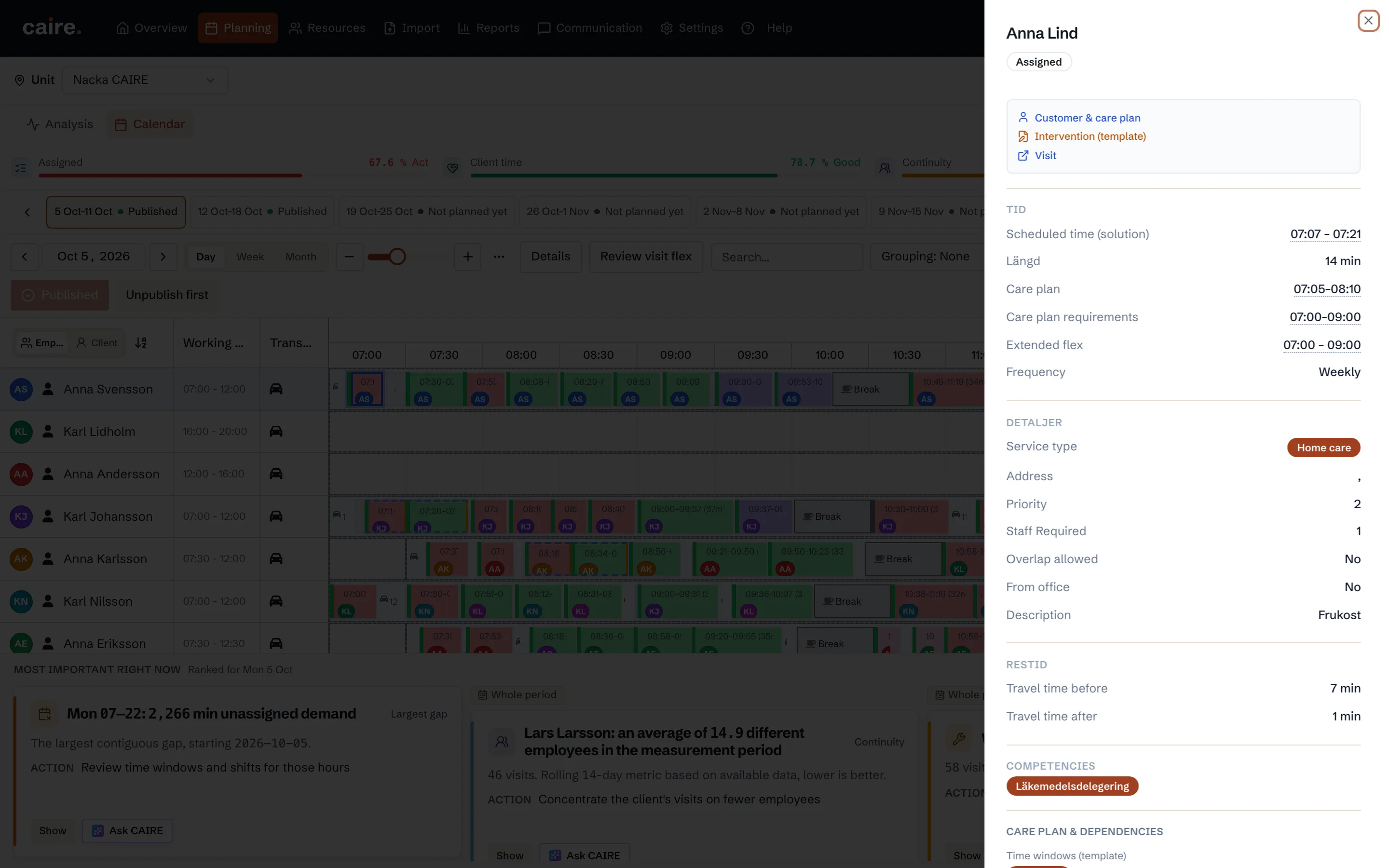
                  Approved image · Cropped detail

                  Approved: 2026-10-10

                  Image annotation
                  Visit details with preferred and required time windows from the linked care plan
                    The native visit view shows the saved preferred and required time windows from the visit's linked template.The planner can inspect both time windows for a real assigned visit. The image shows the template's saved windows, not the scheduled start time or an edited planning value.
                    Open approved image full size

                    Image shows: The native visit view shows the saved preferred and required time windows from the visit's linked template.

                    What it demonstrates: The planner can inspect both time windows for a real assigned visit. The image shows the template's saved windows, not the scheduled start time or an edited planning value.

                    Product URL

                    CAIRE platform

                    app.caire.se

                    View/route template: /schedules/:scheduleId/solutions/:solutionIdThe template shows where the view lives. Record IDs resolve to a selected record in the app and are not a direct link.

                    Website destinations and suggestions
                    • Image libraryIn current website sourceImage treatment: Cropped detail
                    • SchedulingSuggestionImage treatment: Cropped detail
                    Capture source and setup

                    Source module: Planering · Besökets tidsfönster

                    Opens in CAIRE: Kalender → vald S1-lösning → Besöksdetaljer → Tid

                    Capture scenario: Synthetic demonstration scenario S1

                    Capture setup
                    1. Verifiera den exakta sparade S1-lösningen och hitta ett tilldelat besök vars länkade mall har både krav och önskat tidsfönster
                    2. Öppna kalendern för samma lösning och välj besöket från dess verkliga tilldelning
                    3. Visa besöksdetaljerna när mallens sparade tidsfönster har laddats
                    CAIRE platformPlanning and calendar

                    Visit details with saved travel time before and after an assigned visit

                    Approved image · Cropped detail

                    Approved: 2026-10-10

                    Image annotation
                    Visit details with saved travel time before and after an assigned visit
                      The native visit view shows the solution's travel-time values before and after the selected assignment.The planner can read saved travel time around a real assigned visit. These values belong to this solution and do not show a new route calculation.
                      Open approved image full size

                      Image shows: The native visit view shows the solution's travel-time values before and after the selected assignment.

                      What it demonstrates: The planner can read saved travel time around a real assigned visit. These values belong to this solution and do not show a new route calculation.

                      Product URL

                      CAIRE platform

                      app.caire.se

                      View/route template: /schedules/:scheduleId/solutions/:solutionIdThe template shows where the view lives. Record IDs resolve to a selected record in the app and are not a direct link.

                      Website destinations and suggestions
                      • Image libraryIn current website sourceImage treatment: Cropped detail
                      • SchedulingSuggestionImage treatment: Cropped detail
                      Capture source and setup

                      Source module: Planering · Besökets restid

                      Opens in CAIRE: Kalender → vald S1-lösning → Besöksdetaljer → Restid

                      Capture scenario: Synthetic demonstration scenario S1

                      Capture setup
                      1. Verifiera den exakta sparade S1-lösningen och välj ett tilldelat besök med positiva sparade restidsvärden före och efter
                      2. Öppna kalendern för samma lösning och välj samma tilldelade besök
                      3. Visa de två restidsraderna i besöksdetaljerna utan att ändra eller härleda värden
                      CAIRE platformPlanning and calendar

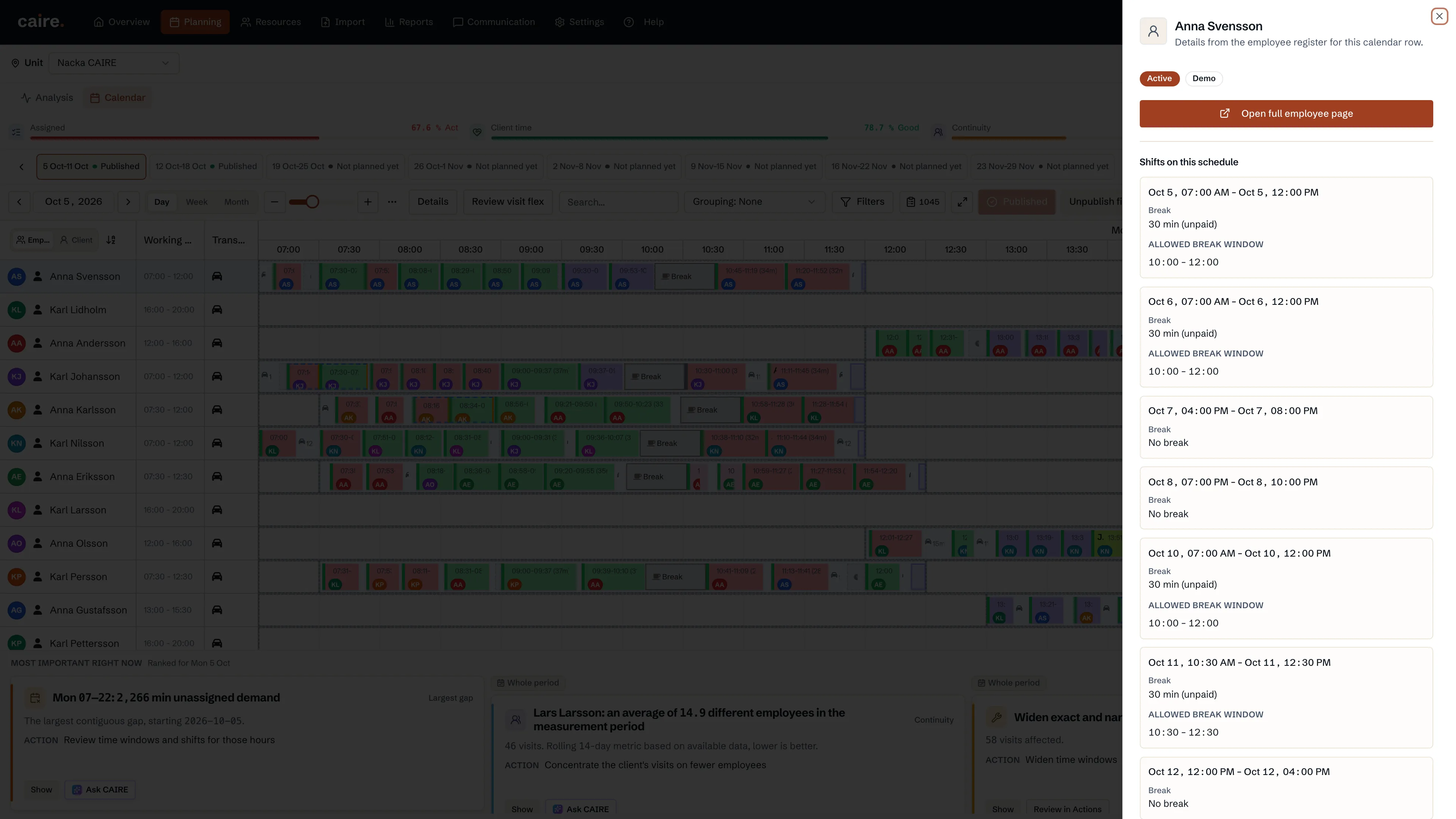
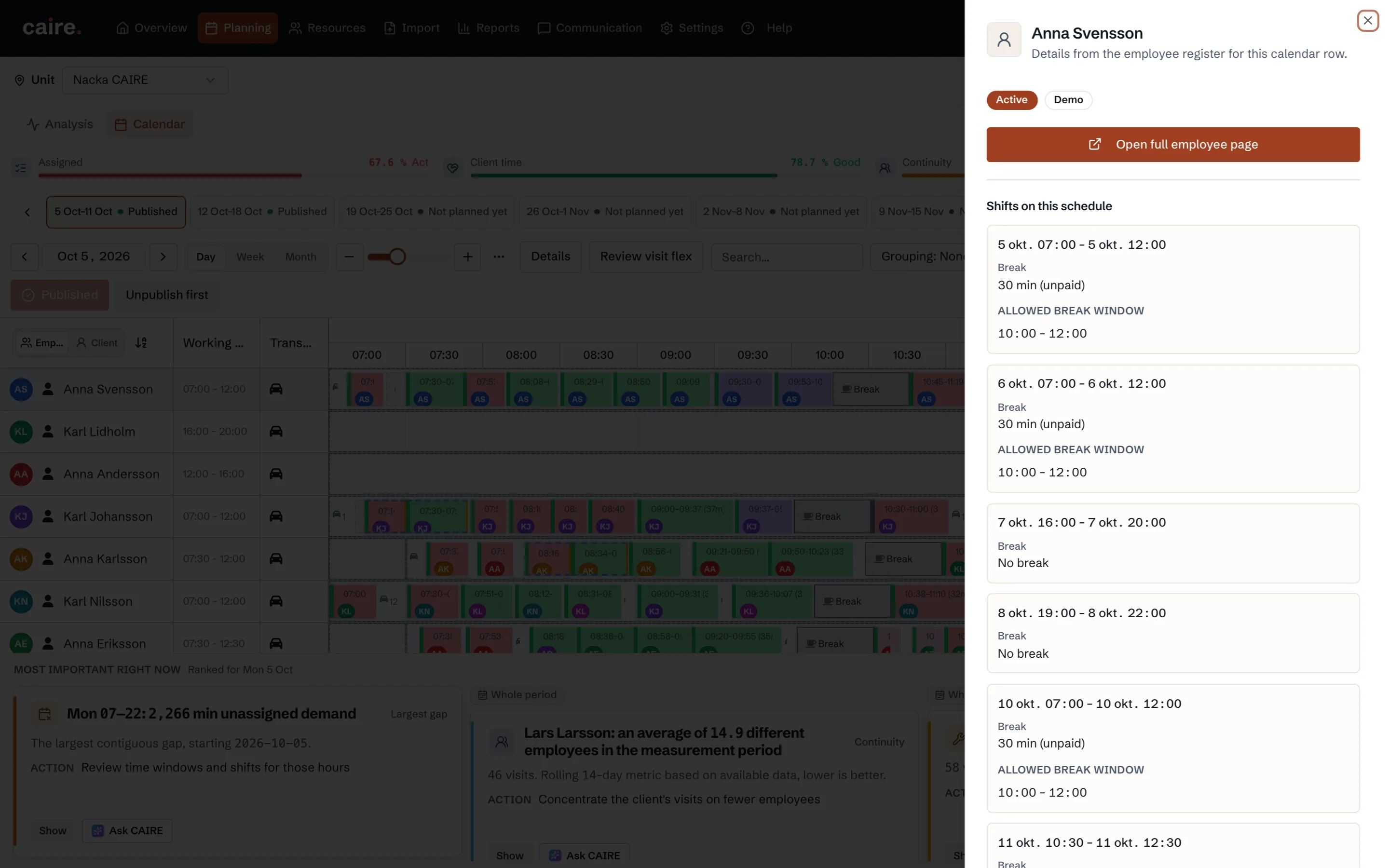
                      Employee shift details with a saved break window

                      Approved image · Cropped detail

                      Approved: 2026-10-10

                      Image annotation
                      Employee shift details with a saved break window
                        The native employee view shows the allowed break window, bounded by the selected shift, from the same saved shift pool as the calendar.The planner can inspect a break window for a real saved shift. The window uses the persisted break row and is bounded by the shift's start and end; it is not a synthetic default window.
                        Open approved image full size

                        Image shows: The native employee view shows the allowed break window, bounded by the selected shift, from the same saved shift pool as the calendar.

                        What it demonstrates: The planner can inspect a break window for a real saved shift. The window uses the persisted break row and is bounded by the shift's start and end; it is not a synthetic default window.

                        Product URL

                        CAIRE platform

                        app.caire.se

                        View/route template: /schedules/:scheduleId/solutions/:solutionIdThe template shows where the view lives. Record IDs resolve to a selected record in the app and are not a direct link.

                        Website destinations and suggestions
                        • Image libraryIn current website sourceImage treatment: Cropped detail
                        • SchedulingSuggestionImage treatment: Cropped detail
                        Capture source and setup

                        Source module: Planering · Medarbetarens rastfönster

                        Opens in CAIRE: Kalender → medarbetarrad → Visa anställd → Skift i schemat

                        Capture scenario: Synthetic demonstration scenario S1

                        Capture setup
                        1. Verifiera S1:s sparade kalender och dess angivna skiftpool
                        2. Läs skiften igen med samma schema och skiftpool som kalendern och välj en medarbetare med ett skift som har rastminuter och ett sparat rastfönster
                        3. Öppna Visa anställd från samma medarbetarrad och visa det matchande skiftets rastfönster
                        CAIRE platformPlanning and calendar

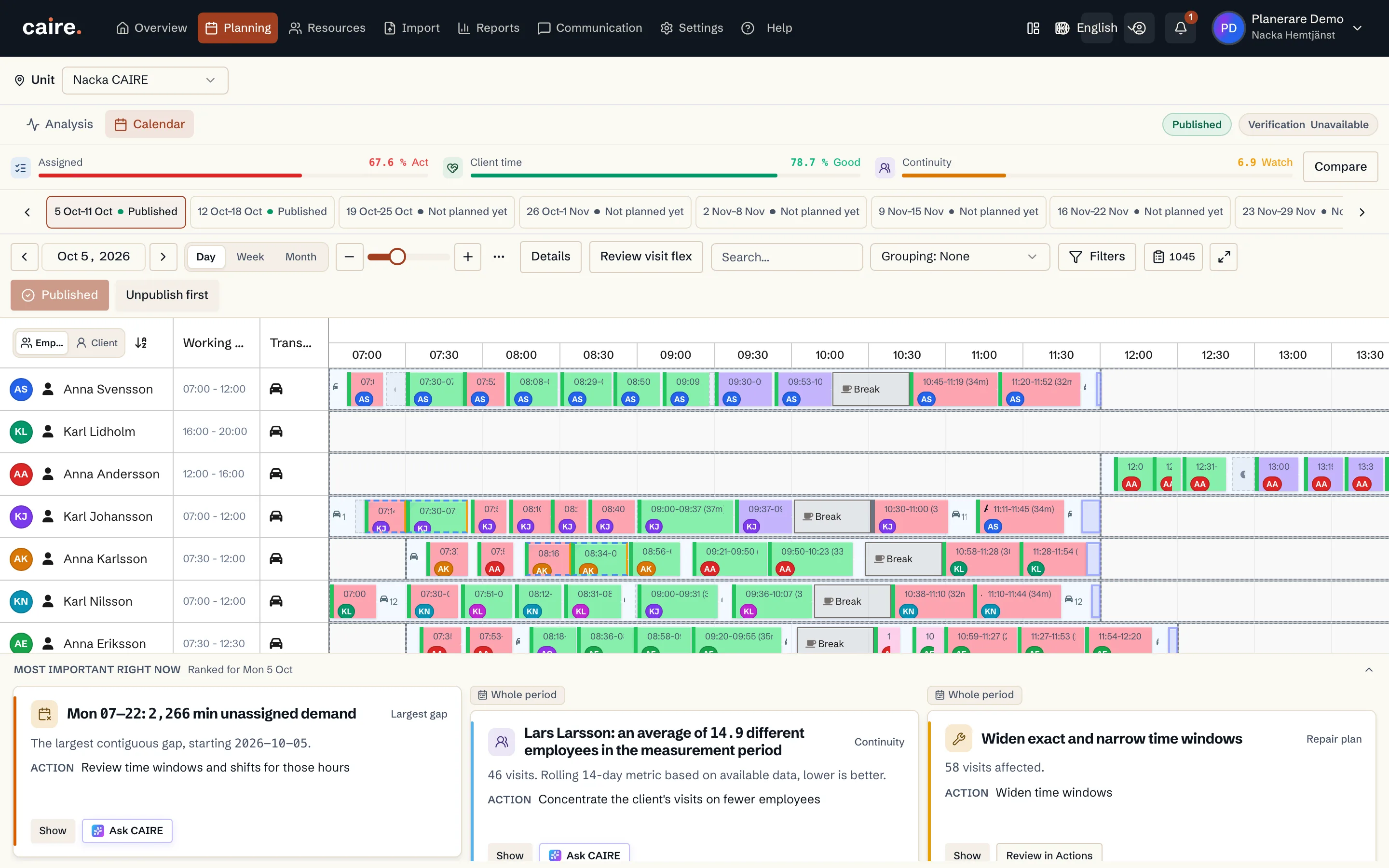
                        Actual analysis findings pinned below the calendar day view

                        Approved image · Image and caption

                        Approved: 2026-10-10

                        Actual analysis findings pinned below the calendar day view
                        The calendar shows findings for the selected solution's day.Findings come from the calendar's real solution and day reads.
                        Open approved image full size

                        Image shows: The calendar shows findings for the selected solution's day.

                        What it demonstrates: Findings come from the calendar's real solution and day reads.

                        Product URL

                        CAIRE platform

                        app.caire.se

                        View/route template: /schedules/:scheduleId/solutions/:solutionIdThe template shows where the view lives. Record IDs resolve to a selected record in the app and are not a direct link.

                        Website destinations and suggestions
                        • Image libraryIn current website sourceImage treatment: Image and caption
                        • SchedulingSuggestionImage treatment: Image and caption
                        Capture source and setup

                        Source module: Planering · Kalenderinsikter

                        Opens in CAIRE: Schema → Kalender → vald lösning → Viktigast just nu under kalendern

                        Capture scenario: Synthetic demonstration scenario S1

                        Capture setup
                        1. Öppna kalendern för sparat färdigt DEV-resultat
                        2. Välj dagsvy och öppna kalenderns insiktsrad
                        3. Fortsätt endast om den riktiga kalenderläsningen returnerar minst ett fynd
                        CAIRE platformPlanning and calendar

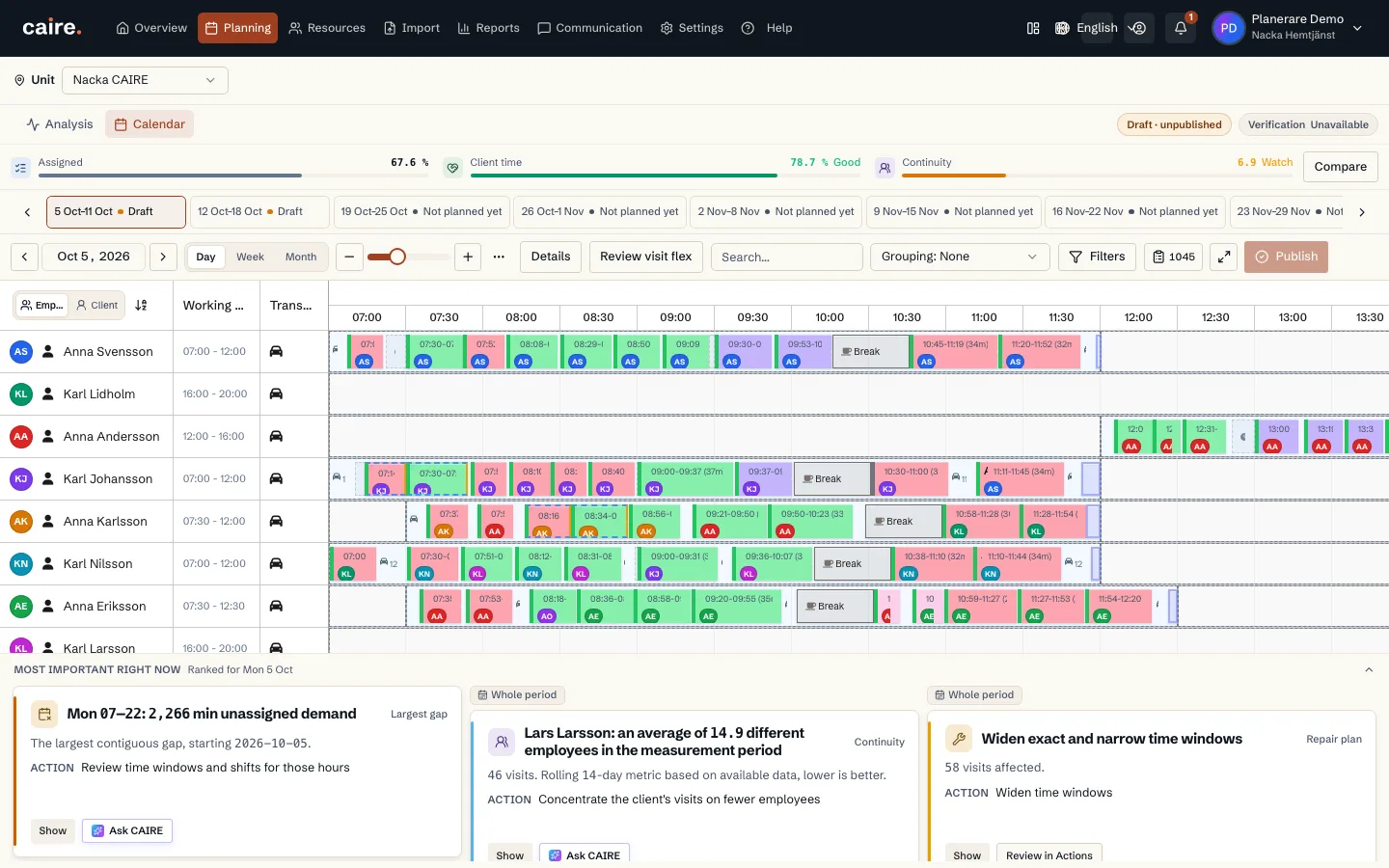
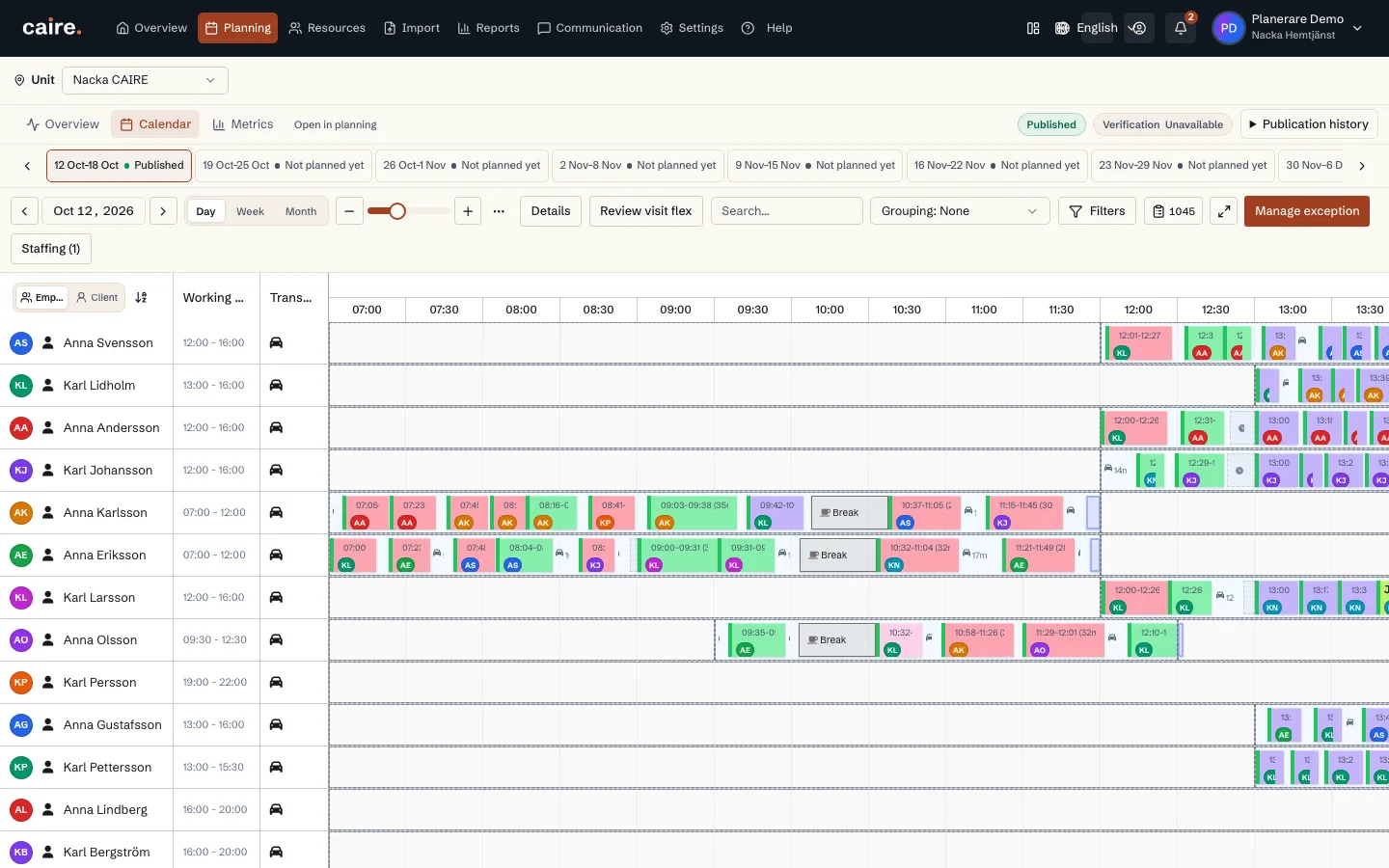
                        Daily calendar of employees’ planned visits

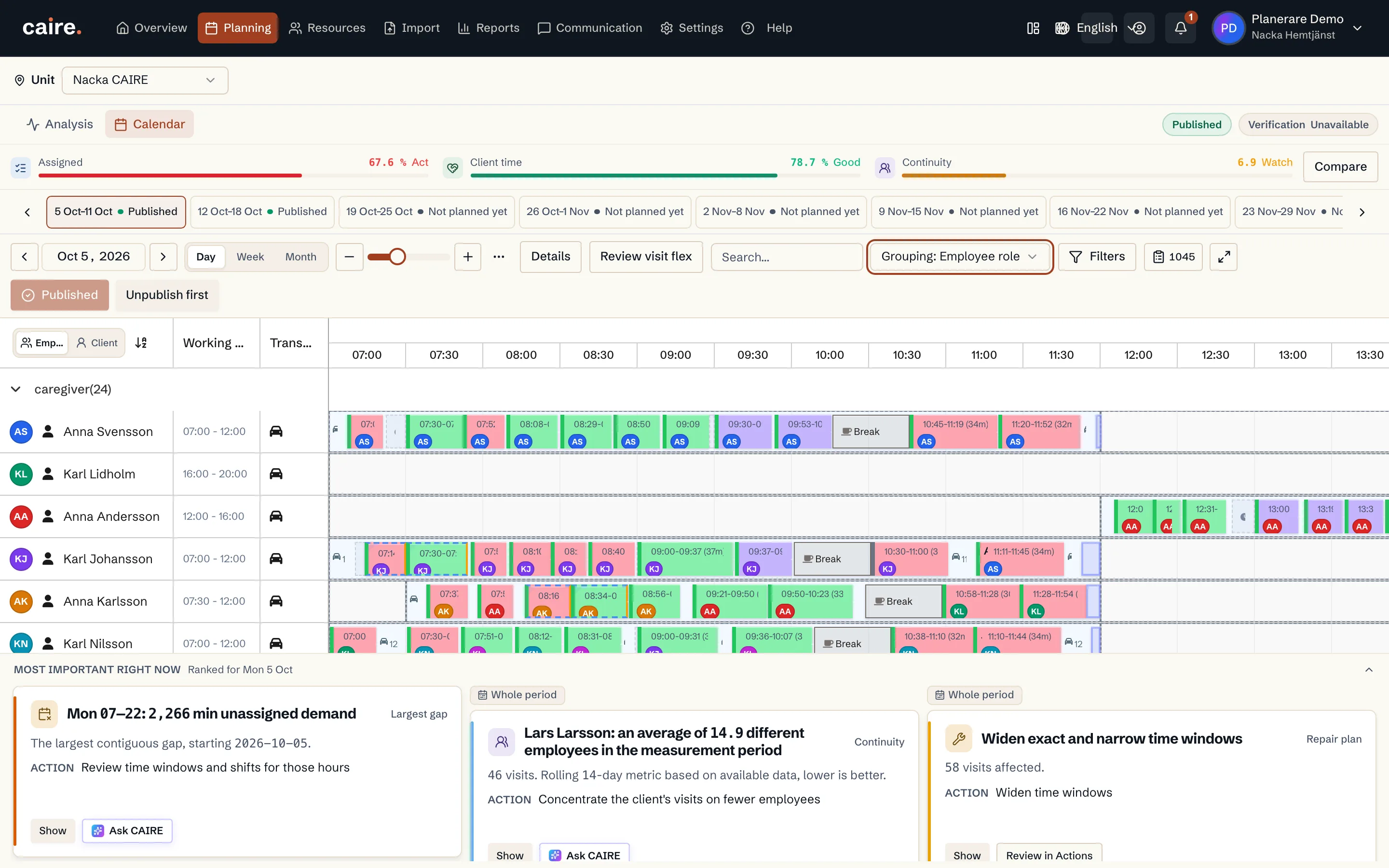
                        Approved image · Image and caption

                        Approved: 2026-10-10

                        Daily calendar of employees’ planned visits
                        Follow visit times and order through the day.The calendar shows visits from the selected planning result.
                        Open approved image full size

                        Image shows: Follow visit times and order through the day.

                        What it demonstrates: The calendar shows visits from the selected planning result.

                        Product URL

                        CAIRE platform

                        app.caire.se

                        View/route template: /schedules/:scheduleId/solutions/:solutionIdThe template shows where the view lives. Record IDs resolve to a selected record in the app and are not a direct link.

                        Website destinations and suggestions
                        • Image libraryIn current website sourceImage treatment: Image and caption
                        • SchedulingSuggestionImage treatment: Image and caption
                        Capture source and setup

                        Source module: Dagvy

                        Opens in CAIRE: Planering → Kalender → Dag

                        Capture scenario: Synthetic demonstration scenario S1

                        Capture setup
                        1. Öppna det sparade DEV-resultatet i Planering
                        CAIRE platformPlanning and calendar

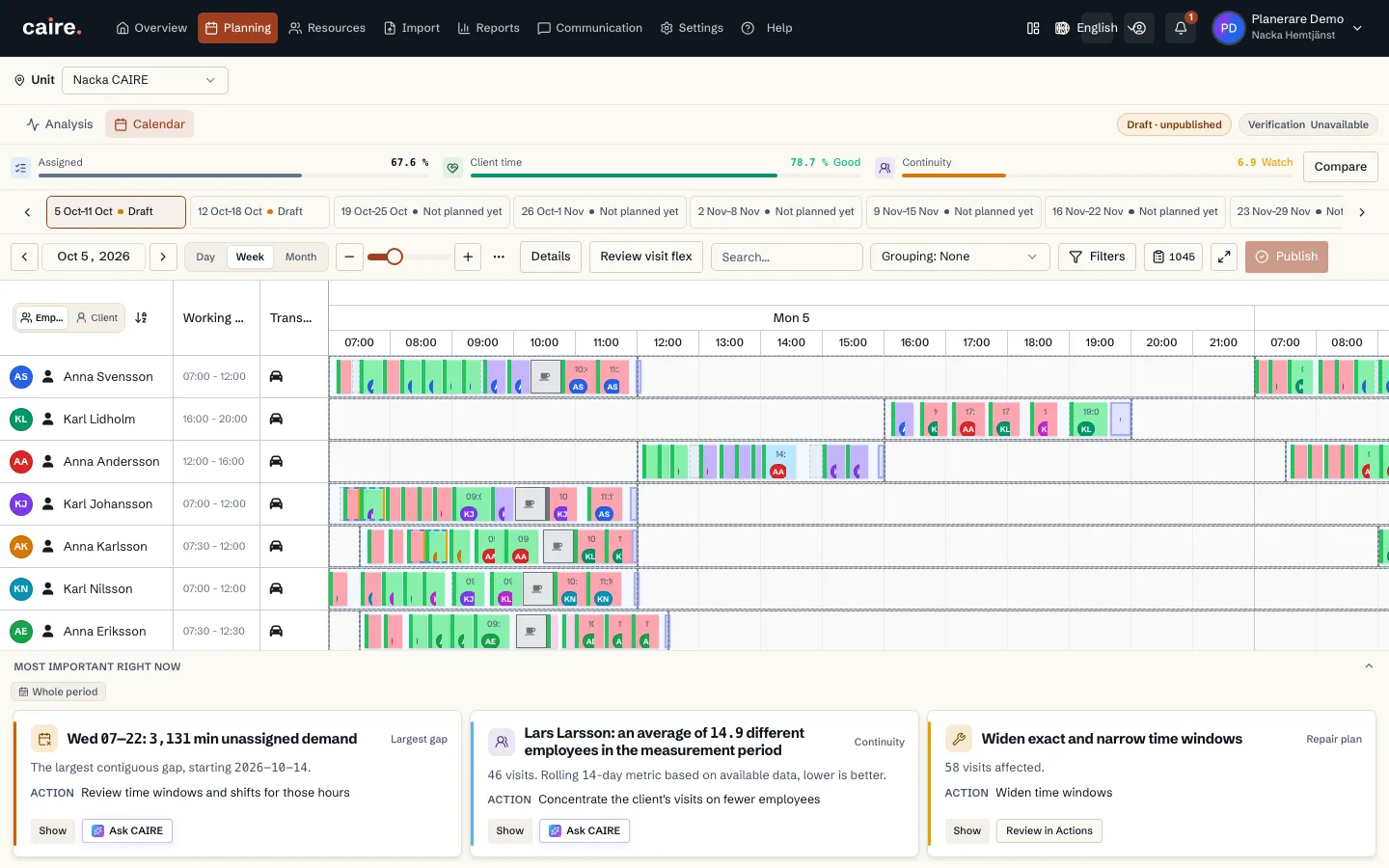
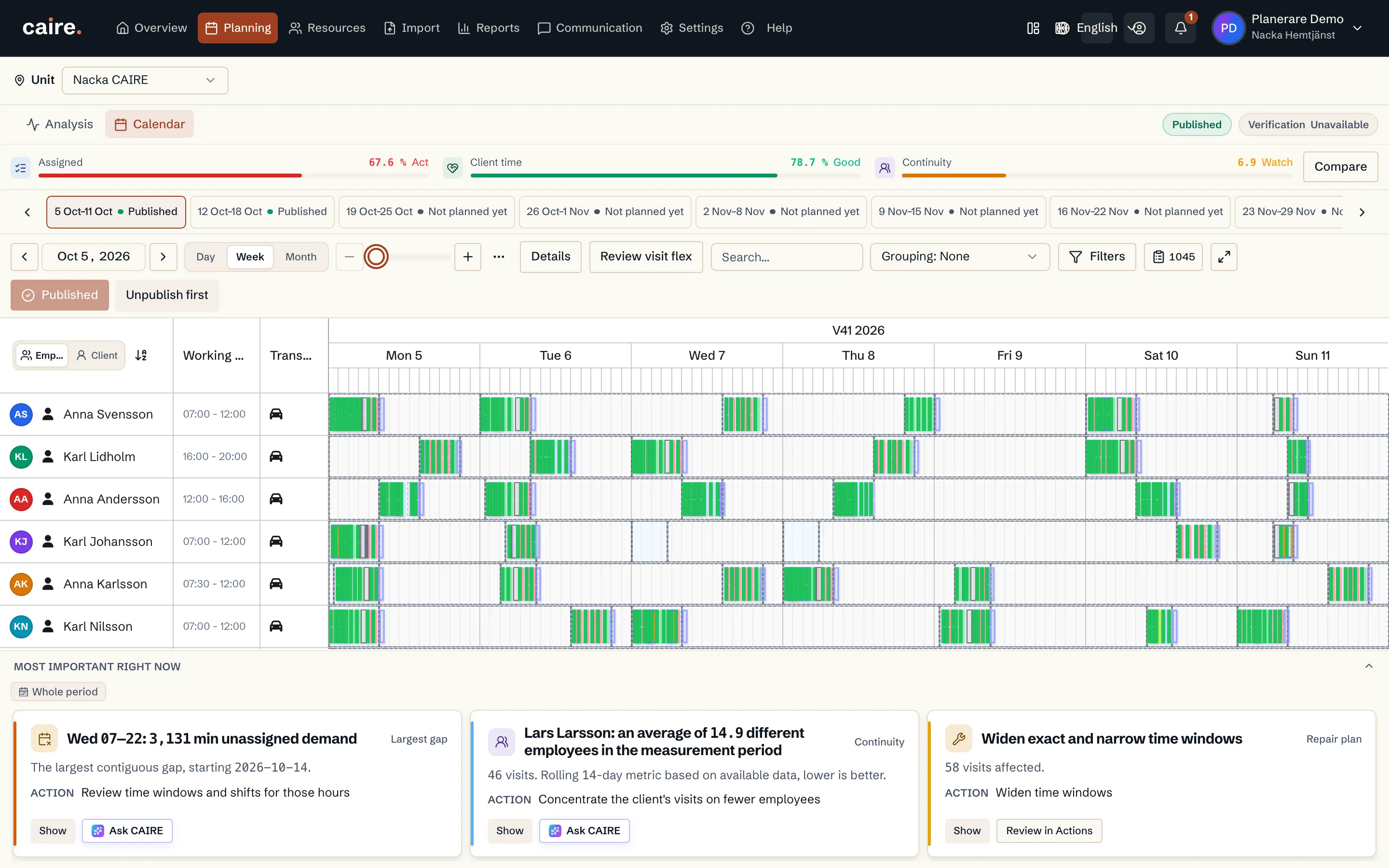
                        Weekly calendar of employees’ planned visits

                        Approved image · Image and caption

                        Approved: 2026-10-10

                        Weekly calendar of employees’ planned visits
                        See how visits are arranged across the planning week.The week view shows visits from the selected planning result across the week.
                        Open approved image full size

                        Image shows: See how visits are arranged across the planning week.

                        What it demonstrates: The week view shows visits from the selected planning result across the week.

                        Product URL

                        CAIRE platform

                        app.caire.se

                        View/route template: /schedules/:scheduleId/solutions/:solutionIdThe template shows where the view lives. Record IDs resolve to a selected record in the app and are not a direct link.

                        Website destinations and suggestions
                        • Image libraryIn current website sourceImage treatment: Image and caption
                        • SchedulingSuggestionImage treatment: Image and caption
                        Capture source and setup

                        Source module: Veckovy

                        Opens in CAIRE: Planering → Kalender → Vecka

                        Capture scenario: Synthetic demonstration scenario S1

                        Capture setup
                        1. Öppna det sparade DEV-resultatet i Planering
                        CAIRE platformPlanning and calendar

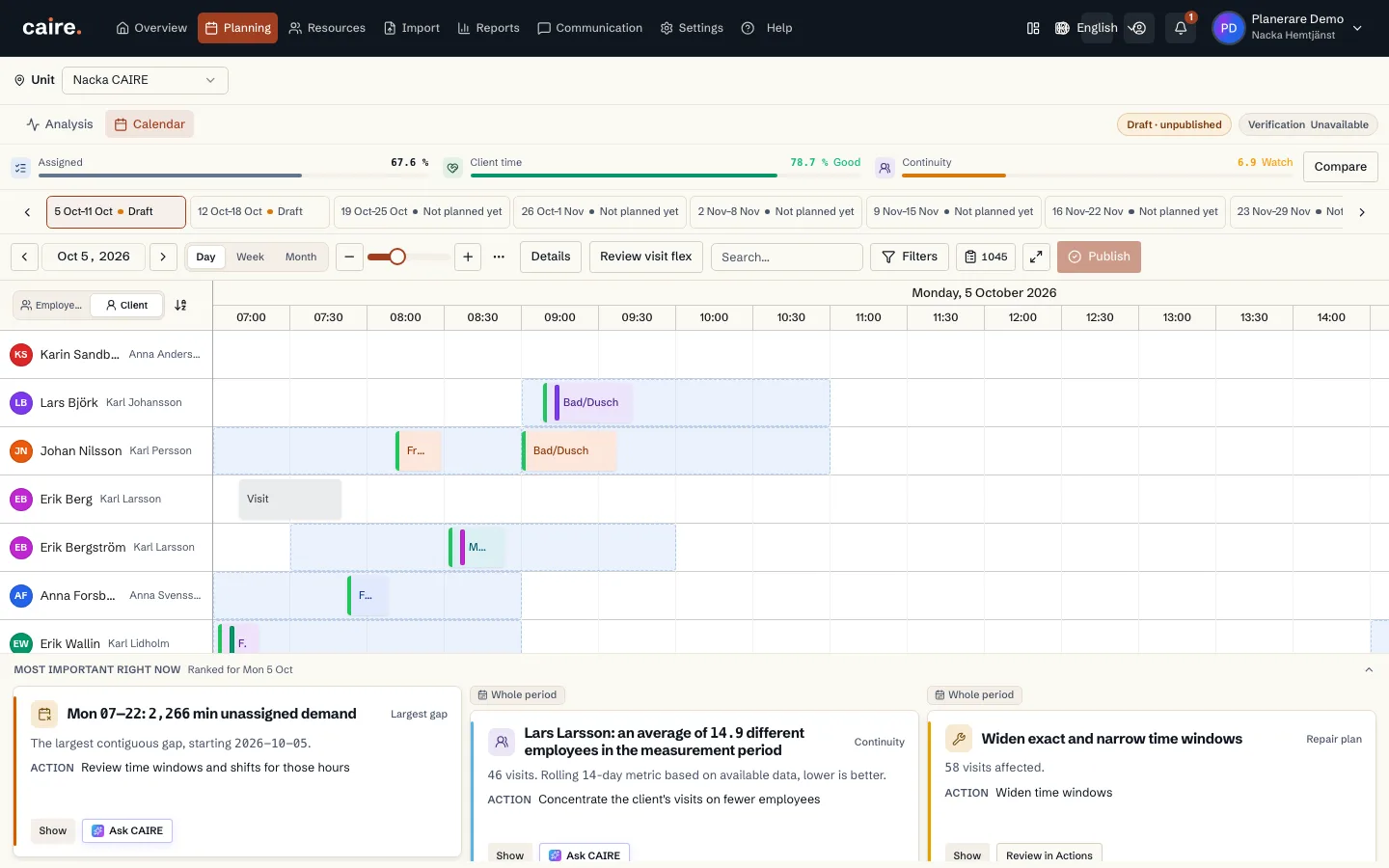
                        Daily calendar grouped by client

                        Approved image · Image and caption

                        Approved: 2026-10-10

                        Daily calendar grouped by client
                        Follow clients’ planned visits through the day.Client rows show visits from the selected planning result by client.
                        Open approved image full size

                        Image shows: Follow clients’ planned visits through the day.

                        What it demonstrates: Client rows show visits from the selected planning result by client.

                        Product URL

                        CAIRE platform

                        app.caire.se

                        View/route template: /schedules/:scheduleId/solutions/:solutionIdThe template shows where the view lives. Record IDs resolve to a selected record in the app and are not a direct link.

                        Website destinations and suggestions
                        • Image libraryIn current website sourceImage treatment: Image and caption
                        • SchedulingSuggestionImage treatment: Image and caption
                        Capture source and setup

                        Source module: Kundvy

                        Opens in CAIRE: Planering → Kalender → Kundrader → Dag

                        Capture scenario: Synthetic demonstration scenario S1

                        Capture setup
                        1. Öppna det sparade DEV-resultatet i Planering
                        CAIRE platformPlanning and calendar

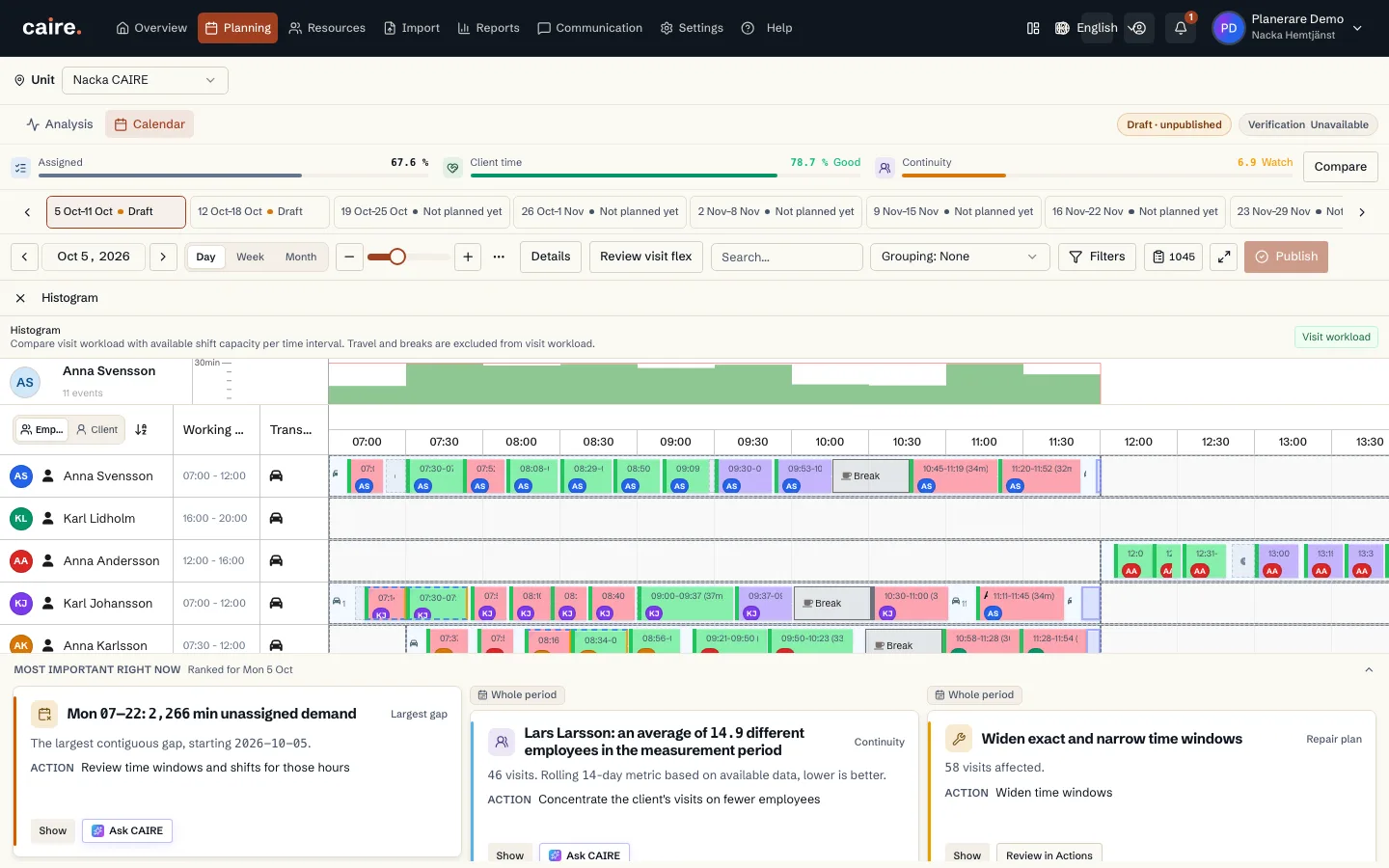
                        Histogram of visit workload and shift capacity

                        Approved image · Image and caption

                        Approved: 2026-10-10

                        Histogram of visit workload and shift capacity
                        Compare visit workload with available shift capacity by interval.The histogram reads visits and capacity from the calendar’s selected result.
                        Open approved image full size

                        Image shows: Compare visit workload with available shift capacity by interval.

                        What it demonstrates: The histogram reads visits and capacity from the calendar’s selected result.

                        Product URL

                        CAIRE platform

                        app.caire.se

                        View/route template: /schedules/:scheduleId/solutions/:solutionIdThe template shows where the view lives. Record IDs resolve to a selected record in the app and are not a direct link.

                        Website destinations and suggestions
                        • Image libraryIn current website sourceImage treatment: Image and caption
                        • SchedulingSuggestionImage treatment: Image and caption
                        Capture source and setup

                        Source module: Histogram

                        Opens in CAIRE: Planering → Detaljer → Histogram

                        Capture scenario: Synthetic demonstration scenario S1

                        Capture setup
                        1. Öppna det sparade DEV-resultatet i Planering
                        CAIRE platformPlanning and calendar

                        Calendar of resource capacity use by time interval

                        Approved image · Image and caption

                        Approved: 2026-10-10

                        Calendar of resource capacity use by time interval
                        Compare planned resource use across the day.The view shows resource utilization from the calendar’s selected result.
                        Open approved image full size

                        Image shows: Compare planned resource use across the day.

                        What it demonstrates: The view shows resource utilization from the calendar’s selected result.

                        Product URL

                        CAIRE platform

                        app.caire.se

                        View/route template: /schedules/:scheduleId/solutions/:solutionIdThe template shows where the view lives. Record IDs resolve to a selected record in the app and are not a direct link.

                        Website destinations and suggestions
                        • Image libraryIn current website sourceImage treatment: Image and caption
                        • SchedulingSuggestionImage treatment: Image and caption
                        Capture source and setup

                        Source module: Utnyttjande

                        Opens in CAIRE: Planering → Detaljer → Utnyttjande

                        Capture scenario: Synthetic demonstration scenario S1

                        Capture setup
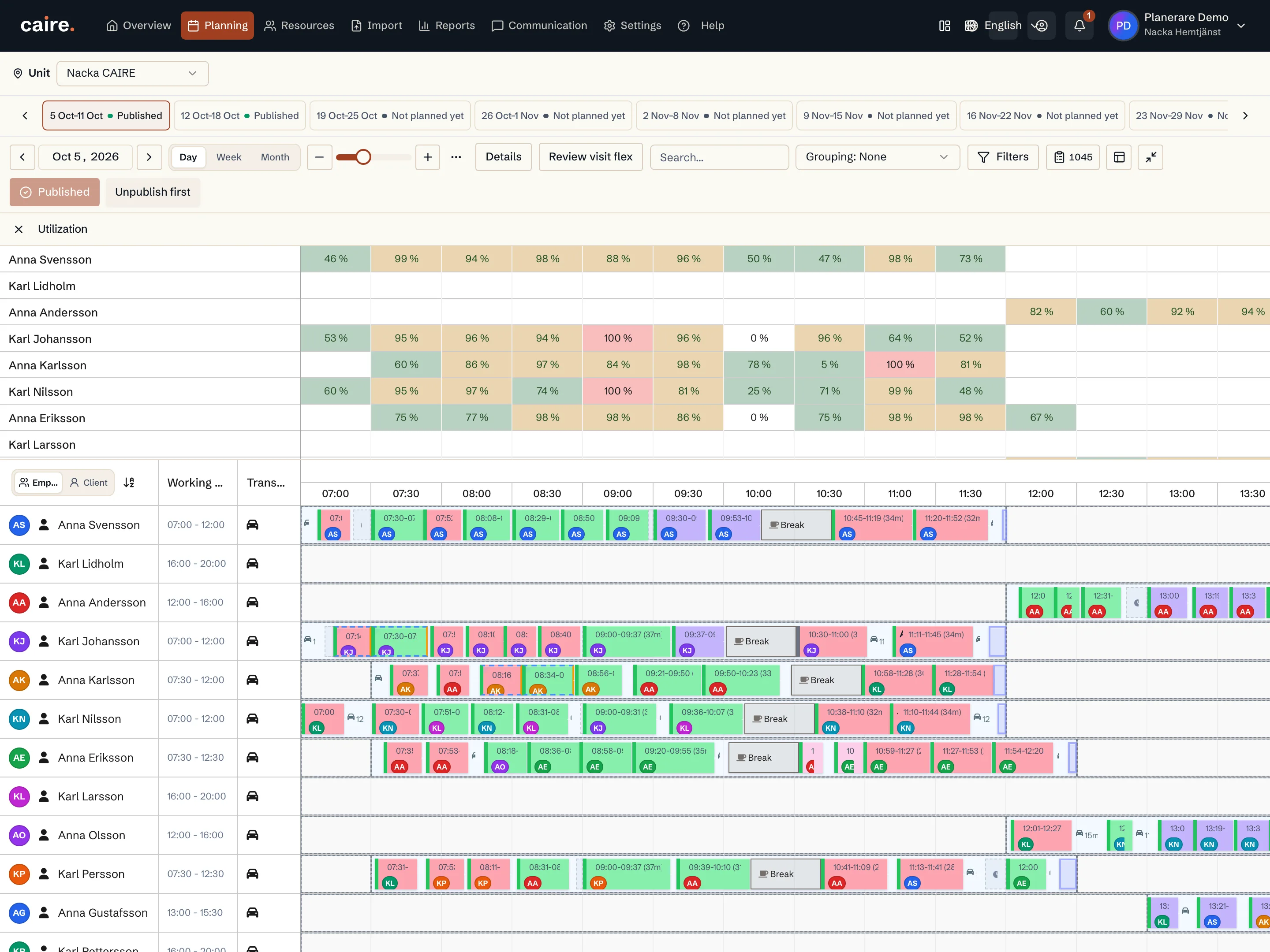
                        1. Öppna det sparade DEV-resultatet i Planering
                        CAIRE platformPlanning and calendar

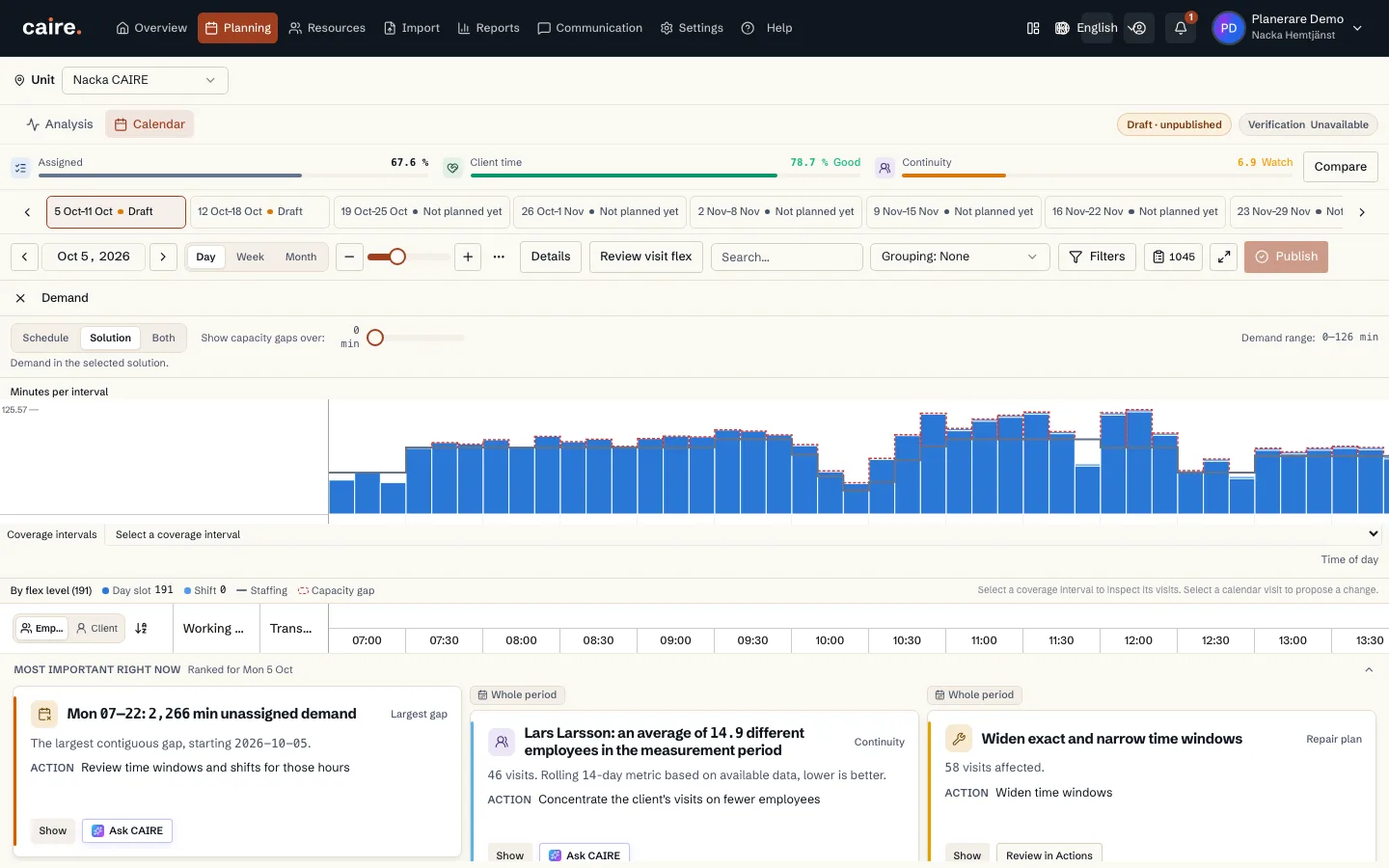
                        Timeline of demand, staffing and capacity gaps

                        Approved image · Image and caption

                        Approved: 2026-10-10

                        Timeline of demand, staffing and capacity gaps
                        Follow demand and staffing across the day’s intervals.The chart shows demand data for the selected schedule and result.
                        Open approved image full size

                        Image shows: Follow demand and staffing across the day’s intervals.

                        What it demonstrates: The chart shows demand data for the selected schedule and result.

                        Product URL

                        CAIRE platform

                        app.caire.se

                        View/route template: /schedules/:scheduleId/solutions/:solutionIdThe template shows where the view lives. Record IDs resolve to a selected record in the app and are not a direct link.

                        Website destinations and suggestions
                        • Image libraryIn current website sourceImage treatment: Image and caption
                        • SchedulingSuggestionImage treatment: Image and caption
                        Capture source and setup

                        Source module: Efterfrågan

                        Opens in CAIRE: Planering → Detaljer → Efterfrågan

                        Capture scenario: Synthetic demonstration scenario S1

                        Capture setup
                        1. Öppna det sparade DEV-resultatet i Planering
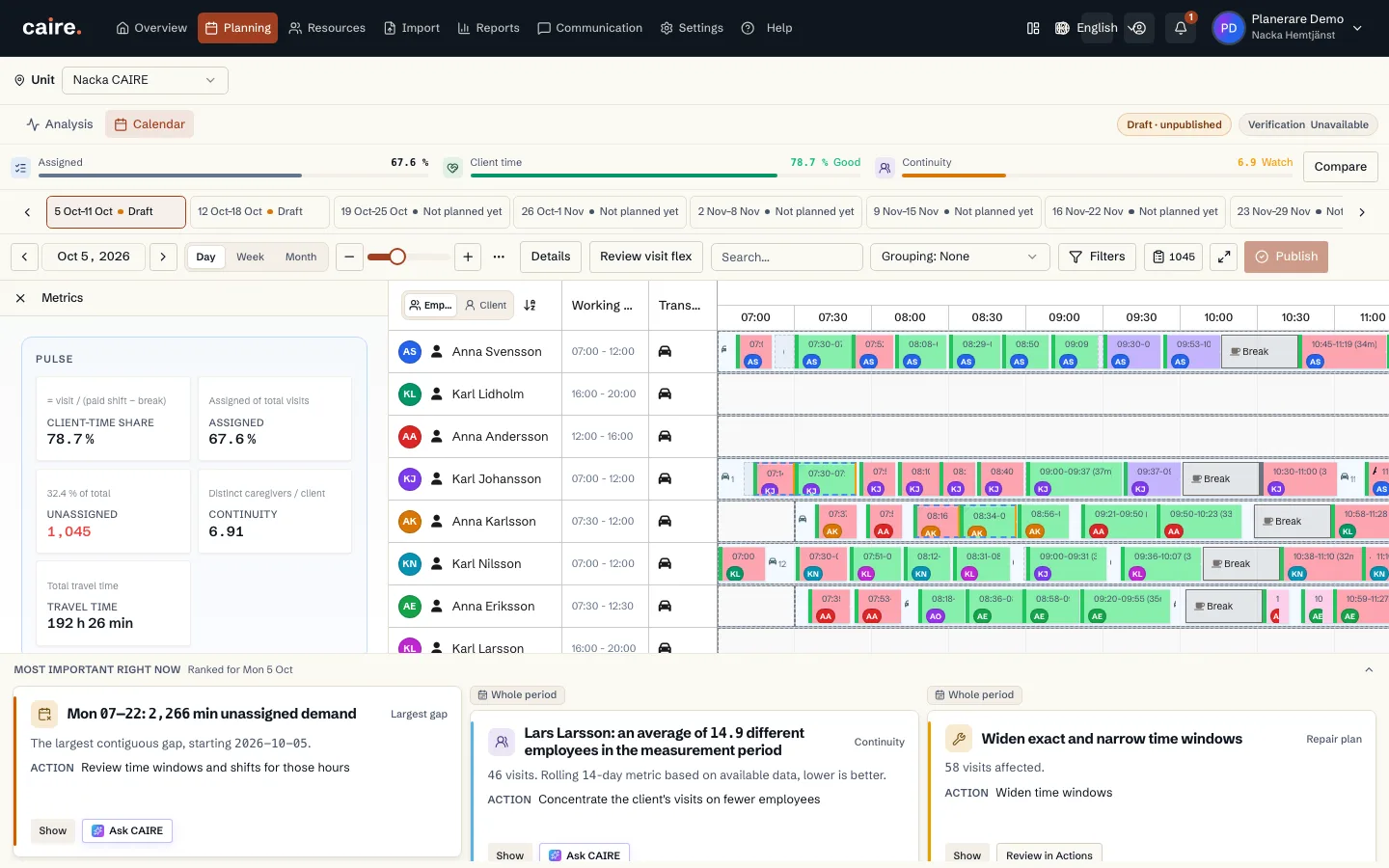
                        CAIRE platformPlanning and calendar

                        Four visible metrics for the calendar’s selected planning result

                        Approved image · Image and caption

                        Approved: 2026-10-10

                        Four visible metrics for the calendar’s selected planning result
                        Review client-time share, assigned visits, unassigned visits and continuity.The panel shows four visible measures from the calendar’s selected solution.
                        Open approved image full size

                        Image shows: Review client-time share, assigned visits, unassigned visits and continuity.

                        What it demonstrates: The panel shows four visible measures from the calendar’s selected solution.

                        Product URL

                        CAIRE platform

                        app.caire.se

                        View/route template: /schedules/:scheduleId/solutions/:solutionIdThe template shows where the view lives. Record IDs resolve to a selected record in the app and are not a direct link.

                        Website destinations and suggestions
                        • Image libraryIn current website sourceImage treatment: Image and caption
                        • SchedulingSuggestionImage treatment: Image and caption
                        Capture source and setup

                        Source module: Nyckeltal

                        Opens in CAIRE: Planering → Detaljer → Nyckeltal

                        Capture scenario: Synthetic demonstration scenario S1

                        Capture setup
                        1. Öppna det sparade DEV-resultatet i Planering
                        CAIRE platformPlanning and calendar

                        Travel-time card for the calendar’s selected planning result

                        Approved image · Image and caption

                        Approved: 2026-10-10

                        Travel-time card for the calendar’s selected planning result
                        Review the solution’s reported travel time in the Metrics panel.The card shows the travel-time value from the calendar’s selected solution.
                        Open approved image full size

                        Image shows: Review the solution’s reported travel time in the Metrics panel.

                        What it demonstrates: The card shows the travel-time value from the calendar’s selected solution.

                        Product URL

                        CAIRE platform

                        app.caire.se

                        View/route template: /schedules/:scheduleId/solutions/:solutionIdThe template shows where the view lives. Record IDs resolve to a selected record in the app and are not a direct link.

                        Website destinations and suggestions
                        • Image libraryIn current website sourceImage treatment: Image and caption
                        • SchedulingSuggestionImage treatment: Image and caption
                        Capture source and setup

                        Source module: Nyckeltal · restid

                        Opens in CAIRE: Planering → Detaljer → Nyckeltal → Restid

                        Capture scenario: Synthetic demonstration scenario S1

                        Capture setup
                        1. Öppna det sparade DEV-resultatet i Planering
                        CAIRE platformPlanning and calendar

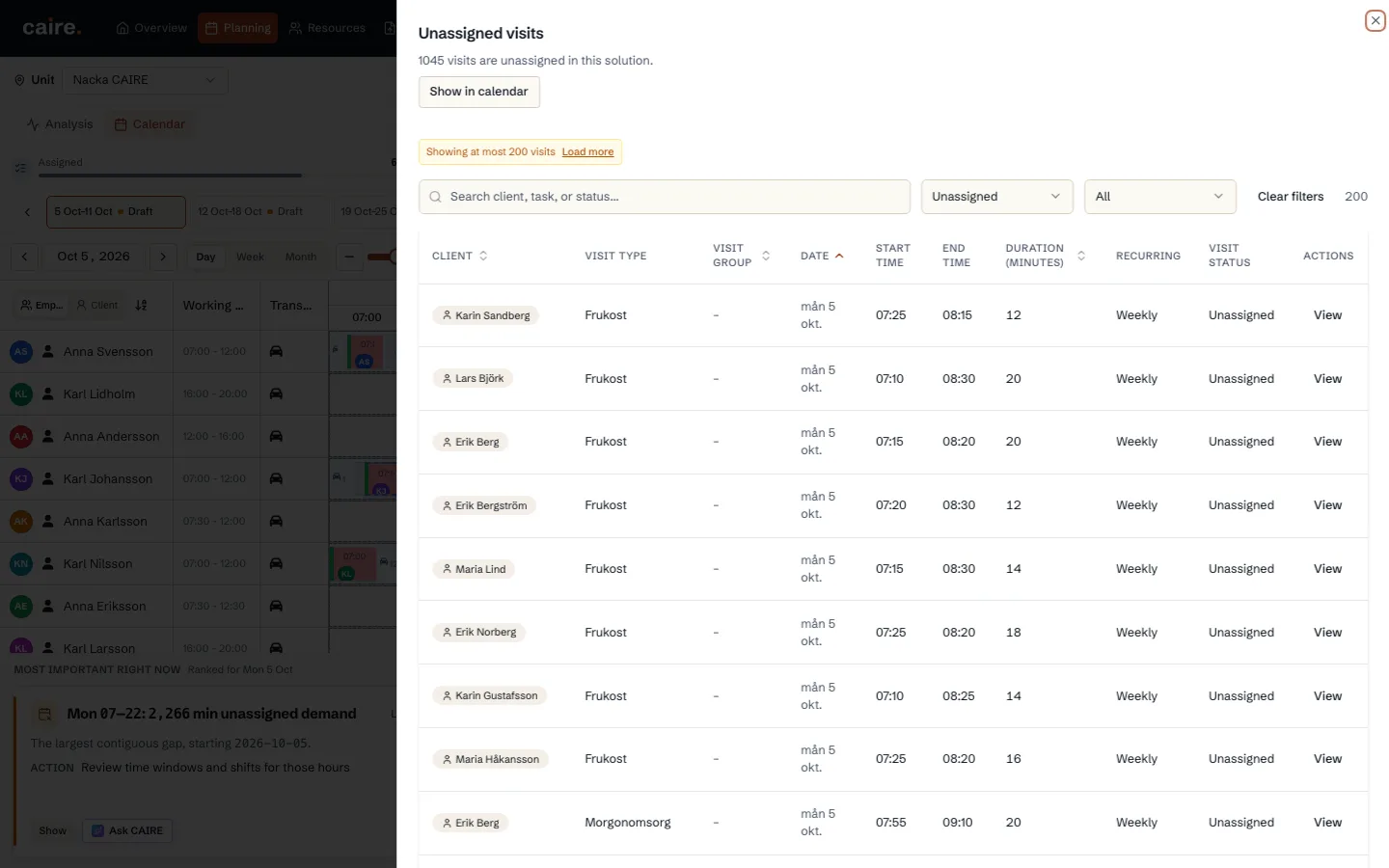
                        List of visits without an employee assignment

                        Approved image · Image and caption

                        Approved: 2026-10-10

                        List of visits without an employee assignment
                        Open the list and review visits without an assignment.The list shows unassigned visits in the calendar’s selected planning result.
                        Open approved image full size

                        Image shows: Open the list and review visits without an assignment.

                        What it demonstrates: The list shows unassigned visits in the calendar’s selected planning result.

                        Product URL

                        CAIRE platform

                        app.caire.se

                        View/route template: /schedules/:scheduleId/solutions/:solutionIdThe template shows where the view lives. Record IDs resolve to a selected record in the app and are not a direct link.

                        Website destinations and suggestions
                        • Image libraryIn current website sourceImage treatment: Image and caption
                        • SchedulingSuggestionImage treatment: Image and caption
                        Capture source and setup

                        Source module: Otilldelade besök

                        Opens in CAIRE: Planering → Kalender → Otilldelade besök

                        Capture scenario: Synthetic demonstration scenario S1

                        Capture setup
                        1. Öppna det sparade DEV-resultatet i Planering
                        CAIRE platformPlanning and calendar

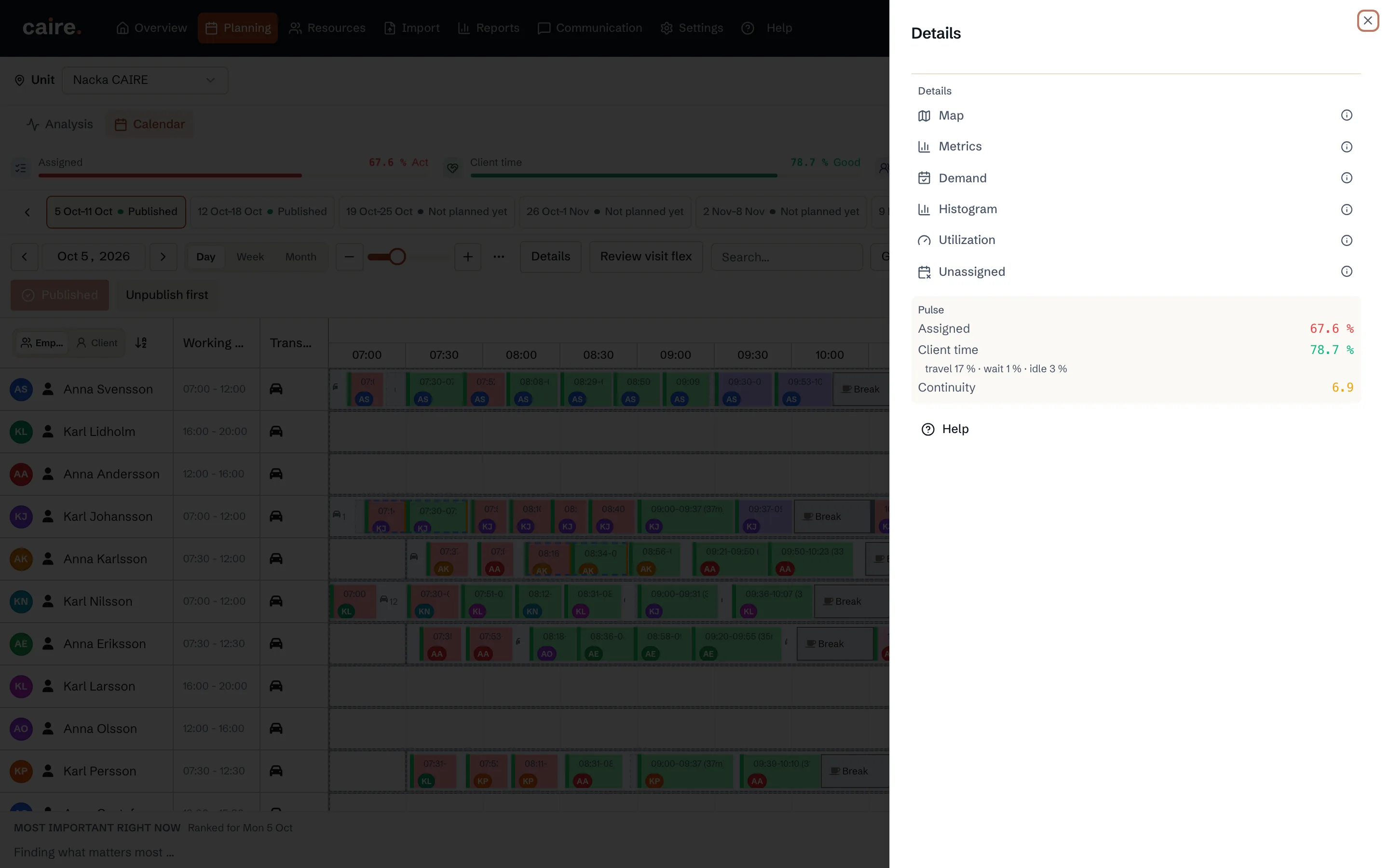
                        Details panel with calendar view controls

                        Approved image · Image and caption

                        Approved: 2026-10-10

                        Details panel with calendar view controls
                        Open the panel to reach calendar detail modes.The panel shows the detail modes available for this calendar.
                        Open approved image full size

                        Image shows: Open the panel to reach calendar detail modes.

                        What it demonstrates: The panel shows the detail modes available for this calendar.

                        Product URL

                        CAIRE platform

                        app.caire.se

                        View/route template: /schedules/:scheduleId/solutions/:solutionIdThe template shows where the view lives. Record IDs resolve to a selected record in the app and are not a direct link.

                        Website destinations and suggestions
                        • Image libraryIn current website sourceImage treatment: Image and caption
                        • SchedulingSuggestionImage treatment: Image and caption
                        Capture source and setup

                        Source module: Kalenderdetaljer

                        Opens in CAIRE: Planering → Kalender → Detaljer

                        Capture scenario: Synthetic demonstration scenario S1

                        Capture setup
                        1. Öppna det sparade DEV-resultatet i Planering
                        CAIRE platformPlanning and calendar

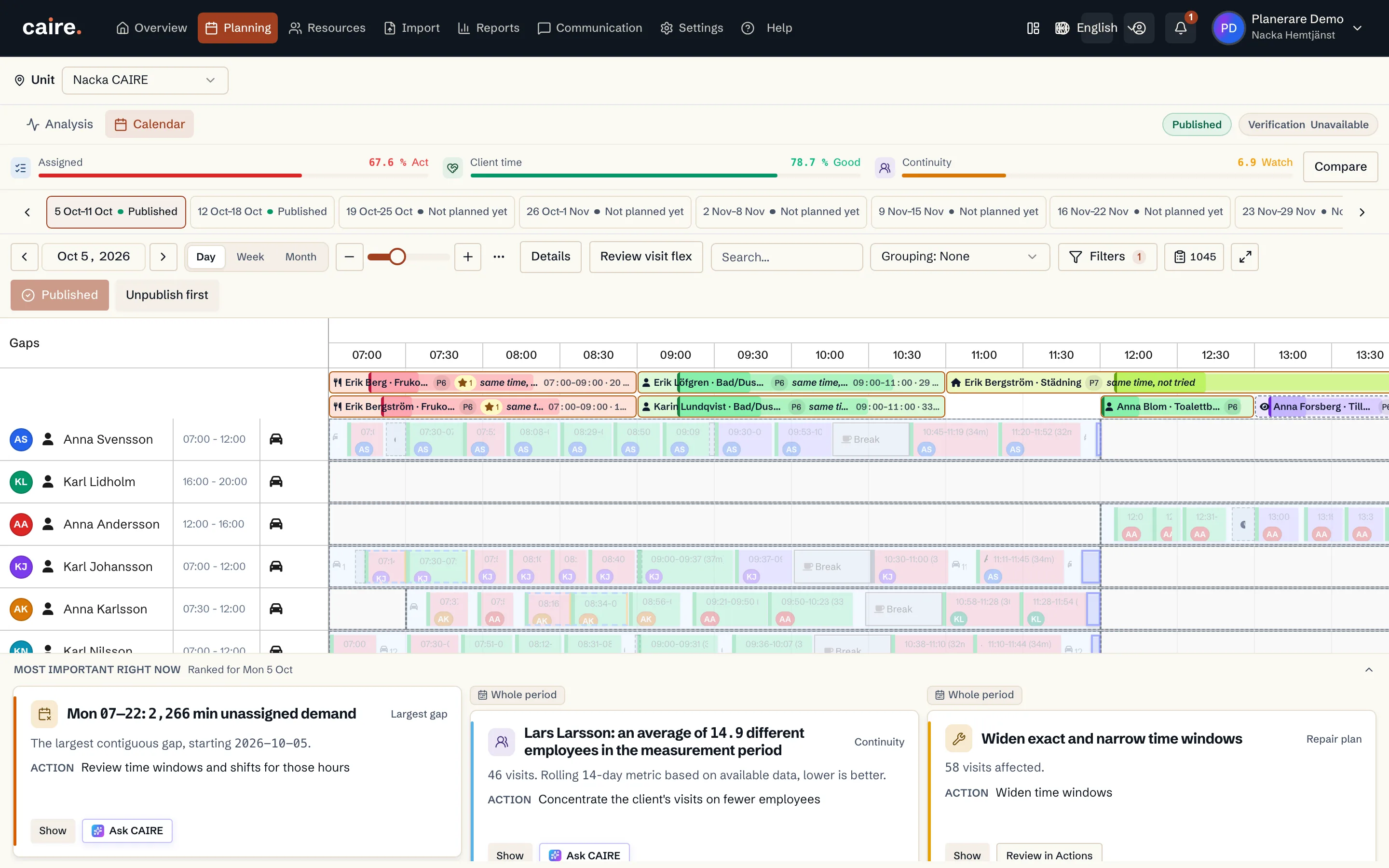
                        Calendar with unassigned visits in their allowed time windows

                        Approved image · Image and caption

                        Approved: 2026-10-10

                        Calendar with unassigned visits in their allowed time windows
                        Review unassigned visits grouped above the employee calendar.The view shows unassigned visits from the selected solution.
                        Open approved image full size

                        Image shows: Review unassigned visits grouped above the employee calendar.

                        What it demonstrates: The view shows unassigned visits from the selected solution.

                        Product URL

                        CAIRE platform

                        app.caire.se

                        View/route template: /schedules/:scheduleId/solutions/:solutionIdThe template shows where the view lives. Record IDs resolve to a selected record in the app and are not a direct link.

                        Website destinations and suggestions
                        • Image libraryIn current website sourceImage treatment: Image and caption
                        • SchedulingSuggestionImage treatment: Image and caption
                        Capture source and setup

                        Source module: Otilldelade i kalendern

                        Opens in CAIRE: Planering → Kalender → Detaljer → Otilldelade

                        Capture scenario: Synthetic demonstration scenario S1

                        Capture setup
                        1. Öppna det sparade DEV-resultatet i Planering
                        CAIRE platformPlanning and calendar

                        Detail panel for a scheduled visit

                        Approved image · Image and caption

                        Approved: 2026-10-10

                        Detail panel for a scheduled visit
                        Review the visit’s scheduled time and duration.The panel shows details for the selected calendar visit.
                        Open approved image full size

                        Image shows: Review the visit’s scheduled time and duration.

                        What it demonstrates: The panel shows details for the selected calendar visit.

                        Product URL

                        CAIRE platform

                        app.caire.se

                        View/route template: /schedules/:scheduleId/solutions/:solutionIdThe template shows where the view lives. Record IDs resolve to a selected record in the app and are not a direct link.

                        Website destinations and suggestions
                        • Image libraryIn current website sourceImage treatment: Image and caption
                        • SchedulingSuggestionImage treatment: Image and caption
                        Capture source and setup

                        Source module: Besöksdetaljer

                        Opens in CAIRE: Planering → Kalender → välj ett besök

                        Capture scenario: Synthetic demonstration scenario S1

                        Capture setup
                        1. Öppna det sparade DEV-resultatet i Planering
                        CAIRE platformPlanning and calendar

                        Detail panel for an employee and their scheduled shifts

                        Approved image · Image and caption

                        Approved: 2026-10-10

                        Detail panel for an employee and their scheduled shifts
                        Review the employee’s shifts shown on the calendar row.The panel shows shifts from the selected calendar schedule.
                        Open approved image full size

                        Image shows: Review the employee’s shifts shown on the calendar row.

                        What it demonstrates: The panel shows shifts from the selected calendar schedule.

                        Product URL

                        CAIRE platform

                        app.caire.se

                        View/route template: /schedules/:scheduleId/solutions/:solutionIdThe template shows where the view lives. Record IDs resolve to a selected record in the app and are not a direct link.

                        Website destinations and suggestions
                        • Image libraryIn current website sourceImage treatment: Image and caption
                        • SchedulingSuggestionImage treatment: Image and caption
                        Capture source and setup

                        Source module: Medarbetardetaljer i kalendern

                        Opens in CAIRE: Planering → Kalender → öppna en medarbetares radmeny

                        Capture scenario: Synthetic demonstration scenario S1

                        Capture setup
                        1. Öppna det sparade DEV-resultatet i Planering
                        CAIRE platformPlanning and calendar

                        Calendar with employee rows grouped by role

                        Approved image · Image and caption

                        Approved: 2026-10-10

                        Calendar with employee rows grouped by role
                        View calendar employees within their role groups.The grouping uses the roles present on calendar employees.
                        Open approved image full size

                        Image shows: View calendar employees within their role groups.

                        What it demonstrates: The grouping uses the roles present on calendar employees.

                        Product URL

                        CAIRE platform

                        app.caire.se

                        View/route template: /schedules/:scheduleId/solutions/:solutionIdThe template shows where the view lives. Record IDs resolve to a selected record in the app and are not a direct link.

                        Website destinations and suggestions
                        • Image libraryIn current website sourceImage treatment: Image and caption
                        • SchedulingSuggestionImage treatment: Image and caption
                        Capture source and setup

                        Source module: Kalender grupperad per roll

                        Opens in CAIRE: Planering → Kalender → Gruppering → Medarbetarroll

                        Capture scenario: Synthetic demonstration scenario S1

                        Capture setup
                        1. Öppna det sparade DEV-resultatet i Planering
                        CAIRE platformPlanning and calendar

                        Calendar filtered to break events

                        Approved image · Image and caption

                        Approved: 2026-10-10

                        Calendar filtered to break events
                        Show the break events present in the selected calendar result.The filter shows only breaks present in the calendar’s saved data.
                        Open approved image full size

                        Image shows: Show the break events present in the selected calendar result.

                        What it demonstrates: The filter shows only breaks present in the calendar’s saved data.

                        Product URL

                        CAIRE platform

                        app.caire.se

                        View/route template: /schedules/:scheduleId/solutions/:solutionIdThe template shows where the view lives. Record IDs resolve to a selected record in the app and are not a direct link.

                        Website destinations and suggestions
                        • Image libraryIn current website sourceImage treatment: Image and caption
                        • SchedulingSuggestionImage treatment: Image and caption
                        Capture source and setup

                        Source module: Rastlager i kalendern

                        Opens in CAIRE: Planering → Kalender → Filter → Paus

                        Capture scenario: Synthetic demonstration scenario S1

                        Capture setup
                        1. Öppna det sparade DEV-resultatet i Planering
                        CAIRE platformPlanning and calendar

                        Calendar view of employees’ visits

                        Approved image · Image and caption

                        Approved: 2026-10-10

                        Calendar view of employees’ visits
                        Visit order and routes connect the working day.The calendar shows visit placement and employees’ working days. Read it together with the planning result and organisational rules.
                        Open approved image full size

                        Image shows: Visit order and routes connect the working day.

                        What it demonstrates: The calendar shows visit placement and employees’ working days. Read it together with the planning result and organisational rules.

                        Product URL

                        CAIRE platform

                        app.caire.se

                        View/route template: /schedules/:scheduleId/solutions/:solutionIdThe template shows where the view lives. Record IDs resolve to a selected record in the app and are not a direct link.

                        Website destinations and suggestions
                        • Image libraryIn current website sourceImage treatment: Image and caption
                        • SchedulingSuggestionImage treatment: Image and caption
                        Capture source and setup

                        Source module: Kalender

                        Opens in CAIRE: Planering → Kalender, vecka

                        Capture scenario: Existing product image retained with its source context

                        Capture setup
                        1. Öppna kalendern i veckovy
                        CAIRE platformAnalysis and results

                        The report's paired bars for planned and performed visit duration

                        Approved image · Image and caption

                        Approved: 2026-10-10

                        The report's paired bars for planned and performed visit duration
                        Two bars compare paired planned time with imported performed time.Values come from the report's saved planned and performed bindings for the same period.
                        Open approved image full size

                        Image shows: Two bars compare paired planned time with imported performed time.

                        What it demonstrates: Values come from the report's saved planned and performed bindings for the same period.

                        Product URL

                        CAIRE platform

                        app.caire.se

                        View/route template: /schedules/:scheduleId/solutions/:solutionId/reportThe template shows where the view lives. Record IDs resolve to a selected record in the app and are not a direct link.

                        Website destinations and suggestions
                        Capture source and setup

                        Source module: Rapport · Plan mot utfört

                        Opens in CAIRE: Schema → rapport → vald, redan accepterad eCare-period → Plan mot utfört: nyckeltal

                        Capture scenario: Synthetic demonstration scenario S4

                        Capture setup
                        1. Öppna den sparade S4-rapporten och välj Plan mot utfört: nyckeltal
                        2. Visa den parade jämförelsen för samma besök
                        CAIRE platformAnalysis and results

                        The report's charts of deviations from planned start times

                        Approved image · Image and caption

                        Approved: 2026-10-10

                        The report's charts of deviations from planned start times
                        The section shows how early or late visits started compared with the plan.Charts appear only when imported clocks and coverage support the measurements.
                        Open approved image full size

                        Image shows: The section shows how early or late visits started compared with the plan.

                        What it demonstrates: Charts appear only when imported clocks and coverage support the measurements.

                        Product URL

                        CAIRE platform

                        app.caire.se

                        View/route template: /schedules/:scheduleId/solutions/:solutionId/reportThe template shows where the view lives. Record IDs resolve to a selected record in the app and are not a direct link.

                        Website destinations and suggestions
                        Capture source and setup

                        Source module: Rapport · Starttider

                        Opens in CAIRE: Schema → rapport → vald, redan accepterad eCare-period → Plan mot utfört: starttider

                        Capture scenario: Synthetic demonstration scenario S4

                        Capture setup
                        1. Öppna den sparade S4-rapporten och välj Plan mot utfört: starttider
                        2. Fortsätt bara när båda native diagrammen innehåller mätta värden
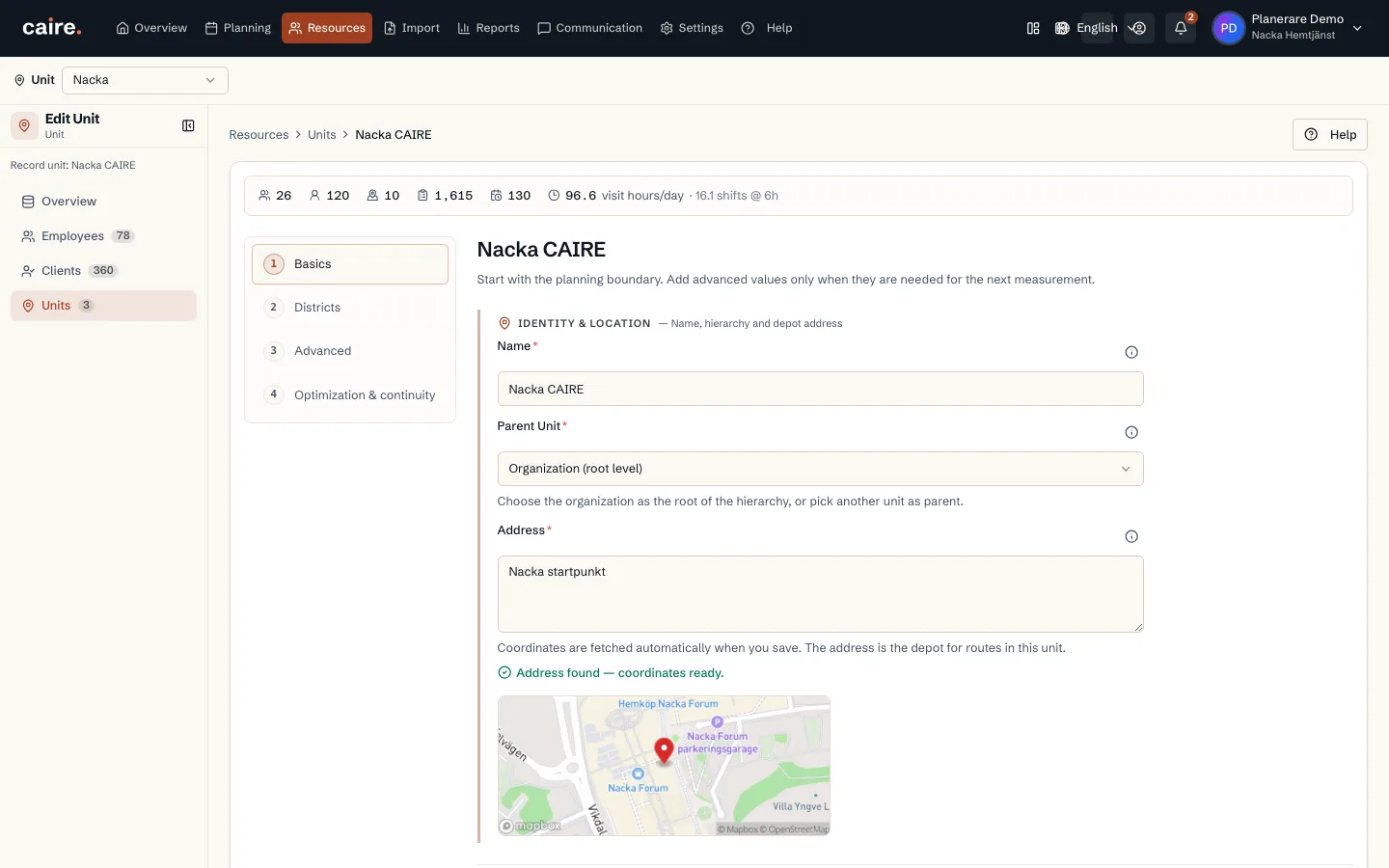
                        CAIRE platformAnalysis and results

                        The report's continuity distribution for the selected Caire solution

                        Approved image · Image and caption

                        Approved: 2026-10-10

                        The report's continuity distribution for the selected Caire solution
                        The chart shows how many different caregivers clients meet in the selected solution.The distribution comes from the completed solution's saved continuity metrics.
                        Open approved image full size

                        Image shows: The chart shows how many different caregivers clients meet in the selected solution.

                        What it demonstrates: The distribution comes from the completed solution's saved continuity metrics.

                        Product URL

                        CAIRE platform

                        app.caire.se

                        View/route template: /schedules/:scheduleId/solutions/:solutionId/reportThe template shows where the view lives. Record IDs resolve to a selected record in the app and are not a direct link.

                        Website destinations and suggestions
                        Capture source and setup

                        Source module: Rapport · Kontinuitet

                        Opens in CAIRE: Schema → färdig DEV-lösning → rapport → Kontinuitet

                        Capture scenario: Synthetic demonstration scenario S2

                        Capture setup
                        1. Öppna rapporten för en färdig CAIRE-lösning i DEV och välj Kontinuitet
                        2. Fortsätt bara när den valda CAIRE-sidan har mätta kontinuitetsband
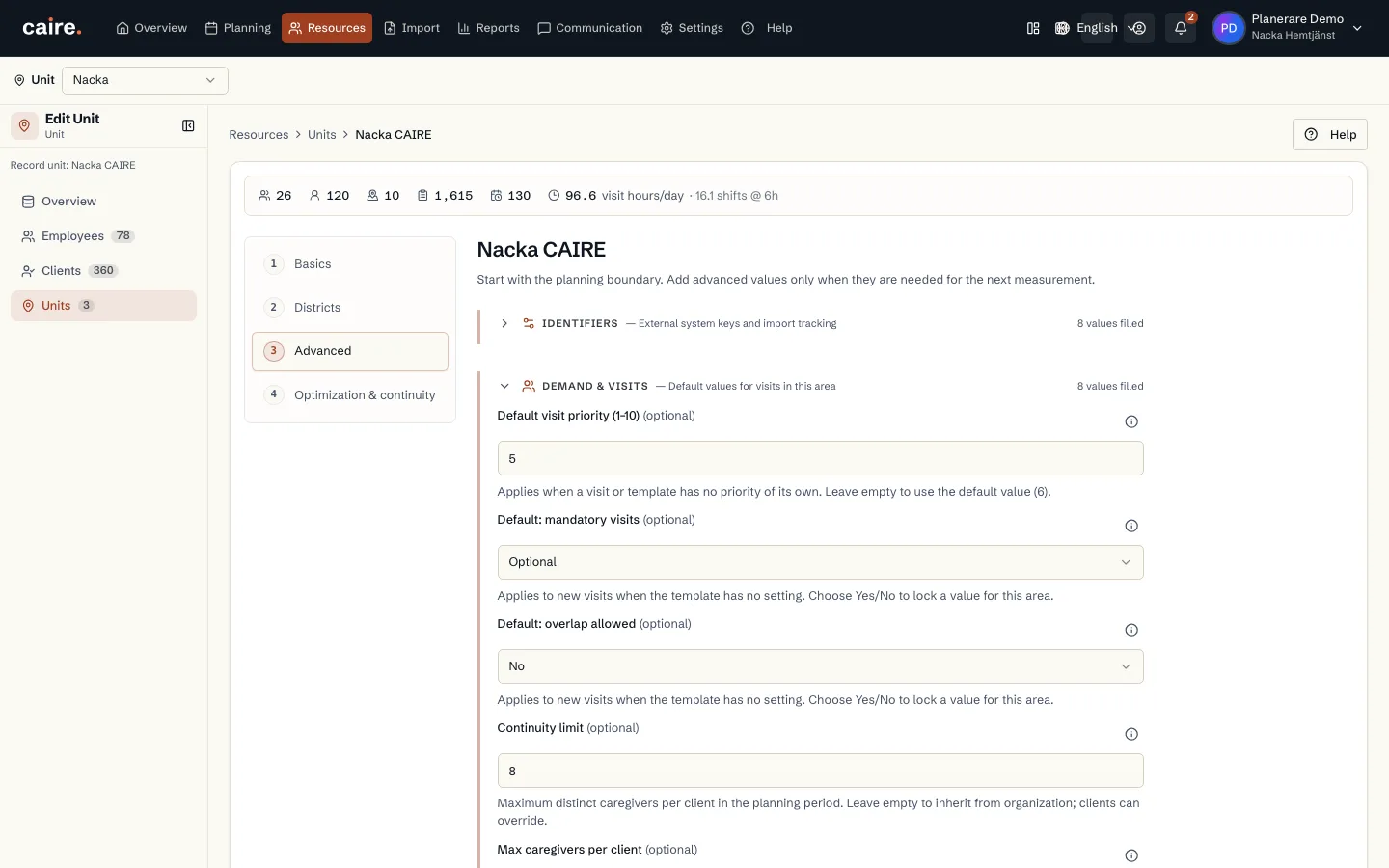
                        CAIRE platformAnalysis and results

                        Report chart for a completed Caire solution and its reference

                        Approved image · Image and caption

                        Approved: 2026-10-10

                        Report chart for a completed Caire solution and its reference
                        The section shows the report's comparison when its data contains a qualified CAIRE side.The comparison uses a completed Caire result and its saved reference for the same period.
                        Open approved image full size

                        Image shows: The section shows the report's comparison when its data contains a qualified CAIRE side.

                        What it demonstrates: The comparison uses a completed Caire result and its saved reference for the same period.

                        Product URL

                        CAIRE platform

                        app.caire.se

                        View/route template: /schedules/:scheduleId/solutions/:solutionId/reportThe template shows where the view lives. Record IDs resolve to a selected record in the app and are not a direct link.

                        Website destinations and suggestions
                        Capture source and setup

                        Source module: Rapport · CAIRE-jämförelse

                        Opens in CAIRE: Schema → färdig DEV-lösning → rapport → Caires schema mot referensen

                        Capture scenario: Synthetic demonstration scenario S2

                        Capture setup
                        1. Kräver en färdig CAIRE-lösning i DEV och en annan sparad referenslösning
                        2. Fortsätt bara om den riktiga rapporten visar jämförelsediagrammet
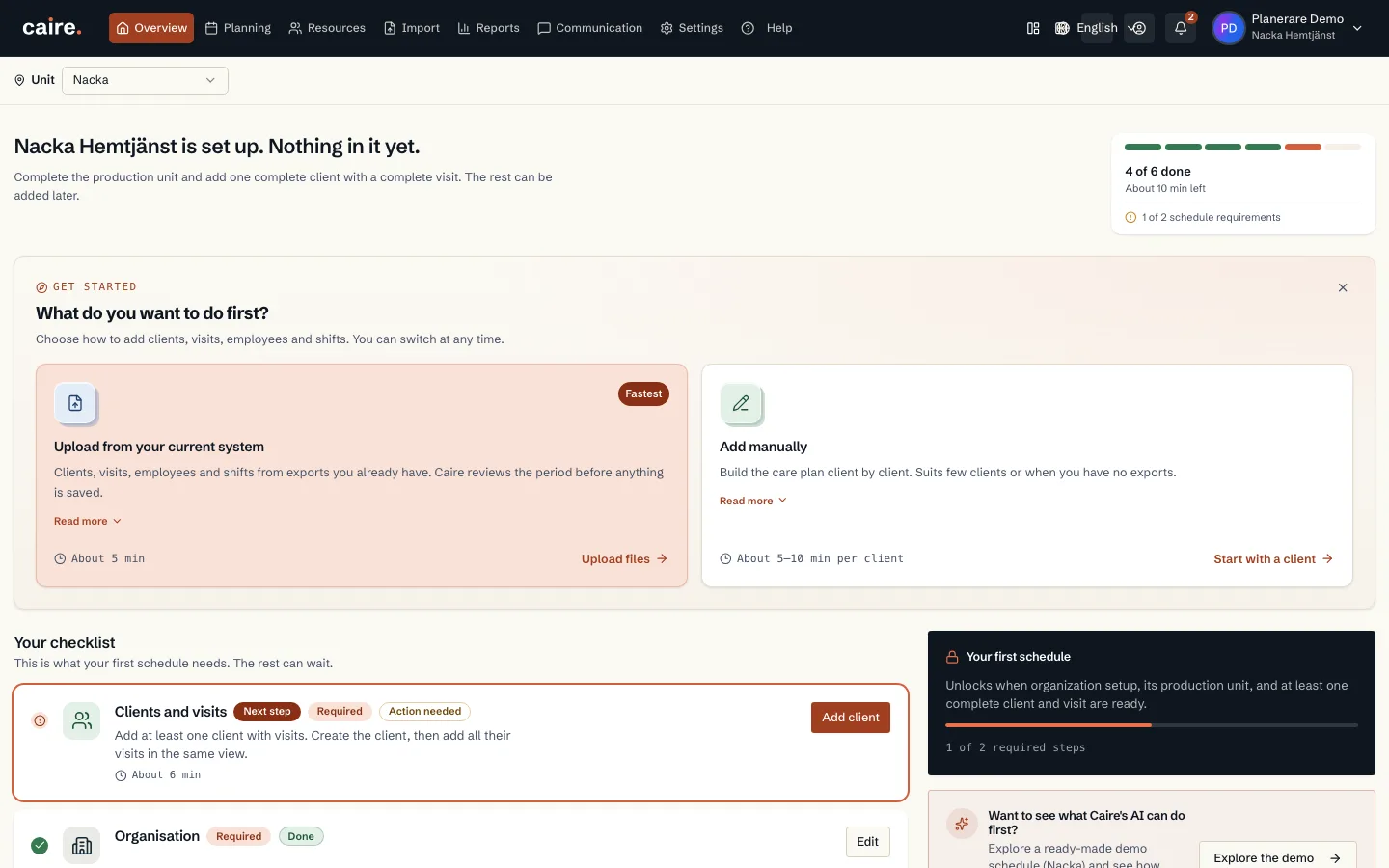
                        CAIRE platformAnalysis and results

                        The report's explanation of unassigned visits in the selected solution

                        Approved image · Image and caption

                        Approved: 2026-10-10

                        The report's explanation of unassigned visits in the selected solution
                        The report shows how the selected proposal partitions visits that remain unassigned.The breakdown comes from the saved report for the flex-15 solution and accepted Carefox period.
                        Open approved image full size

                        Image shows: The report shows how the selected proposal partitions visits that remain unassigned.

                        What it demonstrates: The breakdown comes from the saved report for the flex-15 solution and accepted Carefox period.

                        Product URL

                        CAIRE platform

                        app.caire.se

                        View/route template: /schedules/:scheduleId/solutions/:solutionId/reportThe template shows where the view lives. Record IDs resolve to a selected record in the app and are not a direct link.

                        Website destinations and suggestions
                        Capture source and setup

                        Source module: Rapport · Otilldelade besök

                        Opens in CAIRE: Schema → rapport → Varför blir besök kvar?

                        Capture scenario: Synthetic demonstration scenario S2

                        Capture setup
                        1. Öppna den sparade flex-15-rapporten för den accepterade Carefox-perioden
                        2. Visa den valda lösningens uppmätta fördelning av otilldelade besök
                        CAIRE platformAnalysis and results

                        The report timeline for a day with saved planning data

                        Approved image · Image and caption

                        Approved: 2026-10-10

                        The report timeline for a day with saved planning data
                        The timeline shows planned blocks for the report's selected example day.The day's content comes from the saved example data for flex-15.
                        Open approved image full size

                        Image shows: The timeline shows planned blocks for the report's selected example day.

                        What it demonstrates: The day's content comes from the saved example data for flex-15.

                        Product URL

                        CAIRE platform

                        app.caire.se

                        View/route template: /schedules/:scheduleId/solutions/:solutionId/reportThe template shows where the view lives. Record IDs resolve to a selected record in the app and are not a direct link.

                        Website destinations and suggestions
                        Capture source and setup

                        Source module: Rapport · Exempeldag

                        Opens in CAIRE: Schema → rapport → Exempeldag

                        Capture scenario: Synthetic demonstration scenario S2

                        Capture setup
                        1. Öppna den sparade flex-15-rapporten för den accepterade Carefox-perioden
                        2. Fortsätt bara när rapporten innehåller en tidslinje med planerade block
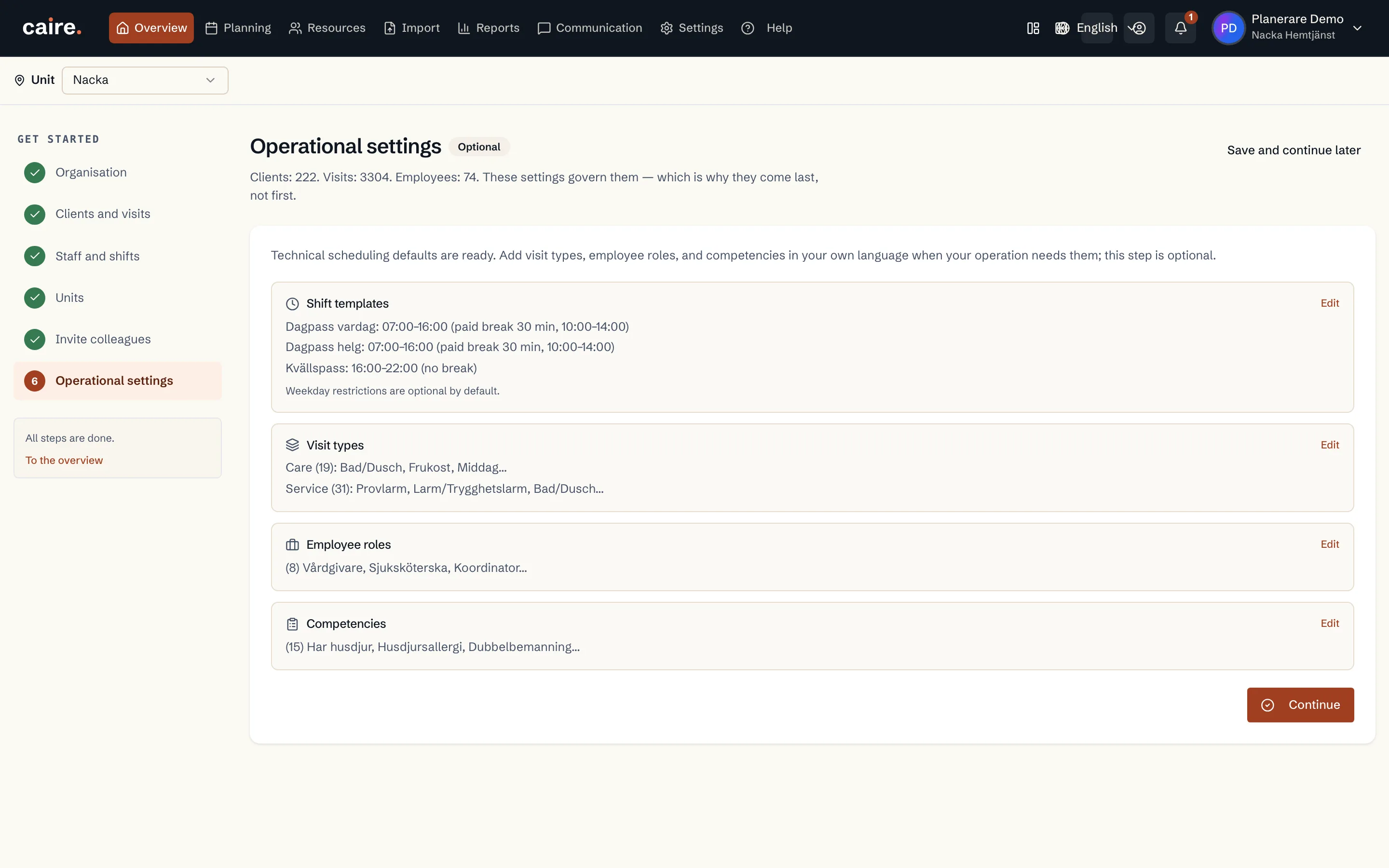
                        CAIRE platformAnalysis and results

                        The report builder's page count and print and Excel actions
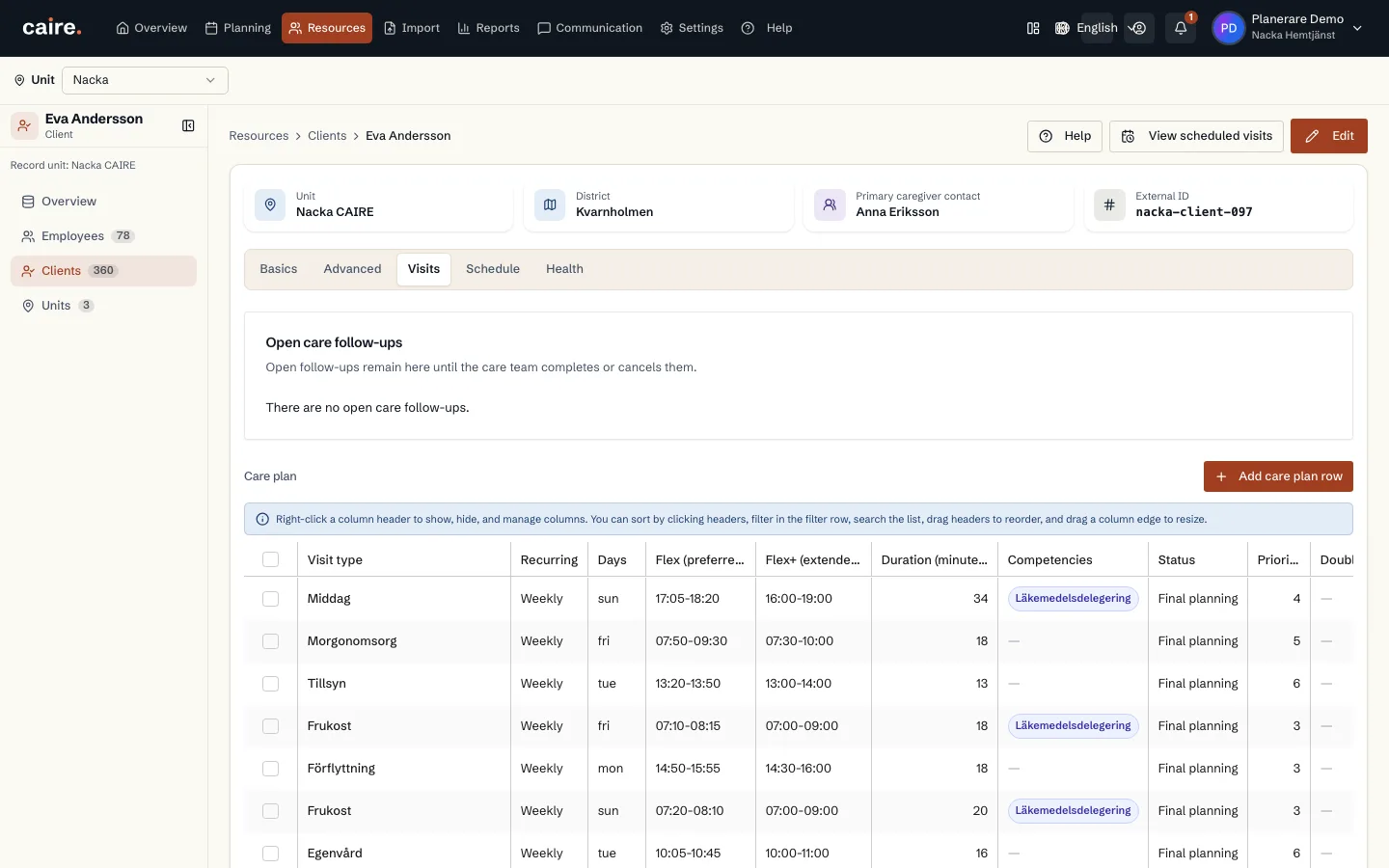
                        Approved image · Image and caption

                        Approved: 2026-10-10

                        The report builder's page count and print and Excel actions
                        The report builder shows its page count and the available print and Excel actions.This view shows export controls for the saved report; it does not confirm that a file was created.
                        Open approved image full size

                        Image shows: The report builder shows its page count and the available print and Excel actions.

                        What it demonstrates: This view shows export controls for the saved report; it does not confirm that a file was created.

                        Product URL

                        CAIRE platform

                        app.caire.se

                        View/route template: /schedules/:scheduleId/solutions/:solutionId/reportThe template shows where the view lives. Record IDs resolve to a selected record in the app and are not a direct link.

                        Website destinations and suggestions
                        • Image libraryIn current website sourceImage treatment: Image and caption
                        • Share and exportIn current website sourceImage treatment: Image and caption
                        Capture source and setup

                        Source module: Rapport · Utskrifts- och Excel-val

                        Opens in CAIRE: Schema → rapportbyggare → Dela

                        Capture scenario: Synthetic demonstration scenario S2

                        Capture setup
                        1. Öppna rapportbyggaren för den sparade flex-15-rapporten
                        2. Visa sidantalet samt rapportens utskrifts- och Excel-knappar
                        CAIRE platformAnalysis and results

                        The hourly inspector's visits for a saved solution

                        Approved image · Image and caption

                        Approved: 2026-10-10

                        The hourly inspector's visits for a saved solution
                        The visit list shows assigned and unassigned visits for the selected hour.The data comes from the same selected hour in the completed DEV result for the accepted Carefox period.
                        Open approved image full size

                        Image shows: The visit list shows assigned and unassigned visits for the selected hour.

                        What it demonstrates: The data comes from the same selected hour in the completed DEV result for the accepted Carefox period.

                        Product URL

                        CAIRE platform

                        app.caire.se

                        View/route template: /schedules/:idThe template shows where the view lives. Record IDs resolve to a selected record in the app and are not a direct link.

                        Website destinations and suggestions
                        Capture source and setup

                        Source module: Flaskhalsar · Besök

                        Opens in CAIRE: Analys → Flaskhalsar → timme → Besök

                        Capture scenario: Synthetic demonstration scenario S2

                        Capture setup
                        1. Välj en timme med sparade besök, överlappande pass och otilldelad efterfrågan
                        2. Öppna fliken Besök
                        CAIRE platformAnalysis and results

                        The hourly inspector's shifts for a saved solution

                        Approved image · Image and caption

                        Approved: 2026-10-10

                        The hourly inspector's shifts for a saved solution
                        The shift list shows staffing that overlaps the selected hour.The data comes from the same selected hour in the completed DEV result for the accepted Carefox period.
                        Open approved image full size

                        Image shows: The shift list shows staffing that overlaps the selected hour.

                        What it demonstrates: The data comes from the same selected hour in the completed DEV result for the accepted Carefox period.

                        Product URL

                        CAIRE platform

                        app.caire.se

                        View/route template: /schedules/:idThe template shows where the view lives. Record IDs resolve to a selected record in the app and are not a direct link.

                        Website destinations and suggestions
                        Capture source and setup

                        Source module: Flaskhalsar · Pass

                        Opens in CAIRE: Analys → Flaskhalsar → timme → Pass

                        Capture scenario: Synthetic demonstration scenario S2

                        Capture setup
                        1. Välj en timme med sparade besök, överlappande pass och otilldelad efterfrågan
                        2. Öppna fliken Pass
                        CAIRE platformAnalysis and results

                        The hourly inspector's time windows for a saved solution

                        Approved image · Image and caption

                        Approved: 2026-10-10

                        The hourly inspector's time windows for a saved solution
                        The table shows required and preferred time windows for visits in the hour.The data comes from the same selected hour in the completed DEV result for the accepted Carefox period.
                        Open approved image full size

                        Image shows: The table shows required and preferred time windows for visits in the hour.

                        What it demonstrates: The data comes from the same selected hour in the completed DEV result for the accepted Carefox period.

                        Product URL

                        CAIRE platform

                        app.caire.se

                        View/route template: /schedules/:idThe template shows where the view lives. Record IDs resolve to a selected record in the app and are not a direct link.

                        Website destinations and suggestions
                        Capture source and setup

                        Source module: Flaskhalsar · Tidsfönster

                        Opens in CAIRE: Analys → Flaskhalsar → timme → Tidsfönster

                        Capture scenario: Synthetic demonstration scenario S2

                        Capture setup
                        1. Välj en timme med sparade besök, överlappande pass och otilldelad efterfrågan
                        2. Öppna fliken Tidsfönster
                        CAIRE platformAnalysis and results

                        The hourly inspector's solver configuration for a saved solution

                        Approved image · Image and caption

                        Approved: 2026-10-10

                        The hourly inspector's solver configuration for a saved solution
                        The table shows applied solver weights and their reference values.The data comes from the same selected hour in the completed DEV result for the accepted Carefox period.
                        Open approved image full size

                        Image shows: The table shows applied solver weights and their reference values.

                        What it demonstrates: The data comes from the same selected hour in the completed DEV result for the accepted Carefox period.

                        Product URL

                        CAIRE platform

                        app.caire.se

                        View/route template: /schedules/:idThe template shows where the view lives. Record IDs resolve to a selected record in the app and are not a direct link.

                        Website destinations and suggestions
                        Capture source and setup

                        Source module: Flaskhalsar · Lösarkonfig

                        Opens in CAIRE: Analys → Flaskhalsar → timme → Lösarkonfig

                        Capture scenario: Synthetic demonstration scenario S2

                        Capture setup
                        1. Välj en timme med sparade besök, överlappande pass och otilldelad efterfrågan
                        2. Öppna fliken Lösarkonfig
                        CAIRE platformAnalysis and results

                        The hourly inspector's capacity for a saved solution

                        Approved image · Image and caption

                        Approved: 2026-10-10

                        The hourly inspector's capacity for a saved solution
                        Capacity cards show demand, supply and unassigned time for the selected hour.The data comes from the same selected hour in the completed DEV result for the accepted Carefox period.
                        Open approved image full size

                        Image shows: Capacity cards show demand, supply and unassigned time for the selected hour.

                        What it demonstrates: The data comes from the same selected hour in the completed DEV result for the accepted Carefox period.

                        Product URL

                        CAIRE platform

                        app.caire.se

                        View/route template: /schedules/:idThe template shows where the view lives. Record IDs resolve to a selected record in the app and are not a direct link.

                        Website destinations and suggestions
                        Capture source and setup

                        Source module: Flaskhalsar · Kapacitet

                        Opens in CAIRE: Analys → Flaskhalsar → timme → Kapacitet

                        Capture scenario: Synthetic demonstration scenario S2

                        Capture setup
                        1. Välj en timme med sparade besök, överlappande pass och otilldelad efterfrågan
                        2. Öppna fliken Kapacitet
                        CAIRE platformAnalysis and results

                        Unassigned-demand chart with a summary for the selected solution

                        Approved image · Image and caption

                        Approved: 2026-10-10

                        Unassigned-demand chart with a summary for the selected solution
                        The chart shows the daily distribution and the selected period summary.Bars, period and summary come from the solution's coverage data.
                        Open approved image full size

                        Image shows: The chart shows the daily distribution and the selected period summary.

                        What it demonstrates: Bars, period and summary come from the solution's coverage data.

                        Product URL

                        CAIRE platform

                        app.caire.se

                        View/route template: /schedules/:idThe template shows where the view lives. Record IDs resolve to a selected record in the app and are not a direct link.

                        Website destinations and suggestions
                        Capture source and setup

                        Source module: Analys · Luckor

                        Opens in CAIRE: Schema → Analys → sparat DEV-resultat → Otilldelade → Luckor

                        Capture scenario: Synthetic demonstration scenario S1

                        Capture setup
                        1. Öppna sparat färdigt DEV-resultat
                        2. Visa hela Luckor-diagrammet och dess periodvärden
                        CAIRE platformAnalysis and results

                        Ranked list of positive idle and waiting time by employee

                        Approved image · Image and caption

                        Approved: 2026-10-10

                        Ranked list of positive idle and waiting time by employee
                        The list shows employees and their measured idle and waiting time.The ranking uses the solution's measured idle and wait rows.
                        Open approved image full size

                        Image shows: The list shows employees and their measured idle and waiting time.

                        What it demonstrates: The ranking uses the solution's measured idle and wait rows.

                        Product URL

                        CAIRE platform

                        app.caire.se

                        View/route template: /schedules/:idThe template shows where the view lives. Record IDs resolve to a selected record in the app and are not a direct link.

                        Website destinations and suggestions
                        Capture source and setup

                        Source module: Analys · Ledig tid och väntan

                        Opens in CAIRE: Schema → Analys → sparat DEV-resultat → Otilldelade → Ledig tid och väntan

                        Capture scenario: Synthetic demonstration scenario S1

                        Capture setup
                        1. Öppna sparat färdigt DEV-resultat
                        2. Rulla listan in i bild så dess mätning laddas
                        CAIRE platformAnalysis and results

                        Continuity spread above the ten and fifteen caregiver thresholds

                        Approved image · Image and caption

                        Approved: 2026-10-10

                        Continuity spread above the ten and fifteen caregiver thresholds
                        The detail counts clients above two continuity thresholds.Counts come from the solution's client-level continuity measures.
                        Open approved image full size

                        Image shows: The detail counts clients above two continuity thresholds.

                        What it demonstrates: Counts come from the solution's client-level continuity measures.

                        Product URL

                        CAIRE platform

                        app.caire.se

                        View/route template: /schedules/:idThe template shows where the view lives. Record IDs resolve to a selected record in the app and are not a direct link.

                        Website destinations and suggestions
                        Capture source and setup

                        Source module: Analys · Kontinuitet

                        Opens in CAIRE: Schema → Analys → sparat DEV-resultat → Översikt → öppna kontinuitetsfördelningen

                        Capture scenario: Synthetic demonstration scenario S1

                        Capture setup
                        1. Öppna sparat färdigt DEV-resultat med tillgänglig itinerary
                        2. Öppna detaljen om brukare med många medarbetare
                        CAIRE platformAnalysis and results

                        Comparison of assignments, client time, continuity and travel time

                        Approved image · Image and caption

                        Approved: 2026-10-10

                        Comparison of assignments, client time, continuity and travel time
                        The summary shows four measures for the solution and selected reference.Values on both sides come from the same explicit solution pair.
                        Open approved image full size

                        Image shows: The summary shows four measures for the solution and selected reference.

                        What it demonstrates: Values on both sides come from the same explicit solution pair.

                        Product URL

                        CAIRE platform

                        app.caire.se

                        View/route template: /schedules/:idThe template shows where the view lives. Record IDs resolve to a selected record in the app and are not a direct link.

                        Website destinations and suggestions
                        Capture source and setup

                        Source module: Analys · Jämförelse

                        Opens in CAIRE: Schema → Analys → sparat DEV-resultat → välj CAIRE mot BASIC

                        Capture scenario: Synthetic demonstration scenario S1

                        Capture setup
                        1. Öppna sparat färdigt DEV-resultat och ett separat färdigt BASIC-resultat
                        2. Välj BASIC som explicit jämförelse; båda lösningarna behöver läsbara mått
                        CAIRE platformAnalysis and results

                        Plan versus actual for the imported period

                        Approved image · Image and caption

                        Approved: 2026-10-10

                        Plan versus actual for the imported period
                        The report brings together planned and imported performed visits for the period.The report reads saved period data and presents its comparison evidence.
                        Open approved image full size

                        Image shows: The report brings together planned and imported performed visits for the period.

                        What it demonstrates: The report reads saved period data and presents its comparison evidence.

                        Product URL

                        CAIRE platform

                        app.caire.se

                        View/route template: /schedules/:scheduleId/solutions/:solutionId/reportThe template shows where the view lives. Record IDs resolve to a selected record in the app and are not a direct link.

                        Website destinations and suggestions
                        Capture source and setup

                        Source module: Plan mot verklighet

                        Opens in CAIRE: Schema → rapport → Plan mot verklighet

                        Capture scenario: Synthetic demonstration scenario S4

                        Capture setup
                        1. Öppna rapporten för det sparade importerade schemat
                        CAIRE platformAnalysis and results

                        Report builder with content from the imported period

                        Approved image · Image and caption

                        Approved: 2026-10-10

                        Report builder with content from the imported period
                        The report builder lists sections available for the saved report.Report content is selected from data that is actually available.
                        Open approved image full size

                        Image shows: The report builder lists sections available for the saved report.

                        What it demonstrates: Report content is selected from data that is actually available.

                        Product URL

                        CAIRE platform

                        app.caire.se

                        View/route template: /schedules/:scheduleId/solutions/:solutionId/reportThe template shows where the view lives. Record IDs resolve to a selected record in the app and are not a direct link.

                        Website destinations and suggestions
                        Capture source and setup

                        Source module: Rapportöversikt

                        Opens in CAIRE: Schema → rapport → rapportbyggare

                        Capture scenario: Synthetic demonstration scenario S4

                        Capture setup
                        1. Öppna rapportbyggaren för den sparade rapporten
                        CAIRE platformAnalysis and results

                        Report section comparing planned and performed visits

                        Approved image · Image and caption

                        Approved: 2026-10-10

                        Report section comparing planned and performed visits
                        The section compares planned visits with performed times included in the import.The comparison uses saved planned and performed data.
                        Open approved image full size

                        Image shows: The section compares planned visits with performed times included in the import.

                        What it demonstrates: The comparison uses saved planned and performed data.

                        Product URL

                        CAIRE platform

                        app.caire.se

                        View/route template: /schedules/:scheduleId/solutions/:solutionId/reportThe template shows where the view lives. Record IDs resolve to a selected record in the app and are not a direct link.

                        Website destinations and suggestions
                        Capture source and setup

                        Source module: Plan mot utfört

                        Opens in CAIRE: Schema → rapport → Plan mot utfört

                        Capture scenario: Synthetic demonstration scenario S4

                        Capture setup
                        1. Öppna rapportavsnittet för planerade och utförda besök
                        CAIRE platformAnalysis and results

                        Continuity section in the imported period report

                        Approved image · Image and caption

                        Approved: 2026-10-10

                        Continuity section in the imported period report
                        The section presents continuity evidence from the report's saved period data.The report uses the client and visit relationships actually imported.
                        Open approved image full size

                        Image shows: The section presents continuity evidence from the report's saved period data.

                        What it demonstrates: The report uses the client and visit relationships actually imported.

                        Product URL

                        CAIRE platform

                        app.caire.se

                        View/route template: /schedules/:scheduleId/solutions/:solutionId/reportThe template shows where the view lives. Record IDs resolve to a selected record in the app and are not a direct link.

                        Website destinations and suggestions
                        Capture source and setup

                        Source module: Kontinuitet

                        Opens in CAIRE: Schema → rapport → kontinuitet

                        Capture scenario: Synthetic demonstration scenario S4

                        Capture setup
                        1. Öppna kontinuitetsavsnittet i den importerade periodrapporten
                        2. Använd rapportens verifierade CAIRE-förslag när kontinuitetsjämförelsen kräver det
                        CAIRE platformAnalysis and results

                        Evidence and method for the imported period report

                        Approved image · Image and caption

                        Approved: 2026-10-10

                        Evidence and method for the imported period report
                        The section describes the report's sources and boundaries.The report makes its evidence available for review.
                        Open approved image full size

                        Image shows: The section describes the report's sources and boundaries.

                        What it demonstrates: The report makes its evidence available for review.

                        Product URL

                        CAIRE platform

                        app.caire.se

                        View/route template: /schedules/:scheduleId/solutions/:solutionId/reportThe template shows where the view lives. Record IDs resolve to a selected record in the app and are not a direct link.

                        Website destinations and suggestions
                        Capture source and setup

                        Source module: Underlag och metod

                        Opens in CAIRE: Schema → rapport → underlag och metod

                        Capture scenario: Synthetic demonstration scenario S4

                        Capture setup
                        1. Öppna rapportens underlag och metod
                        CAIRE platformAnalysis and results

                        Analysis of unassigned visits with cause breakdown and visit list

                        Approved image · Image and caption

                        Approved: 2026-10-10

                        Analysis of unassigned visits with cause breakdown and visit list
                        See the cause breakdown and which visits remain unassigned.The analysis view shows causes and unassigned visits for the selected solution.
                        Open approved image full size

                        Image shows: See the cause breakdown and which visits remain unassigned.

                        What it demonstrates: The analysis view shows causes and unassigned visits for the selected solution.

                        Product URL

                        CAIRE platform

                        app.caire.se

                        View/route template: /schedules/:idThe template shows where the view lives. Record IDs resolve to a selected record in the app and are not a direct link.

                        Website destinations and suggestions
                        Capture source and setup

                        Source module: Otilldelade

                        Opens in CAIRE: Schema → Analys → Utforska → Otilldelade

                        Capture scenario: Synthetic demonstration scenario S1

                        Capture setup
                        1. Öppna ett sparat DEV-resultat i Analys
                        2. Välj preset Otilldelade
                        CAIRE platformAnalysis and results

                        Chart of demand and staffing over time

                        Approved image · Image and caption

                        Approved: 2026-10-10

                        Chart of demand and staffing over time
                        The chart shows demand and staffing across the period.The chart shows the solution's distribution of demand and supply over time.
                        Open approved image full size

                        Image shows: The chart shows demand and staffing across the period.

                        What it demonstrates: The chart shows the solution's distribution of demand and supply over time.

                        Product URL

                        CAIRE platform

                        app.caire.se

                        View/route template: /schedules/:idThe template shows where the view lives. Record IDs resolve to a selected record in the app and are not a direct link.

                        Website destinations and suggestions
                        Capture source and setup

                        Source module: Utbud vs efterfrågan

                        Opens in CAIRE: Schema → Analys → Utforska → Utbud vs efterfrågan

                        Capture scenario: Synthetic demonstration scenario S1

                        Capture setup
                        1. Öppna ett sparat DEV-resultat i Analys
                        2. Välj preset Utbud vs efterfrågan
                        CAIRE platformAnalysis and results

                        Heatmap of demand and coverage by day and hour

                        Approved image · Image and caption

                        Approved: 2026-10-10

                        Heatmap of demand and coverage by day and hour
                        The heatmap shows the hourly distribution of demand and coverage.The heatmap shows the solution's hourly distribution by day.
                        Open approved image full size

                        Image shows: The heatmap shows the hourly distribution of demand and coverage.

                        What it demonstrates: The heatmap shows the solution's hourly distribution by day.

                        Product URL

                        CAIRE platform

                        app.caire.se

                        View/route template: /schedules/:idThe template shows where the view lives. Record IDs resolve to a selected record in the app and are not a direct link.

                        Website destinations and suggestions
                        Capture source and setup

                        Source module: Flaskhalsar

                        Opens in CAIRE: Schema → Analys → Utforska → Flaskhalsar

                        Capture scenario: Synthetic demonstration scenario S1

                        Capture setup
                        1. Öppna ett sparat DEV-resultat i Analys
                        2. Välj preset Flaskhalsar
                        CAIRE platformAnalysis and results

                        Bar chart of idle time by employee

                        Approved image · Image and caption

                        Approved: 2026-10-10

                        Bar chart of idle time by employee
                        Compare the idle-time measure across employees.The bar chart shows the selected solution measure for each employee.
                        Open approved image full size

                        Image shows: Compare the idle-time measure across employees.

                        What it demonstrates: The bar chart shows the selected solution measure for each employee.

                        Product URL

                        CAIRE platform

                        app.caire.se

                        View/route template: /schedules/:idThe template shows where the view lives. Record IDs resolve to a selected record in the app and are not a direct link.

                        Website destinations and suggestions
                        Capture source and setup

                        Source module: Per medarbetare

                        Opens in CAIRE: Schema → Analys → Utforska → Per medarbetare

                        Capture scenario: Synthetic demonstration scenario S1

                        Capture setup
                        1. Öppna ett sparat DEV-resultat i Analys
                        2. Välj preset Per medarbetare
                        CAIRE platformAnalysis and results

                        Bar chart of unassigned time by client

                        Approved image · Image and caption

                        Approved: 2026-10-10

                        Bar chart of unassigned time by client
                        Compare unassigned time across clients.The bar chart shows the selected solution measure for each client.
                        Open approved image full size

                        Image shows: Compare unassigned time across clients.

                        What it demonstrates: The bar chart shows the selected solution measure for each client.

                        Product URL

                        CAIRE platform

                        app.caire.se

                        View/route template: /schedules/:idThe template shows where the view lives. Record IDs resolve to a selected record in the app and are not a direct link.

                        Website destinations and suggestions
                        Capture source and setup

                        Source module: Per brukare

                        Opens in CAIRE: Schema → Analys → Utforska → Per brukare

                        Capture scenario: Synthetic demonstration scenario S1

                        Capture setup
                        1. Öppna ett sparat DEV-resultat i Analys
                        2. Välj preset Per brukare
                        CAIRE platformAnalysis and results

                        Bar chart of unassigned time by district

                        Approved image · Image and caption

                        Approved: 2026-10-10

                        Bar chart of unassigned time by district
                        Compare unassigned time across districts.Explore shows the selected solution measure for each district.
                        Open approved image full size

                        Image shows: Compare unassigned time across districts.

                        What it demonstrates: Explore shows the selected solution measure for each district.

                        Product URL

                        CAIRE platform

                        app.caire.se

                        View/route template: /schedules/:idThe template shows where the view lives. Record IDs resolve to a selected record in the app and are not a direct link.

                        Website destinations and suggestions
                        Capture source and setup

                        Source module: Per distrikt

                        Opens in CAIRE: Schema → Analys → Utforska → Per distrikt

                        Capture scenario: Synthetic demonstration scenario S1

                        Capture setup
                        1. Öppna ett sparat DEV-resultat i Analys
                        2. Välj preset Per distrikt
                        CAIRE platformAnalysis and results

                        Bar chart of travel time by transport mode

                        Approved image · Image and caption

                        Approved: 2026-10-10

                        Bar chart of travel time by transport mode
                        Compare the solution's travel time by transport mode.Explore shows travel time for the transport modes present in the solution.
                        Open approved image full size

                        Image shows: Compare the solution's travel time by transport mode.

                        What it demonstrates: Explore shows travel time for the transport modes present in the solution.

                        Product URL

                        CAIRE platform

                        app.caire.se

                        View/route template: /schedules/:idThe template shows where the view lives. Record IDs resolve to a selected record in the app and are not a direct link.

                        Website destinations and suggestions
                        Capture source and setup

                        Source module: Transport

                        Opens in CAIRE: Schema → Analys → Utforska → Transport

                        Capture scenario: Synthetic demonstration scenario S1

                        Capture setup
                        1. Öppna ett sparat DEV-resultat i Analys
                        2. Välj preset Transport
                        CAIRE platformAnalysis and results

                        Bar chart of idle time by shift

                        Approved image · Image and caption

                        Approved: 2026-10-10

                        Bar chart of idle time by shift
                        Compare the idle-time measure across shifts.The bar chart shows the selected solution measure for each shift.
                        Open approved image full size

                        Image shows: Compare the idle-time measure across shifts.

                        What it demonstrates: The bar chart shows the selected solution measure for each shift.

                        Product URL

                        CAIRE platform

                        app.caire.se

                        View/route template: /schedules/:idThe template shows where the view lives. Record IDs resolve to a selected record in the app and are not a direct link.

                        Website destinations and suggestions
                        Capture source and setup

                        Source module: Per skift

                        Opens in CAIRE: Schema → Analys → Utforska → Per skift

                        Capture scenario: Synthetic demonstration scenario S1

                        Capture setup
                        1. Öppna ett sparat DEV-resultat i Analys
                        2. Välj preset Per skift
                        CAIRE platformAnalysis and results

                        Bar chart of continuity by client

                        Approved image · Image and caption

                        Approved: 2026-10-10

                        Bar chart of continuity by client
                        See how the continuity measure varies across clients.The bar chart shows the solution's continuity measure for each client.
                        Open approved image full size

                        Image shows: See how the continuity measure varies across clients.

                        What it demonstrates: The bar chart shows the solution's continuity measure for each client.

                        Product URL

                        CAIRE platform

                        app.caire.se

                        View/route template: /schedules/:idThe template shows where the view lives. Record IDs resolve to a selected record in the app and are not a direct link.

                        Website destinations and suggestions
                        • Image libraryIn current website sourceImage treatment: Image and caption
                        • ContinuityIn current website sourceImage treatment: Image and caption
                        Capture source and setup

                        Source module: Kontinuitet per brukare

                        Opens in CAIRE: Schema → Analys → Utforska → Kontinuitet per brukare

                        Capture scenario: Synthetic demonstration scenario S1

                        Capture setup
                        1. Öppna ett sparat DEV-resultat i Analys
                        2. Välj preset Kontinuitet per brukare
                        CAIRE platformAnalysis and results

                        Three saved planning results compared by visit assignment, time composition and quality profile

                        Approved image · Image and caption

                        Approved: 2026-10-10

                        Three saved planning results compared by visit assignment, time composition and quality profile
                        Compare Caire route with two visit-flexibility profiles for the same planning period.The view places the three saved results side by side and compares visit assignment, time composition and quality profile for the same period.
                        Open approved image full size

                        Image shows: Compare Caire route with two visit-flexibility profiles for the same planning period.

                        What it demonstrates: The view places the three saved results side by side and compares visit assignment, time composition and quality profile for the same period.

                        Product URL

                        CAIRE platform

                        app.caire.se

                        View/route template: /schedules/compareThe template shows where the view lives. Record IDs resolve to a selected record in the app and are not a direct link.

                        Website destinations and suggestions
                        Capture source and setup

                        Source module: Jämför

                        Opens in CAIRE: Jämför → Tre lösningar

                        Capture scenario: Synthetic demonstration scenario S2

                        Capture setup
                        1. Välj Caire-rutten som referens och två sparade insatsflexprofiler för samma planeringsperiod
                        2. Granska besökstilldelning, tidsfördelning och kvalitetsprofil
                        CAIRE platformAnalysis and results

                        First recommended action for the selected solution

                        Approved image · Image and caption

                        Approved: 2026-10-10

                        First recommended action for the selected solution
                        The action list shows a recommended step with its group and description.The step is shown in the solution's recommendation list.
                        Open approved image full size

                        Image shows: The action list shows a recommended step with its group and description.

                        What it demonstrates: The step is shown in the solution's recommendation list.

                        Product URL

                        CAIRE platform

                        app.caire.se

                        View/route template: /schedules/:idThe template shows where the view lives. Record IDs resolve to a selected record in the app and are not a direct link.

                        Website destinations and suggestions
                        • Image libraryIn current website sourceImage treatment: Image and caption
                        • Review actionsIn current website sourceImage treatment: Image and caption
                        Capture source and setup

                        Source module: Åtgärder

                        Opens in CAIRE: Schema → Analys → Åtgärder (sparat DEV-resultat)

                        Capture scenario: Synthetic demonstration scenario S1

                        Capture setup
                        1. Öppna det sparade DEV-resultatet i Analys
                        2. Visa avsnittet Åtgärder
                        CAIRE platformAnalysis and results

                        Hard, medium and soft scores for the selected solution

                        Approved image · Image and caption

                        Approved: 2026-10-10

                        Hard, medium and soft scores for the selected solution
                        The score panel shows the solution's three score levels and constraint analysis.The scores and constraint rows come from the solution's analysis data.
                        Open approved image full size

                        Image shows: The score panel shows the solution's three score levels and constraint analysis.

                        What it demonstrates: The scores and constraint rows come from the solution's analysis data.

                        Product URL

                        CAIRE platform

                        app.caire.se

                        View/route template: /schedules/:idThe template shows where the view lives. Record IDs resolve to a selected record in the app and are not a direct link.

                        Website destinations and suggestions
                        Capture source and setup

                        Source module: Poäng & villkorsanalys

                        Opens in CAIRE: Schema → Analys → Avancerat → Poäng & villkorsanalys (sparat DEV-resultat)

                        Capture scenario: Synthetic demonstration scenario S1

                        Capture setup
                        1. Öppna det sparade DEV-resultatet i Analys
                        2. Visa Poäng & villkorsanalys
                        CAIRE platformAnalysis and results

                        Exact time balance with input, output and time components

                        Approved image · Image and caption

                        Approved: 2026-10-10

                        Exact time balance with input, output and time components
                        The balance chart shows the ledger's input, output and time components.The chart renders values from the solution's exact time ledger.
                        Open approved image full size

                        Image shows: The balance chart shows the ledger's input, output and time components.

                        What it demonstrates: The chart renders values from the solution's exact time ledger.

                        Product URL

                        CAIRE platform

                        app.caire.se

                        View/route template: /schedules/:idThe template shows where the view lives. Record IDs resolve to a selected record in the app and are not a direct link.

                        Website destinations and suggestions
                        Capture source and setup

                        Source module: Nyckeltal · tidsbalans

                        Opens in CAIRE: Schema → Analys → Avancerat → Nyckeltal (sparat DEV-resultat)

                        Capture scenario: Synthetic demonstration scenario S1

                        Capture setup
                        1. Öppna det sparade DEV-resultatet i Analys
                        2. Visa Nyckeltal
                        CAIRE platformAnalysis and results

                        Finance card with revenue, cost and margin for the solution

                        Approved image · Image and caption

                        Approved: 2026-10-10

                        Finance card with revenue, cost and margin for the solution
                        The card shows the finance fields the ledger has for the solution.The fields render the solution's financial ledger data and any rate information.
                        Open approved image full size

                        Image shows: The card shows the finance fields the ledger has for the solution.

                        What it demonstrates: The fields render the solution's financial ledger data and any rate information.

                        Product URL

                        CAIRE platform

                        app.caire.se

                        View/route template: /schedules/:idThe template shows where the view lives. Record IDs resolve to a selected record in the app and are not a direct link.

                        Website destinations and suggestions
                        • Image libraryIn current website sourceImage treatment: Image and caption
                        • Time ledgerIn current website sourceImage treatment: Image and caption
                        Capture source and setup

                        Source module: Ekonomi · lösningsutfall

                        Opens in CAIRE: Schema → Analys → Avancerat → Ekonomi (sparat DEV-resultat)

                        Capture scenario: Synthetic demonstration scenario S1

                        Capture setup
                        1. Öppna det sparade DEV-resultatet i Analys
                        2. Visa Ekonomi
                        CAIRE platformAnalysis and results

                        Inspector with measures for a selected employee row

                        Approved image · Image and caption

                        Approved: 2026-10-10

                        Inspector with measures for a selected employee row
                        The inspector shows measures for the opened employee.The summary uses measures from the selected employee row.
                        Open approved image full size

                        Image shows: The inspector shows measures for the opened employee.

                        What it demonstrates: The summary uses measures from the selected employee row.

                        Product URL

                        CAIRE platform

                        app.caire.se

                        View/route template: /schedules/:idThe template shows where the view lives. Record IDs resolve to a selected record in the app and are not a direct link.

                        Website destinations and suggestions
                        Capture source and setup

                        Source module: Utforska · medarbetarinspektör

                        Opens in CAIRE: Schema → Analys → Utforska → öppna en medarbetarrad

                        Capture scenario: Synthetic demonstration scenario S1

                        Capture setup
                        1. Öppna det sparade DEV-resultatet i Analys
                        2. Öppna en medarbetarrad i Utforska
                        CAIRE platformAnalysis and results

                        Inspector with measures for a selected client row

                        Approved image · Image and caption

                        Approved: 2026-10-10

                        Inspector with measures for a selected client row
                        The inspector shows measures for the opened client.The summary uses measures from the selected client row.
                        Open approved image full size

                        Image shows: The inspector shows measures for the opened client.

                        What it demonstrates: The summary uses measures from the selected client row.

                        Product URL

                        CAIRE platform

                        app.caire.se

                        View/route template: /schedules/:idThe template shows where the view lives. Record IDs resolve to a selected record in the app and are not a direct link.

                        Website destinations and suggestions
                        • Image libraryIn current website sourceImage treatment: Image and caption
                        • Review a clientIn current website sourceImage treatment: Image and caption
                        Capture source and setup

                        Source module: Utforska · brukarinspektör

                        Opens in CAIRE: Schema → Analys → Utforska → öppna en brukarrad

                        Capture scenario: Synthetic demonstration scenario S1

                        Capture setup
                        1. Öppna det sparade DEV-resultatet i Analys
                        2. Öppna en brukarrad i Utforska
                        CAIRE platformAnalysis and results

                        Table of waiting-time measures by employee

                        Approved image · Image and caption

                        Approved: 2026-10-10

                        Table of waiting-time measures by employee
                        The table shows employee waiting time and a total row.Rows show Explore's waiting-time measure for the employee dimension.
                        Open approved image full size

                        Image shows: The table shows employee waiting time and a total row.

                        What it demonstrates: Rows show Explore's waiting-time measure for the employee dimension.

                        Product URL

                        CAIRE platform

                        app.caire.se

                        View/route template: /schedules/:idThe template shows where the view lives. Record IDs resolve to a selected record in the app and are not a direct link.

                        Website destinations and suggestions
                        Capture source and setup

                        Source module: Utforska · väntetid per medarbetare

                        Opens in CAIRE: Schema → Analys → Utforska → Medarbetare → Tabell → Väntetid

                        Capture scenario: Synthetic demonstration scenario S1

                        Capture setup
                        1. Öppna det sparade DEV-resultatet i Analys
                        2. Visa väntetid per medarbetare i tabell
                        CAIRE platformAnalysis and results

                        Table of continuity measures by client

                        Approved image · Image and caption

                        Approved: 2026-10-10

                        Table of continuity measures by client
                        The table shows continuity measures for clients and a total row.Rows show Explore's continuity measure for the client dimension.
                        Open approved image full size

                        Image shows: The table shows continuity measures for clients and a total row.

                        What it demonstrates: Rows show Explore's continuity measure for the client dimension.

                        Product URL

                        CAIRE platform

                        app.caire.se

                        View/route template: /schedules/:idThe template shows where the view lives. Record IDs resolve to a selected record in the app and are not a direct link.

                        Website destinations and suggestions
                        Capture source and setup

                        Source module: Utforska · kontinuitet per brukare

                        Opens in CAIRE: Schema → Analys → Utforska → Brukare → Tabell → Kontinuitet

                        Capture scenario: Synthetic demonstration scenario S1

                        Capture setup
                        1. Öppna det sparade DEV-resultatet i Analys
                        2. Visa kontinuitet per brukare i tabell
                        CAIRE platformAnalysis and results

                        Table of visit counts by district

                        Approved image · Image and caption

                        Approved: 2026-10-10

                        Table of visit counts by district
                        The table shows visit counts by district and a total row.Rows show Explore's visit measure for the district dimension.
                        Open approved image full size

                        Image shows: The table shows visit counts by district and a total row.

                        What it demonstrates: Rows show Explore's visit measure for the district dimension.

                        Product URL

                        CAIRE platform

                        app.caire.se

                        View/route template: /schedules/:idThe template shows where the view lives. Record IDs resolve to a selected record in the app and are not a direct link.

                        Website destinations and suggestions
                        Capture source and setup

                        Source module: Utforska · besök per distrikt

                        Opens in CAIRE: Schema → Analys → Utforska → Distrikt → Tabell → Besök

                        Capture scenario: Synthetic demonstration scenario S1

                        Capture setup
                        1. Öppna det sparade DEV-resultatet i Analys
                        2. Visa antal besök per distrikt i tabell
                        CAIRE platformAnalysis and results

                        Timeline chart of demand by weekday

                        Approved image · Image and caption

                        Approved: 2026-10-10

                        Timeline chart of demand by weekday
                        The chart shows weekday demand in the selected period.The bars render the demand measure from the solution's coverage matrix.
                        Open approved image full size

                        Image shows: The chart shows weekday demand in the selected period.

                        What it demonstrates: The bars render the demand measure from the solution's coverage matrix.

                        Product URL

                        CAIRE platform

                        app.caire.se

                        View/route template: /schedules/:idThe template shows where the view lives. Record IDs resolve to a selected record in the app and are not a direct link.

                        Website destinations and suggestions
                        Capture source and setup

                        Source module: Utforska · efterfrågan per veckodag

                        Opens in CAIRE: Schema → Analys → Utforska → Veckodag → Tidslinje → Efterfrågan

                        Capture scenario: Synthetic demonstration scenario S1

                        Capture setup
                        1. Öppna det sparade DEV-resultatet i Analys
                        2. Visa efterfrågan per veckodag i tidslinje
                        CAIRE platformAnalysis and results

                        Daily analytics table for Nacka CAIRE, 5–17 October 2026

                        Approved image · Image and caption

                        Approved: 2026-10-10

                        Daily analytics table for Nacka CAIRE, 5–17 October 2026
                        View published daily measures for the selected service area and period.The rows and visit-demand values come from Reports for the selected service area's published data.
                        Open approved image full size

                        Image shows: View published daily measures for the selected service area and period.

                        What it demonstrates: The rows and visit-demand values come from Reports for the selected service area's published data.

                        Product URL

                        CAIRE platform

                        app.caire.se

                        View/route template: /analyticsThe template shows where the view lives. Record IDs resolve to a selected record in the app and are not a direct link.

                        Website destinations and suggestions
                        Capture source and setup

                        Source module: Rapporter

                        Opens in CAIRE: Rapporter → Enhet och datum → daglig analystabell

                        Capture scenario: Synthetic demonstration scenario S1

                        Capture setup
                        1. Öppna Rapporter för den publicerade Nacka CAIRE-källan
                        2. Välj Nacka CAIRE och perioden 5–17 oktober 2026 i verktygsraden
                        3. Välj Behov i nyckeltalen och visa den dagliga tabellen
                        CAIRE platformAnalysis and results

                        Daily visit-demand chart for Nacka CAIRE, 5–17 October 2026

                        Approved image · Image and caption

                        Approved: 2026-10-10

                        Daily visit-demand chart for Nacka CAIRE, 5–17 October 2026
                        Follow published visit demand by day for the selected service area.The bars and dates come from Reports for the selected service area's published data.
                        Open approved image full size

                        Image shows: Follow published visit demand by day for the selected service area.

                        What it demonstrates: The bars and dates come from Reports for the selected service area's published data.

                        Product URL

                        CAIRE platform

                        app.caire.se

                        View/route template: /analyticsThe template shows where the view lives. Record IDs resolve to a selected record in the app and are not a direct link.

                        Website destinations and suggestions
                        Capture source and setup

                        Source module: Rapporter

                        Opens in CAIRE: Rapporter → Enhet och datum → Dagligt underlag

                        Capture scenario: Synthetic demonstration scenario S1

                        Capture setup
                        1. Öppna Rapporter för den publicerade Nacka CAIRE-källan
                        2. Välj Nacka CAIRE och perioden 5–17 oktober 2026 i verktygsraden
                        3. Välj Behov i nyckeltalen och visa trenddiagrammet
                        CAIRE platformAnalysis and results

                        Published analytics evidence with source period, status and coverage

                        Approved image · Image and caption

                        Approved: 2026-10-10PR #6968

                        Published analytics evidence with source period, status and coverage
                        See which published schedule supplies the figures and which service-area days have evidence.The source card binds the analysis to the selected saved schedule and result. Provenance, status and coverage help the planner review the evidence without assuming an improvement.
                        Open approved image full size

                        Image shows: See which published schedule supplies the figures and which service-area days have evidence.

                        What it demonstrates: The source card binds the analysis to the selected saved schedule and result. Provenance, status and coverage help the planner review the evidence without assuming an improvement.

                        Product URL

                        CAIRE platform

                        app.caire.se

                        View/route template: /analyticsThe template shows where the view lives. Record IDs resolve to a selected record in the app and are not a direct link.

                        Website destinations and suggestions
                        Capture source and setup

                        Source module: Rapporter · underlag

                        Opens in CAIRE: Rapporter → Varför ser det ut så? → Underlag och rekommenderade granskningar

                        Capture scenario: Synthetic demonstration scenario S1

                        Capture setup
                        1. Välj publicerade Nacka CAIRE och perioden 5–17 oktober 2026
                        2. Kontrollera källkortets exakta schema- och lösningslänkar
                        3. Visa underlagsstatus, ursprung, period och täckning utan att öppna export
                        CAIRE platformAnalysis and results

                        Expanded metric definitions and date rules in Reports

                        Approved image · Image and caption

                        Approved: 2026-10-10PR #6968

                        Expanded metric definitions and date rules in Reports
                        Read what the analytics measures mean and how visits and shifts are attributed to dates.Definitions belong to the measures in the current analytics selection. The planner can interpret time and demand with the explicit date rule and see when evidence is unavailable.
                        Open approved image full size

                        Image shows: Read what the analytics measures mean and how visits and shifts are attributed to dates.

                        What it demonstrates: Definitions belong to the measures in the current analytics selection. The planner can interpret time and demand with the explicit date rule and see when evidence is unavailable.

                        Product URL

                        CAIRE platform

                        app.caire.se

                        View/route template: /analyticsThe template shows where the view lives. Record IDs resolve to a selected record in the app and are not a direct link.

                        Website destinations and suggestions
                        Capture source and setup

                        Source module: Rapporter · måttdefinitioner

                        Opens in CAIRE: Rapporter → Varför ser det ut så? → Måttdefinitioner

                        Capture scenario: Synthetic demonstration scenario S1

                        Capture setup
                        1. Välj publicerade Nacka CAIRE och perioden 5–17 oktober 2026
                        2. Kontrollera positivt besöksbehov och det valda publicerade källkortet
                        3. Expandera Måttdefinitioner och visa definitioner samt datumregeln
                        CAIRE platformAnalysis and results

                        Comparison of changed visits between two planning results

                        Approved image · Image and caption

                        Approved: 2026-10-10

                        Comparison of changed visits between two planning results
                        Compare two planning results for the same period, visit by visit.The comparison lists visits that changed between two results: the care-plan time, the time window, planned time and caregiver in the left and right schedules. The planner chooses which changes apply.
                        Open approved image full size

                        Image shows: Compare two planning results for the same period, visit by visit.

                        What it demonstrates: The comparison lists visits that changed between two results: the care-plan time, the time window, planned time and caregiver in the left and right schedules. The planner chooses which changes apply.

                        Product URL

                        CAIRE platform

                        app.caire.se

                        View/route template: /schedules/compareThe template shows where the view lives. Record IDs resolve to a selected record in the app and are not a direct link.

                        Website destinations and suggestions
                        Capture source and setup

                        Source module: Jämför

                        Opens in CAIRE: Jämför → Ändrade besök

                        Capture scenario: Existing product image retained with its source context

                        Capture setup
                        1. Välj två lösningar för samma period
                        2. Öppna Ändrade besök
                        CAIRE platformAnalysis and results

                        The draft's current state: assigned visits, client time and continuity for the chosen solution

                        Approved image · Metric cards

                        Approved: 2026-10-10

                        Image annotation
                        The draft's current state: assigned visits, client time and continuity for the chosen solution
                        Read the solution's assignment, client time and continuity with its assumptions below.The analysis view shows the chosen solution's three measures, assigned visits, client-time share and continuity, with the assumptions behind the run. Compare measures within the same period using the same definitions.
                        Open approved image full size

                        Image shows: Read the solution's assignment, client time and continuity with its assumptions below.

                        What it demonstrates: The analysis view shows the chosen solution's three measures, assigned visits, client-time share and continuity, with the assumptions behind the run. Compare measures within the same period using the same definitions.

                        Product URL

                        CAIRE platform

                        app.caire.se

                        View/route template: /schedules/:idThe template shows where the view lives. Record IDs resolve to a selected record in the app and are not a direct link.

                        Website destinations and suggestions
                        • Image libraryIn current website sourceImage treatment: Metric cards
                        • AnalyticsIn current website sourceImage treatment: Metric cards
                        • AnalyticsIn current website sourceImage treatment: Metric cards
                        • Analytics overviewIn current website sourceImage treatment: Metric cards
                        • Analytics overviewIn current website sourceImage treatment: Metric cards
                        Capture source and setup

                        Source module: Analys

                        Opens in CAIRE: Schema → Analys → Läget i utkastet

                        Capture scenario: Synthetic demonstration scenario S1

                        Capture setup
                        1. Öppna schemat på fliken Analys för CAIRE-lösningen
                        2. Vänta tills korten Tilldelade besök, Brukartid och Kontinuitet visar värden
                        CAIRE platformAnalysis and results

                        Two solutions compared: visit assignment and time mix side by side

                        Approved image · Image and caption

                        Approved: 2026-10-10

                        Two solutions compared: visit assignment and time mix side by side
                        Compare two solutions for the same schedule, side by side.The comparison shows two solutions for the same schedule: how many visits are assigned and how paid time splits into visits, travel and waiting.
                        Open approved image full size

                        Image shows: Compare two solutions for the same schedule, side by side.

                        What it demonstrates: The comparison shows two solutions for the same schedule: how many visits are assigned and how paid time splits into visits, travel and waiting.

                        Product URL

                        CAIRE platform

                        app.caire.se

                        View/route template: /schedules/compareThe template shows where the view lives. Record IDs resolve to a selected record in the app and are not a direct link.

                        Website destinations and suggestions
                        Capture source and setup

                        Source module: Jämför

                        Opens in CAIRE: Jämför → Översikt

                        Capture scenario: Existing product image retained with its source context

                        Capture setup
                        1. Välj två lösningar för samma schema
                        CAIRE platformAnalysis and results

                        The calendar with a chosen shift and its route drawn on the map

                        Approved image · Numbered markers

                        Approved: 2026-10-10

                        Image annotation
                        The calendar with a chosen shift and its route drawn on the map
                        1. 1The chosen shift in the calendar
                        2. 2The shift's route on the map, visit by visit
                        3. 3The visits in order with the travel time between them
                        Click a shift to see the employee's route on the map, with the visits in order.The route is drawn from the solution's saved travel: the same order, travel times and addresses the planning used. The planner sees at once whether the day holds together geographically.
                        Open approved image full size

                        Image shows: Click a shift to see the employee's route on the map, with the visits in order.

                        What it demonstrates: The route is drawn from the solution's saved travel: the same order, travel times and addresses the planning used. The planner sees at once whether the day holds together geographically.

                        Product URL

                        CAIRE platform

                        app.caire.se

                        View/route template: /schedules/:scheduleId/solutions/:solutionIdThe template shows where the view lives. Record IDs resolve to a selected record in the app and are not a direct link.

                        Website destinations and suggestions
                        Capture source and setup

                        Source module: Planering

                        Opens in CAIRE: Planering → Kalender och Karta för CAIRE-lösningen

                        Capture scenario: Synthetic demonstration scenario S1

                        Capture setup
                        1. Öppna lösningen i läget Karta
                        2. Klicka på ett pass i kalendern så att medarbetarens rutt ritas
                        3. Vänta tills rutten syns på kartan och besöken listas i ordning
                        CAIRE platformAnalysis and results

                        The planning calendar with assigned visits, client time and continuity above the shifts

                        Approved image · Metric cards

                        Approved: 2026-10-10

                        Image annotation
                        The planning calendar with assigned visits, client time and continuity above the shifts
                        Three measures above the calendar show how good the plan is while you work in it.The measures come from the same solution the calendar shows. Assigned visits, client-time share and continuity carry over to Analysis, Compare and the report with the same definitions.
                        Open approved image full size

                        Image shows: Three measures above the calendar show how good the plan is while you work in it.

                        What it demonstrates: The measures come from the same solution the calendar shows. Assigned visits, client-time share and continuity carry over to Analysis, Compare and the report with the same definitions.

                        Product URL

                        CAIRE platform

                        app.caire.se

                        View/route template: /schedules/:scheduleId/solutions/:solutionIdThe template shows where the view lives. Record IDs resolve to a selected record in the app and are not a direct link.

                        Website destinations and suggestions
                        Capture source and setup

                        Source module: Planering

                        Opens in CAIRE: Planering → Kalender för CAIRE-lösningen

                        Capture scenario: Synthetic demonstration scenario S1

                        Capture setup
                        1. Öppna lösningen i kalendern
                        2. Vänta tills de tre måtten i verktygsfältet visar värden
                        CAIRE platformAnalysis and results

                        Three saved planning candidates on the coverage and shift-efficiency curve

                        Approved image · Image and caption

                        Approved: 2026-10-10

                        Three saved planning candidates on the coverage and shift-efficiency curve
                        Compare three saved capacity proposals before mapping real staff and publishing the schedule.The curve shows saved DEV candidates' assignment and paid-shift efficiency for the same demand. Demand-first planning uses generated placeholder staff; real staff must be mapped before publication. Unassigned visits make the coverage difference visible.
                        Open approved image full size

                        Image shows: Compare three saved capacity proposals before mapping real staff and publishing the schedule.

                        What it demonstrates: The curve shows saved DEV candidates' assignment and paid-shift efficiency for the same demand. Demand-first planning uses generated placeholder staff; real staff must be mapped before publication. Unassigned visits make the coverage difference visible.

                        Product URL

                        CAIRE platform

                        app.caire.se

                        View/route template: /schedules/:idThe template shows where the view lives. Record IDs resolve to a selected record in the app and are not a direct link.

                        Website destinations and suggestions
                        Capture source and setup

                        Source module: Lösningsförslag

                        Opens in CAIRE: Schema → Analys → Lösningsförslag

                        Capture scenario: Synthetic demonstration scenario S2

                        Capture setup
                        1. Skapa tre verkliga DEV-kandidater med samma efterfrågan i behovsstyrd kapacitetsplanering
                        2. Behåll genererad platshållarpersonal synlig; publicera inte innan riktig personal har kopplats
                        3. Vänta på sparade slutresultat
                        4. Verifiera en kandidat med otilldelade besök
                        5. Öppna kurvan
                        CAIRE platformOperations and settings

                        Expanded publication history with the current receipt and timestamp

                        Approved image · Cropped detail

                        Approved: 2026-10-10

                        Image annotation
                        Expanded publication history with the current receipt and timestamp
                          The native history shows the published version's receipt, status, timestamp and solution link.The planner can identify the saved version that was published and when. A publication receipt does not establish delivery to a partner system.
                          Open approved image full size

                          Image shows: The native history shows the published version's receipt, status, timestamp and solution link.

                          What it demonstrates: The planner can identify the saved version that was published and when. A publication receipt does not establish delivery to a partner system.

                          Product URL

                          CAIRE platform

                          app.caire.se

                          View/route template: /operationsThe template shows where the view lives. Record IDs resolve to a selected record in the app and are not a direct link.

                          Website destinations and suggestions
                          Capture source and setup

                          Source module: Publiceringshistorik

                          Opens in CAIRE: Drift → Publiceringshistorik → SchedulePublicationHistory

                          Capture scenario: Synthetic demonstration scenario S3

                          Capture setup
                          1. Läs S3:s aktuella publicerade lösning och minst ett matchande schedulePublicationReceipts-kvitto
                          2. Öppna drift för samma enhet och verksamhetsdag
                          3. Expandera Publiceringshistorik och visa det aktuella kvittot
                          CAIRE platformOperations and settings

                          Help and operations

                          Approved image · Image and caption

                          Approved: 2026-10-10

                          Help and operations
                          The organisation's existing operational requests and the selected request detail.Planners can review incoming operational requests and their status in one workflow.
                          Open approved image full size

                          Image shows: The organisation's existing operational requests and the selected request detail.

                          What it demonstrates: Planners can review incoming operational requests and their status in one workflow.

                          Product URL

                          CAIRE platform

                          app.caire.se

                          View/route template: /communicationsThe template shows where the view lives. Record IDs resolve to a selected record in the app and are not a direct link.

                          Website destinations and suggestions
                          Capture source and setup

                          Source module: Hjälp och drift

                          Opens in CAIRE: Kommunikation → Hjälp och drift

                          Capture scenario: Synthetic demonstration scenario S5

                          Capture setup
                          1. Öppna kommunikationsflödet i den syntetiska S5-organisationen
                          2. Välj en befintlig kö och granska ett organisationstillhörigt ärende
                          CAIRE platformOperations and settings

                          Visits and messages

                          Approved image · Image and caption

                          Approved: 2026-10-10

                          Visits and messages
                          Existing visit-related message threads with the selected thread's content.The office gets one view of visit messages and their context.
                          Open approved image full size

                          Image shows: Existing visit-related message threads with the selected thread's content.

                          What it demonstrates: The office gets one view of visit messages and their context.

                          Product URL

                          CAIRE platform

                          app.caire.se

                          View/route template: /communicationsThe template shows where the view lives. Record IDs resolve to a selected record in the app and are not a direct link.

                          Website destinations and suggestions
                          Capture source and setup

                          Source module: Besök och meddelanden

                          Opens in CAIRE: Kommunikation → Besök och meddelanden

                          Capture scenario: Synthetic demonstration scenario S5

                          Capture setup
                          1. Öppna kommunikationsflödet i den syntetiska S5-organisationen
                          2. Välj en befintlig kö och granska ett organisationstillhörigt ärende
                          CAIRE platformOperations and settings

                          Deviations

                          Approved image · Image and caption

                          Approved: 2026-10-10

                          Deviations
                          The organisation's existing deviations and details for the selected deviation.Planners can review deviations before any follow-up.
                          Open approved image full size

                          Image shows: The organisation's existing deviations and details for the selected deviation.

                          What it demonstrates: Planners can review deviations before any follow-up.

                          Product URL

                          CAIRE platform

                          app.caire.se

                          View/route template: /communicationsThe template shows where the view lives. Record IDs resolve to a selected record in the app and are not a direct link.

                          Website destinations and suggestions
                          Capture source and setup

                          Source module: Avvikelser

                          Opens in CAIRE: Kommunikation → Avvikelser

                          Capture scenario: Synthetic demonstration scenario S5

                          Capture setup
                          1. Öppna kommunikationsflödet i den syntetiska S5-organisationen
                          2. Välj en befintlig kö och granska ett organisationstillhörigt ärende
                          CAIRE platformOperations and settings

                          Client and family

                          Approved image · Image and caption

                          Approved: 2026-10-10

                          Client and family
                          The organisation's existing requests from clients or relatives and details for the selected request.Requests appear in context so the organisation can assess them.
                          Open approved image full size

                          Image shows: The organisation's existing requests from clients or relatives and details for the selected request.

                          What it demonstrates: Requests appear in context so the organisation can assess them.

                          Product URL

                          CAIRE platform

                          app.caire.se

                          View/route template: /communicationsThe template shows where the view lives. Record IDs resolve to a selected record in the app and are not a direct link.

                          Website destinations and suggestions
                          Capture source and setup

                          Source module: Kund och anhörig

                          Opens in CAIRE: Kommunikation → Kund och anhörig

                          Capture scenario: Synthetic demonstration scenario S5

                          Capture setup
                          1. Öppna kommunikationsflödet i den syntetiska S5-organisationen
                          2. Välj en befintlig kö och granska ett organisationstillhörigt ärende
                          CAIRE platformOperations and settings

                          Notification inbox with a selected notification

                          Approved image · Image and caption

                          Approved: 2026-10-10

                          Notification inbox with a selected notification
                          The inbox shows existing notifications, their priority and details for the selected item.The notification's priority, source and event are shown together to help the planner assess the next step.
                          Open approved image full size

                          Image shows: The inbox shows existing notifications, their priority and details for the selected item.

                          What it demonstrates: The notification's priority, source and event are shown together to help the planner assess the next step.

                          Product URL

                          CAIRE platform

                          app.caire.se

                          View/route template: /notificationsThe template shows where the view lives. Record IDs resolve to a selected record in the app and are not a direct link.

                          Website destinations and suggestions
                          Capture source and setup

                          Source module: Aviseringar

                          Opens in CAIRE: Aviseringar → Alla

                          Capture scenario: Synthetic demonstration scenario S5

                          Capture setup
                          1. Öppna aviseringar för den inloggade S5-organisationen
                          2. Granska en befintlig syntetisk avisering och dess händelselogg
                          CAIRE platformOperations and settings

                          Getting started in the platform

                          Approved image · Image and caption

                          Approved: 2026-10-10

                          Getting started in the platform
                          The live data-foundation status, next steps and guides for preparing planning.Help connects the organisation's current foundation status to relevant guidance.
                          Open approved image full size

                          Image shows: The live data-foundation status, next steps and guides for preparing planning.

                          What it demonstrates: Help connects the organisation's current foundation status to relevant guidance.

                          Product URL

                          CAIRE platform

                          app.caire.se

                          View/route template: /help/*The template shows where the view lives. Record IDs resolve to a selected record in the app and are not a direct link.

                          Website destinations and suggestions
                          Capture source and setup

                          Source module: Kom igång i plattformen

                          Opens in CAIRE: Hjälp → Kom igång

                          Capture scenario: Synthetic demonstration scenario S5

                          Capture setup
                          1. Öppna den inloggade plattformens Hjälpcenter
                          2. Välj arbetsflödet och följ stegen och de tillhörande guiderna
                          CAIRE platformOperations and settings

                          Plan a schedule

                          Approved image · Image and caption

                          Approved: 2026-10-10

                          Plan a schedule
                          Steps for creating, analysing, tuning and comparing planning results.The planning workflow brings actions and guides together in the order a planner uses them.
                          Open approved image full size

                          Image shows: Steps for creating, analysing, tuning and comparing planning results.

                          What it demonstrates: The planning workflow brings actions and guides together in the order a planner uses them.

                          Product URL

                          CAIRE platform

                          app.caire.se

                          View/route template: /help/*The template shows where the view lives. Record IDs resolve to a selected record in the app and are not a direct link.

                          Website destinations and suggestions
                          Capture source and setup

                          Source module: Planera ett schema

                          Opens in CAIRE: Hjälp → Planera

                          Capture scenario: Synthetic demonstration scenario S5

                          Capture setup
                          1. Öppna den inloggade plattformens Hjälpcenter
                          2. Välj arbetsflödet och följ stegen och de tillhörande guiderna
                          CAIRE platformOperations and settings

                          Work with a published schedule

                          Approved image · Image and caption

                          Approved: 2026-10-10

                          Work with a published schedule
                          Steps and guides for publishing, changes and operational follow-up.Help shows the workflow for a published schedule without carrying out actions.
                          Open approved image full size

                          Image shows: Steps and guides for publishing, changes and operational follow-up.

                          What it demonstrates: Help shows the workflow for a published schedule without carrying out actions.

                          Product URL

                          CAIRE platform

                          app.caire.se

                          View/route template: /help/*The template shows where the view lives. Record IDs resolve to a selected record in the app and are not a direct link.

                          Website destinations and suggestions
                          Capture source and setup

                          Source module: Arbeta med ett publicerat schema

                          Opens in CAIRE: Hjälp → Arbeta i drift

                          Capture scenario: Synthetic demonstration scenario S5

                          Capture setup
                          1. Öppna den inloggade plattformens Hjälpcenter
                          2. Välj arbetsflödet och följ stegen och de tillhörande guiderna
                          CAIRE platformOperations and settings

                          Follow up planning

                          Approved image · Image and caption

                          Approved: 2026-10-10

                          Follow up planning
                          Guides for following up planning results and reports.Planners can find follow-up guidance together after a schedule is prepared.
                          Open approved image full size

                          Image shows: Guides for following up planning results and reports.

                          What it demonstrates: Planners can find follow-up guidance together after a schedule is prepared.

                          Product URL

                          CAIRE platform

                          app.caire.se

                          View/route template: /help/*The template shows where the view lives. Record IDs resolve to a selected record in the app and are not a direct link.

                          Website destinations and suggestions
                          Capture source and setup

                          Source module: Följ upp planeringen

                          Opens in CAIRE: Hjälp → Följ upp

                          Capture scenario: Synthetic demonstration scenario S5

                          Capture setup
                          1. Öppna den inloggade plattformens Hjälpcenter
                          2. Välj arbetsflödet och följ stegen och de tillhörande guiderna
                          CAIRE platformOperations and settings

                          Employee rules

                          Approved image · Image and caption

                          Approved: 2026-10-10

                          Employee rules
                          The organisation's current rules for staff, costs and shifts.The rules appear in a read-only section and can be reviewed without saving changes.
                          Open approved image full size

                          Image shows: The organisation's current rules for staff, costs and shifts.

                          What it demonstrates: The rules appear in a read-only section and can be reviewed without saving changes.

                          Product URL

                          CAIRE platform

                          app.caire.se

                          View/route template: /settingsThe template shows where the view lives. Record IDs resolve to a selected record in the app and are not a direct link.

                          Website destinations and suggestions
                          Capture source and setup

                          Source module: Medarbetarregler

                          Opens in CAIRE: Inställningar → Medarbetarregler

                          Capture scenario: Synthetic demonstration scenario S5

                          Capture setup
                          1. Öppna Inställningar i den syntetiska S5-organisationen
                          2. Granska den valda sektionen utan att ändra värden
                          CAIRE platformOperations and settings

                          Planning profiles

                          Approved image · Image and caption

                          Approved: 2026-10-10

                          Planning profiles
                          The organisation's current planning and optimisation defaults.The defaults can be reviewed as the organisation's starting point for new plans.
                          Open approved image full size

                          Image shows: The organisation's current planning and optimisation defaults.

                          What it demonstrates: The defaults can be reviewed as the organisation's starting point for new plans.

                          Product URL

                          CAIRE platform

                          app.caire.se

                          View/route template: /settingsThe template shows where the view lives. Record IDs resolve to a selected record in the app and are not a direct link.

                          Website destinations and suggestions
                          Capture source and setup

                          Source module: Planeringsprofiler

                          Opens in CAIRE: Inställningar → Planeringsprofiler

                          Capture scenario: Synthetic demonstration scenario S5

                          Capture setup
                          1. Öppna Inställningar i den syntetiska S5-organisationen
                          2. Granska den valda sektionen utan att ändra värden
                          CAIRE platformOperations and settings

                          Calendar appearance

                          Approved image · Image and caption

                          Approved: 2026-10-10

                          Calendar appearance
                          The existing colour choices for the scheduler calendar.The view shows the organisation's schedule display settings without changing them.
                          Open approved image full size

                          Image shows: The existing colour choices for the scheduler calendar.

                          What it demonstrates: The view shows the organisation's schedule display settings without changing them.

                          Product URL

                          CAIRE platform

                          app.caire.se

                          View/route template: /settingsThe template shows where the view lives. Record IDs resolve to a selected record in the app and are not a direct link.

                          Website destinations and suggestions
                          Capture source and setup

                          Source module: Kalenderutseende

                          Opens in CAIRE: Inställningar → Utseende

                          Capture scenario: Synthetic demonstration scenario S5

                          Capture setup
                          1. Öppna Inställningar i den syntetiska S5-organisationen
                          2. Granska den valda sektionen utan att ändra värden
                          CAIRE platformOperations and settings

                          Product overview with actual access statuses

                          Approved image · Image and caption

                          Approved: 2026-10-10

                          Product overview with actual access statuses
                          The product overview shows product cards and the organisation's current access status.Access status comes from the organisation's entitlements and can be reviewed without starting a purchase or activation.
                          Open approved image full size

                          Image shows: The product overview shows product cards and the organisation's current access status.

                          What it demonstrates: Access status comes from the organisation's entitlements and can be reviewed without starting a purchase or activation.

                          Product URL

                          CAIRE platform

                          app.caire.se

                          View/route template: /accountThe template shows where the view lives. Record IDs resolve to a selected record in the app and are not a direct link.

                          Website destinations and suggestions
                          Capture source and setup

                          Source module: Produkter

                          Opens in CAIRE: Konto → Produkter

                          Capture scenario: Synthetic demonstration scenario S5

                          Capture setup
                          1. Öppna kontots produktflik med den syntetiska S5-organisationens behörigheter
                          2. Granska tillgängliga produktkort och faktisk åtkomststatus
                          CAIRE platformOperations and settings

                          Import source selection for a synthetic period

                          Approved image · Image and caption

                          Approved: 2026-10-10

                          Import source selection for a synthetic period
                          The import starts with the planner selecting which system produced the export.The source selection opens the corresponding file format and import flow.
                          Open approved image full size

                          Image shows: The import starts with the planner selecting which system produced the export.

                          What it demonstrates: The source selection opens the corresponding file format and import flow.

                          Product URL

                          CAIRE platform

                          app.caire.se

                          View/route template: /importThe template shows where the view lives. Record IDs resolve to a selected record in the app and are not a direct link.

                          Website destinations and suggestions
                          Capture source and setup

                          Source module: Importkälla

                          Opens in CAIRE: Import → välj system

                          Capture scenario: Synthetic demonstration scenario S4

                          Capture setup
                          1. Öppna importen för den syntetiska enheten
                          2. Välj Alfa eCare TES
                          CAIRE platformOperations and settings

                          Synthetic report files ready for analysis

                          Approved image · Image and caption

                          Approved: 2026-10-10

                          Synthetic report files ready for analysis
                          The selected eCare files are shown together before analysis.Several reports can be reviewed as one period import.
                          Open approved image full size

                          Image shows: The selected eCare files are shown together before analysis.

                          What it demonstrates: Several reports can be reviewed as one period import.

                          Product URL

                          CAIRE platform

                          app.caire.se

                          View/route template: /importThe template shows where the view lives. Record IDs resolve to a selected record in the app and are not a direct link.

                          Website destinations and suggestions
                          Capture source and setup

                          Source module: Valda rapportfiler

                          Opens in CAIRE: Import → välj rapportfiler

                          Capture scenario: Synthetic demonstration scenario S4

                          Capture setup
                          1. Välj Alfa eCare TES
                          2. Lägg till de genererade rapportfilerna
                          CAIRE platformOperations and settings

                          Analysis of synthetic imported reports

                          Approved image · Image and caption

                          Approved: 2026-10-10

                          Analysis of synthetic imported reports
                          The preview summarizes the content parsed from the files.The planner can check the import scope before saving it.
                          Open approved image full size

                          Image shows: The preview summarizes the content parsed from the files.

                          What it demonstrates: The planner can check the import scope before saving it.

                          Product URL

                          CAIRE platform

                          app.caire.se

                          View/route template: /importThe template shows where the view lives. Record IDs resolve to a selected record in the app and are not a direct link.

                          Website destinations and suggestions
                          Capture source and setup

                          Source module: Importanalys

                          Opens in CAIRE: Import → analysera filer

                          Capture scenario: Synthetic demonstration scenario S4

                          Capture setup
                          1. Analysera de syntetiska eCare-rapporterna
                          CAIRE platformOperations and settings

                          Review of resources from a synthetic import

                          Approved image · Image and caption

                          Approved: 2026-10-10

                          Review of resources from a synthetic import
                          The review shows resources and period data proposed for saving.Imported content can be reviewed before confirmation.
                          Open approved image full size

                          Image shows: The review shows resources and period data proposed for saving.

                          What it demonstrates: Imported content can be reviewed before confirmation.

                          Product URL

                          CAIRE platform

                          app.caire.se

                          View/route template: /importThe template shows where the view lives. Record IDs resolve to a selected record in the app and are not a direct link.

                          Website destinations and suggestions
                          Capture source and setup

                          Source module: Resursgranskning

                          Opens in CAIRE: Import → granska resurser

                          Capture scenario: Synthetic demonstration scenario S4

                          Capture setup
                          1. Analysera rapporterna
                          2. Öppna resursgranskningen
                          CAIRE platformOperations and settings

                          Saved client data from a synthetic import

                          Approved image · Image and caption

                          Approved: 2026-10-10

                          Saved client data from a synthetic import
                          The service-area view shows client data created by the confirmed import.Imported data remains in the selected service area after leaving the import view.
                          Open approved image full size

                          Image shows: The service-area view shows client data created by the confirmed import.

                          What it demonstrates: Imported data remains in the selected service area after leaving the import view.

                          Product URL

                          CAIRE platform

                          app.caire.se

                          View/route template: /resources/service-areas/:idThe template shows where the view lives. Record IDs resolve to a selected record in the app and are not a direct link.

                          Website destinations and suggestions
                          Capture source and setup

                          Source module: Sparad importerat underlag

                          Opens in CAIRE: Resurser → syntetisk importenhet

                          Capture scenario: Synthetic demonstration scenario S4

                          Capture setup
                          1. Öppna den syntetiska enhetens sparade importunderlag
                          CAIRE platformOperations and settings

                          Published working day

                          Approved image · Image and caption

                          Approved: 2026-10-10

                          Published working day
                          The published calendar and the entry to staffing gaps.The view shows the published result and the organisation's staffing rules. A proposal remains separate from planner approval.
                          Open approved image full size

                          Image shows: The published calendar and the entry to staffing gaps.

                          What it demonstrates: The view shows the published result and the organisation's staffing rules. A proposal remains separate from planner approval.

                          Product URL

                          CAIRE platform

                          app.caire.se

                          View/route template: /operationsThe template shows where the view lives. Record IDs resolve to a selected record in the app and are not a direct link.

                          Website destinations and suggestions
                          Capture source and setup

                          Source module: Drift och bemanning

                          Opens in CAIRE: Drift → publicerad dag → Bemanningsluckor

                          Capture scenario: Synthetic demonstration scenario S3

                          Capture setup
                          1. Publicera ett verkligt sparat DEV-resultat
                          2. Rapportera en syntetisk sjukdag genom den vanliga API-mutationen
                          3. Öppna rätt arbetsdag och invänta sparat förslag
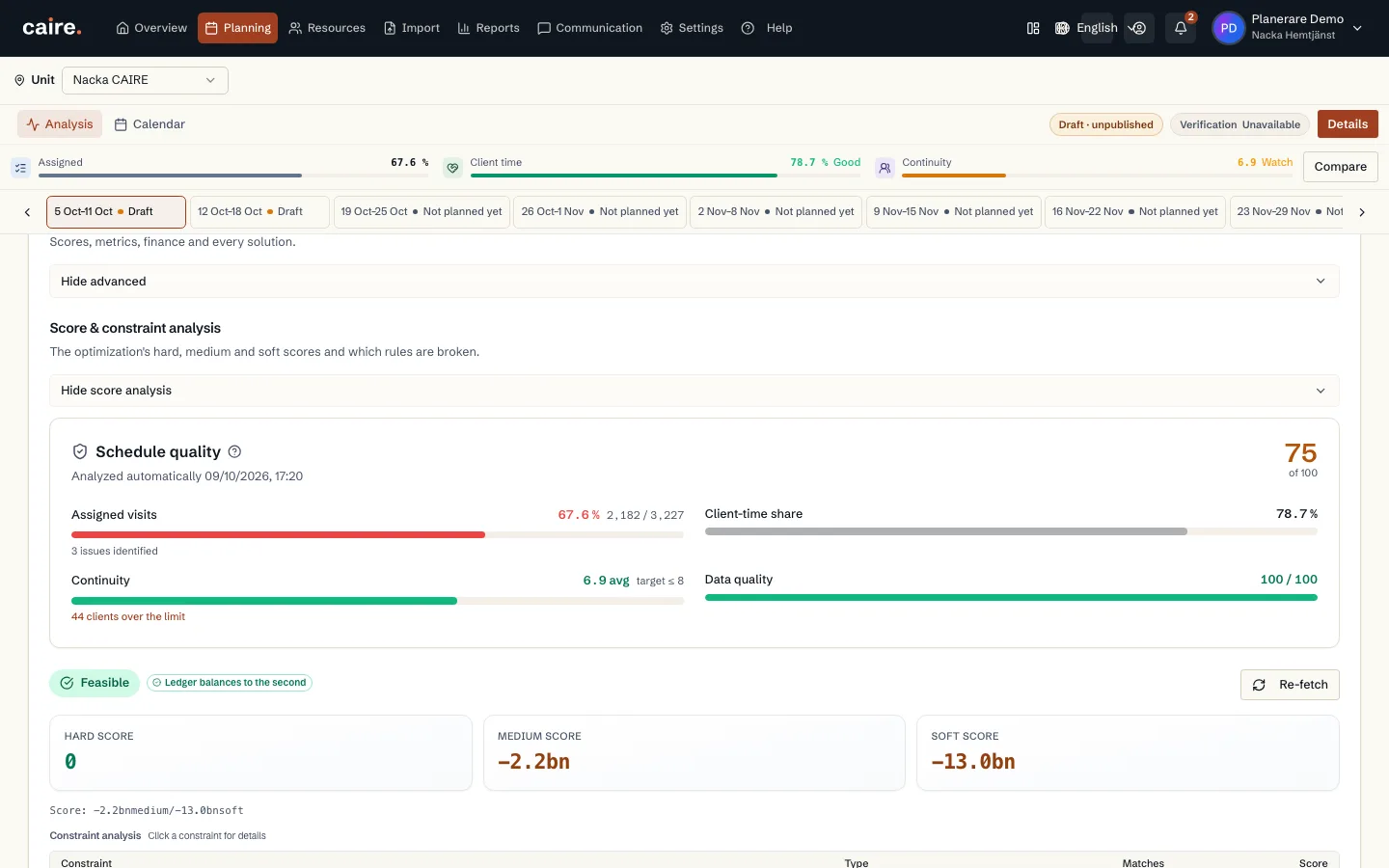
                          CAIRE platformOperations and settings

                          Replacement proposal

                          Approved image · Image and caption

                          Approved: 2026-10-10

                          Replacement proposal
                          A saved replacement proposal shows who can cover affected visits before the planner decides.The view shows the published result and the organisation's staffing rules. A proposal remains separate from planner approval.
                          Open approved image full size

                          Image shows: A saved replacement proposal shows who can cover affected visits before the planner decides.

                          What it demonstrates: The view shows the published result and the organisation's staffing rules. A proposal remains separate from planner approval.

                          Product URL

                          CAIRE platform

                          app.caire.se

                          View/route template: /operationsThe template shows where the view lives. Record IDs resolve to a selected record in the app and are not a direct link.

                          Website destinations and suggestions
                          Capture source and setup

                          Source module: Drift och bemanning

                          Opens in CAIRE: Drift → publicerad dag → Bemanningsluckor

                          Capture scenario: Synthetic demonstration scenario S3

                          Capture setup
                          1. Publicera ett verkligt sparat DEV-resultat
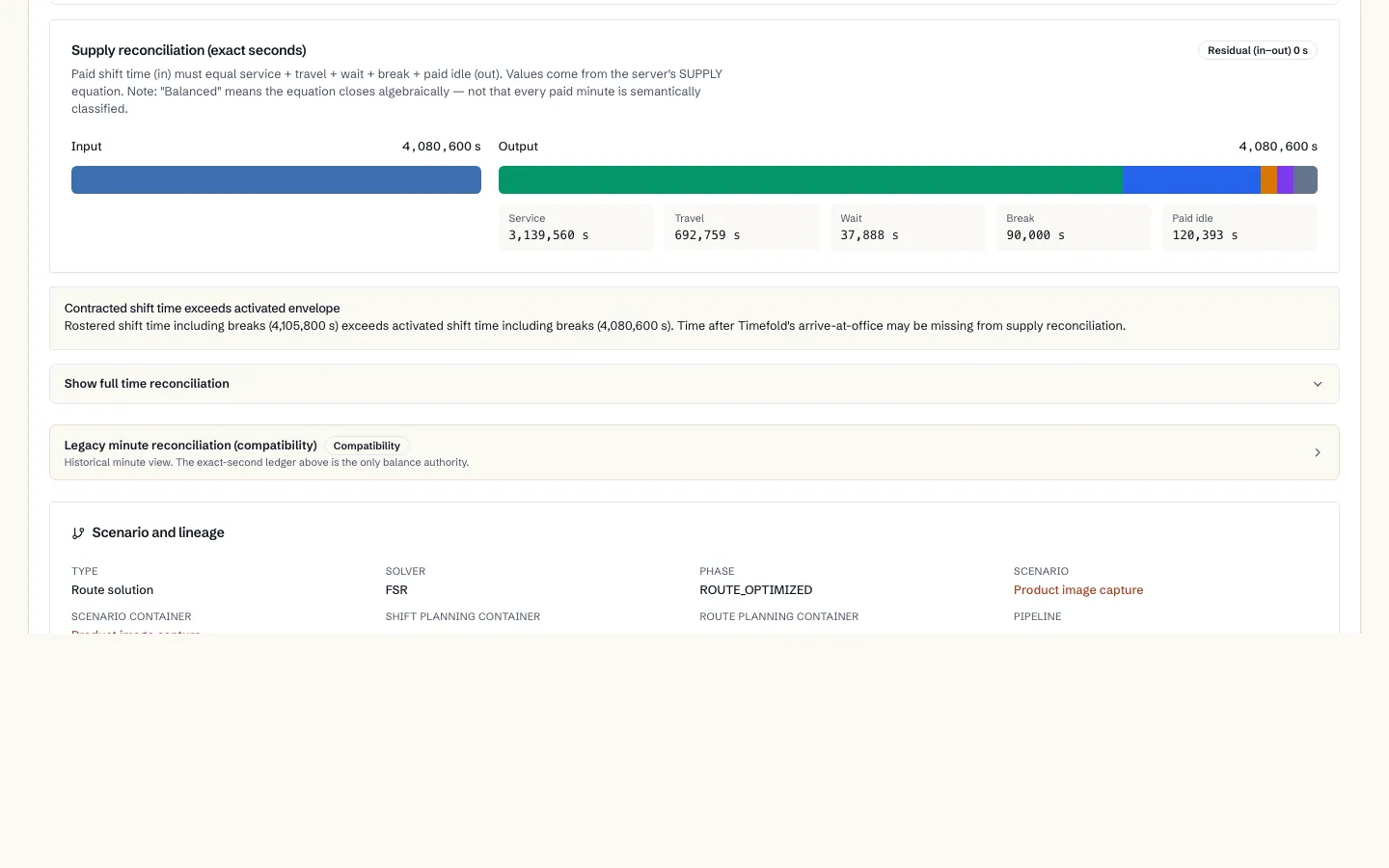
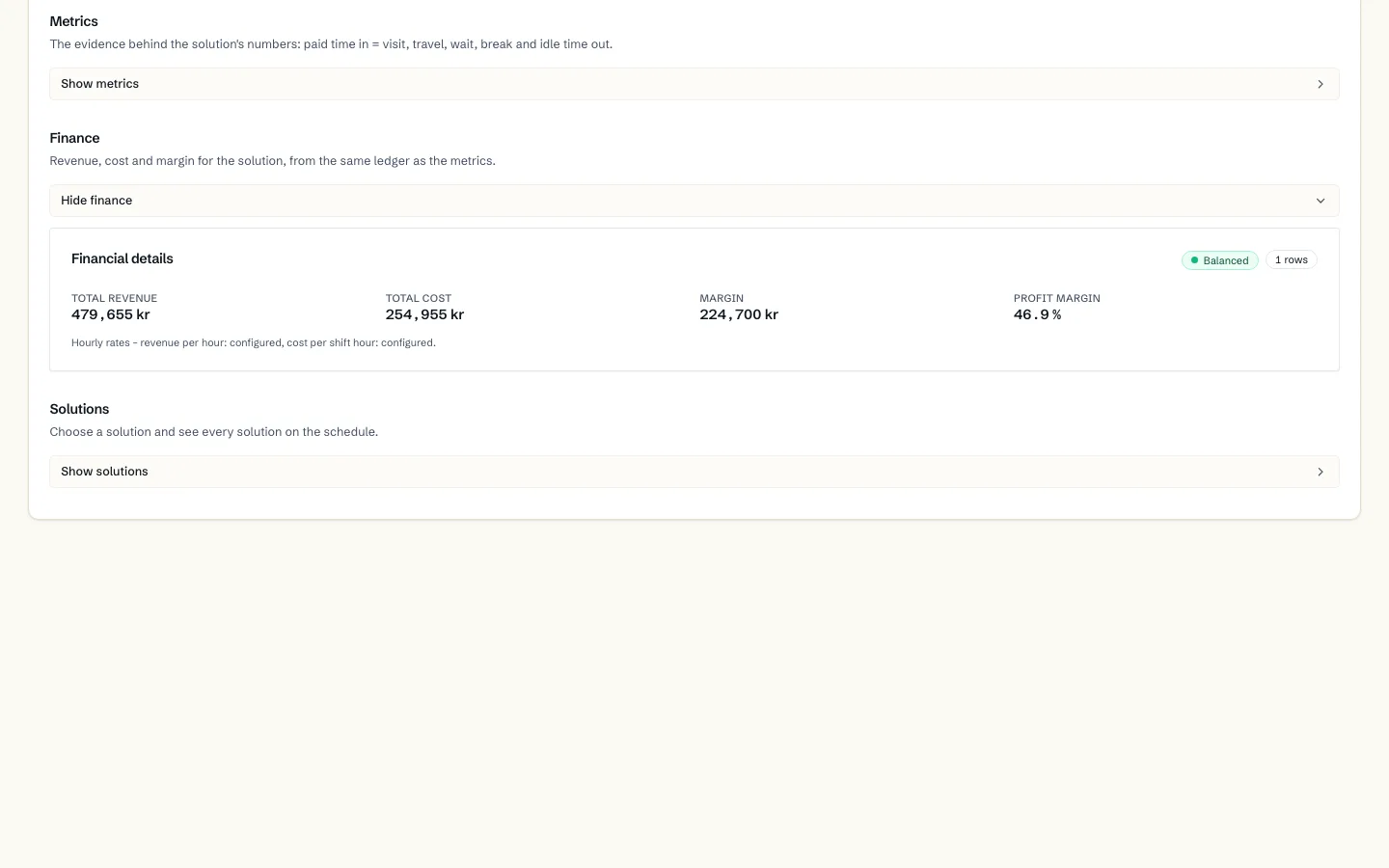
                          2. Rapportera en syntetisk sjukdag genom den vanliga API-mutationen
                          3. Öppna rätt arbetsdag och invänta sparat förslag
                          CAIRE platformOperations and settings

                          Staffing settings

                          Approved image · Image and caption

                          Approved: 2026-10-10

                          Staffing settings
                          Settings for contact, proposals and approval within the unit's staffing workflow.The view shows the published result and the organisation's staffing rules. A proposal remains separate from planner approval.
                          Open approved image full size

                          Image shows: Settings for contact, proposals and approval within the unit's staffing workflow.

                          What it demonstrates: The view shows the published result and the organisation's staffing rules. A proposal remains separate from planner approval.

                          Product URL

                          CAIRE platform

                          app.caire.se

                          View/route template: /operationsThe template shows where the view lives. Record IDs resolve to a selected record in the app and are not a direct link.

                          Website destinations and suggestions
                          Capture source and setup

                          Source module: Drift och bemanning

                          Opens in CAIRE: Drift → publicerad dag → Bemanningsluckor

                          Capture scenario: Synthetic demonstration scenario S3

                          Capture setup
                          1. Publicera ett verkligt sparat DEV-resultat
                          2. Rapportera en syntetisk sjukdag genom den vanliga API-mutationen
                          3. Öppna rätt arbetsdag och invänta sparat förslag
                          CAIRE platformOperations and settings

                          Staffing gaps after a sickness report, with a proposed replacement; Swedish interface

                          Approved image · Image and caption

                          Approved: 2026-10-10

                          Staffing gaps after a sickness report, with a proposed replacement; Swedish interface
                          See the gaps after a sickness report and review the proposed replacement.The staffing-gaps panel lists shifts and visits in the published schedule that lack staff. For each gap Caire proposes a replacement by availability, skills and continuity, and the planner approves.
                          Open approved image full size

                          Image shows: See the gaps after a sickness report and review the proposed replacement.

                          What it demonstrates: The staffing-gaps panel lists shifts and visits in the published schedule that lack staff. For each gap Caire proposes a replacement by availability, skills and continuity, and the planner approves.

                          Product URL

                          CAIRE platform

                          app.caire.se

                          View/route template: /operationsThe template shows where the view lives. Record IDs resolve to a selected record in the app and are not a direct link.

                          Website destinations and suggestions
                          Capture source and setup

                          Source module: Bemanning

                          Opens in CAIRE: Publicerat schema → Bemanningsluckor

                          Capture scenario: Synthetic demonstration scenario S3

                          Capture setup
                          1. Rapportera en sjukdag
                          2. Öppna panelen Bemanningsluckor
                          CAIRE platformAsk CAIRE and help

                          Ask Caire with five schedule prompts and an empty composer for the selected solution

                          Approved image · Cropped detail

                          Approved: 2026-10-10

                          Image annotation
                          Ask Caire with five schedule prompts and an empty composer for the selected solution
                            The native assistant presents prompts about improvements, peak hours, unassigned visits, data fixes and reruns alongside the work context.The planner can choose a relevant starting question for the open schedule and solution. This initial state shows prompt choices, not an AI answer, proposal or completed improvement.
                            Open approved image full size

                            Image shows: The native assistant presents prompts about improvements, peak hours, unassigned visits, data fixes and reruns alongside the work context.

                            What it demonstrates: The planner can choose a relevant starting question for the open schedule and solution. This initial state shows prompt choices, not an AI answer, proposal or completed improvement.

                            Product URL

                            CAIRE platform

                            app.caire.se

                            View/route template: /schedules/:scheduleId/solutions/:solutionIdThe template shows where the view lives. Record IDs resolve to a selected record in the app and are not a direct link.

                            Website destinations and suggestions
                            Capture source and setup

                            Source module: Fråga Caire · Schemafrågor

                            Opens in CAIRE: Kalender → Caire-assistent → CaireAiPanel

                            Capture scenario: Synthetic demonstration scenario S1

                            Capture setup
                            1. Verifiera S1:s sparade DEV-lösning och öppna dess kalender
                            2. Öppna assistentens chattläge med schema- och lösningskontext
                            3. Kräv de fem inbyggda schemafrågorna från quickPrompts.ts och en tom skrivruta utan meddelanden
                            4. Fånga startläget utan att klicka frågor eller skicka ett AI-meddelande
                            CAIRE platformAsk CAIRE and help

                            Ask Caire start card for optimising a solution with schedule selection

                            Approved image · Cropped detail

                            Approved: 2026-10-10

                            Image annotation
                            Ask Caire start card for optimising a solution with schedule selection
                              Review the visible start card and choose which schedule a new solution should use.The card requires a schedule before the planner can continue to prepare a solution. The image shows the form at its starting state; no schedule is selected and no solution is prepared.
                              Open approved image full size

                              Image shows: Review the visible start card and choose which schedule a new solution should use.

                              What it demonstrates: The card requires a schedule before the planner can continue to prepare a solution. The image shows the form at its starting state; no schedule is selected and no solution is prepared.

                              Product URL

                              CAIRE platform

                              app.caire.se

                              View/route template: /ask-caireThe template shows where the view lives. Record IDs resolve to a selected record in the app and are not a direct link.

                              Website destinations and suggestions
                              Capture source and setup

                              Source module: Fråga Caire

                              Opens in CAIRE: Fråga Caire → Arbetskontext → Optimera en lösning

                              Capture scenario: Synthetic demonstration scenario S6

                              Capture setup
                              1. Öppna Fråga Caire-arbetsytan för Nacka CAIRE (Demo)
                              2. Rulla konversationen till det synliga startkortet för att optimera en lösning
                              3. Granska schemavalet och Fortsätt-knappen utan att välja schema eller skicka formuläret
                              CAIRE platformAsk CAIRE and help

                              Current planning foundation and service-area context in Ask Caire

                              Approved image · Cropped detail

                              Approved: 2026-10-10

                              Image annotation
                              Current planning foundation and service-area context in Ask Caire
                                See which service area the conversation uses and how its planning foundation is currently shown.The work context and foundation status are read from the selected organisation's data. The view reports current readiness without changing settings or source data.
                                Open approved image full size

                                Image shows: See which service area the conversation uses and how its planning foundation is currently shown.

                                What it demonstrates: The work context and foundation status are read from the selected organisation's data. The view reports current readiness without changing settings or source data.

                                Product URL

                                CAIRE platform

                                app.caire.se

                                View/route template: /ask-caireThe template shows where the view lives. Record IDs resolve to a selected record in the app and are not a direct link.

                                Website destinations and suggestions
                                Capture source and setup

                                Source module: Planeringsgrund

                                Opens in CAIRE: Fråga Caire → Arbetskontext

                                Capture scenario: Synthetic demonstration scenario S6

                                Capture setup
                                1. Öppna Fråga Caire-arbetsytan med den valda enheten
                                2. Granska aktuell grundstatus och nästa rekommenderade steg
                                CAIRE platformAsk CAIRE and help

                                Contextual help about optimisation readiness

                                Approved image · Image and caption

                                Approved: 2026-10-10

                                Contextual help about optimisation readiness
                                Read guidance and next steps from the planning view, scoped to the selected service area.The help panel shows the selected guide and any recommendations available for the current context. Opening the guide sends no message.
                                Open approved image full size

                                Image shows: Read guidance and next steps from the planning view, scoped to the selected service area.

                                What it demonstrates: The help panel shows the selected guide and any recommendations available for the current context. Opening the guide sends no message.

                                Product URL

                                CAIRE platform

                                app.caire.se

                                View/route template: /schedules/:scheduleId/solutions/:solutionIdThe template shows where the view lives. Record IDs resolve to a selected record in the app and are not a direct link.

                                Website destinations and suggestions
                                Capture source and setup

                                Source module: Hjälp och beredskap

                                Opens in CAIRE: Planering → Kontextuell hjälp → Optimeringsberedskap

                                Capture scenario: Synthetic demonstration scenario S6

                                Capture setup
                                1. Öppna Hjälp från den valda planeringskontexten
                                2. Granska guiden och eventuella aktuella rekommendationer
                                CAIRE platformAsk CAIRE and help

                                Ask Caire answer detail with its visible evidence

                                Approved image · Cropped detail

                                Approved: 2026-10-10

                                Image annotation
                                Ask Caire answer detail with its visible evidence
                                  Review the evidence shown with an actual answer about the saved solution's diagnostics.The question reads diagnostics from the selected solution, and the panel shows the evidence the service actually returns. This is not a fabricated example or a completed planning change.
                                  Open approved image full size

                                  Image shows: Review the evidence shown with an actual answer about the saved solution's diagnostics.

                                  What it demonstrates: The question reads diagnostics from the selected solution, and the panel shows the evidence the service actually returns. This is not a fabricated example or a completed planning change.

                                  Product URL

                                  CAIRE platform

                                  app.caire.se

                                  View/route template: /schedules/:scheduleId/solutions/:solutionIdThe template shows where the view lives. Record IDs resolve to a selected record in the app and are not a direct link.

                                  Website destinations and suggestions
                                  • Image libraryIn current website sourceImage treatment: Cropped detail
                                  • Source evidenceIn current website sourceImage treatment: Cropped detail
                                  Capture source and setup

                                  Source module: Svar och underlag

                                  Opens in CAIRE: Planering → Fråga Caire → Svar och underlag

                                  Capture scenario: Synthetic demonstration scenario S6

                                  Capture setup
                                  1. Öppna Fråga Caire på den sparade lösningen
                                  2. Ställ en läsande diagnostikfråga och granska svarets faktiska underlag
                                  CAIRE platformAsk CAIRE and help

                                  Ask Caire in the platform

                                  Approved image · Image and caption

                                  Approved: 2026-10-10

                                  Ask Caire in the platform
                                  Write to Caire with context from your work.The AI assistant provides an entry point for questions and support in the platform. Access and available actions follow the user's permissions.
                                  Open approved image full size

                                  Image shows: Write to Caire with context from your work.

                                  What it demonstrates: The AI assistant provides an entry point for questions and support in the platform. Access and available actions follow the user's permissions.

                                  Product URL

                                  CAIRE platform

                                  app.caire.se

                                  View/route template: /schedules/:scheduleId/solutions/:solutionIdThe template shows where the view lives. Record IDs resolve to a selected record in the app and are not a direct link.

                                  Website destinations and suggestions
                                  • Image libraryIn current website sourceImage treatment: Image and caption
                                  • Ask CaireIn current website sourceImage treatment: Image and caption
                                  • Ask CaireIn current website sourceImage treatment: Image and caption
                                  • Ask CaireIn current website sourceImage treatment: Image and caption
                                  Capture source and setup

                                  Source module: Fråga Caire

                                  Opens in CAIRE: Fråga Caire-panelen

                                  Capture scenario: Synthetic demonstration scenario S6

                                  Capture setup
                                  1. Öppna kalendern med ett sparat DEV-resultat
                                  2. Ställ analysfrågan genom den typade READ_DIAGNOSTICS-ingången
                                  3. Invänta ett riktigt svar med källhänvisning
                                  CAIRE platformAsk CAIRE and help

                                  Ask Caire shows an action proposal before approval

                                  Approved image · Image and caption

                                  Approved: 2026-10-10

                                  Ask Caire shows an action proposal before approval
                                  Review the proposal's scope, risk and expected impact before choosing to proceed.The proposal is bound to the selected solution. Previewing it starts no optimization; the planner reviews the evidence before the next step.
                                  Open approved image full size

                                  Image shows: Review the proposal's scope, risk and expected impact before choosing to proceed.

                                  What it demonstrates: The proposal is bound to the selected solution. Previewing it starts no optimization; the planner reviews the evidence before the next step.

                                  Product URL

                                  CAIRE platform

                                  app.caire.se

                                  View/route template: /schedules/:scheduleId/solutions/:solutionIdThe template shows where the view lives. Record IDs resolve to a selected record in the app and are not a direct link.

                                  Website destinations and suggestions
                                  Capture source and setup

                                  Source module: Fråga Caire — åtgärdsförslag

                                  Opens in CAIRE: Fråga Caire-panelen med ett typat åtgärdsförslag

                                  Capture scenario: Synthetic demonstration scenario S6

                                  Capture setup
                                  1. Öppna ett sparat DEV-resultat
                                  2. Förbered ett typat åtgärdsförslag genom den vanliga behörighetskontrollerade ingången
                                  3. Visa förhandsgranskningen utan att starta en omplanering