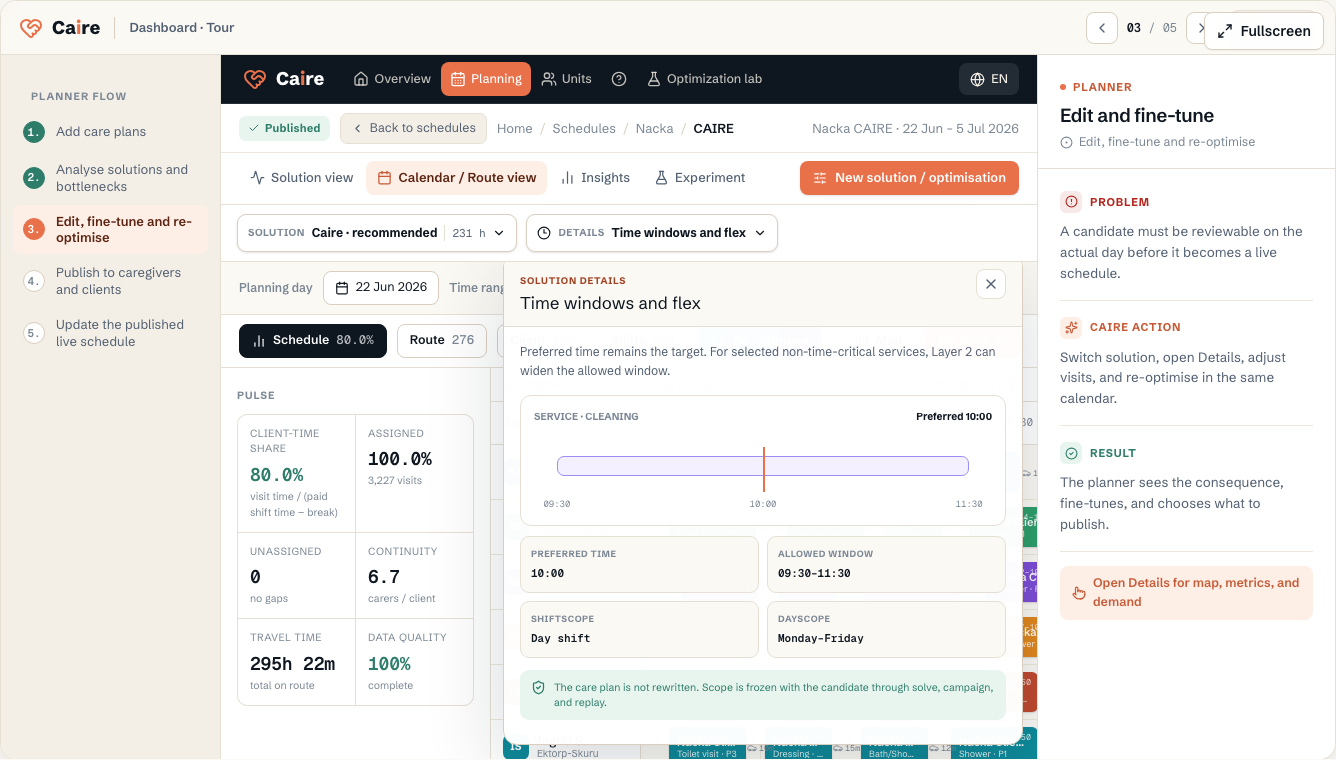
Preferred time remains the target
Preferred time shows when the source or care plan says the service should ideally start. The allowed time window is the boundary within which a proposal may place the visit. A wider allowed window does not overwrite preferred time.
Caire can widen the window for selected services
For selected non-time-critical services, Caire can widen the allowed time window. The organisation can limit the rule, for example to one shift or selected weekdays.
The same limits are locked with the proposal and follow it when it is recalculated. The rule does not change the care plan and is not general flexibility for every visit.
Routing, office work, and overlap are separate properties
Routed field visits receive travel between stops. Office work has no travel to or from the activity. Overlap is a separate permission for selected routed services, such as cleaning, laundry, or shopping, to happen at the same time as another activity.
Double staffing instead means that one visit requires several employees. It is not the same as overlap and not the same as office work.
Visit chains
When several visits for the same client belong together, they can be planned as a chain. Caire then sees a more accurate work shape than if each row is treated as an independent stop.